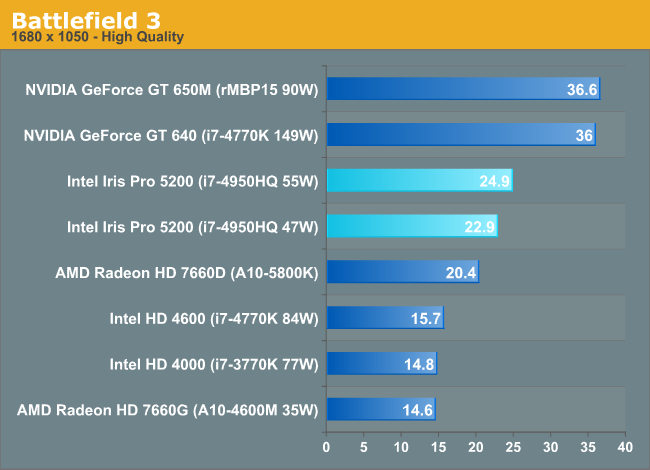
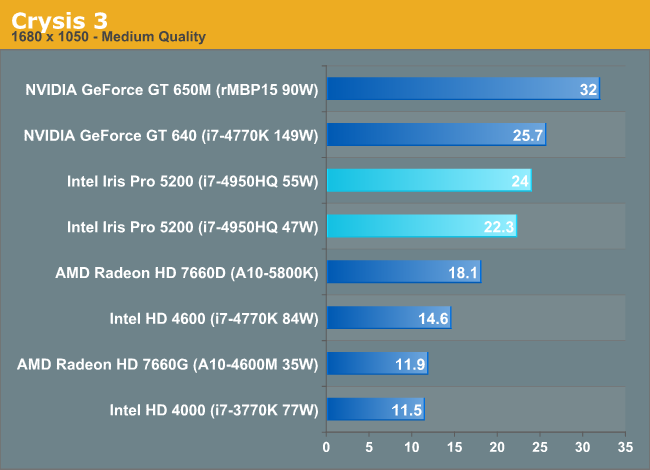
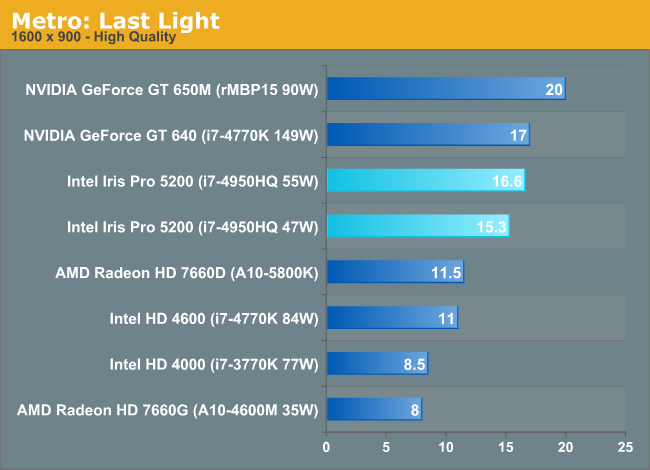
The bespoke iris model apple is using in the MBPr isn't released yet, and any performance comparisons are pure speculation.
They may just be asking for higher-binned Iris Pro chips that allow them to set it reliably at a higher TDP than the default 47W.
Refer to Anandtech's article:
http://www.anandtech.com/show/6993/intel-iris-pro-5200-graphics-review-core-i74950hq-tested/5
At the request of at least one very eager OEM, Intel is offering a higher-TDP configuration of the i7-4950HQ. Using Intel’s Extreme Tuning Utility (XTU) I was able to simulate this cTDP up configuration by increasing the sustained power limit to 55W, and moving the short term turbo power limit up to 69W. OEMs moving from a 2-chip CPU + GPU solution down to a single Iris Pro are encouraged to do the same as their existing thermal solutions should be more than adequate to cool a 55W part. I strongly suspect this is the configuration we’ll see in the next-generation 15-inch MacBook Pro with Retina Display.
If they do that, though, then the power-saving benefits of Iris Pro would turn out to not be so significant after all.
The screen uses nowhere near as much power as the CPU+GPU running hard. It's nothing in comparison... i've chewed my MBP battery in 45 minutes before running 3d stuff. Normally can get 7 hours or so. The screen uses very little in the scheme of things if you're pushing the box.
I'm not talking about a couple of hours more at idle. I'm talking about a couple more hours when actually using the machine.
Refer to the above about why the power saving benefits may not be so significant.
In the configuration that Anandtech had it, Iris Pro gets pretty close to 650M in the current rMBP, but still quite a bit behind. It's understandable because Apple overclocked the 650M in the rMBP to exceed 660M performance while keeping TDP down.
But the point is Iris Pro was running close to 70W with Turbo Boost.
And unlike separate 45W CPU + 45W GPU config where the GPU may hit 45W but the CPU may be at 20W, you're looking at a single chip that will happily Turbo until it hits 70W... no matter if it's the CPU or GPU that's under load.
So in the end, the situation under load levels out either way. You probably save 10-15W at absolute max load at most if Apple goes that route.
But there is no realistic case where you have both the CPU and GPU running at max load (total 90W) on the rMBP unless you're running Folding@HOME or something else like that.
And the screen really does use that much power. The battery is 95WHr, but even at idle, I can only get a max of 9 hours. Most of the time less. That means the screen, just sitting there being pretty, consumes roughly 8-10W per hour on average. That's nothing to scoff at considering most other panels would sip battery at 3-5W.