Become a MacRumors Supporter for $50/year with no ads, ability to filter front page stories, and private forums.
Yes. OS X is designed so that you can launch applications and then never close them (just close the window - ⌘W or the red button). Then you will continue to get the notifications. Properly written applications consume little resources when not being used, so you can have dozens running with little impact.

----------


You have something wrong. I've got 5 POP, 2 Exchange, and an iCloud (IMAP) account and it barely blips the gauges except when checking mail. You can control the rate at which it does mail checks. If it is consuming all that CPU all the time you should try rebuilding the mailboxes.

I understand that, but other apps on my mac like Messages, App Store and other Apple apps are not supposed to be open in order to get their push notifications. For example, if someone sends me a message (SMS/iMessage) the Messages app pushes the message and I receive the notification even if the app is closed.

I guess that all these apps don't really close and something still runs in the background, but still, isn't there an email client that does the same..?
 
I guess that all these apps don't really close and something still runs in the background, but still, isn't there an email client that does the same..?

That's right -- they do have background processes. I don't know if there is a mail client that does the same. I used to use Thunderbird and now use Mail -- neither does. But I have Mail open when I log in and then I never close it. It got me to set up a spare Mac mini at work. I was always missing mail on the company supplied Windows computer because I was always clicking the "X" when I finished reading, which closes Exchange and therefore I would get no mail.
 
That's right -- they do have background processes. I don't know if there is a mail client that does the same. I used to use Thunderbird and now use Mail -- neither does. But I have Mail open when I log in and then I never close it. It got me to set up a spare Mac mini at work. I was always missing mail on the company supplied Windows computer because I was always clicking the "X" when I finished reading, which closes Exchange and therefore I would get no mail.

For me CMD+Q is the way to go - that's why I was interested in an app that does real push notifications.

By the way, have to say that Airmail 2 does a very good job at push notifications if the app is open in the background.
 
Best E-Mail Client (merged)

For me CMD+Q is the way to go - that's why I was interested in an app that does real push notifications.


By the way, have to say that Airmail 2 does a very good job at push notifications if the app is open in the background.


I am looking for the same. Having to keep an app open in order to receive notifications doesn't make sense, specially if the e-mail client is able to do what you mentioned in a less capable device like the iPhone.

Having an app open is distracting and intrusive when one needs order and efficiency through the workflow.
 
I am looking for the same. Having to keep an app open in order to receive notifications doesn't make sense, specially if the e-mail client is able to do what you mentioned in a less capable device like the iPhone.

Having an app open is distracting and intrusive when one needs order and efficiency through the workflow.

On the iPhone I bet your Mail app is running but you just don't know it. Unless you explicitly close it (double-click the button, find the app, and swipe upwards) it's running.

Close the Mail window (⌘W) on the Mac and (if you have the indicator lights turned off) you would never know it was still running. The App Nap, auto-save, and resume features added to the Mac starting with Lion are basically the iOS features brought "Back to the Mac." If the RAM memory is needed for another application, the Mail app gets temporarily removed, just like it does in iOS.
 
On the iPhone I bet your Mail app is running but you just don't know it. Unless you explicitly close it (double-click the button, find the app, and swipe upwards) it's running.

Close the Mail window (⌘W) on the Mac and (if you have the indicator lights turned off) you would never know it was still running. The App Nap, auto-save, and resume features added to the Mac starting with Lion are basically the iOS features brought "Back to the Mac." If the RAM memory is needed for another application, the Mail app gets temporarily removed, just like it does in iOS.

Mobile OS and desktop class OS are different things. Pretending to use them the same way is artificial – and sometimes it just doesn't work.

For starters, I don't know anyone who disables the indicator light – certainly I don't do it. Therefore I always know if Mail is still running and I get distracted (not to mention the badge, that yes, can be disabled, but that's not an ideal option). Also, if you use cmd+tab a lot – just like I do – you'd see Mail messing around there.

EDIT: FWIW, what you said on the first paragraph is incorrect. You can kill the Mail app process and still get push mail. Actually that's the entire point: receiving email even when the app is not running or being used.
 
Last edited:
I would like to try Airmail.

Where does Airmail store the sincronized email messages (in order to back them up).

Thanks,
Daniele
 
Yep the new version of airmail is quite good altho it messes up mail count for yahoo email folders
 
Mobile OS and desktop class OS are different things. Pretending to use them the same way is artificial – and sometimes it just doesn't work.

For starters, I don't know anyone who disables the indicator light – certainly I don't do it. Therefore I always know if Mail is still running and I get distracted (not to mention the badge, that yes, can be disabled, but that's not an ideal option). Also, if you use cmd+tab a lot – just like I do – you'd see Mail messing around there.

EDIT: FWIW, what you said on the first paragraph is incorrect. You can kill the Mail app process and still get push mail. Actually that's the entire point: receiving email even when the app is not running or being used.

What you said in the last paragraph is exactly what I thought. The thing about push notifications is that you don't need the app to be open in order to get a notification from it.

I just don't like apps running in the background with no reason. Seems odd that push notifications require to run in the background on the Mac while all smartphones implement the concept of push notifications perfectly.
 
the only problem I have with Mail is that I'd prefer to send pictures/attachments as an actual attachment rather than in-line and I can't find anywhere to change that behavior
 
I would like to try Airmail.

Where does Airmail store the sincronized email messages (in order to back them up).

Thanks,
Daniele

I wouldn't recommend Airmail at the moment.
I installed it a few days ago, added my accounts and it's using +/- 50% of the CPU at moment (random). Contacted Airmail and they said they had a fix and I had to change something in the preferences, but that didn't work.
From then on, no communication anymore from the support.

I really like the interface, to ability to store messages as "to do", etc... but using so much CPU is just crazy...
 
I wouldn't recommend Airmail at the moment.
I installed it a few days ago, added my accounts and it's using +/- 50% of the CPU at moment (random). Contacted Airmail and they said they had a fix and I had to change something in the preferences, but that didn't work.
From then on, no communication anymore from the support.

I really like the interface, to ability to store messages as "to do", etc... but using so much CPU is just crazy...

Postbox allows you to store messages as "to do" as well.
 
I wouldn't recommend Airmail at the moment.
I installed it a few days ago, added my accounts and it's using +/- 50% of the CPU at moment (random). Contacted Airmail and they said they had a fix and I had to change something in the preferences, but that didn't work.
From then on, no communication anymore from the support.

I'm using the latest MAS version of Airmail 2 and it fluctuates anywhere between 0-3% CPU usage. This is with 6 active accounts.

I'm not sure what the deal is with your excessive CPU usage. Are you using 2.0.386 from the Mac App Store or the beta?
 
I'm using the latest MAS version of Airmail 2 and it fluctuates anywhere between 0-3% CPU usage. This is with 6 active accounts.

I'm not sure what the deal is with your excessive CPU usage. Are you using 2.0.386 from the Mac App Store or the beta?

Hi, yes I'm using the 2.0.3(86) version.
Where do I get the MAS version? And why didn't the support team told me that... Hope that helps :)
 
I would like to try Airmail.

Where does Airmail store the sincronized email messages (in order to back them up).

Thanks,
Daniele

For Airmail v2 I believe you will find it here:

/Users/<yourusername>/Library/Containers/it.bloop.airmail2/Data/Library/Application Support/Airmail

----------

...added my accounts and it's using +/- 50% of the CPU at moment...

Mine did this at first install while it was downloading the IMAP mail from the servers, since then good as gold...
 
Mine did this at first install while it was downloading the IMAP mail from the servers, since then good as gold...

I used it for a week, so all the IMAP messages were downloaded (full circle).
Now, it still uses so much CPU and according to Google I'm not the only one...

You downloaded the version in the Appstore or the Beta on their website?
 
I used it for a week, so all the IMAP messages were downloaded (full circle).
Now, it still uses so much CPU and according to Google I'm not the only one...

You downloaded the version in the Appstore or the Beta on their website?

App store.
 
App store.

I don't get it why it does it on my Macbook.
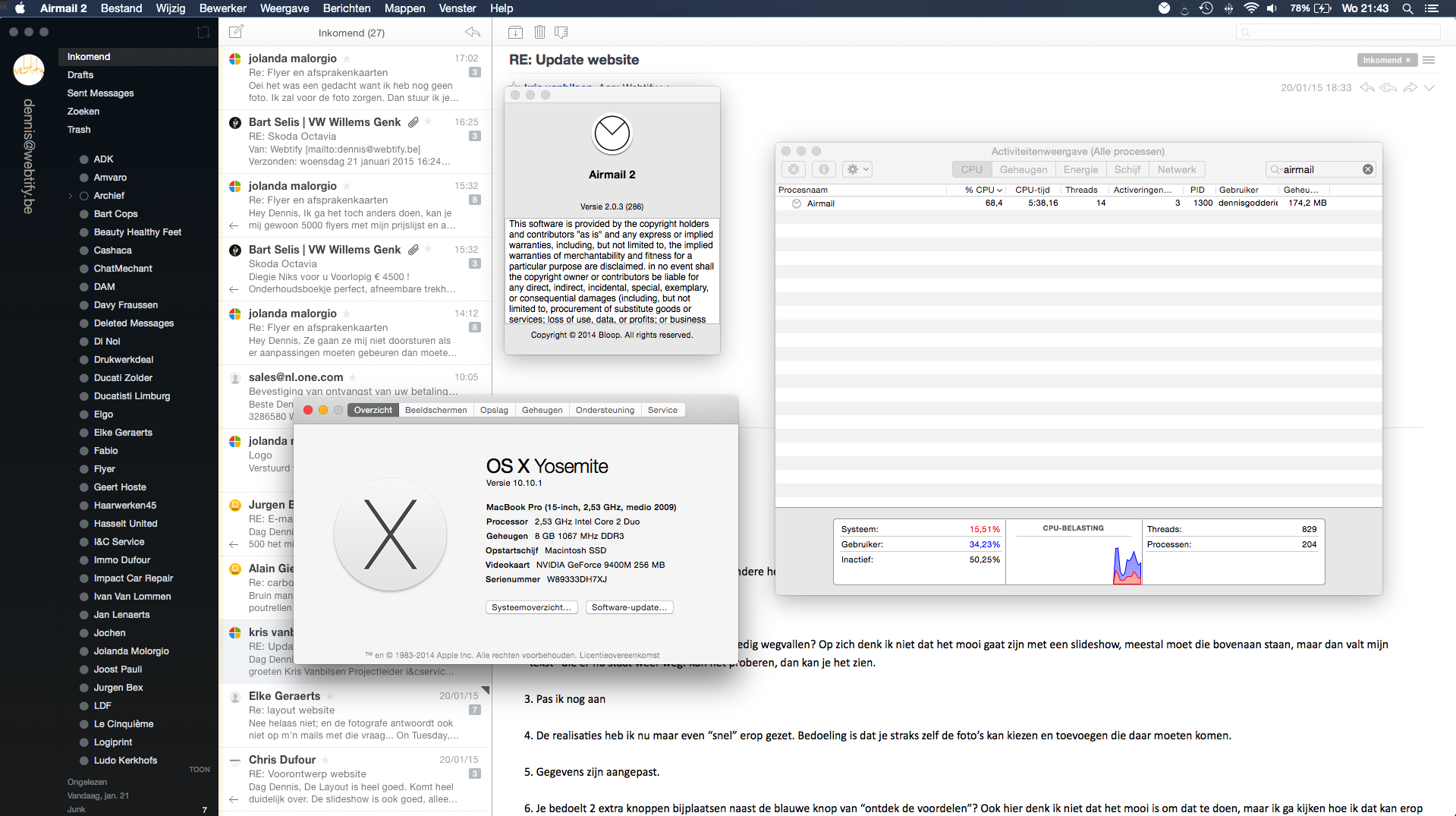
See the screen:
airmail.png

Larger version: http://www.webtify.be/airmail.png

Got it also from the appstore... :(
 
That looks like the MBP has only just been started, what happens to the Airmail cpu over time, say after the MBP has been on for an hour?

Do you always shutdown, I only sleep mine with very occasional restarts.
 
Macbook is running from this morning.
I always put it to sleep, but reboot it once every 2 or 3 days.
If I keep Airmail open, an hour or 2, it keeps jumping up and down with the CPU (from 1/2% tot 60/70%).

Is it useful to try the Beta they have on their website (it's a lower version I think tho)?
 
Macbook is running from this morning.
I always put it to sleep, but reboot it once every 2 or 3 days.
If I keep Airmail open, an hour or 2, it keeps jumping up and down with the CPU (from 1/2% tot 60/70%).

Is it useful to try the Beta they have on their website (it's a lower version I think tho)?

Do you not just leave Airmail open? I do and it certainly settled down for me, if it keeps rising and you close Airmail off it may just be that it isn't being allowed to complete its periodic sync for some reason, I'd be inclined to leave it running say overnight, if it is still chewing cpu there is a problem but it may just be taking a while to sync - is your internet connection to your mail servers good?
 
Yes, I got a good internet connection.
But I have airmail on my Mac for about a week or 2 and it still does that.
I already let it running a whole day and it kept doing it.
The sync is ready when the "cirkels" in front of the folder are filled normally. They are empty when you add your account and then become filled.

I'll let Airmail run for a few hours from this moment and let you know more in the morning (it's 11pm here).

Thank you for your support already, it's better then the Airmail Support at the moment (=not responding!).
 
Yes, I got a good internet connection.
But I have airmail on my Mac for about a week or 2 and it still does that.
I already let it running a whole day and it kept doing it.
The sync is ready when the "cirkels" in front of the folder are filled normally. They are empty when you add your account and then become filled.

I'll let Airmail run for a few hours from this moment and let you know more in the morning (it's 11pm here).

Thank you for your support already, it's better then the Airmail Support at the moment (=not responding!).

Hmmm - how many accounts do you have setup in Airmail? I have 1 Exchange, 1 iCloud, 2 IMAP and 1 local and all is well - maybe if you have more than 1 we need to try and isolate to a single account that it is getting stuck on?
 
Register on MacRumors! This sidebar will go away, and you'll see fewer ads.