Become a MacRumors Supporter for $50/year with no ads, ability to filter front page stories, and private forums.
I appreciate your comment but was simply curious as to what people here are looking for beyond "Mail." I admit that I miss certain facets of Outlook (from a past job) and also from Lotus Notes email. I have to smile having been long long ago an administrator for a multi-state set up of an ancient email system - CC:Mail all ran on OS/2 plus my rather sleek REXX maintenance scripts/programming.

So, what do you like about your mail app over "Mail" in particular?

I own Postbox, Airmail, Outlook and Sparrow but I keep going back to Mail as it takes care of my simple needs (2 POP and 2 IMAP mail accounts). My only real complaint is that you have to double click a contact to add it into the "To" field when previously a single click will do.

I also dabbled with OS/2 (the predecessor to Warp, Warp and Ecommstation) and wish I could set it up in a Parallels VM just for nostalgia's sake:)
 
I own Postbox, Airmail, Outlook and Sparrow but I keep going back to Mail as it takes care of my simple needs (2 POP and 2 IMAP mail accounts). My only real complaint is that you have to double click a contact to add it into the "To" field when previously a single click will do.

I also dabbled with OS/2 (the predecessor to Warp, Warp and Ecommstation) and wish I could set it up in a Parallels VM just for nostalgia's sake:)

I'll have to check out (as others suggested)the alternative to Mail. As for OS/2, interesting how much Windows 2000 (and Mac later for that matter) looks like they were 'inspired' by the GUI of OS/2. I'll just say it was the most stable OS I have ever used in server and desktop. Now I am mostly OSX with some Linux and Win 7 on the side. Sigh.

Thanks all for your imput on why you like your selection a Mail alternative.
 
Thank you all for the recommendations. Still... I don't have a favorite yet.
 
Best App/Client for Outlook.com email address

So I do have a Gmail account, but I also have a Hotmail (now Outlook) email address that I've had since forever, and would like to continue to use.

Problem is I DESPISE the Outlook.com webmail interface and would love to use a different app or client, as long as it plays nice. I feel like the new batch of popular email clients (Airmail, Postbox, etc) all reference how well they handle Gmail, but not many mention Hotmail/Outlook. I've done some searching and still feel like I can't find a client that is consistently mentioned as a great option for Hotmail accounts.

Just wondering if anyone is using one of these with a Hotmail address and has it working well for them. Ideally I'd love something that is essentially the desktop equivalent of the stock iOS mail app. Everything comes through flawlessly on there for me, and any changes I make on there are reflected on the server and in webmail (deleting emails, flags, etc.)

Any recommendations would be greatly appreciated!
 
Thanks for the feedback and recommendations. I just upgraded to Mavericks, but couldn't get Apple Mail to work well with Hotmail on Snow Leopard....maybe I'll give it another shot. AirMail was one on my list for maybe I'll give that a shot too as it's fairly cheap.
 
Thanks for the feedback and recommendations. I just upgraded to Mavericks, but couldn't get Apple Mail to work well with Hotmail on Snow Leopard....maybe I'll give it another shot. AirMail was one on my list for maybe I'll give that a shot too as it's fairly cheap.

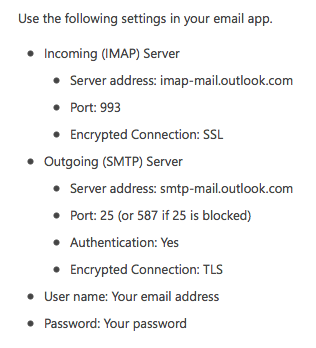
Did you set it up using the IMAP settings here from outlook.com?

vn1c8Lb.png
 
Just to follow up here and give an account of my experiences thus far in case others are in the same boat....

Using the settings here and after giving some time for Apple Mail to sync everything up properly, it seems to be integrating quite well with Hotmail/Outlook and actually appears to be a pretty nice option. Flags transfer over seamlessly as well. Just experiencing one quirk where the very odd email doesn't come through for some reason....maybe like 1 in every 15 or 20. It seems there are others who have experienced the same and I'm about to try a couple fixes.

Also downloaded AirMail and it works quite well with Hotmail/Outlook as well. Setting it up was literally the easiest thing ever - entered my email address and password and it detected everything and set it all up. Again, after giving it some time to sync everything up, it has been running nicely.

I haven't decided which I'm going to go with yet as I'm still playing around with both, however both appear to be very useable options for Hotmail/Outlook and which is best for you might depend on your uses and options/features you prefer or need.
 
Alternative to Outlook

Hi,
I am new to Mac, with a Mac Mini, but I have used Outlook on PC's for a long time. I can't get excited about spending over $200 just to get Outlook on my Mac. So I am looking for an alternative.

I have looked at many different email and address book apps, but none seem to offer what I am looking for. The problem is when I want to send an email to multiple addressees. With Mail, or any of the others I have looked at, it is necessary to pick one address at a time, instead of just opening contacts and selecting all the addresses you want to send to.

I know I could set up groups, except I often have to send mail to multiple addresses that would not normally be in a specific group. For example, one time I might want to send email to a, b, c, and d. Another time it might be a, b, e, and f. And another time it might be c, e, f, h, j, and m. As you can see, it would be difficult to set up groups for each of these, especially if I might only use some of them occasionally.

So, I am hoping someone here might be able to point me to an app that would let me select multiple addresses at one time, instead of one at a time as in Contacts and the other apps I have looked at (Cobook, Airmail, Thunderbird, and one or two others).

Thanks in advance for any help,

Jerry
 
One possibility is to get email service from a host that provides Outlook for free. The examples you provided make me think you're a business user, which are the customers that are the target of those bundled service plans.

Another possibility is Office 365, which has several plans that include Outlook.
 
You have come to the right place!

In Mail, create a new message. In the Toolbar do you see an "Address" button (with a silhouette)? If not, Control-Click the Toolbar, select "Customize Toolbar..." and drag the Address button up there where you want it. Click "Done".

Now click the Address button, select multiple recipients via the usual Command-Click and click the To:, CC: or BCC: button.

I know...intuitive, right?
 
Hi,

I know you have looked at Thunderbird already. You can do what you are asking for there very well.

From my experience with mail programs, Thunderbird is the most powerful when it comes to searching any previous Emails (e.g. I no longer keep my inbox empty).

Also, integrates well with Google Calendar if you are using the "Google Calendar Tab 3.9" add in.

To get what you want to do with multiple Thunderbird, right click on the toolbar when you have a new message open and click on "customize", then add the "Contacts" button.

When you click "Contacts" you can do exactly as you asked for.

You would have to get all your contacts into your address book somehow which I have not had any experience with.

Hope this helps.

kuck
 
Hi,

I know you have looked at Thunderbird already. You can do what you are asking for there very well.

From my experience with mail programs, Thunderbird is the most powerful when it comes to searching any previous Emails (e.g. I no longer keep my inbox empty).

Also, integrates well with Google Calendar if you are using the "Google Calendar Tab 3.9" add in.

To get what you want to do with multiple Thunderbird, right click on the toolbar when you have a new message open and click on "customize", then add the "Contacts" button.

When you click "Contacts" you can do exactly as you asked for.

You would have to get all your contacts into your address book somehow which I have not had any experience with.

Hope this helps.

kuck
Thunderbird used to be the most powerful regarding search but MailMate has surpassed it by leaps and bounds.

OP, I've never had to do what you're describing but MailMate is the best email app for OSX, period (IMHO).

They have a 30 day fully functional trial so I recommend before you spend any money or commit 100% give MailMate a try. I believe you'll thank me;) :cool:
 
Hi,

I know you have looked at Thunderbird already. You can do what you are asking for there very well.

From my experience with mail programs, Thunderbird is the most powerful when it comes to searching any previous Emails (e.g. I no longer keep my inbox empty).

Also, integrates well with Google Calendar if you are using the "Google Calendar Tab 3.9" add in.

To get what you want to do with multiple Thunderbird, right click on the toolbar when you have a new message open and click on "customize", then add the "Contacts" button.

When you click "Contacts" you can do exactly as you asked for.

You would have to get all your contacts into your address book somehow which I have not had any experience with.

Hope this helps.

kuck
Thunderbird used to be the most powerful regarding search but MailMate has surpassed it by leaps and bounds.

OP, I've never had to do what you're describing but MailMate is the best email app for OSX, period (IMHO).

They have a 30 day fully functional trial so I recommend before you spend any money or commit 100% give MailMate a try. I believe you'll thank me;) :cool:
 
Thanks to all for your input. Brian, you made Mail workable for me. It would sure be nice if Apple would make these things a bit more intuitive, or at least offer a good help file/site.

Others, I will look over your suggestions to see if they might be better than Mail for me.

Thanks again, Jerry
 
....I know I could set up groups, except I often have to send mail to multiple addresses that would not normally be in a specific group. For example, one time I might want to send email to a, b, c, and d. Another time it might be a, b, e, and f. And another time it might be c, e, f, h, j, and m. As you can see, it would be difficult to set up groups for each of these, especially if I might only use some of them occasionally.
...

I can not see how any program anywhere can solve this problem. You would either need to have these groups set up, or do it individually. How could the computer know that this time you wanted A,B &C but next time you want A, B and F, etc?

Somebody has to tell the computer what you want - it can not guess.

Right?
 
You're absolutely right, nostress. I guess my concern was with the way Contacts allows you to only select one address at a time. It is very time consuming to go through Contacts one at a time to select many addresses.

Since Brian introduced my to the Control-Click to set up a contacts icon in Mail, my problems is pretty much fixed. Also, Thunderbird allows a Contacts tab that does pretty much the same thing.

I still need to individually select each address, but now I can do it in one act, instead of going through the 'click +, scroll through addresses, select one to add, click +, scroll, add, click+, scroll add, etc.' routine.

Jerry
 
I set up groups in Contacts (just counted, I've got 35 of them). Individuals can be in multiple groups. To send a message to a group I create a new message and then drag the group (from Contacts) into the To: or Bcc: field
 
Looking for an email client...

...to use with my two email accounts. The one feature I want is to have a unified inbox for both accounts, with different background colors for the different accounts (e.g. AOL emails with light red background, Gmail with light blue background). I want to look at my inbox and immediately see which emails belong to which account.

Apple's Mail can do this via rules...but it simply doesn't work well. I set it up last weekend, and I manually applied the rules to all my old emails. Today I fired it up again, and all new messages I received since then had white backgrounds again, for some reason the rules were not applied.

Is there an alternative email client, where this feature works reliably? I really don't need any extra fancy functionality beyond that. But a visual disctinction between the accounts in my inbox is vital.
 
Register on MacRumors! This sidebar will go away, and you'll see fewer ads.