
Got a tip for us?
Let us know
Become a MacRumors Supporter for $50/year with no ads, ability to filter front page stories, and private forums.
Best option to write to NTFS drives
- Thread starter ruqui
- Start date
- Sort by reaction score
You are using an out of date browser. It may not display this or other websites correctly.
You should upgrade or use an alternative browser.
You should upgrade or use an alternative browser.

SlCKB0Y
macrumors 68040
Several have reported problems over the years
Can you find us any software which has had zero problems over the years?

GGJstudios
macrumors Westmere
What's your point? I'm simply stating facts, so people will be informed. And yes, I've had zero problems over the years with Paragon.Can you find us any software which has had zero problems over the years?

Schranke
macrumors 6502a
What's your point? I'm simply stating facts, so people will be informed. And yes, I've had zero problems over the years with Paragon.
But for the sake of the argument here.
You are 1 out of many, that means nothing.
i have had zero problems with tuxera over the years.
so both programs dont have any problems?
GGJstudios
macrumors Westmere
There have been numerous reports over the years about problems with Tuxera (which is the only reason I bring it up in the first place), and very few about Paragon (most of those being user error). If you want to use either one, go for it. I'm not debating whether any app is error-free and I have no vested interest in what anyone uses for NTFS writing, or if they use anything at all. I'm simply stating facts, so people are fully aware before making a decision. You've been made aware of the facts. Do whatever you want.But for the sake of the argument here.
You are 1 out of many, that means nothing.
i have had zero problems with tuxera over the years.
so both programs dont have any problems?
SlCKB0Y
macrumors 68040
What's your point? I'm simply stating facts, so people will be informed. And yes, I've had zero problems over the years with Paragon.
I'm saying that no software will ever be free of bugs.
Personally I choose Paragon over Tuxera because it significantly outperforms it.
I seem to remember reading somewhere that Paragon had an NTFS license agreement with Microsoft (and presumably had some level of code access). This would certainly explain its speed and feature advantage over ntfs-3g based solutions.
Last edited:
I am disappointed that Apple doesn't have this working right out of the box. Either they should use the money they are sitting on to buy out Paragon or some other project, or come up with an App in the App Store to do this.
I had the same problem 3 years ago when I bought this Mac, and now I have to try and figure this out. And I don't really remember what I was using in 10.6.8, but it worked perfectly and was free. I know I tried one and it didn't work, then a second one and it did. But the first one I could never uninstall... 😡
I had the same problem 3 years ago when I bought this Mac, and now I have to try and figure this out. And I don't really remember what I was using in 10.6.8, but it worked perfectly and was free. I know I tried one and it didn't work, then a second one and it did. But the first one I could never uninstall... 😡

dastinger
macrumors 6502a
Hey guys,
So, I have an external 2.5" HDD with two partitions in it (one FAT32 and the other NTFS). I'm able to read and write to the NTFS partition using Tuxera and Paragon (tried both) and everything works fine until I connect the drive to my Samsung LED and read a file. After disconnecting and getting it back to my MBP, it doesn't let me write anything. It doesn't even have the available space on the status bar in Finder. The only way to fix it is to do a thorough disk repair under Windows (chkdsk :X /r under CMD). I think it is due to the TV not having any option to eject the drive.. could it be? And, either way, is there any way to solve this under OSX? Needing to connect the drive to a Windows machine and wait almost an hour for the disk to be repaired is not an option.
Any help would be appreciated.
So, I have an external 2.5" HDD with two partitions in it (one FAT32 and the other NTFS). I'm able to read and write to the NTFS partition using Tuxera and Paragon (tried both) and everything works fine until I connect the drive to my Samsung LED and read a file. After disconnecting and getting it back to my MBP, it doesn't let me write anything. It doesn't even have the available space on the status bar in Finder. The only way to fix it is to do a thorough disk repair under Windows (chkdsk :X /r under CMD). I think it is due to the TV not having any option to eject the drive.. could it be? And, either way, is there any way to solve this under OSX? Needing to connect the drive to a Windows machine and wait almost an hour for the disk to be repaired is not an option.
Any help would be appreciated.

Well, I finally decided to try the free option and everything looks good so so far 🙂, now I can mount and write my NTFS drives without any problem!
I'm posting what I did (under Mountain Lion 10.8.2):
1. Install brew (http://mxcl.github.com/homebrew/)
2. Open a terminal and execute:
sudo su -
(this opens a shell as root, I did this to avoid typing sudo in all the next steps)
3. brew install fuse4x
4. brew install ntfs-3g
5. /bin/cp -rfX /usr/local/Cellar/fuse4x-kext/0.9.2/Library/Extensions/fuse4x.kext /Library/Extensions
6. chmod +s /Library/Extensions/fuse4x.kext/Support/load_fuse4x
7. mv /sbin/mount_ntfs /sbin/mount_ntfs.orig
8. ln -s /usr/local/Cellar/ntfs-3g/2012.1.15/sbin/mount_ntfs /sbin/mount_ntfs
That's all! No need to reboot or anything else, just mount your NTFS drives and write 🙂
Thanks to everybody who helped!
I'm posting what I did (under Mountain Lion 10.8.2):
1. Install brew (http://mxcl.github.com/homebrew/)
2. Open a terminal and execute:
sudo su -
(this opens a shell as root, I did this to avoid typing sudo in all the next steps)
3. brew install fuse4x
4. brew install ntfs-3g
5. /bin/cp -rfX /usr/local/Cellar/fuse4x-kext/0.9.2/Library/Extensions/fuse4x.kext /Library/Extensions
6. chmod +s /Library/Extensions/fuse4x.kext/Support/load_fuse4x
7. mv /sbin/mount_ntfs /sbin/mount_ntfs.orig
8. ln -s /usr/local/Cellar/ntfs-3g/2012.1.15/sbin/mount_ntfs /sbin/mount_ntfs
That's all! No need to reboot or anything else, just mount your NTFS drives and write 🙂
Thanks to everybody who helped!
Last edited:

satcomer
Suspended
Well, I finally decided to try the free option and everything looks good so so far 🙂, now I can mount and write my NTFS drives without any problem!
I'm posting what I did (under Mountain Lion 10.8.2):
1. Install brew (http://mxcl.github.com/homebrew/)
2. Open a terminal and execute:
sudo su -
(this opens a shell as root, I did this to avoid typing sudo in all the next steps)
3. brew install fuse4x
4. brew install ntfs-3g
5. /bin/cp -rfX /usr/local/Cellar/fuse4x-kext/0.9.2/Library/Extensions/fuse4x.kext /Library/Extensions
6. chmod +s /Library/Extensions/fuse4x.kext/Support/load_fuse4x
7. mv /sbin/mount_ntfs /sbin/mount_ntfs.orig
8. ln -s /usr/local/Cellar/ntfs-3g/2012.1.15/sbin/mount_ntfs /sbin/mount_ntfs
That's all! No need to reboot or anything else, just mount your NTFS drives and write 🙂
Thanks to everybody who helped!
Good for you. Just remember that when 10.9 comes out it will take a couple of weeks or even a couple of months before ntfs-3g or fuse4x are update for the new version of OS X. So always check when upgrading and don't live of the cutting edge of updating!!!! Let others on the net be your beta testers for those drivers.
dastinger
macrumors 6502a
There isn't any procedure to do that on my Sammy LED. That's the issue.When all else fails, read your owner's manual. It will tell you how to perform the Safely Remove USB procedure.
Good for you. Just remember that when 10.9 comes out it will take a couple of weeks or even a couple of months before ntfs-3g or fuse4x are update for the new version of OS X. So always check when upgrading and don't live of the cutting edge of updating!!!! Let others on the net be your beta testers for those drivers.
Thanks for the advice. Anyway, I think the same will happen with the paid versions (with the added drawback that I will have to pay again for updating the software), so in the end I think I've chosen the best option.

MisterMe
macrumors G4
Of course it is not in the TV; it is in the TV's operator's manual.There isn't any procedure to do that on my Sammy LED. That's the issue.
dastinger
macrumors 6502a
Ok, are you trolling or...? They say that a safely remove USB feature isn't necessary since the TV only reads from the USB stick. On top of that, writing on the drive afterwards does not work ONLY on the Mac. Using Windows, I am able to write like nothing happened.Of course it is not in the TV; it is in the TV's operator's manual.
MisterMe
macrumors G4
Nobody is trolling you. When asking for help, you should give complete relevant information. Reread your previous posts. This is the first time that you said that your problem exists only when attempting to use the Flash drive with your Mac after connecting it to your TV. More important than your failure to state that your problem manifested only on the Mac was your failure to give the model number of your problematic TV set. In my attempt to help you, I searched Samsung's website to identify a TV set owner's manual that is close to yours.Ok, are you trolling or...? They say that a safely remove USB feature isn't necessary since the TV only reads from the USB stick. On top of that, writing on the drive afterwards does not work ONLY on the Mac. Using Windows, I am able to write like nothing happened.
My reading of the manual has removing the USB from the TV set as Step 4 of a four-step procedure. After listing the removal procedure, Samsung lists seven bulleted cautions.
You appear to believe that your NTFS-formatted USB Flash drive should be fine if you snatch it from the TV and run. It will not.
dastinger
macrumors 6502a
I'm sorry that info was missing from my first post. I usually am careful with the information given when asking for help. So, answering your questions:Nobody is trolling you. When asking for help, you should give complete relevant information. Reread your previous posts. This is the first time that you said that your problem exists only when attempting to use the Flash drive with your Mac after connecting it to your TV. More important than your failure to state that your problem manifested only on the Mac was your failure to give the model number of your problematic TV set. In my attempt to help you, I searched Samsung's website to identify a TV set owner's manual that is close to yours.
My reading of the manual has removing the USB from the TV set as Step 4 of a four-step procedure. After listing the removal procedure, Samsung lists seven bulleted cautions.
You appear to believe that your NTFS-formatted USB Flash drive should be fine if you snatch it from the TV and run. It will not.
The LED is a Samsung EH5300 (40"). The HDD only has problems writing under OSX (it reads fine though). Under Windows it writes fine. The only way I found to solve this is by doing a chkdsk /r under CMD in Windows. It takes 1 hour for a 500GB 5400RPM HDD so it's unacceptable.
I looked at the manual and searched for USB, Safely and Remove. I could've missed it but there is nothing about USB removal.
Here's the link:
http://www.samsung.com/uk/consumer/tv-audio-video/television/led-tv/UE40EH5300KXXU
Any idea of how to procede? What were the steps you found on the other TV's manual?
I've been following this thread, and as a matter of interest, downloaded the PDF version of the manual for the referenced Samsung TV model. It only took a couple of minutes searching on USB to find where it says not to remove a USB drive until the TV has stopped writing to it.
It could be that when the disk, or files, are accessed by the TV, they are marked as in use. Then, if the disk is disconnected before the TV closes/releases the disk, Windows has no problem writing to the marked open disk, but OS X balks. Chkdsk closes open files it finds.
What happens if you turn off the TV before removing the disk?
In reference to chkdsk, what errors does it report, if any?
It could be that when the disk, or files, are accessed by the TV, they are marked as in use. Then, if the disk is disconnected before the TV closes/releases the disk, Windows has no problem writing to the marked open disk, but OS X balks. Chkdsk closes open files it finds.
What happens if you turn off the TV before removing the disk?
In reference to chkdsk, what errors does it report, if any?
dastinger
macrumors 6502a
I tried several ways of removing the disk and it always happens. I always make sure that whatever is playing stops first. Then I either remove it or get out of AllShare to remove it. Most of the times, though, I turn off the TV and only remove it afterwards. And the issue always comes.I've been following this thread, and as a matter of interest, downloaded the PDF version of the manual for the referenced Samsung TV model. It only took a couple of minutes searching on USB to find where it says not to remove a USB drive until the TV has stopped writing to it.
It could be that when the disk, or files, are accessed by the TV, they are marked as in use. Then, if the disk is disconnected before the TV closes/releases the disk, Windows has no problem writing to the marked open disk, but OS X balks. Chkdsk closes open files it finds.
What happens if you turn off the TV before removing the disk?
In reference to chkdsk, what errors does it report, if any?
If I remember correctly, chkdsk does not find any errors but it takes ages to finish. I'll do it again right away and, when it finishes, I'll try to search for the errors.
Also, this doesn't happen with my FAT32 pen drive. Either way I remove it from the TV, I'm able to write to it under OSX.
Try a plain chkdsk with no paramaters. If it returns 0KB in bad sectors, what is chkdsk /r (repair bad sectors) doing that takes so long? It should only repair bad sectors, so the time taken indicates practically every sector on the disk needs repair, and it should give a report on the repairs made, if any. Have you tried a chkdsk /f which might be quicker.
Have you done a SMART test on the drive?
Correction: Chkdsk /r will take a long time because it checks every sector for physical errors, actually a disk surface scan. Chkdsk /r also does a /f which fixes logical errors, more likely your problem.
Have you done a SMART test on the drive?
Correction: Chkdsk /r will take a long time because it checks every sector for physical errors, actually a disk surface scan. Chkdsk /r also does a /f which fixes logical errors, more likely your problem.
Last edited:
dastinger
macrumors 6502a
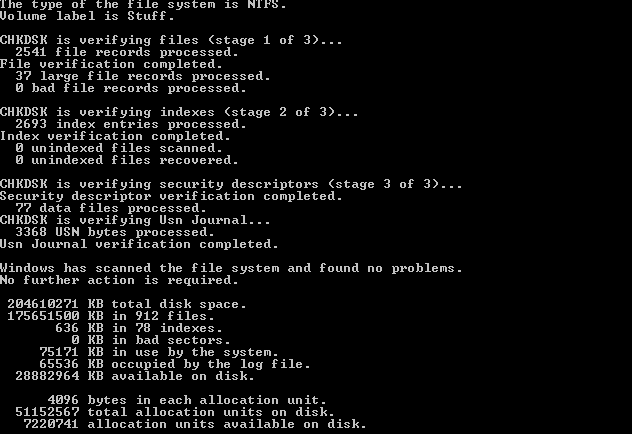
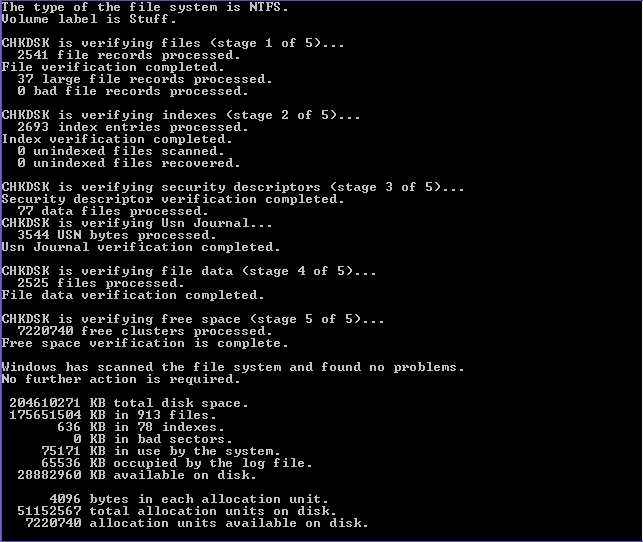
I just did a chkdsk /f and /r afterwards. Both returned no errors but, magically, I am able to write to the drive again under OSX using Tuxera.Try a plain chkdsk with no paramaters. If it returns 0KB in bad sectors, what is chkdsk /r (repair bad sectors) doing that takes so long? It should only repair bad sectors, so the time taken indicates practically every sector on the disk needs repair, and it should give a report on the repairs made, if any. Have you tried a chkdsk /f which might be quicker.
Have you done a SMART test on the drive?
Correction: Chkdsk /r will take a long time because it checks every sector for physical errors, actually a disk surface scan. Chkdsk /r also does a /f which fixes logical errors, more likely your problem.
Here is the chkdsk /f screen after it was over
And here's the chkdsk /r one
I never ran a SMART test on the drive. Could you point me to what app should I use to do that? And, since it's a NTFS drive, I assume I'll have to run the test under Windows?
I'll watch something on the TV using the drive right away and check if, afterwards, the same thing happens.
Thanks a lot for your help.
samiulhassan
macrumors newbie
i have true NTFS 3g but faces some problem when used TrueCrypt. later i moved to Tuxera and very much happy with it. haven't faced a single problem yet.
dastinger
macrumors 6502a
It was really late when I finished watching 2 episodes so I didn't have the time to try it out but I did today. Yesterday, I made sure I stopped what I was watching, exited AllShare, turned off the TV and waited for 2 to 3 minutes before removing the HDD. Today I connected it to my MBP and it's still writable! I don't want to check this as solved but, from now on, I'll do it this way and hope that it works *fingers crossed*.
Thanks a lot for your help!
Thanks a lot for your help!
That is an incorrect statement. In case of OS X the base it lies upon is entirely open source (Darwin as well as many stuff from FreeBSD). It is this base where things like NTFS support will be implemented.Linux is free and open source software, unlike Windows or Mac OS X.
Also, being open source says not much. It only means that the source code is open for anyone to look at. It depends on the license on what you as a user or developer or company are able to do with it. This also applies to closed source: it's the license that tells you what you can do and what you can't do. That's why there are certain closed source-open source mixes that work really well (such as OS X).
In this case it's a very complex situation. There are some lawsuits against Microsoft where they had to be more open about their technologies such as .doc, NTFS, SMB/CIFS, etc. Then there are various laws about reverse engineering and there is risk management. Technically there are some other reasons as well. Most of the 3rd party NTFS implementations are either somewhat closed source or they require something like FUSE. OS X doesn't have FUSE. All in all it means that Apple has to do quite a lot to get NTFS working properly. It is much easier to leave it to others that already have created a FUSE version for OS X and things like that. If Apple is working on it they'll release it when it is working properly. The open source community is more techbased and most of them can handle when things break. That leads to a bit of a different point of view: they'll release it even when it doesn't fully work as long as it is "workable". Anyway, it's the same reasons why many others don't support NTFS.
GGJstudios
macrumors Westmere
My statement is entirely correct. While Mac OS X is based on open source software, OS X itself is neither free nor open source.That is an incorrect statement. In case of OS X the base it lies upon is entirely open source (Darwin as well as many stuff from FreeBSD)