Become a MacRumors Supporter for $50/year with no ads, ability to filter front page stories, and private forums.

EGT

macrumors 68000
Original poster
Hi all

I've been having a bit of friendly banter with someone on another forum. I was talking about how i use my Mac for daily computing and PC for the odd game, work stuff etc.

The person replied with, "I've seen blue screens of death on macs and other general errors".

I've only been using OS X for over a year and have seen my fair share of panics but is there ever a "blue screen of death"?

Thanks
 
There is no BSoD, but there is a Grey Screen of Death. I expereinced literally dozens of those when I used some old Macs in elementry school (circa 1995-1997). I have no clue what those machines were...
 
similar but never blue

in about eight years intensively pushing macs avg.8-12 hours a day i've seen just once something resebling the blue screen of death, and that is the upper half of the screen turning black with terminal-like code and gibberish scrolling fast for about two seconds. that was on a dp450 running 10.0 back at the university.
(not blue though... never seen or heard of blue on macs)
 
I think the term BSOD is more a general term for "absolute crash"

In Windows we all know it as the "original" Blue Screen of Death" with some white message.

In Mac OS 9 and earlier we knew is as the "Bomb" with the text "Sorry, a System error has occurred"

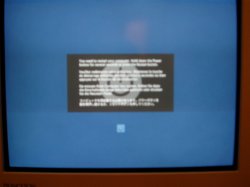
In Mac OS X (10.2 and higher IIRC) we get the dimmed screen with the message "You must restart your computer..." in 4 languages.

If you have a modern Linux running KDE or Gnome somewhere, you probably have a screen saver installed which is called "BSOD" This one displays a slideshow of many common (old and new) kernel panics, bombs, memory dumps, blue screens etc. It's a hilarious screen saver 🙂
 
I wish I had a screenshot, but there is a screen of death, even for 10.3 (not seen it yet for Tiger). The screen comes over with a grey tint, you get told to push the power butting for 5 seconds and then turn your Mac on again. There is also a power symbol. Also, you can get garbled text.
That's the bad news, the good news it i've seen this maybe 10 times or less in 2.5 years!
 
Yes, that is a kernel panic. I think its basically the equivalent of a blue screen of death.

Nasty it is.
 
EGT said:
Yes, that is a kernel panic. I think its basically the equivalent of a blue screen of death.

Nasty it is.
I think I did know this!
Nasty stuff!
Another one - I have a PCMCIA 802.11b/g card in my PB G3, if I do not:
1. Turn Off Airport
2. Power Off Card
I get command line in white over black run down my screen and a the system crashes.
The holding-the-power-button still shuts down though.
The equivalent would be leaving your Mac on, opening it up and yanking out the Airport Card I guess!
I do get these Kernel Panics most often with PCMCIA now I come to think of it though.
 
I have enevr seen a blue screen of death on a mac. I thought macs only got kernal panics when something was wrong with the system.
 
That's what i thought as well. I just decided to ask you guys and girls
 
I get a blue screen on my powerbook for 1-2 seconds when I bring it from sleep mode. I cant say its of death though...
 
"In Mac OS X (10.2 and higher IIRC) we get the dimmed screen with the message "You must restart your computer..." in 4 languages."

A scary screen indeed. I've only had that, oh, maybe 5 times though since having OS X (any version).

Anyone know what damage is done when that comes up?
 
MacsRgr8 said:
I
In Mac OS 9 and earlier we knew is as the "Bomb" with the text "Sorry, a System error has occurred"
Didn't it chime to when u got that screen.... ("Chimes of death" my computer consulted said it was...)
 
Plymouthbreezer said:
"In Mac OS X (10.2 and higher IIRC) we get the dimmed screen with the message "You must restart your computer..." in 4 languages."

A scary screen indeed. I've only had that, oh, maybe 5 times though since having OS X (any version).

Anyone know what damage is done when that comes up?

No damage is done, per se, but it's loosely possible that files that were being written to at the time could get damaged. I think journalling does a lot to protect you?

Anyway, FWIW, I've had three or four KPs in the year and a half I've had my iBook, but I've also had it lock up a few times -- no KP, but no response from anything, and nothing could be done except hold down the power button and reboot. 🙁 Seemed to be software related -- I had a number of them on 10.3.8 -- it would lock up sometimes when I acquired the WEP network my department uses, but only on one of the first few times after doing system maintenance tasks and rebooting. 10.3.9 made that go away. But Tiger has locked up twice for me too.... 🙁
 
puckhead193 said:
Didn't it chime to when u got that screen.... ("Chimes of death" my computer consulted said it was...)

Nope...the chime of death was usually a good indication of hardware failure.
 
Holy crap! Not more than 2 minutes after I posted this, I get the multilingual request to hold down the power button. So I got a crappy shot with my crappy camera.

Anyone else see the irony? 😱 😱 😱 😱 😱 😱
 

Attachments

  • P1010004.jpg
    P1010004.jpg
    99.4 KB · Views: 385
kingjr3 said:
Holy crap! Not more than 2 minutes after I posted this, I get the multilingual request to hold down the power button. So I got a crappy shot with my crappy camera.

Anyone else see the irony? 😱 😱 😱 😱 😱 😱

Awwww, I'm sorry! 🙁 And, erm, that looks different. Is that the Tiger KP screen, or is it because you're running a really hi-res?
 
i always liked the pictures that can sometimes replace the grey apple at start up. i got a circle slash once, like the slash in no smoking signs. that's always nice and unnerving. soon after the machine wouldn't even start up.

i've never really had a purely software problem with my mac. sure i get the occational unnexpectedly quitting application, but those are never that big a deal, and it's usually Safari anyway, or something else involved with the web somehow. but no system-wide software errors for me. they've all been hardware problems, and let me tell ya, hardware problems are nasty.
 
Mac OS X.0.0 Beta on a iBook G3 Kernel panics everytime You wake the thing up from sleep! Aww the good days of Mac OS X.nothing
 
line said:
in about eight years intensively pushing macs avg.8-12 hours a day i've seen just once something resebling the blue screen of death, and that is the upper half of the screen turning black with terminal-like code and gibberish scrolling fast for about two seconds. that was on a dp450 running 10.0 back at the university.
(not blue though... never seen or heard of blue on macs)

I arrived at the Apple Store at 7am on April 29, to ensure I was first in line for tiger. One of the iBooks had this issue just after they opened at 10... Anytime it tried to boot, it got the UNIX-style display with black screen and white text, saying some stuff about Darwin and whatnot. They were going around reimaging all the drives for Tiger with a FW hard drive, and that seemed to fix it.
 
kingjr3 said:
Holy crap! Not more than 2 minutes after I posted this, I get the multilingual request to hold down the power button. So I got a crappy shot with my crappy camera.

Anyone else see the irony? 😱 😱 😱 😱 😱 😱

Spoooooookyy !!!
 
waking up my powerbook is still inconsistant ...
one time i tried to wake it up and all i saw was a blue screen . and i had to restart . i guess thats a blue screen of death ?
but really .. everytime i lift my lid its always a suprise as to whats going to happen .. . not usually a freeze/crash . but sometimes i have to re close it and put it to sleep blah blah ... anyone else go through the same stuff ?

the worse is when you try to show off your pb to someone and the damn thing wont wake up .. and your like .. . "well sometimes i dont feel like waking up .. i guess my pb is the same way today ... "


damn im tired


😱
 
mkrishnan said:
Awwww, I'm sorry! 🙁 And, erm, that looks different. Is that the Tiger KP screen, or is it because you're running a really hi-res?

Nope... running Panther. Happened during the shutdown process.
 
Register on MacRumors! This sidebar will go away, and you'll see fewer ads.