Become a MacRumors Supporter for $50/year with no ads, ability to filter front page stories, and private forums.
It would be great to have 1 nvme slot inside for time capsule back up. 1 less clutter outside.
If it stayed cool, yes! From amongst the 11 reviews currently on Amazon of the CalDigit TS5 Plus:

Symex: "It does generate a lot of heat which is to be expected with all that this dock is providing, so keep it in an area out of direct sunlight or near a hot router, etc."

Luke Orlando: "It does run pretty hot but this makes sense and is moreover expected given all the I/O running through this thing."

Jeremy: "Definitely a bit bigger than my TS3 and runs a bit hotter but nothing concerning."

I have to wonder what a Thunderbolt 5 served NVME SSD would add to that.

Speaking of which, on the CalDigit TS5 Plus and other docks, does iStat Menus or do similar products give you temp. reading on internal components the way they do your Mac?
 
It would be great to have 1 nvme slot inside for time capsule back up. 1 less clutter outside.
 
  • Like
Reactions: akbarali.ch
Almost perfect, just that, they put all the ports in one place. Putting power input next to frequently used ports is calling for a disastrous world wide power out-tage. I mean, once i plug the power and Ethernet, i dont see a reason why i would ever unplug them. so put them away somewhere safe and out of frequently used ports. I don't get who designs all these things?
 
Almost perfect, just that, they put all the ports in one place. Putting power input next to frequently used ports is calling for a disastrous world wide power out-tage. I mean, once i plug the power and Ethernet, i dont see a reason why i would ever unplug them. so put them away somewhere safe and out of frequently used ports. I don't get who designs all these things?


😉
 
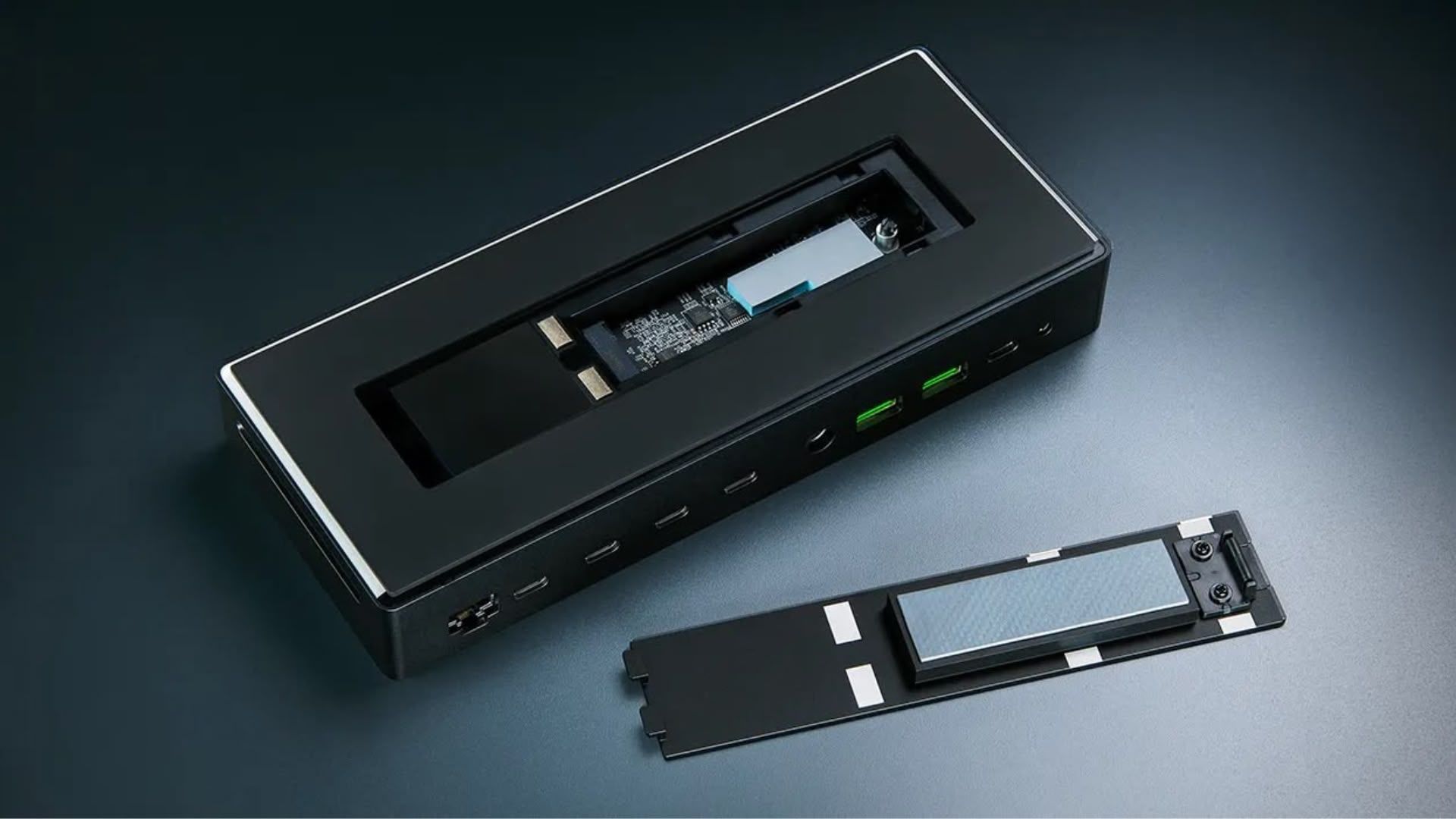
The models that have internal nvme slot, I am guessing you could buy the 1TB model, and then change out the nvme?
 
The models that have internal nvme slot, I am guessing you could buy the 1TB model, and then change out the nvme?
I didn't think so because I hadn't seen a vendor advertise that for TB 5 docks with an internal SSD, but I Googled to double check.
9to5 Mac: Review: Sonnet Echo 13 Thunderbolt 5 SSD Dock – 140W MacBook charging, 2.5GbE, up to 6000 MB/s SSD speed [Video]

From that source:

"The top of the Echo 13 features the SONNETTECH branding on a removable black faceplate that exposes the cooling fan and NVMe SSD enclosure underneath."
"The fan (and heat sink) does a great job of keeping the Echo 13 cool to the touch, especially considering that NVMe SSDs can get ridiculously hot when under load."
"I also like the fact that you can easily access the SSD by removing the top cover and heat sink. This means that you can upgrade the drive later on down the line if need be."

At a casual skim, sounds to me like the author assumed it'd worth rather than tried it?

Oh, and a warning about the 1 terabyte version - "Please note that Sonnet says that the 1TB SKU features slower write speeds of up to 4000MB/s."

Somebody called Morgonaut claimed it is user upgradable: Is the Sonnet Echo 13 Thunderbolt 5 SSD user-upgradable? YES IT IS!

She did it. It worked. She warned Sonnett doesn't officially support replacing the internal SSD, but it looked pretty easy to do.

So, it looks like with the SonnetTech, yes you can, and the cooling fan (which the first review indicated was audible) did a great job of keeping the dock cool to the touch.
 
  • Like
Reactions: buggz
This adapter I know and bought some - but it doesn't work to connect Thunderbolt 1 and even not Thunderbolt 2 PromisePegasus drives to Thunderbolt 3 or later
What Mac did you try using the Apple Thunderbolt 3 to Thunderbolt 2 Adapter with?
Did you use a working Thunderbolt 1 or Thunderbolt 2 cable?
 
  • Love
Reactions: interessiert
What Mac did you try using the Apple Thunderbolt 3 to Thunderbolt 2 Adapter with?
Did you use a working Thunderbolt 1 or Thunderbolt 2 cable?

Yes, I used old Tunderbolt cables 1 and 2 - and several Macs IMac Mid 2016 with Monterey and others New Mac Book Pro M1 16" - never got a good result.

I guess because of Promise Pegasus software...

Because another old hd drove from SONY did work

Thanks for your reply!
 
Yes, I used old Tunderbolt cables 1 and 2 - and several Macs IMac Mid 2016 with Monterey and others New Mac Book Pro M1 16" - never got a good result.

I guess because of Promise Pegasus software...

Because another old hd drove from SONY did work
Software doesn't matter if the hardware does not appear in System Information.app in the Thunderbolt list and the PCI list.
Does the Promise Pegasus Thunderbolt hardware appear in the Thunderbolt tab of System Information.app?
Does the Promise Pegasus hard drive controller appear in the PCI tab of System Information.app?
Does the Promise Pegasus hard drives appear in the USB or FireWire or ATA or SATA or SAS or SCSI or NVMe or Storage tabs of System Information.app?
Was the Sony hard drive connected with Thunderbolt 1 or Thunderbolt 2 using the Apple Thunderbolt 3 to Thunderbolt 2 Adapter?
 
  • Love
Reactions: interessiert
Software doesn't matter if the hardware does not appear in System Information.app in the Thunderbolt list and the PCI list.
Does the Promise Pegasus Thunderbolt hardware appear in the Thunderbolt tab of System Information.app?
Does the Promise Pegasus hard drive controller appear in the PCI tab of System Information.app?
Does the Promise Pegasus hard drives appear in the USB or FireWire or ATA or SATA or SAS or SCSI or NVMe or Storage tabs of System Information.app?
Was the Sony hard drive connected with Thunderbolt 1 or Thunderbolt 2 using the Apple Thunderbolt 3 to Thunderbolt 2 Adapter?

As far as I remember, I couldn't identify cables (Thunderbolt 1 oder 2?) - I tried all cables I had. And with several his SONY Thunderbolt 2 drive worked with Mac Pro 2010 OpenCorePatcher also the (fantastic) Mac Book Pro 16" M1 2021 - both with Sonoma - the Promise Pegasus with no device/cable...

I am on a longer trip - later I will (try to) answer your ideas!

Anyway thanks for your attention 🙂
 
Interested in the TS5 Plus for the 10gbe but wondering if that $500 is better put towards an M4 Mac Mini with 10gbe option.
 
Interested in the TS5 Plus for the 10gbe but wondering if that $500 is better put towards an M4 Mac Mini with 10gbe option.
Sometimes an 'apples to oranges' comparison is interesting and worthwhile. That's a good question. Let's take a look.

1.) You didn't say M4Pro Mac Mini; if you go with the base M4, you get Thunderbolt 4, not 5. That dock is a Thunderbolt 5 dock. Do you already have a computer with Thunderbolt 5 capability?

2.) Most people looking at this dock probably already have a computer. What, if anything, do you have? Will the Mac Mini be redundant, or render your other computer redundant?

3.) How long do you tend to keep a computer, and how long do you tend to keep a dock? If you bought the TS5 Plus, is it likely you'll use it with 2 computer systems in a row?

4.) Do you mainly use a dock with one computer, or 2+? This matters because a TS5 Plus can be switched from, say, a Mac Mini to a MacBook Pro, by moving the Thunderbolt 5 cable between them. A 10 Gbps ethernet port in a Mac Mini is...usable only by that Mac Mini.

5.) How many peripherals do you wish to hook up by cables? The Mac Mini has a decent selection of ports, and a much cheaper USB-C hub, or older Thunderbolt hub (like my CalDigit 3 Plus picked up for $90 used) can add to it, but the TS5 Plus adds a whole lotta ports.

This may sound weird, and I may be totally off, but I suspect the people who budget around $500 for a computer, such as the Mac Mini, probably aren't in the market for a $500 dock. Maybe M4Pro Mac Minis spec.'d up, Mac Studio and MacBook Pro users, but those aren't people paying $500 for the Mac.

Oh, and at the low end price-wise, that Mac Mini probably comes with a small SSD, so don't forget to factor in the cost of an external SSD enclosure and SSD to stick in it...at today's grossly inflated SSD prices.

For that matter, getting back to your question, if you are a user ready and able to take advantage of 10 Gbps ethernet, will you be happy with a $500 Mac? Maybe so, I'm asking. I tend to associate 10 Gbps ethernet use with higher end power users who'd likely want more, but even if I'm right not everybody is 'most people.'

 
Sometimes an 'apples to oranges' comparison is interesting and worthwhile. That's a good question. Let's take a look.

1.) You didn't say M4Pro Mac Mini; if you go with the base M4, you get Thunderbolt 4, not 5. That dock is a Thunderbolt 5 dock. Do you already have a computer with Thunderbolt 5 capability?

2.) Most people looking at this dock probably already have a computer. What, if anything, do you have? Will the Mac Mini be redundant, or render your other computer redundant?

3.) How long do you tend to keep a computer, and how long do you tend to keep a dock? If you bought the TS5 Plus, is it likely you'll use it with 2 computer systems in a row?

4.) Do you mainly use a dock with one computer, or 2+? This matters because a TS5 Plus can be switched from, say, a Mac Mini to a MacBook Pro, by moving the Thunderbolt 5 cable between them. A 10 Gbps ethernet port in a Mac Mini is...usable only by that Mac Mini.

5.) How many peripherals do you wish to hook up by cables? The Mac Mini has a decent selection of ports, and a much cheaper USB-C hub, or older Thunderbolt hub (like my CalDigit 3 Plus picked up for $90 used) can add to it, but the TS5 Plus adds a whole lotta ports.

This may sound weird, and I may be totally off, but I suspect the people who budget around $500 for a computer, such as the Mac Mini, probably aren't in the market for a $500 dock. Maybe M4Pro Mac Minis spec.'d up, Mac Studio and MacBook Pro users, but those aren't people paying $500 for the Mac.

Oh, and at the low end price-wise, that Mac Mini probably comes with a small SSD, so don't forget to factor in the cost of an external SSD enclosure and SSD to stick in it...at today's grossly inflated SSD prices.

For that matter, getting back to your question, if you are a user ready and able to take advantage of 10 Gbps ethernet, will you be happy with a $500 Mac? Maybe so, I'm asking. I tend to associate 10 Gbps ethernet use with higher end power users who'd likely want more, but even if I'm right not everybody is 'most people.'
All very good questions.

I currently have an M4 Pro MBP 14 and a TS3 Plus dock. I had a separate IOCREST 10gbe Thunderbolt adapter connected to the CalDigit but docking the MBP would often cause the 10gbe connection to drop down to 2.5 or 1gbps speeds. The IOCREST unit was a nuisance to use and unreliable, especially when trying to transfer large amounts of data between my 10gbe NAS.

I still have a need for 10bge, but don't really use up the rest of the ports on my existing TS3 Plus, except for the occasional SD Card port that my MBP also has. So, basically the TS5 Plus will be a very expensive 10gbe adapter for my use. Sure, the additional ports may come in handy but the TS5 Plus lacks HDMI and would need a DisplayPort-to-HDMI adapter, or just rely on the HDMI port from my MBP.

Looking at the compromises, I started considering the base M4 Mac Mini since it still has HDMI, has enough ports for me, and can be optioned with 10gbe. Sure, the storage is meager on the base config but I have my 40 TB NAS to fall back on. It seems the Mac Mini gets me the 10gbe for $100 more than the TS5 Plus, but I also gain some storage and processing ability with a Mac Mini. I don't really make full use of my M4 Pro MBP so the base M4 on the Mac Mini is probably more than sufficient for most daily tasks. If I were to bump up the specs of the Mac Mini then I might as well just spring for the Mac Studio.
 
Last edited:
  • Like
Reactions: drrich2
Register on MacRumors! This sidebar will go away, and you'll see fewer ads.