Need some help. I think I may need to completely reset my MBP
I have a mid-2012 MBP (500 ssd, 16 gb ram) that I’ve been running Ventura with OCLP on for a couple (?) years now and it’s been great. Highly recommend.
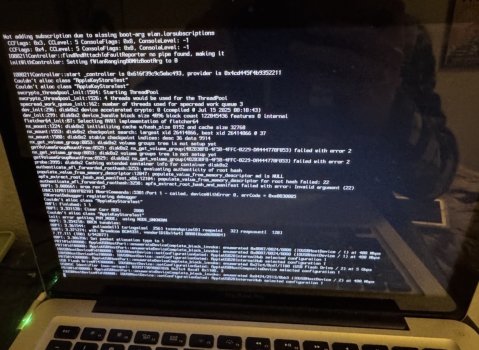
The other day I restarted because my airpods were having difficulty connecting (they’re on their last legs) and restarting usually solves the problem. Only this time after entering my login password, the progress bar stalled halfway for several minutes and I was greeted with this screen:

My correct login credentials did not work.
To make a long story short, after my troubleshooting efforts and many resets (pram, recovery mode, safe mode, etc) and one SATA cable replacement later, I’ve come to the conclusion that I just need to wipe my computer and start over. I didn’t bother making a time machine backup (I know) cause I usually just drag and drop things I want to keep long term onto a separate hard drive every couple months. Helps reduce clutter. Will be doing Time Machine going forward.
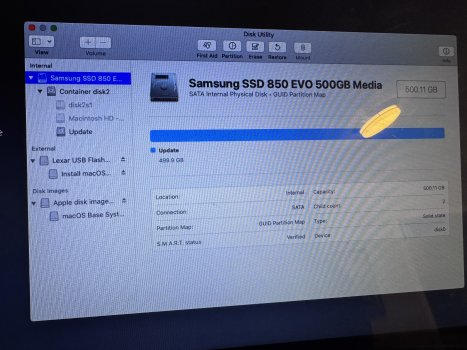
When I booted into recovery mode, I only have one ssd actually installed so not sure which one it is. I’m assuming they’re split cause of OCLP. Here’s photos of all 3:


Anyone know why the Update drive shows “used” as 69 MB while all of my actual files and content (315 GB) are shown under “other volumes”?
Is this salvageable or am I better off just factory resetting and starting over?
I have a mid-2012 MBP (500 ssd, 16 gb ram) that I’ve been running Ventura with OCLP on for a couple (?) years now and it’s been great. Highly recommend.
The other day I restarted because my airpods were having difficulty connecting (they’re on their last legs) and restarting usually solves the problem. Only this time after entering my login password, the progress bar stalled halfway for several minutes and I was greeted with this screen:
My correct login credentials did not work.
To make a long story short, after my troubleshooting efforts and many resets (pram, recovery mode, safe mode, etc) and one SATA cable replacement later, I’ve come to the conclusion that I just need to wipe my computer and start over. I didn’t bother making a time machine backup (I know) cause I usually just drag and drop things I want to keep long term onto a separate hard drive every couple months. Helps reduce clutter. Will be doing Time Machine going forward.
When I booted into recovery mode, I only have one ssd actually installed so not sure which one it is. I’m assuming they’re split cause of OCLP. Here’s photos of all 3:
Anyone know why the Update drive shows “used” as 69 MB while all of my actual files and content (315 GB) are shown under “other volumes”?
Is this salvageable or am I better off just factory resetting and starting over?
Last edited: