

I’ve just got to use the new custom EQ feature on my AirPods Pro 2 and I have to say, it’s exactly what you’d expect of Apple.
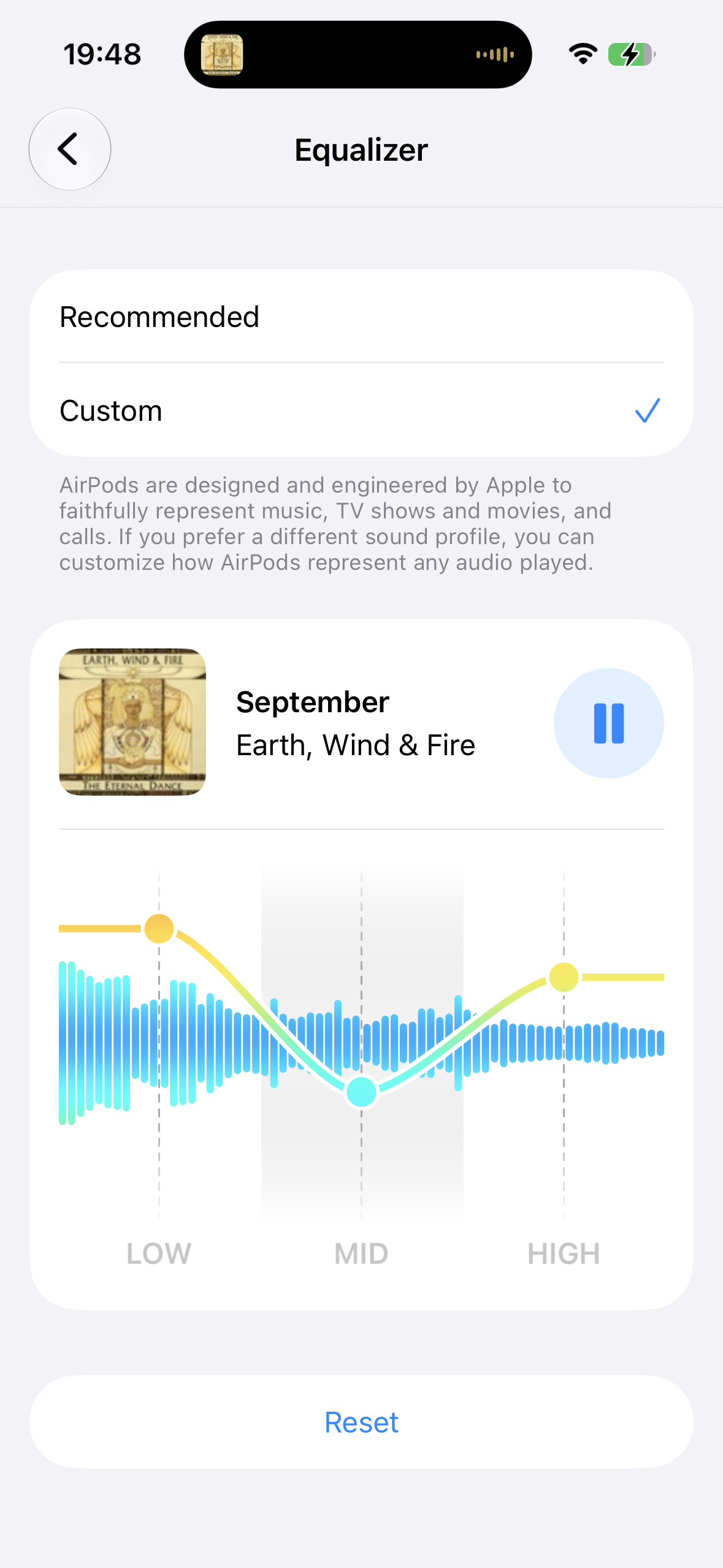
You can choose between the “Recommended” default setting and a custom equalizer, which offers you three sliders, one for bass, one for mids and one for treble, which can be dragged up and down to either in- or decrease the volume of the indicated sound range.
That’s it.
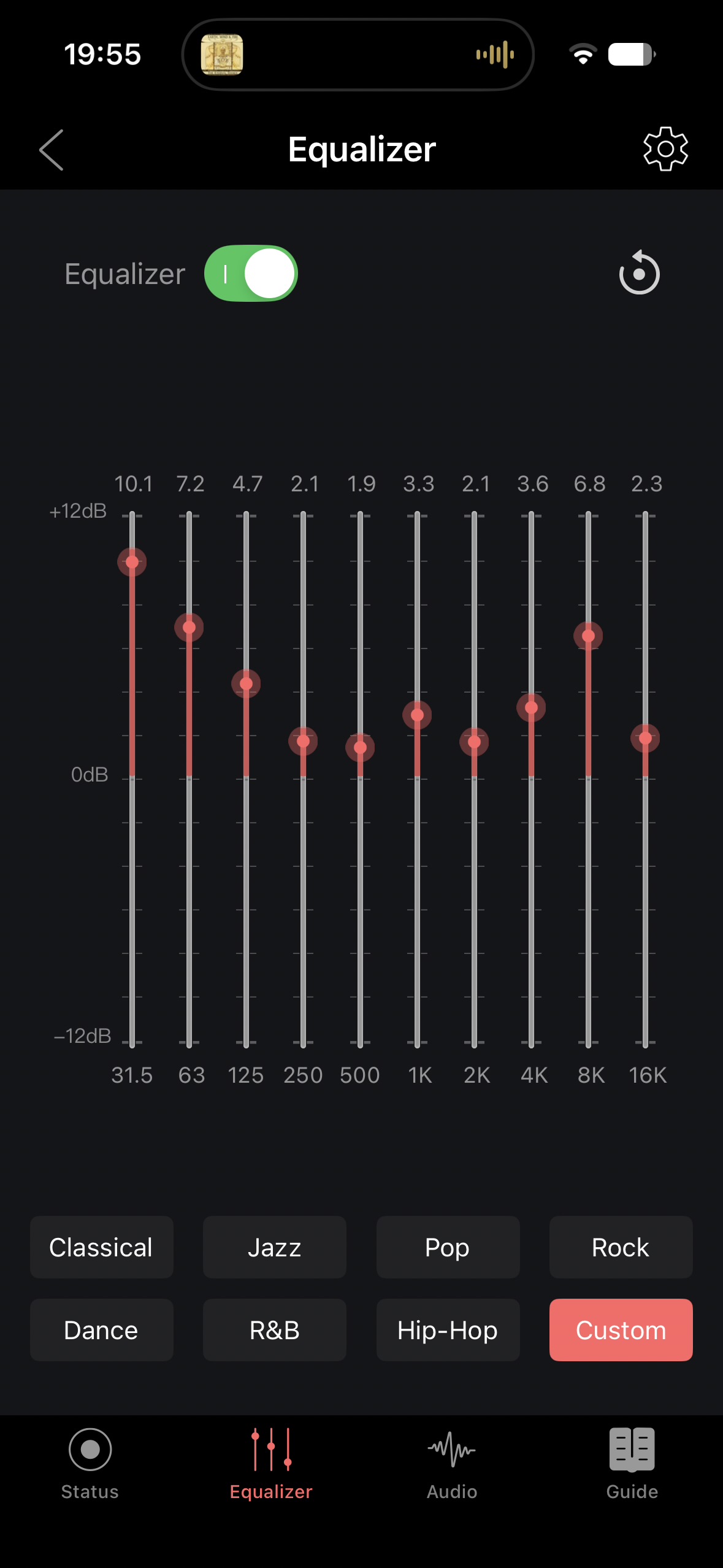
Compared to practically any other app that offers custom EQ, for example the FiiO app as pictured below, it offers no real customization of the sound and it also barely improves it, at least for me.
I am personally very disappointed, during the keynote I was very optimistic that Apple would actually deliver a solid UI for average and “prosumers” alike, like everyone else. But that is unfortunately years and years into their Bluetooth headsets journey still not the case.
Now, I know the feature isn’t ironed out yet as it made no effort in informing me about my enabled Headphone Accommodation, which will probably and hopefully be added in the future.
It also changes the sound even if all sliders are completely up or down, which isn’t confidence inducing but expected for a low tier EQ unfortunately. At least it does seem to bring some clarity to the sound when all are maxed out, which is a step up from the default sound.
It’s practically just more of modern Apple software at its finest, stopping short of actually delivering a useful tool for anyone but an “average” consumer.
All that said, I do actually benefit from this feature.
To me, AirPods Pro 2 are bordering perfection. Their ease of use in daily life, ANC (albeit not the best), the phenomenal transparency mode and surprisingly long battery life of these small units paired with their ear tip design practically removing any real risk of gunk getting into the mesh behind it make them already very good.
But I always found the sound very lacking. Good, but too muddy, too heavy many detail especially in the mids being lost.
Until I experimented with Headphone Accommodations and found the setting to use with the Pro 2’a:
Slight, Balanced sound.
It’s a whole new class of listening to music. So good, when I recently used Sons XM6’s and I was, bored. I used all presets and even though the neutral one sounded the best, only after using a custom EQ did they manage to hold a candle to my Pro 2’s with Headphone Accommodations.
Really, the only thing the Sony’s did “better”, apart from the ANC, was bass. It’s just a little more punchy and pronounced after setting it just right for my taste. A little more than neutral, you know? And that’s what my AirPods have with Headphone Accommodations, neutral sound with amazing detail and still pronounced and clear bass, just a bit too little to be considered “fun” bass.
But no more. Now I can slightly increase the bass AND have spectacular clarity on these minuscule headphones, it’s honestly incredible.
And if for nothing else in relation to this feature, for that 5% bass increase I am very thankful.
If you’d like to try and improve the sound of your existing AirPods (Pro 2) without using beta software on your iPhone and AirPods, try the following:
Without media playing and Spatial Stereo turned off go to
Settings - Accessibility - Audio & Visual - Headphone Accommodations
and turn on
Balanced Tone
and put the slider on
Slight
Use your AirPods on no more than 50% volume and listen to a song with a vibrant sound range.
(I can obviously recommend September by Earth, Wind & Fire, but songs I also always use to test different sound systems are Different Pulses (Joris Delacroix Remix) by John Avidan
and About Last Night by Chalz & Maths Time Joy)
In the middle of the song, turn Headphone Accommodations off.
Me and my family have been using this setting on all of our AirPods for over a year now, even my audiophile mother loves her pair since I introduced her to this setting.
You can choose between the “Recommended” default setting and a custom equalizer, which offers you three sliders, one for bass, one for mids and one for treble, which can be dragged up and down to either in- or decrease the volume of the indicated sound range.
That’s it.
Compared to practically any other app that offers custom EQ, for example the FiiO app as pictured below, it offers no real customization of the sound and it also barely improves it, at least for me.
I am personally very disappointed, during the keynote I was very optimistic that Apple would actually deliver a solid UI for average and “prosumers” alike, like everyone else. But that is unfortunately years and years into their Bluetooth headsets journey still not the case.
Now, I know the feature isn’t ironed out yet as it made no effort in informing me about my enabled Headphone Accommodation, which will probably and hopefully be added in the future.
It also changes the sound even if all sliders are completely up or down, which isn’t confidence inducing but expected for a low tier EQ unfortunately. At least it does seem to bring some clarity to the sound when all are maxed out, which is a step up from the default sound.
It’s practically just more of modern Apple software at its finest, stopping short of actually delivering a useful tool for anyone but an “average” consumer.
All that said, I do actually benefit from this feature.
To me, AirPods Pro 2 are bordering perfection. Their ease of use in daily life, ANC (albeit not the best), the phenomenal transparency mode and surprisingly long battery life of these small units paired with their ear tip design practically removing any real risk of gunk getting into the mesh behind it make them already very good.
But I always found the sound very lacking. Good, but too muddy, too heavy many detail especially in the mids being lost.
Until I experimented with Headphone Accommodations and found the setting to use with the Pro 2’a:
Slight, Balanced sound.
It’s a whole new class of listening to music. So good, when I recently used Sons XM6’s and I was, bored. I used all presets and even though the neutral one sounded the best, only after using a custom EQ did they manage to hold a candle to my Pro 2’s with Headphone Accommodations.
Really, the only thing the Sony’s did “better”, apart from the ANC, was bass. It’s just a little more punchy and pronounced after setting it just right for my taste. A little more than neutral, you know? And that’s what my AirPods have with Headphone Accommodations, neutral sound with amazing detail and still pronounced and clear bass, just a bit too little to be considered “fun” bass.
But no more. Now I can slightly increase the bass AND have spectacular clarity on these minuscule headphones, it’s honestly incredible.
And if for nothing else in relation to this feature, for that 5% bass increase I am very thankful.
If you’d like to try and improve the sound of your existing AirPods (Pro 2) without using beta software on your iPhone and AirPods, try the following:
Without media playing and Spatial Stereo turned off go to
Settings - Accessibility - Audio & Visual - Headphone Accommodations
and turn on
Balanced Tone
and put the slider on
Slight
Use your AirPods on no more than 50% volume and listen to a song with a vibrant sound range.
(I can obviously recommend September by Earth, Wind & Fire, but songs I also always use to test different sound systems are Different Pulses (Joris Delacroix Remix) by John Avidan
and About Last Night by Chalz & Maths Time Joy)
In the middle of the song, turn Headphone Accommodations off.
Me and my family have been using this setting on all of our AirPods for over a year now, even my audiophile mother loves her pair since I introduced her to this setting.