Become a MacRumors Supporter for $50/year with no ads, ability to filter front page stories, and private forums.
Status
The first post of this thread is a WikiPost and can be edited by anyone with the appropiate permissions. Your edits will be public.
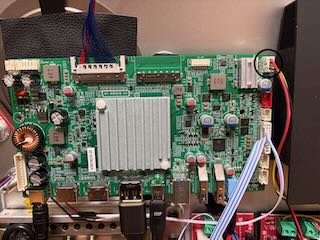
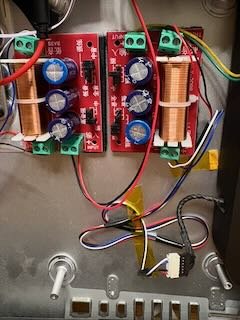
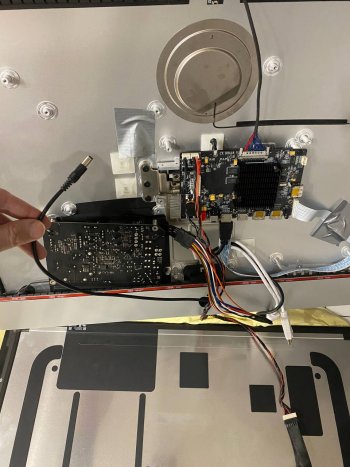
I am in the process of converting a 2015 27" iMac and I am using a JRY-W9RQUHD-SA1 board and trying to use the original iMac speakers. I have connected the crossovers to the board and to the speakers but there is no sound coming from the speakers. I have included a couple of pictures of the board and the crossovers so you can see how they are connected.

Any suggestions on what I may have done wrong or how to fit the issue would be greatly appreciated.

Thanks
 

Attachments

  • IMG_0439.jpeg
    IMG_0439.jpeg
    4.6 MB · Views: 1
  • IMG_0440.jpeg
    IMG_0440.jpeg
    512.7 KB · Views: 1
I am in the process of converting a 2015 27" iMac and I am using a JRY-W9RQUHD-SA1 board and trying to use the original iMac speakers. I have connected the crossovers to the board and to the speakers but there is no sound coming from the speakers. I have included a couple of pictures of the board and the crossovers so you can see how they are connected.

Any suggestions on what I may have done wrong or how to fit the issue would be greatly appreciated.

Thanks.


I am getting machine sounds through the speakers but not music or website audio
Disregard, audio is now working
 
Last edited:
Long time lurker, first time builder. Kaeslin's logic and final build align very well with my own requirements and I have gathered all of the components required for a similar build. R9A18 board, OEM CPU, no added complications. I purchased the "basic" R9A18 kit (driver board, 3 wiring harnesses and remote) from Stonetaskin.

There isn't nearly as much media for R9A18 builds as the R1811. I have examined many still images and have frame captured parts of the Miani video to try to establish correct board to panel wiring connections. I post the following images of cable alignments with the hope that a reader can confirm they are correct.

First, the alignment of the Stonetaskin kit's backlit cable harness connectors to the R9A18 board:
R9A18 Backlit Harness to Board.jpg


Second, the Stonetaskin kit's backlit cable harness to the panel's harness - noting the 3 molded dots and the Red wire to Grey wire alignment on the right side:
R9A18 Backlit to Panel Connector.jpg


Third, the Stonetaskin kit's wire harness alignment to both the R9A18 board and to the panel's connector:
R9A18 Display Connector ends.jpg


If anyone can confirm these connections won't fry a board or set my house on fire then I will plug them and power up :)

thanks
 
Register on MacRumors! This sidebar will go away, and you'll see fewer ads.