Become a MacRumors Supporter for $50/year with no ads, ability to filter front page stories, and private forums.
Since the release of APFS I also have preferred HFS+ for external HDDs with macOS. I haven't used APFS with a HDD for years now so I'm not sure if there is still a degradation in performance. If there is then I guess Apple would probably still keep ExFAT around. I'd love to see an official port of ZFS to macOS but that probably won't happen since Apple already abandoned that idea in the past.

ExFAT will be around for a very long time. Almost all modern capture devices use that instead of FAT32 (which has a 4GB per file limit). And I think there's no issues with licensing as it is with other formats.
 
smith (in 13 above)
"There are just some people who shouldn't use betas..."

If you're referring to me (the OP), what is your complaint?

My m4 Mini runs on OS 15.7.x Sequoia (and is running on it now).

I have an external drive, with which to install beta releases, just to see what they're like. I'm not a developer, and I freely admit to knowing NOTHING about coding or Mac programming.

But unlike many others, I DON'T run beta releases on my "main Macs".
Not on the internal drives.
I explicitly take care to avoid that.

So, no, I didn't read the developer notes, I just installed the 26.4 developer beta to see what it would do. I had previously installed various developer/pulic betas of OS 26, and although I wasn't overly impressed, they didn't make any major changes that might affect Mac users who had a bunch of older drives which might be using the HFS+ file system.

And from 39 years now of Mac user experience, I see what Apple is doing here. In effect, they are slipping in major changes "under the table", so to speak. Since Apple no longer uses platter-based drives in any of their products, they're going to discard the drive format system that worked best with them, and "move on".

I'll go out on a LONG limb and predict that with 26.4 onward, access to HFS+ formatted drives is now going to be read-only.

And... in time... may be OS 27, may be OS 28... access to HFS+ may be dropped entirely.
No writing.
No reading.
No mounting.
Just as HFS (non-plus) is today.

Hopefully I'll be proven wrong, and OS 26 (and 27) will still offer full support of HFS+.
But we'll have to wait and see.

For now, however... things are what they are.
Ah, so the classic tactic, when proven wrong, instead of just admitting you were wrong, you say “oh I was actually right and Apple’s documentation is lying.”
The classic “just trust me bro” method.
 
Seems really unlikely that Apple would intentionally phase out support for a whole filesystem in a dot release. Perhaps in 27 or 28...
I can't imagine a filesystem as entrenched as HFS just gets downgraded to read-only in a dot release without any prior notification from Apple themselves. Apple is pushing a dialog box about Rosetta 2 being deprecated in 2 years, but almost-30-years-old HFS' lifespan is measurable in weeks? Please.
 
  • Like
Reactions: kitKAC
Public beta 1 for 26.4 is out now.
Perhaps someone will install it and see if it, too, makes HFS+ read-only.

(I would have installed it, but the public beta won't install "over" the first developer beta -- software update says it's "up to date"...)
 
Public beta 1 for 26.4 is out now.
Perhaps someone will install it and see if it, too, makes HFS+ read-only.

(I would have installed it, but the public beta won't install "over" the first developer beta -- software update says it's "up to date"...)
not sure if this applies to all hfs+ drives. i think it may depend on size.

i put 5tb drive in - got the bug and not writable

then i put 1tb drive in and no bug happened. it is writable

both were hfs+

so what is the size that becomes problematic? maybe 3tb?
 
Public beta 1 for 26.4 is out now.
Perhaps someone will install it and see if it, too, makes HFS+ read-only.

(I would have installed it, but the public beta won't install "over" the first developer beta -- software update says it's "up to date"...)
That’s because they are the exact same build.
They are always the exact same build, and when they are not, the developer beta gets updated to the same build as the public beta.
Respectfully, if you don’t understand or recognize things as simple as this which has been true for the last decade, or things as simple as apples “Known Issues”in their release notes, you really, really should not be running Betas in any form, external SSD or not.
When Apple says something is a “Known Issue”, it means it is an issue that they intend on resolving and *not* expected behavior.
 
This misuse of deprecate and deprecation is so common.

Deprecate is to notify that something will become unavailable at some time in the future. Deprecate does not mean to make something unavailable or unsupported right now.

In Apple's usage: Something (usually software related) is deprecated when Apple notifies that the thing will, at some point in the future, become unavailable. In other words you are discouraged from using it now even though it is still available and supported.

Extract from the macOS dictionary (the 1st meaning applies):
deprecate| verb [with object]
1 express disapproval of: what I deprecate is persistent indulgence.
• (be deprecated) (chiefly of a software feature) be usable but regarded as obsolete and best avoided, typically because it has been superseded: this feature is deprecated and will be removed in later versions
2 disparage or belittle (something): he deprecates the value of children's television.


Better to say: typically Apple deprecates something years before making it unavailable.

You are not the only one. The thread title is wrong, too.

Definitions and usage varies by region/industry but I would add that it is more than discouragement, it means that it should no longer be used at all, availability is purely to support transitions.
 
Lounge wrote:
"When Apple says something is a “Known Issue”, it means it is an issue that they intend on resolving and *not* expected behavior."

Copied directly from

"External Media
Known Issues
HFS external media might fail to mount automatically. (168672160)
Workaround: For macOS only, use CLI tool diskutil mount to attach the relevant disk device."

I had no problems MOUNTING HFS+ drives -- they still mount (usually).
I made that clear in my original post to this thread.

But I see nothing in the release notes "known issues" that states that -- once mounted -- HFS+ volumes will become "read-only".

Could you point out to me where in the release notes it says as much?

If the release notes dont mention this, then does your statement above still apply?
Why have they neglected to mention that "read-only" is NOT "an expected behavior"...?

As I said... hopefully I'll be wrong.
Nothing to do except wait for the next release...
 
  • Angry
Reactions: smithrh
FAT is older than Apple itself and its still supported there is no reason for them to deprecate HFS and given that this a KNOWN ISSUE it means Apple will absolutely fix it and restore functionality in the next beta
The origins FAT file system as currently used dates back to early 1980 when implemented in QDOS, which was renamed to 86-DOS and then MS-DOS. The original version used 12 bit entries in the allocation table, which was adequate for the floppies and low capacity hard drives of the time. Apple dates back to 1976. TBF, the "File Allocation Table" was used in Microsoft's Disk Basic.
 
Lounge wrote:
"When Apple says something is a “Known Issue”, it means it is an issue that they intend on resolving and *not* expected behavior."

Copied directly from

"External Media
Known Issues
HFS external media might fail to mount automatically. (168672160)
Workaround: For macOS only, use CLI tool diskutil mount to attach the relevant disk device."

I had no problems MOUNTING HFS+ drives -- they still mount (usually).
I made that clear in my original post to this thread.

But I see nothing in the release notes "known issues" that states that -- once mounted -- HFS+ volumes will become "read-only".

Could you point out to me where in the release notes it says as much?

If the release notes dont mention this, then does your statement above still apply?
Why have they neglected to mention that "read-only" is NOT "an expected behavior"...?

As I said... hopefully I'll be wrong.
Nothing to do except wait for the next release...
You can be certain that if Apple were ending support for one of its native filesystems, there would be an announcement well before support actually did end, and it would go into a deprecated state well before that discontinuation.
 
Good to know. I still have an external drive that is using HFS+. Perhaps this is a good time to format it in NTFS and use it as backup for my Steam library.
 
2024 Mini m4 here. I normally run it with Sequoia, but I have an experimental/external SSD for Tahoe.

The Tahoe 26.4 developer beta became available yesterday, so I installed it onto my external SSD.

BIG CHANGE. And not for the good.

It now sees all of my HFS+ partitions (on the m4's internal SSD) as "read only".

Up until 26.3, they functioned normally, HFS+ drives, readable and writeable.

When I log in, finder loads and displays this for each HFS+ volume:
View attachment 2605800

I tried opening disk utility, selecting an HFS+ volume, and running "first aid" on it.
Result: drive is unmounted, then du reports failure. But afterwards, I can't even re-mount the drive.

I tried connecting and mounting one of my backup drives (old seagate HDD, formatted to HFS+) -- it, too, appears on the desktop with the same warning, "read only".

Perhaps there is some way around this, using terminal to over-ride the default setting of read-only and again make HFS+ volumes writeable.

But if not, it looks like 26.4 is "the end of the line" for HFS+.

Those who still like and use HFS+ should take care -- if you upgrade to 26.4 (and beyond), those HFS+ drives will no longer be fully "usable".

Could someone else check to see if they experience similar behavior...?

I've had the same problem in Sequoia but I thought there was something wrong with it because of the way it was reported as it can't "repair" the disk. It's also an HFS+ (time machine) drive
 
You can be certain that if Apple were ending support for one of its native filesystems, there would be an announcement well before support actually did end, and it would go into a deprecated state well before that discontinuation.
we can't actually say hfs+ is not compatible with tahoe because in previous versions it was working fine.

but could this "bug" be something deliberately inserted in this version to "test the waters" like nah this isn't something apple officially intends to do, but they would like to see the reaction when they spring this on us.

so like a couple of whingers still with hfs+ drives vs the millions of others already on apfs and hence might be ok to proceed with deprecation ......... or millions still using hfs+ so nope it's a disaster so better back off.
 
Last edited:
"Much ado about nothing."

How many old HFS+ volumes do you have?

Actually, I hope you're right.
But -- just as we see with Rosetta2 -- the time is coming when Apple will abandon HFS+.
Perhaps sooner, rather than later...?
 
  • Angry
Reactions: smithrh
Apple introduced HFS in 1985, dropped support for formatting in 2009 (Snow Leopard) and dropped support for mounting in 2019 (Catalina).

Apple introduced HFS+ in 1998, APFS in 2017 (High Sierra), started converting all internal drives to APFS in 2018 (Mojave) and no longer supported installations on HFS+ in 2019 (Catalina).

HFS+ does not support dates beyond 6 February 2040.

“In earlier versions of macOS before Ventura, the Apple kernel driver offers a function to re-mount NTFS drives in read/write mode…
But with the new Apple Silicon architecture, Windows is not supported anymore, and Apple has removed the write capability for NTFS-formatted drives completely.”
https://mounty.app


References:
https://en.wikipedia.org/wiki/HFS_Plus
https://osxdaily.com/2024/02/27/how-to-mount-copy-hfs-classic-mac-drives-on-macos/
https://apple.fandom.com/wiki/HFS_Plus
https://apple.fandom.com/wiki/Hierarchical_File_System
 
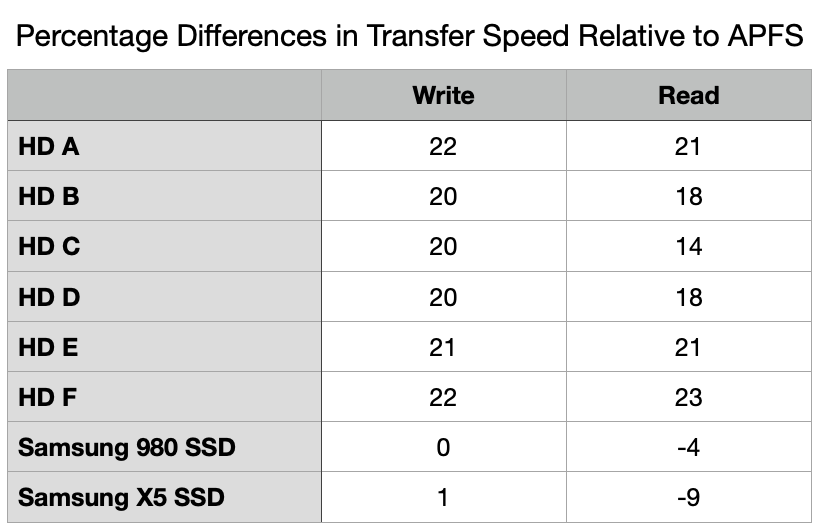
Correct me if I am wrong - My understanding is that APFS has performance issues with spinning rust storage when compared to HFS+.
 
  • Like
Reactions: Black_Mage
but could this "bug" be something deliberately inserted in this version to "test the waters" like nah this isn't something apple officially intends to do, but they would like to see the reaction when they spring this on us.
There is no way Apple would intentionally break a previously supported filesystem without any advance notice.
 
Correct me if I am wrong - My understanding is that APFS has performance issues with spinning rust storage when compared to HFS+.

In general yes. APFS assumes SSD and so makes little attempt to organize the data for sequential access. HFS+ both in layout and historical allocation and write algorithms does. Over time APFS becomes more fragmented than HFS+ for the same pattern of access. The theory of APFS is that the overhead of avoiding fragmentation isn't worth any benefit of sequential access to SSD. With access times in microseconds, that's seems reasonable. When access times are in milliseconds, as they are with all HDD I know, fragmentation can be very painful.


I use APFS (or exFAT, etc for multi-platform situations) for all SSD and I only plan to buy SSD from here on out (though I may rethink that if the tripling of SSD prices doesn't revert). I keep all my HDD as HFS+ and plan to keep them that way until they die. If Apple completely drops support for HFS+ before that happens then TBD.
 
I use APFS (or exFAT, etc for multi-platform situations) for all SSD and I only plan to buy SSD from here on out (though I may rethink that if the tripling of SSD prices doesn't revert). I keep all my HDD as HFS+ and plan to keep them that way until they die. If Apple completely drops support for HFS+ before that happens then TBD.
That's pretty much my thoughts with respect to APFS and HFS+. It's hard to beat the price per TB with HDD, so that makes having multiple backup disks less of a financial burden. I've also found that HFS+ drives will be faster for backing up APFS filesystems than exFAT.

Here's hoping that HFS+ read support continues for at least another decade.
 
Register on MacRumors! This sidebar will go away, and you'll see fewer ads.