Become a MacRumors Supporter for $50/year with no ads, ability to filter front page stories, and private forums.
ProMotion is rarely at full 120hz, I believe. I think most scrolling is between 80-90hz, which is good enough. Switching this setting off is noticeable, but not quite as dramatic as going from a flat 60hz -> 120hz.

 
Great article. Will try it out. Battery life might take a hit. Apple should make it easier to enable/disable this feature instead of it being deep within the menus.
 
  • Like
Reactions: mganu
Funny how years later a random debunked setting is now advertised as a legit feature. MacRumors authors are just Reddit mods, this article should be deleted or changed.
Would agree. It’s also misleading.
We don’t even know what the toggle exactly does because the 120 hz iPhones definitely running faster/smoother even with the option on its default setting.
This is mostly online and social bs that’s spread here as a crazy hidden feature.
 
Strange, the default toggle switch on my devices is set as follows:
  • Mac Studio M1 Ultra - Enabled
  • MacBook Air M2 - Enabled
  • Mac Mini M2 Pro - Enabled
  • iPhone 16 Pro Max - Enabled
  • iPad Pro 13 M4 - Enabled
  • Vision Pro M5 - Disabled
It's only on the AVP that the default setting is disabled. I wonder why... Any ideas?
 
Last edited:
Strange, the default toggle switch on my devices is set as follows:
  • Mac Studio M1 Ultra - Enabled
  • MacBook Air M2 - Enabled
  • Mac Mini M2 Pro - Enabled
  • iPhone 16 Pro Max - Enabled
  • iPad Pro 13 M4 - Enabled
  • Vision Pro M5 - Disabled
It's only on the AVP that the default setting is disabled. I wonder why... Any ideas?
Still don’t know for 100% what the toggle exactly does but I would guess here that it’s disabled especially for VR where a high refresh rate is mandatory that anything looks smooth.
 
I just only noticed this now (I'm the creator of TestUFO).
Thanks for posting a link to TestUFO in the macrumors article.

Hopefully that new publicity lets Apple makes it easier to turn on/off.

- People who want to save power will want 60fps
- People who want scrolling/panning ergonomics will want 120fps.

P.S. If you use TestUFO on a MacBook, make sure to enable this setting on the TestUFO site:

1769528602456.png
->
1769528613959.png


This is more needed for MacOS than iPhone/iPad - to fix TestUFO stutters especially for the other animation subpages.

TestUFO automatically saves power by default by keeping rendertimes pretty low (under 1ms), but sometimes that triggers power management. This causes TestUFO animations to stutter. The workaround was to do rendertimes at 55% of a refreshcycle; so useful for the more scientific animations (in the subpages of TestUFO).

There are more than 50 animations beyond the TestUFO coverpage -- see full listing of TestUFO animations
 
Last edited:
Is battery life really that much worse?
it eats up 15-20% of your battery… according to reddit😅

Varies by device. My experience with iPad OLED is it only eats <10% now.

It is a personal decision of whether it's worth it or not, depends on the quality of screen (OLED = more 120Hz benefit than LCD) versus the battery loss (newer 120Hz devices = less loss).

Great article. Will try it out. Battery life might take a hit. Apple should make it easier to enable/disable this feature instead of it being deep within the menus.

I agree; it should be much easier to toggle on/off. It should not be a "developer" flag buried very deep.

Especially now better newer 120Hz Apple devices have come out (see below).

ProMotion is rarely at full 120hz, I believe. I think most scrolling is between 80-90hz, which is good enough. Switching this setting off is noticeable, but not quite as dramatic as going from a flat 60hz -> 120hz.
Didn't notice much difference on my 17 PM but did notice on my MBP. Thanks MR!
Scrolling is exactly the same for me. No difference.

Be noted some models of 120Hz show it more dramatically than other models.

Also, it is hard to remember 10% differences with browser restarts (for Prefer-60fps). It's easier to see side by side.

Where 120Hz LCD = Very faint ~10% difference
On MacBook M1 that specific LCD pixel response is so slow that 60 vs 120 appears to be almost identical to many people. (M5 is faster, but not as dramatic as OLED Hz). If you don't see it side-by-side, many sometimes do not notice. Most laptop LCDs do not use overdrive algorithms, so mobile LCDs are even slower than desktop LCDs. That's why the slowest 120Hz LCDs sometimes only feel like going from 60fps -> 70fps.

Where 120Hz OLED = More dramatic 2x clearer scrolling
But more people saw differences on the iPad 120Hz OLED, as OLED amplifies difference between 60 vs 120. In this case, 120fps becomes much more worthwhile vs energy, since 120fps Safari actually only impacts battery life by only single-digits on that really good iPad.

You can also use TestUFO pages framerates-versus (RTS game panning) or framerates-text (vertical scrolling) as self-educational see-for-oneself to see how the 60-vs-120 improvement looks on your specific Apple devices.

Tap any animation to go full screen and use landscape mode if using a mobile device. If you have both an LCD and OLED Apple device, compare the two.

It's amazing how OLED amplifies 60Hz vs 120Hz, especially bigger OLED screens.

There are more ergonomic improvements beyond, perhaps for 2030s-era Apple devices: A preliminary blind study focussed on 2D framerate=Hz scrolling showed geometrics and instant pixel response is more important -- whereupon 120Hz vs 480Hz OLED had more human-visible difference than 60Hz-vs-120Hz LCD. Once the cost difference is free (like 4K is free) and power cost is marginal, such Hz probably will be mainstreamed in a decade for non-gaming use cases. [You can bookmark this prediction; I've been historically accurate]
 
Last edited:
@Blur Busters Would this setting only affect requestAnimationFrame or also browser native animations like scrolling?
All HTML5 APIs are affected, not just rquestAnimationFrame.

It affects everything in Safari, graphics output of all browser APIs are capped at 60fps or unlocked to 120fps+ with the hard-to-access developer flag. I wish it was much easier to toggle, but at least a setting finally exists after being impossible to do >60fps in Safari for a long time.

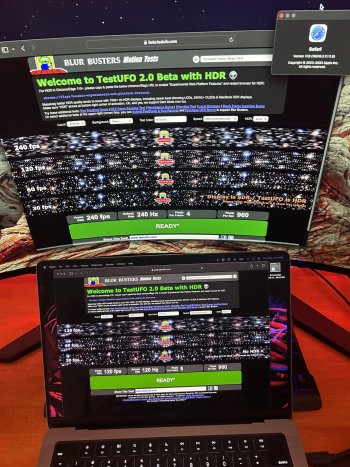
Adjusting setting will also enable it to do >120Hz with external monitors too, like new desktop 240Hz OLEDs now available.
 

Attachments

  • MacBookPro_M1_DualDisplay_120hz_240hz_Safari-scaled.jpg
    MacBookPro_M1_DualDisplay_120hz_240hz_Safari-scaled.jpg
    676.2 KB · Views: 3
Last edited:
Strange, the default toggle switch on my devices is set as follows:
[list of devices]
It's only on the AVP that the default setting is disabled. I wonder why... Any ideas?
Hello fellow Torontoian (YYZ too?)

It's because Vision Pro uses flicker-based motion blur reduction (strobing / black frame insertion technique). All modern VR headsets currently do this to prevent nauseating display motion blur during head turns.

Half framerate produces an annoying artifact on any impulsed displays -- aka flicker-based low-blur display (CRT/BFI/plasma/VR/etc).

1769531177489.png


If you used to use CRT TVs with your video game system a long ago...
...You will recognize the effect on CRT 30fps at 60Hz.

This duplicate image artifact is so annoying, that apple disabled the "Prefer 60fps" setting on the Vision Pro headset.
 
Last edited:
Made no difference. But now I can't unsee the stuttering when the variable refresh rate kicks that was mentioned in the thread 🤷‍♂️
 
Register on MacRumors! This sidebar will go away, and you'll see fewer ads.