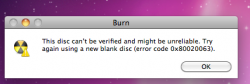
I am starting to think this problem is a funny (odd, not haha) one!
the fix is that there are certain preference files (users/you/library/preferences) on your machine that purposefully trigger this error.
the sure-fire way to fix this (at least in my limited-scope investigating) is to delete all your preferences.
However, I think that it is a specific SINGLE preference file that triggers burning errors!
(all the talk about different brands of media and corresponding "quality" of said specific brands of media is simply so much "hot air")
Now, which specific preference file sets off the burning error? I am not exactly sure, but I have a pretty good idea. Do you ever do anything to circumvent paying for software/content? Most folks today are "torrenting" media that they do not own. (Technically illegal, but most of us under the age of 30 are still doing it, right?)
more hints: torrenting......software piracy.......very popular illegal serial number application......YOUR PREFERENCES SAY A LOT ABOUT YOUR ACTIVITY!
that's all the hints I'm giving, now go and figure it out for yourself!
i'm not burning illegal stuff
im talking to tech support at Other World Computing
and they said its a verify error. and its most likely your lacie that is the problem. it isnt a firmware issue. if it WAS firmware issue then people would be calling in a lot about it. he said most likely data transfer is not occurring fast enough, the transfer between lacie and computer might not be fast enough and increasing memory might help..
tech guy really thinks its a problem with the lacie and that the drive is probably fragmented and i need to defrag the computer and the lacie, and that MIGHT work. he says you "film people" do horrendous things to your external hd. and use it to the maximum. even tho you do clean it out.
But basically he said i need to try 2 things.
the first thing to try:
try your OWC external harddrive, (not your lacie), and plug it in, and burn .mov files to a DVD from the OWC external hard drive. IF IT WORKS (THE BURNING, WITHOUT AN ERROR MESSAGE), then you know its a problem with your lacie. if the burning FAILS though with the OWC external hard drive then do this:
the second thing to try:
step 1) boot up from os disc, leopard disk
2) go into disc utility, and repair both external harddrive and computer hard drive, fix permissions
3) go online mac update.com, download program called iDefrag, let it run,
So i tested out burning from the OWC external hard drive and the result was: it burned successfully.
so that means its probably a problem with my terrabite lacie hard drive
🙁
gotta defrag it big time (with DISC WARRIOR), or get a new external hard drive later.
Source(s):
macsales.com, macupdate.com, disc warrior