Become a MacRumors Supporter for $50/year with no ads, ability to filter front page stories, and private forums.

MacRumors

macrumors bot
Original poster


Apple today provided the third beta of the upcoming iOS 17 software release to developers for testing purposes, and as with all betas, there are small refinements and tweaks to various features and interface elements in the update.
General-iOS-17-Feature-Blue-Green.jpg
 
Last edited:
  • Like
Reactions: zapmymac
Just fix the battery drain first!!
I used to jump on betas in the past.
After killing 2 iPhone batteries, I decided to not do the same on the new iP14 PM.
I am also super excited about the new features, but my wallet cannot take another hit.

I noticed that it’s the heat that devices have - and it also coincides with summer in the northern hemisphere.
So you have 2 issues: hot weather outside, hot running phone - charging more frequently.
Hence - battery health gets destroyed.


If you use this on your primary device - might want to consider reverting back to a released version.
It depends, on you of course - I for one - am barely able to refrain from installing 😂
 
In the Photos app, does it allow the user to sort images in a way that they vanish from the main library if moved into an album?

I have tens of thousands of images in my Library. I‘d like to create albums and sort these images into albums. The problem is simple yet very frustrating. There is no way to know which images have been sorted because the moved image doesn’t disappear from the main Library. It’s very difficult to know which ones have been sorted and which ones are still to be sorted. I’m forced to use Lightroom because of this, but I’d much rather use the Apply Photos app.

If you have a Mac you can create a smart album showing images not in an album - sadly not available on iOS
 
So far this years’ betas have been stable and usable from the start (obviously with bugs but that’s to be expected).

However many of the bugs from the Home app and Home section in Control Center have remained… I really hope the final release fixes it for all.

Almost impossible to set my Hue bulbs to the preset colors saved in home. They’ll more often than not just go to a random color despite the preset color showing what it was saved as. Hue app has no issues so it should be possible for Apple
 
  • Like
Reactions: madeirabhoy
The Apple Music credits section is useless for me unless I can click on each credit to see more of what they've created, this is already possible on Tidal and one of my favorite features. You can also visit an artist's profile and see every track they have a credit on with the ability to filter by credit type ("Show me everytime Pharrell Williams had a Mixing credit", for example).

Come on Apple, you still have some way to go before I can switch to you permanently over Tidal.
 
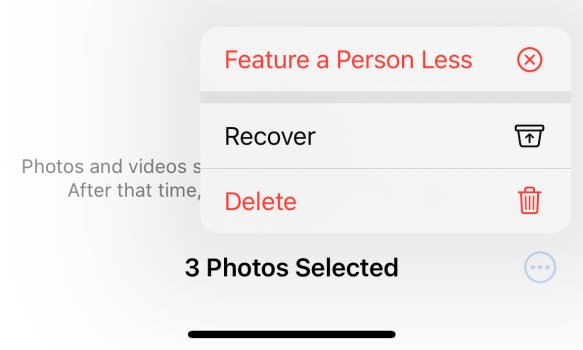
The “Save as Video” doesn’t show up for me with Live Photos in the Recently Deleted album, but I do see “Feature a Person Less.”

Probably a bug that it’s showing something other than Delete or Recover given it’s in Recently Deleted.

IMG_8290.jpeg
 
been bugging the hell out of me that I can’t see songwriters in the “show full lyrics” area since getting the beta, glad to see they were just expanding on that feature in general
 
  • Like
Reactions: imnotthewalrus
Register on MacRumors! This sidebar will go away, and you'll see fewer ads.