This makes no sense. I experience issues even during the day time with all external lamps turned off and using the phone or laptop in natural light from the windows.I read this topic. Your problem is more likely with the lighting in your rooms and streets. You use lamps for lighting that flicker with the frequency of the mains voltage. And if the flickering frequency of the lamp coincides with the refresh rate of the monitor, then this is very bad. You notice the flickering and it gets on your nerves. It is better to set the frequencies to be unequal. If the ceiling lamp flickers at a frequency of 60Hz, then set the monitor refresh rate to 75Hz, not 60Hz or 120Hz (the latter are good in Europe, in Europe the lighting flickers at a frequency of 50Hz) or even better, look for lamps for lighting that do not flicker.

Got a tip for us?
Let us know
Become a MacRumors Supporter for $50/year with no ads, ability to filter front page stories, and private forums.
Other Eye-strain while using iPhone X and up
- Thread starter Kitkad
- WikiPost WikiPost
- Start date
-
- Tags
- eye strain xs max
- Sort by reaction score
You are using an out of date browser. It may not display this or other websites correctly.
You should upgrade or use an alternative browser.
You should upgrade or use an alternative browser.
- Status
- The first post of this thread is a WikiPost and can be edited by anyone with the appropiate permissions. Your edits will be public.

So there must have been a flashing light somewhere or the software used has problems with Jitter.
I have encountered problems with Jitter in one game when I played it without the following modification.
I have encountered problems with Jitter in one game when I played it without the following modification.
Last edited:
dannyh5319
macrumors regular

MICHAELSD
macrumors 603
iPhone Air update:
Sent back to Apple. Thank you, Apple, for at least making returns easy and seamless. I returned the device in a condition that could easily be mistaken as new, and packaged well.
I was skeptical about the new Display Pulse Smoothing toggle, and it did lead to perhaps my best experience with an OLED iPhone to date. Unfortunately and ultimately, the device still caused flicker sensitivity that was typically lingering in the background no matter how much I tried to distract myself or ignore it. In summary, the PWM setting mitigated the worst intense behind-the-eye throbbing I experience while still not ruling out tension headaches or migraines.
Apple display engineers perhaps got too caught up on the feedback requesting that Apple no longer use PWM: in reality, we are requesting a display that is flicker-free along the lines of an iPhone SE or iPhone 11 “Liquid Retina” display. Our goal wasn’t to swap PWM dimming for another dimming method that has measurable frequency and modulation, as technically the display is still rapidly flickering on and off.
Nonetheless, I’m not particularly flicker-sensitive in day-to-day life beyond smartphones and oddly the Mini-LED MacBook Pro. There is the possibility of a dimming implementation that would no longer affect me personally. Continue focusing on increasing frequency and/or reducing modulation. Overall though, an Accessibility setting has to be more comprehensive and profound.
I will continue to wait for an iPhone that causes no sensitivity whatsoever.
Sent back to Apple. Thank you, Apple, for at least making returns easy and seamless. I returned the device in a condition that could easily be mistaken as new, and packaged well.
I was skeptical about the new Display Pulse Smoothing toggle, and it did lead to perhaps my best experience with an OLED iPhone to date. Unfortunately and ultimately, the device still caused flicker sensitivity that was typically lingering in the background no matter how much I tried to distract myself or ignore it. In summary, the PWM setting mitigated the worst intense behind-the-eye throbbing I experience while still not ruling out tension headaches or migraines.
Apple display engineers perhaps got too caught up on the feedback requesting that Apple no longer use PWM: in reality, we are requesting a display that is flicker-free along the lines of an iPhone SE or iPhone 11 “Liquid Retina” display. Our goal wasn’t to swap PWM dimming for another dimming method that has measurable frequency and modulation, as technically the display is still rapidly flickering on and off.
Nonetheless, I’m not particularly flicker-sensitive in day-to-day life beyond smartphones and oddly the Mini-LED MacBook Pro. There is the possibility of a dimming implementation that would no longer affect me personally. Continue focusing on increasing frequency and/or reducing modulation. Overall though, an Accessibility setting has to be more comprehensive and profound.
I will continue to wait for an iPhone that causes no sensitivity whatsoever.
Last edited:
scooterdooter
macrumors newbie
Low amplitude, sine waves are a perfectly okay type of flicker. More of less all devices operated like this until very recently when 3rd Gen OLED/LED abandoned it for the below:I read this topic. Your problem is more likely with the lighting in your rooms and streets. You use lamps for lighting that flicker with the frequency of the mains voltage. And if the flickering frequency of the lamp coincides with the refresh rate of the monitor, then this is very bad. You notice the flickering and it gets on your nerves. It is better to set the frequencies to be unequal. If the ceiling lamp flickers at a frequency of 60Hz, then set the monitor refresh rate to 75Hz, not 60Hz or 120Hz (the latter are good in Europe, in Europe the lighting flickers at a frequency of 50Hz) or even better, look for lamps for lighting that do not flicker.
High amplitude, square and sawtooth waves are not okay and refresh rates have zero affect on them.
scooterdooter
macrumors newbie
Apple display engineers perhaps got too caught up on the feedback requesting that Apple no longer use PWM: in reality, we are requesting a display that is flicker-free along the lines of an iPhone SE or iPhone 11 “Liquid Retina” display. Our goal wasn’t to swap PWM dimming for another dimming method that has measurable frequency and modulation, as technically the display is still rapidly flickering on and off.
Nonetheless, I’m not particularly flicker-sensitive in day-to-day life beyond smartphones and oddly the Mini-LED MacBook Pro. There is the possibility of a dimming implementation that would no longer affect me personally. Continue focusing on increasing frequency and/or reducing modulation. Overall though, an Accessibility setting has to be more comprehensive and profound.
Don't need flicker free. Low amplitude sine wave is fine (under 15% across all brightness). Square and sawtooth are okay if very low (Under 5% across all brightness).
All apple has to do is just copy exactly what Motorola does with the Stylus 2025 for a 17e/18e and all issues are fixed. Everyone here would be able to buy an apple device that works. The oneplus 15r looks even better, so Apple has yet another device to copy.
Apple suffers from NIH (not invented here). Their stuff and solution are the correct one and you are wrong if you think otherwise. Only when sales crater will they do anything different. If people here aren't willing to leave the apple ecosystem, apple won't change anything.
So there must have been a flashing light somewhere or the software used has problems with Jitter.
I have encountered problems with Jitter in one game when I played it without the following modification.
No disrespect, but you're not educated in the spiel you type.
Lots of very clued up folk on this thread dedicating hundreds of hours of their time trying to find solutions or answers. It is very much hardware and/or software associated with the operation of a number of types of screen technology.
If only it was as simple as a flashing bulb...
scooterdooter
macrumors newbie
So there must have been a flashing light somewhere or the software used has problems with Jitter.
I have encountered problems with Jitter in one game when I played it without the following modification.
iphone X:
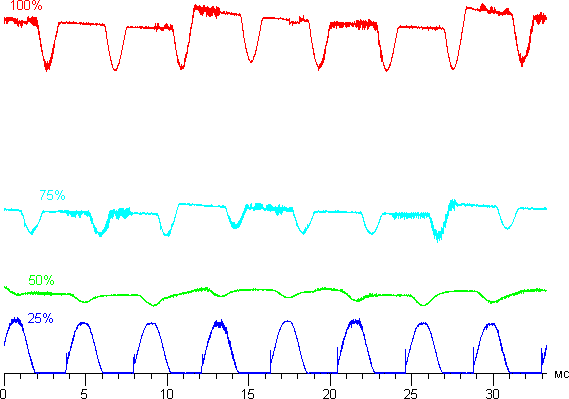
Samsung S10+:

Nah. Manufacturers went nuts around iphone X, hence the OP. All four wave types + different modulation depths including 99% depth = cooked eyes. Mystery has been solved for a while now.
Oneplus 15R:
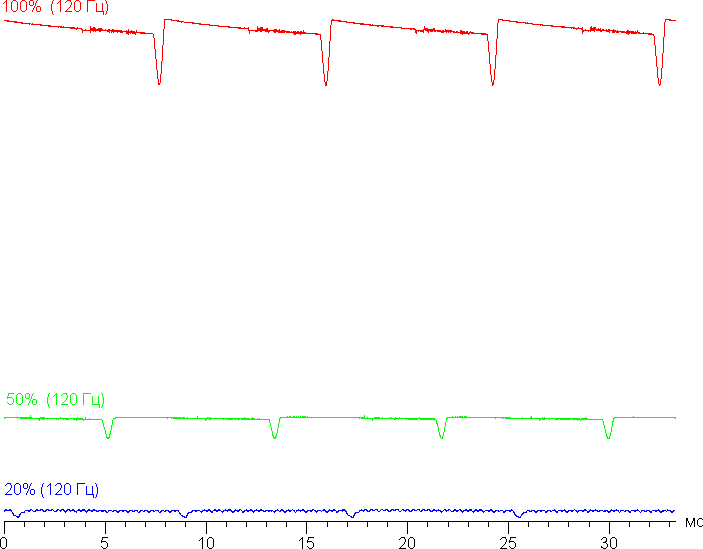
Can apple put the 15R panel into an iphone? Yep. Will they? No, not until sales tank.

PwmMen
macrumors 6502
Vivo does it just as well, no problems whatsoever with my Vivo X300 Pro.
The eye health settings work perfectly. BOE is the best display manufacturer in this regard.
It would be easy for Apple, Samsung, and Google to implement these features, but they apparently don't want to.
I'm so thrilled with my Vivo X300 Pro now that I won't buy another iPhone with iOS.
I now have a better camera, a better display, better cellular and Wi-Fi reception, and a better battery.
Plus, there's Gemini as an AI, which is worlds better than Siri. Apple has lost me with the iPhone.
All my other Apple devices will, of course remain.😉
The eye health settings work perfectly. BOE is the best display manufacturer in this regard.
It would be easy for Apple, Samsung, and Google to implement these features, but they apparently don't want to.
I'm so thrilled with my Vivo X300 Pro now that I won't buy another iPhone with iOS.
I now have a better camera, a better display, better cellular and Wi-Fi reception, and a better battery.
Plus, there's Gemini as an AI, which is worlds better than Siri. Apple has lost me with the iPhone.
All my other Apple devices will, of course remain.😉
Vivo does it just as well, no problems whatsoever with my Vivo X300 Pro.
The eye health settings work perfectly. BOE is the best display manufacturer in this regard.
It would be easy for Apple, Samsung, and Google to implement these features, but they apparently don't want to.
I'm so thrilled with my Vivo X300 Pro now that I won't buy another iPhone with iOS.
I now have a better camera, a better display, better cellular and Wi-Fi reception, and a better battery.
Plus, there's Gemini as an AI, which is worlds better than Siri. Apple has lost me with the iPhone.
All my other Apple devices will, of course remain.😉
I am happy with my NXTPAPER 60 but I really want to try the Vivo X300 Pro (for the camera alone)
The reason I took a gamble on the NXTPAPER was it was sold by Amazon (albeit a different country) and a refund would have been no issue, plus it was £320.
Struggling to find a Vivo supplier that supplies the UK with a no quibble refund process even when the phone is activated, its an expensive gamble at 900+.
Last edited:
super chimp
macrumors 68000
I’ve got to wonder what impact Samsung’s privacy screen technology on the S26 Ultra will have on people’s eyes.
atmacdotcom
macrumors newbie
TL / DR - iPhone 17 base model and iPhone 17 Pro gave me eye strain
- first iPhone 17 Air worked but was returned due to camera limitations and single speaker
- second iPhone 17 air gave me the same eye strain as base model iPhone 17 and iPhone 17 Pro
- even if you find a good screen you still have the possibility of having a screen replacement not work for you if the screen stops working or if you break it which would requiere to replace the display
- hopefully iPhone 17e uses a non LTPO display with the PWM toggle which would work for us
I should also note that I tried the PWM toggle, reduce motion, limit frame rate, RWP, cross fade animations and reduce motion
- LCD on a new iPhone model would be great
Hello everyone, it’s been a while since I have posted on here and I’m hoping y’all are doing well - with this being said I wanted to give an update on my experience with the new models
- the last time I posted I had tried all of the iPhone 15 and 16 models - pro and base models with no luck, including the iPhone 16e, I have now also tried the iPhone 17 models and iPhone Air
I started with iPhone 17 base model which gave me not only the worst eye strain, but also one of the worst anxiety attacks ever, I couldn’t even drive for a few minutes after using the phone, it was almost like being drunk
I then tried the iPhone Air which worked, but I couldn’t get past the single camera, lack of ultra wide camera, and mono speaker so I returned it
I have since used my iPhone SE 3rd generation and iPad Mini 7 and the experience has been great
I tested the iPhone 17 Pro and got the same results as the base model iPhone 17 with eye strain
I then tried the iPhone Air again but in a different color and this time it gave me eye strain just like the base model iPhone 17 and also the iPhone 17 Pro
Of course we all know about the fact that the phones might come with either a Samsung or LG display
But this made me think, what if we buy a phone that works for us, and then later on we need to get the screen replaced if it breaks or stops working and then the new screen replacement doesn’t work for us
This is unacceptable
At this time I am tempted on waiting for the iPhone 17e, if they choose to use the same screen as iPhone 16 or before, meaning non LTPO and include the PWM toggle then this might work for us, we can only hope
I should also note that I tried the PWM toggle, reduce motion, limit frame rate, RWP, cross fade animations and reduce motion
For now I am considering purchasing an Amazon renewed iPhone 11 due to the positive reviews
It would also be awesome if Apple made new phones with the option of an LCD display
Take care y’all
- first iPhone 17 Air worked but was returned due to camera limitations and single speaker
- second iPhone 17 air gave me the same eye strain as base model iPhone 17 and iPhone 17 Pro
- even if you find a good screen you still have the possibility of having a screen replacement not work for you if the screen stops working or if you break it which would requiere to replace the display
- hopefully iPhone 17e uses a non LTPO display with the PWM toggle which would work for us
I should also note that I tried the PWM toggle, reduce motion, limit frame rate, RWP, cross fade animations and reduce motion
- LCD on a new iPhone model would be great
Hello everyone, it’s been a while since I have posted on here and I’m hoping y’all are doing well - with this being said I wanted to give an update on my experience with the new models
- the last time I posted I had tried all of the iPhone 15 and 16 models - pro and base models with no luck, including the iPhone 16e, I have now also tried the iPhone 17 models and iPhone Air
I started with iPhone 17 base model which gave me not only the worst eye strain, but also one of the worst anxiety attacks ever, I couldn’t even drive for a few minutes after using the phone, it was almost like being drunk
I then tried the iPhone Air which worked, but I couldn’t get past the single camera, lack of ultra wide camera, and mono speaker so I returned it
I have since used my iPhone SE 3rd generation and iPad Mini 7 and the experience has been great
I tested the iPhone 17 Pro and got the same results as the base model iPhone 17 with eye strain
I then tried the iPhone Air again but in a different color and this time it gave me eye strain just like the base model iPhone 17 and also the iPhone 17 Pro
Of course we all know about the fact that the phones might come with either a Samsung or LG display
But this made me think, what if we buy a phone that works for us, and then later on we need to get the screen replaced if it breaks or stops working and then the new screen replacement doesn’t work for us
This is unacceptable
At this time I am tempted on waiting for the iPhone 17e, if they choose to use the same screen as iPhone 16 or before, meaning non LTPO and include the PWM toggle then this might work for us, we can only hope
I should also note that I tried the PWM toggle, reduce motion, limit frame rate, RWP, cross fade animations and reduce motion
For now I am considering purchasing an Amazon renewed iPhone 11 due to the positive reviews
It would also be awesome if Apple made new phones with the option of an LCD display
Take care y’all
Last edited:

uacd
macrumors 68000
Forgot to write an update here but I got myself 17 Pro. So far, so good. What's weird that I noticed is that phone is easier to use with PWM toggle not enabled. I am continuing the tests and it looks like iOS 26 is utilizing lots of HDR toggles and elements. I didn't enable low power mode to disable that but it seems that I still cannot look at HDR videos on Instagram or YouTube, but somehow ok with viewing HDR photos in Photos app, videos are still impossible though.
But I noticed another weird thing. I am not much of a selfie shooter but I wanted to test front cam. I wanted to shoot a video with my cat and I saw her eyes light up in red color and for some unknown reason she started growling. There were no cats around (which is usual reaction to threat), but there was iPhone near. What the f... is going on? When did Apple start using IR sensors for taking selfies in low light? Who asked for that?
I mean, I myself took few selfie videos and noticed weird eye strain. Like my eyes were burning or something, kind of dry eye effect. FYI I am not using Face ID since 2023 because I’ve noticed that my eye strain on my 11 Pro disappeared after disabling the feature.
Technically it is said that laser in FaceID is not strong enough to damage eye sight. But I haven’t seen any info about whether it causes any eye issues.
Maybe eye strain is not connected to OLED or PWM at all?
I had not noticed any eye strain when using 17 Pro in default mode (120Hz, PWM toggle not enabled, day/night mode auto switch+dark mode icons auto switch). But each time I try to shoot selfie video I feel weird eye strain, especially when I am not wearing my glasses with IR/blue light filter.
I’ve tested and I am not imagining the things - iPhone 17 Pro uses IR/Face ID sensors as focus assist when shooting videos. Recorded with another phone and it looks like rapid flashing of multiple red dots
But I noticed another weird thing. I am not much of a selfie shooter but I wanted to test front cam. I wanted to shoot a video with my cat and I saw her eyes light up in red color and for some unknown reason she started growling. There were no cats around (which is usual reaction to threat), but there was iPhone near. What the f... is going on? When did Apple start using IR sensors for taking selfies in low light? Who asked for that?
I mean, I myself took few selfie videos and noticed weird eye strain. Like my eyes were burning or something, kind of dry eye effect. FYI I am not using Face ID since 2023 because I’ve noticed that my eye strain on my 11 Pro disappeared after disabling the feature.
Technically it is said that laser in FaceID is not strong enough to damage eye sight. But I haven’t seen any info about whether it causes any eye issues.
Maybe eye strain is not connected to OLED or PWM at all?
I had not noticed any eye strain when using 17 Pro in default mode (120Hz, PWM toggle not enabled, day/night mode auto switch+dark mode icons auto switch). But each time I try to shoot selfie video I feel weird eye strain, especially when I am not wearing my glasses with IR/blue light filter.
I’ve tested and I am not imagining the things - iPhone 17 Pro uses IR/Face ID sensors as focus assist when shooting videos. Recorded with another phone and it looks like rapid flashing of multiple red dots
MICHAELSD
macrumors 603
iPhone 17e could be an underdog since I’ve been chatting with normally sensitive people who can use iPhone 16 with its LTPS display at above 50% brightness. Not to get too optimistic with every new release, but combining a lower-modulation LTPS display with Display Pulse Smoothing may be better yet than the normal iPhone 17 lineup.TL / DR - iPhone 17 base model and iPhone 17 Pro gave me eye strain
- first iPhone 17 Air worked but was returned due to camera limitations and single speaker
- second iPhone 17 air gave me the same eye strain as base model iPhone 17 and iPhone 17 Pro
- even if you find a good screen you still have the possibility of having a screen replacement not work for you if the screen stops working or if you break it which would requiere to replace the display
- hopefully iPhone 17e uses a non LTPO display with the PWM toggle which would work for us
I should also note that I tried the PWM toggle, reduce motion, limit frame rate, RWP, cross fade animations and reduce motion
- LCD on a new iPhone model would be great
Hello everyone, it’s been a while since I have posted on here and I’m hoping y’all are doing well - with this being said I wanted to give an update on my experience with the new models
- the last time I posted I had tried all of the iPhone 15 and 16 models - pro and base models with no luck, including the iPhone 16e, I have now also tried the iPhone 17 models and iPhone Air
I started with iPhone 17 base model which gave me not only the worst eye strain, but also one of the worst anxiety attacks ever, I couldn’t even drive for a few minutes after using the phone, it was almost like being drunk
I then tried the iPhone Air which worked, but I couldn’t get past the single camera, lack of ultra wide camera, and mono speaker so I returned it
I have since used my iPhone SE 3rd generation and iPad Mini 7 and the experience has been great
I tested the iPhone 17 Pro and got the same results as the base model iPhone 17 with eye strain
I then tried the iPhone Air again but in a different color and this time it gave me eye strain just like the base model iPhone 17 and also the iPhone 17 Pro
Of course we all know about the fact that the phones might come with either a Samsung or LG display
But this made me think, what if we buy a phone that works for us, and then later on we need to get the screen replaced if it breaks or stops working and then the new screen replacement doesn’t work for us
This is unacceptable
At this time I am tempted on waiting for the iPhone 17e, if they choose to use the same screen as iPhone 16 or before, meaning non LTPO and include the PWM toggle then this might work for us, we can only hope
I should also note that I tried the PWM toggle, reduce motion, limit frame rate, RWP, cross fade animations and reduce motion
For now I am considering purchasing an Amazon renewed iPhone 11 due to the positive reviews
It would also be awesome if Apple made new phones with the option of an LCD display
Take care y’all
There also seems to be a consensus that some panels are better than others across all the iPhone 17 devices in terms of both color and sensitivity. My recommendation in this case is to rely on a case and/or screen protector, as the display wouldn’t fail on its own. Personally I’d rather protect the phone I have, especially if I was satisfied with it, rather than take a gamble with an AppleCare repair or replacement.
Still, I’m mostly going to look ahead to iPhone 18… then 19… then 20, which could be released the same year as 19 if they don’t skip that generation.
badger1212
macrumors regular
I wondered that too. I got a work iPhone 15 with a privacy screen pre-applied to it and it’s the most comfortable OLED iPhone I’ve used thought still not as comfortable as LCD.I’ve got to wonder what impact Samsung’s privacy screen technology on the S26 Ultra will have on people’s eyes.
That’s interesting, you disabled all Face ID attention awareness options or disabled Face ID completely and using just the passcode ?Forgot to write an update here but I got myself 17 Pro. So far, so good. What's weird that I noticed is that phone is easier to use with PWM toggle not enabled. I am continuing the tests and it looks like iOS 26 is utilizing lots of HDR toggles and elements. I didn't enable low power mode to disable that but it seems that I still cannot look at HDR videos on Instagram or YouTube, but somehow ok with viewing HDR photos in Photos app, videos are still impossible though.
But I noticed another weird thing. I am not much of a selfie shooter but I wanted to test front cam. I wanted to shoot a video with my cat and I saw her eyes light up in red color and for some unknown reason she started growling. There were no cats around (which is usual reaction to threat), but there was iPhone near. What the f... is going on? When did Apple start using IR sensors for taking selfies in low light? Who asked for that?
I mean, I myself took few selfie videos and noticed weird eye strain. Like my eyes were burning or something, kind of dry eye effect. FYI I am not using Face ID since 2023 because I’ve noticed that my eye strain on my 11 Pro disappeared after disabling the feature.
Technically it is said that laser in FaceID is not strong enough to damage eye sight. But I haven’t seen any info about whether it causes any eye issues.
Maybe eye strain is not connected to OLED or PWM at all?
I had not noticed any eye strain when using 17 Pro in default mode (120Hz, PWM toggle not enabled, day/night mode auto switch+dark mode icons auto switch). But each time I try to shoot selfie video I feel weird eye strain, especially when I am not wearing my glasses with IR/blue light filter.
I’ve tested and I am not imagining the things - iPhone 17 Pro uses IR/Face ID sensors as focus assist when shooting videos. Recorded with another phone and it looks like rapid flashing of multiple red dots
uacd
macrumors 68000
I completely disabled it, just using my phone in “swipe-up-to-unlock” mode. Never liked passwords tbh. So far I don’t experience any issues, tho I had enabled PWM switch after all. If I try to ever take a selfie my eyes would feel weird eye muscle strain for a minute. I’ve tested and it seems camera now using IR sensor as beam assist, even during daylight. ProRAW also uses it. For some reason third party apps may not always use it.That’s interesting, you disabled all Face ID attention awareness options or disabled Face ID completely and using just the passcode ?
I’ve asked Gemini about that and it seems there is a small minority of people who can feel this “invisible infrafed” without seeing it, there are few threads about Face ID on this forum and Reddit too so it might make sense.
Back in the days I’ve used my Touch ID a lot on my old 6s, for payments and stuff, but after I got my iPhone 11 Pro it became useless anyway (it was September 2019, in a month we got this pandemic thing and mask mandates), I didn’t want to take mask off just to pay at store so I naturally resorted back to using cash
Thanks. Am willing to try one of the 17s again and give this ok, maybe I will be selective and turn off Face ID for the phone unlock but leave payments and a few other apps with Face ID on.I completely disabled it, just using my phone in “swipe-up-to-unlock” mode. Never liked passwords tbh. So far I don’t experience any issues, tho I had enabled PWM switch after all. If I try to ever take a selfie my eyes would feel weird eye muscle strain for a minute. I’ve tested and it seems camera now using IR sensor as beam assist, even during daylight. ProRAW also uses it. For some reason third party apps may not always use it.
I’ve asked Gemini about that and it seems there is a small minority of people who can feel this “invisible infrafed” without seeing it, there are few threads about Face ID on this forum and Reddit too so it might make sense.
Back in the days I’ve used my Touch ID a lot on my old 6s, for payments and stuff, but after I got my iPhone 11 Pro it became useless anyway (it was September 2019, in a month we got this pandemic thing and mask mandates), I didn’t want to take mask off just to pay at store so I naturally resorted back to using cash
super chimp
macrumors 68000

john g.
macrumors 6502
Curious if it'll have the PWM display smoothing toggle like the Air and the other 17 models.Apparently the 17e has the same screen as the 16e.
MICHAELSD
macrumors 603
I’ve found same display doesn’t equal same display.Apparently the 17e has the same screen as the 16e.
As in, Apple still makes color calibration and probably brightness controller changes even if the tech specs on paper remain the same. Do we know the main display supplier?
iPhone 17e could have Display Pulse Smoothing and lower modulations in theory. The Accessibility setting could still mitigate the worst PWM at lower brightness levels.

BigBen2493
macrumors 6502
Yes the countdown to March 11th is on lolI’ve found same display doesn’t equal same display.
As in, Apple still makes color calibration and probably brightness controller changes even if the tech specs on paper remain the same. Do we know the main display supplier?
iPhone 17e could have Display Pulse Smoothing and lower modulations in theory. The Accessibility setting could still mitigate the worst PWM at lower brightness levels.
PwmMen
macrumors 6502
Although I was more than satisfied with my Vivo X300 Pro,
i bought an iPhone 17 Pro again a few days ago. I simply don't want to use Android.
It has a Samsung G9N display and gives me absolutely no problems with the PWM switch set to "On".
i bought an iPhone 17 Pro again a few days ago. I simply don't want to use Android.
It has a Samsung G9N display and gives me absolutely no problems with the PWM switch set to "On".
BigBen2493
macrumors 6502
Here's hoping it stays that way!Although I was more than satisfied with my Vivo X300 Pro,
i bought an iPhone 17 Pro again a few days ago. I simply don't want to use Android.
It has a Samsung G9N display and gives me absolutely no problems with the PWM switch set to "On".
BigBen2493
macrumors 6502
https://www.tomsguide.com/phones/ip...e-anything-and-ill-answer-your-questions-live So I asked them if it had the Toggle and they say it doesiPhone 17e could be an underdog since I’ve been chatting with normally sensitive people who can use iPhone 16 with its LTPS display at above 50% brightness. Not to get too optimistic with every new release, but combining a lower-modulation LTPS display with Display Pulse Smoothing may be better yet than the normal iPhone 17 lineup.
There also seems to be a consensus that some panels are better than others across all the iPhone 17 devices in terms of both color and sensitivity. My recommendation in this case is to rely on a case and/or screen protector, as the display wouldn’t fail on its own. Personally I’d rather protect the phone I have, especially if I was satisfied with it, rather than take a gamble with an AppleCare repair or replacement.
Still, I’m mostly going to look ahead to iPhone 18… then 19… then 20, which could be released the same year as 19 if they don’t skip that generation.