Become a MacRumors Supporter for $50/year with no ads, ability to filter front page stories, and private forums.
But it is also fact that when maxing out modern games 99.9% of the current computers will not offer a fluid gaming experience either.

PC Gaming, especially on Laptops is about knowing how and what to turn off to optimize a demanding game, but without loosing image quality. AA for example is quite a recource hog and completely unnessecary with 2880x1800. AF on the other hand doesnt take much and is absolutely nessecary for a decent picture quality. Thats the point where many gaming tests on the internet fail. Many are turning on 8xAA and experience FPS below 30, even though without a solid 40 to 50 would be quite possible.

Truth is, if you know how to set up a game you should be able to get excellent performance on the rMBP. Setting the resolution to 1440x900 will look awesome. With a screen as dense as this is, AA is not really needed. It's the tech fiends that would rather be able to say they run everything maxed with highest res just to say they can rather than to play a game.

I game on my 11" MacBook Air! It runs great! Most games can be set to high texture res (small screen...no need for extreme) 1280x800 (looks great) AA off.....not very noticeable. Most games run very well on it.
 
I can't play lord of the rings. Right mouse clicks dont work in fullscreen mode; they do work in Windowed mode, but I have too hard of a time getting everything to look right in windows mode. Odd. Macbook Pro w/retina - windows 7 64 bit ultimate
 
I can't play lord of the rings. Right mouse clicks dont work in fullscreen mode; they do work in Windowed mode, but I have too hard of a time getting everything to look right in windows mode. Odd. Macbook Pro w/retina - windows 7 64 bit ultimate

Sound more like a driver problem of the mouse, or a damaged mouse.
Update the drivers. Reinstall and update the Bootcamp drivers too for safety reasons.
 
Diablo 3!!!

I just received my base 2.3 today and instantly installed D3 on it. I have had the chance to test any prior builds of the game but D3 client version 1.0.3.10485 makes it run flawless on 2880X1800. I have everything set to high except shadows. Unfortunately my fps counter is broken in game. It displays 0. Can anyone else confirm that the new version runs flawlessly at max resolution?
 
1920x1200 is not display correctly

Somehow my 2.3 retina cannot run every games under 1920x1200 full screen. But it runs flawlessly on all other resolutions. I just can't figure out what caused this situation. i have attached screenshot below. this is annoying.

after some testing, it doesn't look like hardware problem at all, the situation is the same with both integrate and discrete graphic. i guess reinstall the os can solve the problem.
 

Attachments

  • Screen Shot 2012-07-15 at 2.49.04 PM.png
    Screen Shot 2012-07-15 at 2.49.04 PM.png
    2.8 MB · Views: 358
  • Screen Shot 2012-07-15 at 6.28.10 PM.png
    Screen Shot 2012-07-15 at 6.28.10 PM.png
    2.2 MB · Views: 278
Last edited:
SC2 runs pretty smooth at ultra in native screen resolution on bootcamp (on external USB3 hard drive) so does Max Payne3 at 1680 x 1200!

= nice machine to play games with!

I have the standard one with 16GB.
 
I am pleased to inform you all that my 2.7, 16GB Retina will run Fallout New Vegas, 2880x1800, with everything maxxed!

Averaging 45fps outside, anti aliasing is obviously disabled because it's not needed at this resolution, but everything else is as high as it can go! I've got to say I am super impressed at this piece of kit. It truly is something I can game with at my desk and still take away with me as a work computer.
 
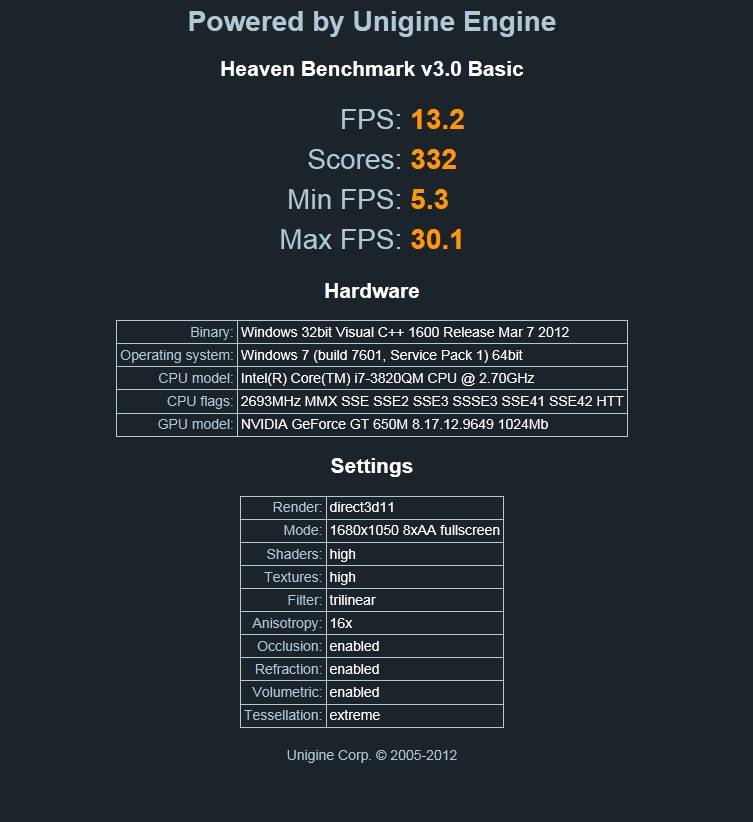
Can someone run Unigine Heaven benchmark at max settings but with 1680x1050 res? If you can run it in bootcamp windows, that would be nice.

I tried out a cMBP 2012 with 2.6ghz AG, it throttled within 5 minutes and noticed CPU temp got up to 98°C before throttle. Had to return it because of excessive display light bleeding. Below are results.
Benchmark Results for cMBP


I may end up buying the retina macbook pro 2.6/16/512. I also heard the graphics are faster on the retina than classic so I just want to compare before I make the investment.
 
Can someone run Unigine Heaven benchmark at max settings but with 1680x1050 res? If you can run it in bootcamp windows, that would be nice.

I tried out a cMBP 2012 with 2.6ghz AG, it throttled within 5 minutes and noticed CPU temp got up to 98°C before throttle. Had to return it because of excessive display light bleeding. Below are results.
Benchmark Results for cMBP


I may end up buying the retina macbook pro 2.6/16/512. I also heard the graphics are faster on the retina than classic so I just want to compare before I make the investment.

Here you go fella, seems to of done a fair bit better than the cMBP:

9aUjQ.jpg
 
Somehow my 2.3 retina cannot run every games under 1920x1200 full screen. But it runs flawlessly on all other resolutions. I just can't figure out what caused this situation. i have attached screenshot below. this is annoying.

after some testing, it doesn't look like hardware problem at all, the situation is the same with both integrate and discrete graphic. i guess reinstall the os can solve the problem.

are you using scaled mode at the same res?

I think the scaled mode for OSX does this.. i have the same issue. Any other res than 1920 wokrs fine.

Try changing the OSX scaled to 1440 and then the 1920 res again in game.

Doubtful that reinstall will fix as I experienced the same issue.
 
Yes, his are newer. The ones I used for the benchmark are vanilla boot camp drivers.

I havent checked since last week as I swapped the MBPr for a 13 mbp but the new drivers Nvidia had we're beta drivers and very rarely are these beta drivers stable, so not a like for like comparison.
 
If you have a rMBP with 256GB of storage, how much are you guys allocating to bootcamp for gaming? Do you think 30-50 GB is enough?

And does anyone run games off of a usb 3 drive? How's performance affected?
 
Last edited:
I'd be interested in knowing this, is this possible?

Yes it is possible and works really well actually. I have a 250gb USB 2 drive set up for all my games and all of them work just fine through USB 2. The load times may be a bit longer, but not by much.
 
I've definitely asked this before, but can't remember where, and don't have a notification of any response, so maybe here's a better place to ask:

- Diablo 3 runs really well on the integrated chipset on my rMBP when on slightly lower settings, and the fans seem loads quieter too... so, does anyone know if a) it's bad to force it to use integrated graphics while doing intensive stuff like gaming, and b) would it use more or less battery forcing integrated to work harder, over using discreet?

Cheers!
 
If you have a rMBP with 256GB of storage, how much are you guys allocating to bootcamp for gaming? Do you think 30-50 GB is enough?
It really depends upon the games you play, but I'd say that 50GB is too little. While one game I play uses up 5GB, another uses 20GB, and my Steam installation (multiple games) is well over 40GB.
 
If you have a rMBP with 256GB of storage, how much are you guys allocating to bootcamp for gaming? Do you think 30-50 GB is enough?

And does anyone run games off of a usb 3 drive? How's performance affected?

1) depends on how many games you plan to play off of bootcamp. i'd estimate Windows7 to take up 15~20GB and 1 game to be about ~5GB.

2) there's a bundle sale on stacksocial right now that includes parallel7 and a bunch of random apps for only $50. i'm just going to use that so i don't have to 'allocate' any space for windows. i'm using a rMBP so i had to download/install via the Windows7 .iso file.

3) running games off of anything external (not sure about TB) will reduce performance due to transfer rate. if your running a intense game off of an external, it will damage your external a lot more than just say.... reading/writing a file.

Note: feel free to correct me 😉
 
I can say that D3, SCII, and Portal 2 all look FLAWLESS (45-60 fps at max settings) at native resolution on the 2.7gHz ultimate spec'd model.
 
If you have a rMBP with 256GB of storage, how much are you guys allocating to bootcamp for gaming? Do you think 30-50 GB is enough?

And does anyone run games off of a usb 3 drive? How's performance affected?

I additionally set up my bootcamp at around 30gb, thinking I'd have room for maybe 2-5 games.

After installing win7 and steam with civilization V I quickly realized that I was slightly off on my math, so I just extended my bootcamp partition to around 50 gb.

A few days later I decided to just extend it again to 100 gb, just so I could have room to have more than a couple games on it at once.

Point being, I'd go at LEAST 50 gb, and plan on extending the partition pretty quickly. Also side point, you can in fact make the parition larger, some don't know this, so it's not a huge issue if you need more room.
 
I additionally set up my bootcamp at around 30gb, thinking I'd have room for maybe 2-5 games.

After installing win7 and steam with civilization V I quickly realized that I was slightly off on my math, so I just extended my bootcamp partition to around 50 gb.

A few days later I decided to just extend it again to 100 gb, just so I could have room to have more than a couple games on it at once.

Point being, I'd go at LEAST 50 gb, and plan on extending the partition pretty quickly. Also side point, you can in fact make the parition larger, some don't know this, so it's not a huge issue if you need more room.

That's awesome! Though can you resize it back down to give more space back to OSX?
 
Register on MacRumors! This sidebar will go away, and you'll see fewer ads.