Become a MacRumors Supporter for $50/year with no ads, ability to filter front page stories, and private forums.
I finally figured it out [had to deep search it].

Spaces. With MacOS we can have 16 spaces with their own individual apps windows open.
Ok, for the iPad, the equivalent would probably be Stage Manager. There’s no longer a 4 app window per stage limit, so you can use different stages as workspaces for different things. And I’m experimenting with new Shortcuts possible in iPadOS 27 to automate them! 👍🏻
 
  • Like
Reactions: hovscorpion12
I've tested it yesterday with a YouTube video played in background with the official YouTube app and it stopped when started a video on Safari so...we'll see in the official release.
Yeah, same here, that’s why I was saying I don’t think they’ve added it yet in the first beta. But perhaps they were meaning for another platform? I’m pretty sure the slide in question was for all of the platforms. But yeah, we’ll see. 🙂👍🏻
 
  • Love
Reactions: hovscorpion12
Overall, I have been very impressed with iPadOS27. Certainly the most stable beta OS I can remember. I have noticed though that I seem to intermittently lose my iPad's cursor when using an external display. Can anyone else confirm if this is happening to them to and I'm not missing something obvious?
 
You may wish to check settings under multitasking and gestures and see if auto hid and show dock is enabled or disabled. I’ve encountered similar occasionally in this beta as well, and toggling that helped. 👍🏻
I don’t see it. That’s the first place I checked.
 

Attachments

  • IMG_3115.jpeg
    IMG_3115.jpeg
    476.3 KB · Views: 16
Overall, I have been very impressed with iPadOS27. Certainly the most stable beta OS I can remember. I have noticed though that I seem to intermittently lose my iPad's cursor when using an external display. Can anyone else confirm if this is happening to them to and I'm not missing something obvious?

Losing the cursor on an external monitor has been an issue on iPadOS26 for quite a while so I don't think it's related to iPadOS27. Happens on 2 of my external monitors. Annoying they haven't fixed it.
 
  • Like
Reactions: hovscorpion12
Yeah, and I tested it with my desktop monitor, and now the Control Center works on the desktop monitor when I click it there! So awesome! That was basically my only main complaint with extended display support! 👍🏻
Oh wow… I’m surprised they fixed this! I thought that was their way of limiting the external monitor experience so you keep your attention to the iPad. Glad they added it.

Now, can you turn off your display while keeping the monitor on? Clamshell mode?
 
  • Like
Reactions: Kal Madda
By the way, do you know if there’s any way to “safely eject/extract” an external drive? There was an “eject” command on the menu that was always greyed out. I wonder if it works now.
 
Yeah, and I tested it with my desktop monitor, and now the Control Center works on the desktop monitor when I click it there! So awesome! That was basically my only main complaint with extended display support! 👍🏻

I just saw this. YESSS. Always frustrating to have to go to the iPad display then back to the monitor.

Since you are using a monitor, do you notice any "spring board crashed with multipole apps

For example: i had my M5 iPad Pro connected to Anker's TB5 dock connected to my 57" Dual-4K Odyssey G9. Safari-Hulu had serious issues playing video so i went with Chrome. Anytime i had a video player with chrome [Youtube, Hulu, Prime Video] and then open a Safari window, the screen would go black. I'd hear the iPad charging sound then have to log back in.

The most frustrating aspect of expended monitor [OS 26.5]

 
Overall, I have been very impressed with iPadOS27. Certainly the most stable beta OS I can remember. I have noticed though that I seem to intermittently lose my iPad's cursor when using an external display. Can anyone else confirm if this is happening to them to and I'm not missing something obvious?
I agree it’s very stable. But watch out for beta 2 or 3, one of them will break it.
 
Oh wow… I’m surprised they fixed this! I thought that was their way of limiting the external monitor experience so you keep your attention to the iPad. Glad they added it.

Now, can you turn off your display while keeping the monitor on? Clamshell mode?
Sadly, I don’t think it supports clamshell mode, I know some were hoping for that. It still requires the iPad’s display to be turned on as far as I can tell. I check in Settings and didn’t see anything for it. 👍🏻
 
Sadly, I don’t think it supports clamshell mode, I know some were hoping for that. It still requires the iPad’s display to be turned on as far as I can tell. I check in Settings and didn’t see anything for it. 👍🏻

I did read somewhere that when connected to a monitor the iPad screen will dim itself.
 
  • Like
Reactions: Kal Madda
I just saw this. YESSS. Always frustrating to have to go to the iPad display then back to the monitor.

Since you are using a monitor, do you notice any "spring board crashed with multipole apps

For example: i had my M5 iPad Pro connected to Anker's TB5 dock connected to my 57" Dual-4K Odyssey G9. Safari-Hulu had serious issues playing video so i went with Chrome. Anytime i had a video player with chrome [Youtube, Hulu, Prime Video] and then open a Safari window, the screen would go black. I'd hear the iPad charging sound then have to log back in.

The most frustrating aspect of expended monitor [OS 26.5]
Yeah, that’s been a really nice improvement. I haven’t had a chance to use it a lot yet, but I’m really happy to see it improved. 👍🏻. And that was one of my iPadOS 27 wishlist items! I’m starting to think Apple looks at my annual iPadOS wishlists. 😉😂 Every year they seem to add at least a few of my wishlist items! 👍🏻

I haven’t encountered anything like that so far, but I can try to purposefully replicate it and see if I do. I’ve only used the monitor a couple times so far with the new beta. So I’ll have to see how that goes and get back with you. 🙂👍🏻
 
  • Love
Reactions: hovscorpion12
I'm confused.

Per this
1781111983459.png


iPad Pro 11" 2nd gen and up are supported, but iPad Pro 12.9 starts at 4th gen?
I was under the impression that the only difference on the same family was just the screen size.
 
I did read somewhere that when connected to a monitor the iPad screen will dim itself.
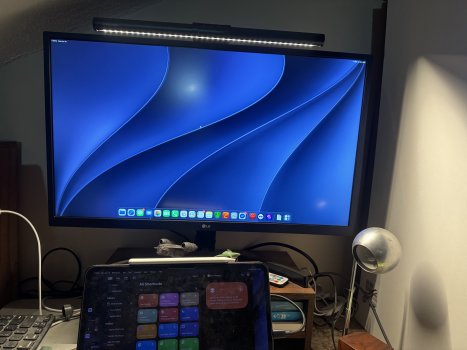
So I just got a chance to tinker around with my desktop monitor and test stuff out. I didn’t encounter the issue you described, and I also looked again for any settings for a “clamshell mode”. My iPad’s display didn’t automatically dim when I connected it to my monitor, but I created an automation that actually does dim the iPad display quite a bit when plugged in. It would still lock if you closed the keyboard case, unless you set the auto display lock to Never. But here’s the automation if it’s helpful, I think it should also work with iPadOS 26 as well, but I could be mistaken. 👍🏻

 
  • Love
Reactions: hovscorpion12
This is how dim the automation is able to set it down. It’s not quite fully dark, but it’s very dim. 👍🏻.
 

Attachments

  • IMG_1269.jpeg
    IMG_1269.jpeg
    1.3 MB · Views: 6
  • IMG_1267.jpeg
    IMG_1267.jpeg
    3.2 MB · Views: 6
Register on MacRumors! This sidebar will go away, and you'll see fewer ads.