Become a MacRumors Supporter for $50/year with no ads, ability to filter front page stories, and private forums.

skinniezinho

macrumors 65816
Original poster
Hello all,
As some of you I would love to have a mail client that support gmail.
With the PPC Ports from @barracuda156 we now have that option.

Since I still don't manage to do it, I will document it here and hopefully get your help, and solve it and it may help others.

So, right now I am running Sorbet Leopard on the PB g4 12 I have on my signature.
So I installed Xcode 3.1.4 and curl for 10.5 from ppc ports site

Since @thedoctor45x share here a pack of plenty of pre compilted ports for 32 bit on 10.5 I said, let's go this way.
Did it.
Did: sudo port install claws-mail

Get into some sudo issues, documented here and they were solved.
Back to it, claws-mail installed but when it opens a little window with X11 appears and nothing more.

Decided to remove everything and starting with ppc ports from @barracuda156's site
All install ok:
sudo port sync -v (takes a big amount of time but finished ok)
sudo port install claws-mail -v ( the thing is turning for like 10h and seems stuck on building gcc10-bootstrap, the "points" don't move but my processor is at 100%

So my questions:
1 - is anyone running claws-mail or other on 10.5 with gmail support?
2 - am I doing something wrong, and if so can you point me into the good direction?
3 - is it normal that it takes so much time to compile or should I have edited some configuration file or whatever to not do it?

again a big thank you to @barracuda156 and @thedoctor45x for the work
edit: @Forest Expertise I saw on this post you also did some work for G4e, shared on this post here, just not clear if this is only for tiger or leopard. I also ask myself if it won't be interesting/possible to have the conf already with your site, or would it break other things?
I am totally noob in terms of this

If there is a easier way to get a client email that works with gmail let me know also
 
Last edited:
@skinniezinho On a general note, only standard release of 10.5.8 is supported for Leopard. I don’t mind giving guesswork-based suggestions for “Sorbet”, but I cannot try that and have no idea what works and what does not there.

Second important consideration: if you have Apple X11 or Quartz installed, this will likely break everything that uses X11/GTK in MacPorts/PPCPorts. At least that was my experience. What I suggest to do is wipe out all of that, following https://www.xquartz.org/FAQs.html
It is probably possible to make multiple instances of X11 installs and X servers co-exist, but you are on your own.
(I expect you to build for ppc and not ppc64; on ppc64 there are known issues with X server, it will probably not work at the moment.)

Back to it, claws-mail installed but when it opens a little window with X11 appears and nothing more.

This is not a very helpful description. Could you describe what exactly happens? Terminal output, crash log (if X crashes).

sudo port sync -v (takes a big amount of time but finished ok)

This is expected on slower hardware and not specific to powerpc. My RISC-V tabled performs worse with this part.

sudo port install claws-mail -v

`sudo port -v install ${portname}`

Arguments go after port and before the command.

( the thing is turning for like 10h and seems stuck on building gcc10-bootstrap, the "points" don't move but my processor is at 100%

You can save on this via a little trick:
`sudo port -v -b install gcc10-bootstrap +universal` (I have it pre-built for ppc+ppc64, and it does not matter if ppc64 is actually needed for you).

However, it will still take forever, since it has to build gcc14 twice and then cmake, boost etc. You could try using user-provided archives with pre-built packages for 10.5 ppc. Notice, you must use default prefix for that (/opt/local, assuming those packages were built with defaults).

So my questions:
1 - is anyone running claws-mail or other on 10.5 with gmail support?

Slightly on a side note, but keep in mind that upstream bugs, if any, can (and should) be raised to upstream. If you have the app building normally, have a working X11, but it fails to work with a valid config, it is likely a bug for upstream to address.

2 - am I doing something wrong, and if so can you point me into the good direction?

X11 set-up is of concern, at the very least.

3 - is it normal that it takes so much time to compile or should I have edited some configuration file or whatever to not do it?

On the Quad one build of gcc takes 5+ hrs, I think. On 2.3 it takes close to 12 hrs.
 
  • Like
Reactions: skinniezinho
Hello all,
As some of you I would love to have a mail client that support gmail.
With the PPC Ports from @barracuda156 we now have that option.

Since I still don't manage to do it, I will document it here and hopefully get your help, and solve it and it may help others.

So, right now I am running Sorbet Leopard on the PB g4 12 I have on my signature.
So I installed Xcode 3.1.4 and curl for 10.5 from ppc ports site

Since @thedoctor45x share here a pack of plenty of pre compilted ports for 32 bit on 10.5 I said, let's go this way.
Did it.
Did: sudo port install claws-mail

Get into some sudo issues, documented here and they were solved.
Back to it, claws-mail installed but when it opens a little window with X11 appears and nothing more.

Decided to remove everything and starting with ppc ports from @barracuda156's site
All install ok:
sudo port sync -v (takes a big amount of time but finished ok)
sudo port install claws-mail -v ( the thing is turning for like 10h and seems stuck on building gcc10-bootstrap, the "points" don't move but my processor is at 100%

So my questions:
1 - is anyone running claws-mail or other on 10.5 with gmail support?
2 - am I doing something wrong, and if so can you point me into the good direction?
3 - is it normal that it takes so much time to compile or should I have edited some configuration file or whatever to not do it?

again a big thank you to @barracuda156 and @thedoctor45x for the work
edit: @Forest Expertise I saw on this post you also did some work for G4e, shared on this post here, just not clear if this is only for tiger or leopard. I also ask myself if it won't be interesting/possible to have the conf already with your site, or would it break other things?
I am totally noob in terms of this

If there is a easier way to get a client email that works with gmail let me know also
@Matias_ has claws-mail pre built for leopard here: https://kemonomimi.nl/
Edit: That may be for 32 but leopard, in which case I am unsure if it will work for you on 64 but.
Follow the instructions on setting up binary archives if you want to save on compile time.
Probably some of my archives will work on leopard, but it is much better to use archives from someone on your same operating system. I only test on G4e processors on Tiger (all I have). Because of the X11 issues mentioned above, you may consider nmail instead of claws-mail on 10.5 if you are okay with command line only
 
Last edited:
  • Like
Reactions: skinniezinho
Anyone with 10.5/10.6, please run port sync prior to building claws-mail, to avoid another rebuild (due to dependencies’ update).
 
Last edited:
@skinniezinho On a general note, only standard release of 10.5.8 is supported for Leopard. I don’t mind giving guesswork-based suggestions for “Sorbet”, but I cannot try that and have no idea what works and what does not there.

Second important consideration: if you have Apple X11 or Quartz installed, this will likely break everything that uses X11/GTK in MacPorts/PPCPorts. At least that was my experience. What I suggest to do is wipe out all of that, following https://www.xquartz.org/FAQs.html
It is probably possible to make multiple instances of X11 installs and X servers co-exist, but you are on your own.
(I expect you to build for ppc and not ppc64; on ppc64 there are known issues with X server, it will probably not work at the moment.)


This is not a very helpful description. Could you describe what exactly happens? Terminal output, crash log (if X crashes).


This is expected on slower hardware and not specific to powerpc. My RISC-V tabled performs worse with this part.


`sudo port -v install ${portname}`

Arguments go after port and before the command.


You can save on this via a little trick:
`sudo port -v -b install gcc10-bootstrap +universal` (I have it pre-built for ppc+ppc64, and it does not matter if ppc64 is actually needed for you).

However, it will still take forever, since it has to build gcc14 twice and then cmake, boost etc. You could try using user-provided archives with pre-built packages for 10.5 ppc. Notice, you must use default prefix for that (/opt/local, assuming those packages were built with defaults).


Slightly on a side note, but keep in mind that upstream bugs, if any, can (and should) be raised to upstream. If you have the app building normally, have a working X11, but it fails to work with a valid config, it is likely a bug for upstream to address.


X11 set-up is of concern, at the very least.


On the Quad one build of gcc takes 5+ hrs, I think. On 2.3 it takes close to 12 hrs.

First of all thanks for taking the time to answer me. Idk why I feel I may even be missing on the basics, way bellow all that you wrote to me.

Here is the output on claws-mail, after installing the pack ready for 10.5...and having to deal with the sudo part like before
I didn't do port-sync this time

sh-3.2# claws-mail

** (claws-mail:663): WARNING **: 22:40:48.350: failed to open directory: /opt/local/etc/skel/.claws-mail
/var/root/.claws-mail/clawsrc: claws_fopen: No such file or directory
prefs.c:126 Condition pfile != NULL failed
traceback:
0: 0 claws-mail 0x001843f8 prefs_file_close + 80
1: 1 claws-mail 0x00183a7c plugin_load_all + 184
2: 2 claws-mail 0x001e3bd0 main + 5284
3: 3 claws-mail 0x0000d380 start + 68
4: 4 ??? 0x00000001 0x0 + 1

/var/root/.claws-mail/menurc: claws_fopen: No such file or directory

(claws-mail:663): Claws-Mail-WARNING **: 22:40:48.360: can't copy /var/root/.claws-mail/menurc to /var/root/.claws-mail/menurc.bak
/var/root/.claws-mail/addrbook/addrbook--index.xml: fopen: No such file or directory
/var/root/.claws-mail/addrbook/addressbook.xml: fopen: No such file or directory
/var/root/.claws-mail/toolbar_main.xml: fopen: No such file or directory


During instalation I saw some openjdk7 "errors" but it finished, if important I will re-do it
Before I go try to uninstall x11 or quartz (not even sure if I have them) may explain to me:
if someone has prebuilt port, how do I know/make sure the command is taking advantage of it and not compiling everything?
Giving my config should I add anything to any configuration file?
During the rest of the week I will do my best to give more feedback.

Thank you all
 
Here is the output on claws-mail, after installing the pack ready for 10.5...

Sorry, if you are using some pre-compiled version on 10.5 (ppc) or a packaged installer, the questions should be addressed to whomever made that. I have no idea about what it is doing.

and having to deal with the sudo part like before
I didn't do port-sync this time

sh-3.2# claws-mail

** (claws-mail:663): WARNING **: 22:40:48.350: failed to open directory: /opt/local/etc/skel/.claws-mail
/var/root/.claws-mail/clawsrc: claws_fopen: No such file or directory
prefs.c:126 Condition pfile != NULL failed
traceback:
0: 0 claws-mail 0x001843f8 prefs_file_close + 80
1: 1 claws-mail 0x00183a7c plugin_load_all + 184
2: 2 claws-mail 0x001e3bd0 main + 5284
3: 3 claws-mail 0x0000d380 start + 68
4: 4 ??? 0x00000001 0x0 + 1

/var/root/.claws-mail/menurc: claws_fopen: No such file or directory

(claws-mail:663): Claws-Mail-WARNING **: 22:40:48.360: can't copy /var/root/.claws-mail/menurc to /var/root/.claws-mail/menurc.bak
/var/root/.claws-mail/addrbook/addrbook--index.xml: fopen: No such file or directory
/var/root/.claws-mail/addrbook/addressbook.xml: fopen: No such file or directory
/var/root/.claws-mail/toolbar_main.xml: fopen: No such file or directory

/var/root should be a directory for temporary files for the root user. Are running the app as root? Any special reason to do that?

During instalation I saw some openjdk7 "errors" but it finished, if important I will re-do it

openjdk7 is a pre-built binary, used to bootstrap openjdk8. The only thing the port does is put files in place and relink one-two dylibs. What kind of errors you get?
This should not be relevant to claws-mail in any way though, it does not use Java.

Before I go try to uninstall x11 or quartz (not even sure if I have them) may explain to me:
if someone has prebuilt port, how do I know/make sure the command is taking advantage of it and not compiling everything?

sudo port [-v] -b install ${portname}

`-b` flag is for “binary” as opposed to `-s` (from source).
 
  • Like
Reactions: skinniezinho
Sorry, if you are using some pre-compiled version on 10.5 (ppc) or a packaged installer, the questions should be addressed to whomever made that. I have no idea about what it is doing.


/var/root should be a directory for temporary files for the root user. Are running the app as root? Any special reason to do that?


openjdk7 is a pre-built binary, used to bootstrap openjdk8. The only thing the port does is put files in place and relink one-two dylibs. What kind of errors you get?
This should not be relevant to claws-mail in any way though, it does not use Java.


sudo port [-v] -b install ${portname}

`-b` flag is for “binary” as opposed to `-s` (from source).
Thanks,
No reason to do it with sudo.
So, I followed the follwing instructions on Xquartz site:
Uninstall (XQuartz 2.8 and later)
Uninstall (XQuartz 2.7.x and earlier)
Messed it up, got confused, want to start over? (Leopard) -
  • Delete pretty much all X11 from you system, and let it forget its receipt
Now if I start over again, and go like:
Re-installed Xcode 3.1.4
Re-install curl for 10.5 from ppc ports site
Install ppc ports

what should be the next step? adding kemonomini.nl "repo"? to avoid building everything?
If yes, it means then:

Add the following 2 lines to /opt/local/etc/macports/archive_sites.conf:
name Kemonomimi ppc
urls http://kemonomimi.nl/ppcports/software/

Download kemonomimi-pubkey.pem to /opt/local/share/macports/ and reference it in /opt/local/etc/macports/pubkeys.conf like this:

/opt/local/share/macports/kemonomimi-pubkey.pem

Is anything I should do on this file considering I am on 10.5 with g4 so 32bit?

Then sudo port sync right?

Then sudo port [-v] -b install claws-mail

Is anything I should install also or fiddle around?

@barracuda156 when you say "Sorry, if you are using some pre-compiled version on 10.5 (ppc) or a packaged installer, the questions should be addressed to whomever made that. I have no idea about what it is doing." it means I should be building from source?
I thought that pre-complited versions were "the same" as from a source, just with the job done, but again, I am total noob in this area.

If with you experience you think it may be that causing some issues I can let it build for days.

@Matias_ has claws-mail pre built for leopard here: https://kemonomimi.nl/
Edit: That may be for 32 but leopard, in which case I am unsure if it will work for you on 64 but.
Follow the instructions on setting up binary archives if you want to save on compile time.
Probably some of my archives will work on leopard, but it is much better to use archives from someone on your same operating system. I only test on G4e processors on Tiger (all I have). Because of the X11 issues mentioned above, you may consider nmail instead of claws-mail on 10.5 if you are okay with command line only
Thanks for your reply, I would prefer something with a GUI, but after one last try if it doesn't work I will try nmail.
Curiously on the previous instalation that repo was already there.
 
Install ppc ports
what should be the next step? adding kemonomini.nl "repo"? to avoid building everything?

It probably makes sense to start from that. You can always rebuild specific port(s) locally from source, if needed.

/opt/local/share/macports/kemonomimi-pubkey.pem

Is anything I should do on this file considering I am on 10.5 with g4 so 32bit?

You don’t need to modify pem keys (please don’t), just add them as-they-are.

Then sudo port sync right?
Then sudo port [-v] -b install claws-mail
Is anything I should install also or fiddle around?

In most cases calling install-some-port works as expected. If it does not, feel free to ask. (It is probably impractical to throw in some likely irrelevant details.)

@barracuda156 when you say "Sorry, if you are using some pre-compiled version on 10.5 (ppc) or a packaged installer, the questions should be addressed to whomever made that. I have no idea about what it is doing." it means I should be building from source?

I only mean that I have no way of debugging something that I cannot reproduce. There is no implication that everything should be built from source by everyone; in general case, that will be a waste of time and cpu cycles.
 
  • Like
Reactions: skinniezinho
Ok, just before I start port sync,
regarding archive_sites.conf:
Like this is ok?

# Pre-built ports for 10.6.8 ppc:
name MacOS-PowerPC
urls http://macos-powerpc.org/packages/

# Pre-built ports for 10.5.8 ppc64:
name MacOS-PowerPC ppc64
urls http://macos-powerpc.org/packages_ppc64/

# To disable the default archive source, uncomment the following dummy
# entry; it will shadow the one from the ports tree.
name Kemonomimi ppc
urls http://kemonomimi.nl/ppcports/software/

or should I modify something given that I am running leopard on 32bit ?
 
Ok, just before I start port sync,
regarding archive_sites.conf:
Like this is ok?

# Pre-built ports for 10.6.8 ppc:
name MacOS-PowerPC
urls http://macos-powerpc.org/packages/

# Pre-built ports for 10.5.8 ppc64:
name MacOS-PowerPC ppc64
urls http://macos-powerpc.org/packages_ppc64/

# To disable the default archive source, uncomment the following dummy
# entry; it will shadow the one from the ports tree.
name Kemonomimi ppc
urls http://kemonomimi.nl/ppcports/software/

or should I modify something given that I am running leopard on 32bit ?

archive_sites.conf deals with where to fetch pre-built packages from. Port sync fetches portfiles, and sources for those are set in sources.conf. It doesn’t really matter for port sync, what you have in archive_sites.conf. All .conf files can be modified on the go. Having said that, what you have looks fine.
 
@skinniezinho I think it works. Those file-not-found happen if claws-mail was not set up yet. Expected behavior.

claws.png
 
  • Like
Reactions: skinniezinho
Sorry for the late reply, I am really noob on this, I saw:
\f0\fs24 \cf0 Error: Processing of port claws-mail failed\
and pasted everything after. Where or how can I get the full log?
 
Code:
port log claws-mail

It may be failing earlier on some dependency. This will show it:
Code:
sudo port -v -N build claws-mail
Depending on which port fail, get the log for it with `port log`.
 
  • Like
Reactions: skinniezinho
Code:
port log claws-mail

It may be failing earlier on some dependency. This will show it:
Code:
sudo port -v -N build claws-mail
Depending on which port fail, get the log for it with `port log`.
Thanks.
It was ghostscript.
Claws-mail build ok from sources
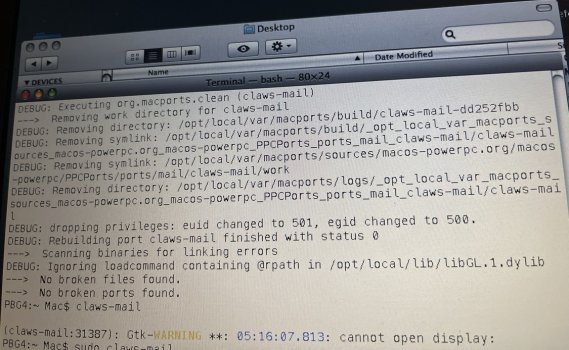
Now I get the error cant open display. I believe because I don’t have x11 installed.
should it install from where ?
 

Attachments

  • IMG_4501.jpeg
    IMG_4501.jpeg
    281.3 KB · Views: 35
Thanks.
It was ghostscript.
Claws-mail build ok from sources
Now I get the error cant open display. I believe because I don’t have x11 installed.
should it install from where ?

On modern powerpc systems: `sudo port -v -N install xquartz` or `sudo port -v -N install xorg-server-legacy`
On 10.4: `sudo port -v -N install xorg-server-1.18`

Then reboot.
 
  • Like
Reactions: skinniezinho
On modern powerpc systems: `sudo port -v -N install xquartz` or `sudo port -v -N install xorg-server-legacy`
On 10.4: `sudo port -v -N install xorg-server-1.18`

Then reboot.
Running 10.5 on a g4
installed xquartz, rebooted
Applications => Macports => X11 clicked, it "quits unexpectedly".
I go to X11, show package contents , MacOS, X11 terminal icon, open it: it says "Segmentation Fault".

Since I thought it may be the installation, I unninstalled, installed again and same thing.
Any hint?
 
Running 10.5 on a g4
installed xquartz, rebooted
Applications => Macports => X11 clicked, it "quits unexpectedly".
I go to X11, show package contents , MacOS, X11 terminal icon, open it: it says "Segmentation Fault".

Since I thought it may be the installation, I unninstalled, installed again and same thing.
Any hint?

1. Have you wiped out pre-installed Apple X11? If not, everything is expected to be broken. How to delete: https://www.xquartz.org/FAQs.html
2. If yes, please post the crash log (it is likely in ~/Libary/Logs or very similar). You can also try `sudo gdb X`, let it load, then type `run`, once it crashes, type `bt`, post the output here.

`xorg-server-legacy` is another option which may be better supported on 10.5.
 
1. Have you wiped out pre-installed Apple X11? If not, everything is expected to be broken. How to delete: https://www.xquartz.org/FAQs.html
2. If yes, please post the crash log (it is likely in ~/Libary/Logs or very similar). You can also try `sudo gdb X`, let it load, then type `run`, once it crashes, type `bt`, post the output here.

`xorg-server-legacy` is another option which may be better supported on 10.5.
Thank you for your pacience .
Yes , it is where it says "Messed it up, got confused, want to start over? (Leopard)" right?
Here is the output
 

Attachments

Thank you for your pacience .
Yes , it is where it says "Messed it up, got confused, want to start over? (Leopard)" right?
Here is the output

Ok, gdb is not super-helpful here. What does this show?
Code:
otool -L /opt/local/bin/Xquartz
otool -L /Applications/MacPorts/X11.app/Contents/MacOS/X11
file /usr/X11
 
PBG4:~ Mac$ otool -L /opt/local/bin/Xquartz
/opt/local/bin/Xquartz:
/System/Library/Frameworks/CoreServices.framework/Versions/A/CoreServices (compatibility version 1.0.0, current version 32.0.0)
/usr/lib/libSystem.B.dylib (compatibility version 1.0.0, current version 111.1.7)
/System/Library/Frameworks/CoreFoundation.framework/Versions/A/CoreFoundation (compatibility version 150.0.0, current version 476.19.0)
PBG4:~ Mac$ otool -L /Applications/MacPorts/X11.app/Contents/MacOS/X11
/Applications/MacPorts/X11.app/Contents/MacOS/X11:
/usr/lib/libSystem.B.dylib (compatibility version 1.0.0, current version 111.1.7)
PBG4:~ Mac$ file /usr/X11
/usr/X11: cannot open `/usr/X11' (No such file or directory)
 
PBG4:~ Mac$ otool -L /opt/local/bin/Xquartz
/opt/local/bin/Xquartz:
/System/Library/Frameworks/CoreServices.framework/Versions/A/CoreServices (compatibility version 1.0.0, current version 32.0.0)
/usr/lib/libSystem.B.dylib (compatibility version 1.0.0, current version 111.1.7)
/System/Library/Frameworks/CoreFoundation.framework/Versions/A/CoreFoundation (compatibility version 150.0.0, current version 476.19.0)
PBG4:~ Mac$ otool -L /Applications/MacPorts/X11.app/Contents/MacOS/X11
/Applications/MacPorts/X11.app/Contents/MacOS/X11:
/usr/lib/libSystem.B.dylib (compatibility version 1.0.0, current version 111.1.7)
PBG4:~ Mac$ file /usr/X11
/usr/X11: cannot open `/usr/X11' (No such file or directory)

Ok, I will find what we need to query to see X11 libs linked in. In the meanwhile, could you try `xorg-server-legacy`? If it works, then the bug is specific to `xquartz`. If it fails in the same way, then something is wrong with the local set-up.
 
Ok, I will find what we need to query to see X11 libs linked in. In the meanwhile, could you try `xorg-server-legacy`? If it works, then the bug is specific to `xquartz`. If it fails in the same way, then something is wrong with the local set-up.
I will, just before I do, just wanna check with you:
sudo port uninstall xquartz
and this https://www.xquartz.org/FAQs.html
is there any other command I should do to be sure I have a clean base for claws-mail?
 
Register on MacRumors! This sidebar will go away, and you'll see fewer ads.