Become a MacRumors Supporter for $50/year with no ads, ability to filter front page stories, and private forums.
regarding xorg-server-legacy:
unninstaled xquartz as stated on the previous post, installed xorg-server-legacy as you told me, rebooted.

PBG4:~ Mac$ startx
font_cache: Scanning user font directories to generate X11 font caches
font_cache: Updating FC cache
font_cache: Done
xauth: file /Users/Mac/.serverauth.130 does not exist

xinit: XFree86_VT property unexpectedly has 0 items instead of 1
/Users/Mac/.xinitrc: line 1: /opt/local/bin/xterm: No such file or directory
/Users/Mac/.xinitrc: line 1: exec: /opt/local/bin/xterm: cannot execute: No such file or directory
xinit: connection to X server lost

waiting for X server to shut down

Here is what I get when I startx
 
I will, just before I do, just wanna check with you:
sudo port uninstall xquartz

There is no need to uninstall anything just because of runtime conflict. `deactivate` suffices.

and this https://www.xquartz.org/FAQs.html
is there any other command I should do to be sure I have a clean base for claws-mail?

If you ask about doing a clean build,
Code:
sudo port deactivate active
sudo port -v sync
sudo port -v -N install claws-mail
Obviously, in a case something was built earlier in a wrong way, this will not be enough, but I would start with this.

Generally, it is advisable to build important and/or just huge ports after deactivating everything first.
 
  • Like
Reactions: skinniezinho
regarding xorg-server-legacy:
unninstaled xquartz as stated on the previous post, installed xorg-server-legacy as you told me, rebooted.

PBG4:~ Mac$ startx
font_cache: Scanning user font directories to generate X11 font caches
font_cache: Updating FC cache
font_cache: Done
xauth: file /Users/Mac/.serverauth.130 does not exist

xinit: XFree86_VT property unexpectedly has 0 items instead of 1
/Users/Mac/.xinitrc: line 1: /opt/local/bin/xterm: No such file or directory
/Users/Mac/.xinitrc: line 1: exec: /opt/local/bin/xterm: cannot execute: No such file or directory
xinit: connection to X server lost

waiting for X server to shut down

Here is what I get when I startx
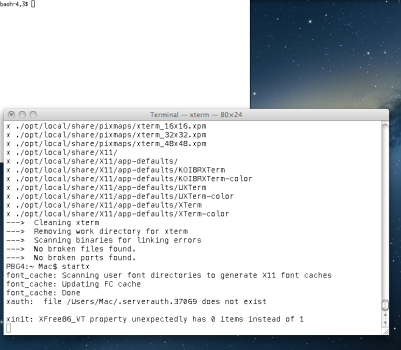
Well, does it work if you install xterm?
 
Well, does it work if you install xterm?
It opens this bash terminal, so I would say it is working?
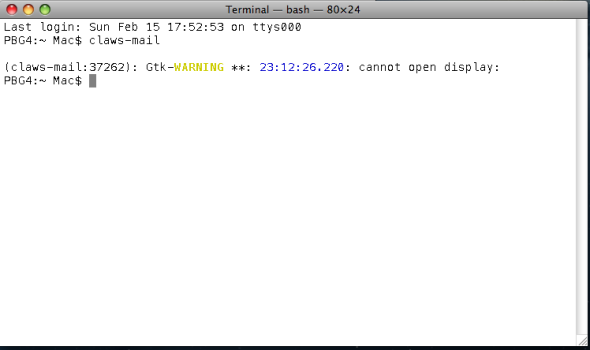
When I try opening claws mail it says cannot open display
 

Attachments

  • Picture 2.png
    Picture 2.png
    21.9 KB · Views: 33
  • Picture 1.png
    Picture 1.png
    149.4 KB · Views: 34
What happens if you launch X11.app as an app? What happens if you run `X` in the terminal?
same thing, opens that terminal as shown in first picture. no errors.
if I just tape X on terminal I see the X11 icon launch, but no terminal with bash, but also no errors
 
same thing, opens that terminal as shown in first picture. no errors.
if I just tape X on terminal I see the X11 icon launch, but no terminal with bash, but also no errors

So do I get it right, that X11.app launches without crashing or freezing? (You can open menus, for example.)
But then claws-mail still cannot launch? If reboot was done after installing xorg-server, it’s strange.
 
Sorry for the late answer.
yes I still get

(claws-mail:272): Gtk-WARNING **: 13:33:27.361: cannot open display:

even after reboot
 
@barracuda156 finally get it running, tried with chapgpt, so not sure what I am telling is "true" or not.
So I needed to tape:
open /Applications/MacPorts/X11.app
and inside the white terminal that opens, type:
claws-mail

This while still having and using xorg-server-legacy
Now it works.
A big thank you for your support, will also profit to use more PPCPorts for the future.

Have a great day
 
  • Like
Reactions: barracuda156
@barracuda156 finally get it running, tried with chapgpt, so not sure what I am telling is "true" or not.
So I needed to tape:
open /Applications/MacPorts/X11.app
and inside the white terminal that opens, type:
claws-mail

This while still having and using xorg-server-legacy
Now it works.
A big thank you for your support, will also profit to use more PPCPorts for the future.

Have a great day

TBH I literally never did it this way, but it may be more correct. Useful to know in case someone else gets stuck on this, thanks.
 
Register on MacRumors! This sidebar will go away, and you'll see fewer ads.