Are there any specific recommendations for the mini 6 pin to 8 pin PCIe power cable? I want to power a 6600 XT on a 5,1. I've been eyeing one option from a seller called TeamProfitcom on Amazon USA. Mostly wondering since I've seen on other threads that there's some janky ones with the wiring, but I don't know what to look for, and even House of Moth or the Definitive Mac Upgrade Guide don't mention much.

Got a tip for us?
Let us know
Become a MacRumors Supporter for $50/year with no ads, ability to filter front page stories, and private forums.
MP 1,1-5,1 GPU Compatibility List for cMP
- Thread starter Pentaxer
- WikiPost WikiPost
- Start date
- Sort by reaction score
You are using an out of date browser. It may not display this or other websites correctly.
You should upgrade or use an alternative browser.
You should upgrade or use an alternative browser.
- Status
- The first post of this thread is a WikiPost and can be edited by anyone with the appropiate permissions. Your edits will be public.

MarkC426
macrumors 601
This is the type
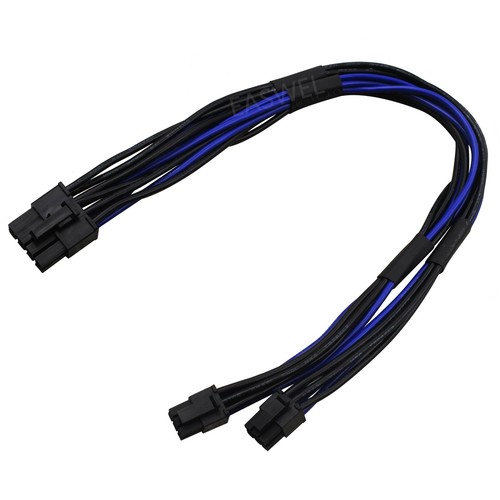
For Mac Pro Graphics Cable 18AWG Dual Mini 6 Pin To 8 Pin Male PCI-E Power Cable | eBay UK
Find many great new & used options and get the best deals for For Mac Pro Graphics Cable 18AWG Dual Mini 6 Pin To 8 Pin Male PCI-E Power Cable at the best online prices at eBay UK! Free delivery for many products!
www.ebay.co.uk
Right, but I was wondering if any seller will do, just as long as the cable has a bunch of positive reviews, or if someone has a specific seller recommendation. Trying to avoid dodgy knock-offs.This is the type
For Mac Pro Graphics Cable 18AWG Dual Mini 6 Pin To 8 Pin Male PCI-E Power Cable | eBay UK
Find many great new & used options and get the best deals for For Mac Pro Graphics Cable 18AWG Dual Mini 6 Pin To 8 Pin Male PCI-E Power Cable at the best online prices at eBay UK! Free delivery for many products!www.ebay.co.uk
I think you are pretty safe with your approach. For reference here's one I purchased in 2023 - https://www.amazon.com/dp/B07P82ZH22?ref_=ppx_hzsearch_conn_dt_b_fed_asin_title_3Right, but I was wondering if any seller will do, just as long as the cable has a bunch of positive reviews, or if someone has a specific seller recommendation. Trying to avoid dodgy knock-offs.
As an Amazon Associate, MacRumors earns a commission from qualifying purchases made through links in this post.

Have you had any problems with it? It's the exact same seller I was considering.I think you are pretty safe with your approach. For reference here's one I purchased in 2023 - https://www.amazon.com/dp/B07P82ZH22?ref_=ppx_hzsearch_conn_dt_b_fed_asin_title_3
As an Amazon Associate, MacRumors earns a commission from qualifying purchases made through links in this post.
No issues whatsoever.Have you had any problems with it? It's the exact same seller I was considering.
Have you had any problems with it? It's the exact same seller I was considering.
Ah yes, this lot are quite good, I have used those as well. My old 5,1 with the Sapphire Radeon 6600XT uses that cable.
Can confirm a PC version of the Nvidia Quadroo K5000 works in a Mac Pro 2008. No bootscreen, but works perfectly with opencore. Tried flashing the ROM, but the Mac ROM doesn't fit on the 2048bit ROM on the PC Card. Still contemplating if I should try to solder a bigger ROM chip on the card. But can't find any succes stories online...
Hello everyone, I'm facing a problem and I hope you can help me. I installed Sonoma on my Mac Pro 5.1 with OCLP and a Radeon RX 580. I now want to change the graphics card to a Radeon Pro W6600. I updated the RX 580 OpenCore to version 2.4.1 and applied the root patches; the machine runs perfectly fine. But when I switch to the Radeon Pro W6600, I get a black screen after clicking on the system via the Radeon W6600's bootpicker. I think I understand the problem: the applied root patches are for the RX 580 and are therefore incompatible with the W6600. The problem is, how do I install the root patches for the W6600 when I can't boot from it? OpenCore installs the root patches by detecting the installed hardware, but with the W6600 I get a black screen. If anyone has a solution, I would be very grateful.


tsialex
Contributor
Hello everyone, I'm facing a problem and I hope you can help me. I installed Sonoma on my Mac Pro 5.1 with OCLP and a Radeon RX 580. I now want to change the graphics card to a Radeon Pro W6600. I updated the RX 580 OpenCore to version 2.4.1 and applied the root patches; the machine runs perfectly fine. But when I switch to the Radeon Pro W6600, I get a black screen after clicking on the system via the Radeon W6600's bootpicker. I think I understand the problem: the applied root patches are for the RX 580 and are therefore incompatible with the W6600. The problem is, how do I install the root patches for the W6600 when I can't boot from it? OpenCore installs the root patches by detecting the installed hardware, but with the W6600 I get a black screen. If anyone has a solution, I would be very grateful.
First and most important thing that you need to know, Radeon Pro W6600 is a NAVI 23 based GPU.
Second thing, any GPU based on NAVI graphic processors is only supported with MacPro5,1 up to Monterey.
NAVI based GPUs with Ventura and newer require a CPU that supports AVX 2 instructions, since MacPro5,1 does not even have basic AVX support, NAVI 1x GPUs will only work with Catalina/BigSur/Monterey while NAVI 2x based GPUs work only with Big Sur and Monterey or depending on the model only with Monterey. No support past Monterey for NAVI based GPUs with a MacPro5,1 or MacPro6,1.

Tratkazir_the_1st
macrumors 65816
Ok, thank you for the reply, this card have been sold by macvidcards and has a bootpicker, but i didn't know taht there was a problem with newer macos systems. so it seems that i have to go back to monterey if i want to put this card on the macpro. If i plan to ga back to Monterey, is it possible to do that from sonoma installed with opencore or i need i fresh install?? Thank you.
tsialex
Contributor
Ok, thank you for the reply, this card have been sold by macvidcards and has a bootpicker, but i didn't know taht there was a problem with newer macos systems. so it seems that i have to go back to monterey if i want to put this card on the macpro. If i plan to ga back to Monterey, is it possible to do that from sonoma installed with opencore or i need i fresh install?? Thank you.
You need to do a clean install.
tsialex
Contributor
Hello, me again, is a radeon rx 6600 xt
RX 6600XT is a NAVI GPU and won't work after Monterey.
Does not work with Ventura, Sonoma, Sequoia or Tahoe when installed to a MacPro5,1.
is a solution to install on the mac pro 5.1 with sonoma and change the rx 580?
You can't change GPUs with OCLP.
OCLP Root Patches remove the GPU drivers for any other GPU besides the one that you used to install OCLP.

keksikuningas
macrumors 6502
I was thinking of downgrading my 5,1 to Monterey and running it with RX 6800 16GB reference card. I noticed it has USB-C video output on it. Will it work under macOS? Tried searching for USB-C in this thread and nobody seems to have mentioned it
found this post discussing it, but not sure if this is up to date info
 support.apple.com
found this on google also, seems I would have trouble with the USB-C even on officially supported hardware
support.apple.com
found this on google also, seems I would have trouble with the USB-C even on officially supported hardware
found this post discussing it, but not sure if this is up to date info
EDIT:
Use an external graphics processor with your Mac - Apple Support (TJ)
Learn how to access additional graphics performance by connecting to an external graphics processor.
Last edited:
SorpassoSonance
macrumors newbie
You can't change GPUs with OCLP.
OCLP Root Patches remove the GPU drivers for any other GPU besides the one that you used to install OCLP.
Is this also the case with Martin Lo’s 1.0.1 OpenCore package?
I was hoping to leave the RX 580 in my machine and then after installing Monterey via Martin Lo’s 1.0.1 package I was going to swap out the 580 for a 5700 XT. But if Martin Lo's package behaves the same way then I will not do so.
Thanks for any clarification!
tsialex
Contributor
Is this also the case with Martin Lo’s 1.0.1 OpenCore package?
No, only with OCLP.
Hello, Pentaxer
I have this old mac pro:
========================
System Version: macOS 10.14.6 (18G9323)
Kernel Version: Darwin 18.7.0
Boot Volume: MacOS Mojave
Boot Mode: Normal
and these 2 cards:
NVIDIA GeForce GT 120
NVIDIA Quadro K620
========================
"Quadro K620" was working fine with "El Capitan", after installing the drivers, from NVIDIA.
"Quadro K620" was working fine with "High sierra", after installing the drivers, from NVIDIA.
Then, I've removed the "GeForce GT 120" card from the machine (it does not support metal), and started Mojave's installtion.
after the restart' step, the machine didn't boot up.
I've shut down the machine, replaced the "GeForce GT 120" card, and could finalize Mojave's installtion.
"Quadro K620" is not working at all.
I've tried searching for a driver to this card: it does not exit.
What should I do?
Thanks.

Macschrauber
macrumors 68040
Hello, Pentaxer
I have this old mac pro:
========================
System Version: macOS 10.14.6 (18G9323)
Kernel Version: Darwin 18.7.0
Boot Volume: MacOS Mojave
Boot Mode: Normal
and these 2 cards:
NVIDIA GeForce GT 120
NVIDIA Quadro K620
========================
"Quadro K620" was working fine with "El Capitan", after installing the drivers, from NVIDIA.
"Quadro K620" was working fine with "High sierra", after installing the drivers, from NVIDIA.
Then, I've removed the "GeForce GT 120" card from the machine (it does not support metal), and started Mojave's installtion.
after the restart' step, the machine didn't boot up.
I've shut down the machine, replaced the "GeForce GT 120" card, and could finalize Mojave's installtion.
"Quadro K620" is not working at all.
I've tried searching for a driver to this card: it does not exit.
What should I do?
Thanks.
This is a Maxwell card - despite the name suggests Keppler. No drivers in Mojave.
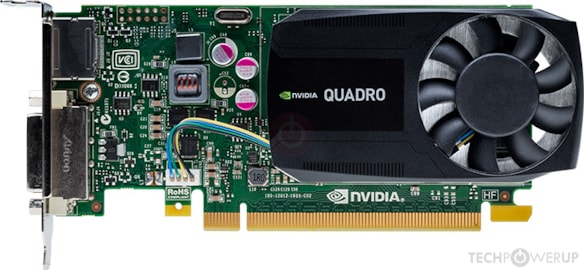
NVIDIA Quadro K620 Specs
NVIDIA GM107, 1124 MHz, 384 Cores, 24 TMUs, 16 ROPs, 2048 MB DDR3, 900 MHz, 128 bit

AppleDrank
macrumors member
To my Mojave CmP 5,1 (2 x 3.33 GHz 6-Core Intel Xeon, 40 GB RAM, 8TB SN850X, MSI RX580 in slot 1), I just added a Samsung 49" G9SC Ultrawide. The RX580 will run the display at native resolution (5120 x 1440) at 120hz over HDMI, but the text looks blurry and the colors look dumbed-down. Using a Cable Matters Versa-certified 8k DP cable, I thought I could run at 3840x1080, but when typing, the flicker came back heavy, even at 60hz, and I even got momentary black screens. I am back running over HDMI at 5120x1440. (edited above to reflect reality).
Are there any options to upgrade to a better card that is both Mojave-compatible and will let me run this display via DP to take full advantage of native resolution on this monitor? I ordered the Pixlas mod but have not installed it yet. Per the sticky and metal benchmarks at https://browser.geekbench.com/metal-benchmarks, it looks like there are a few options with cards I am not familiar with but I was wondering if anyone can speak to this working in real life?
I am unclear when the sticky was updated and if the card list is still accurate, and I believe I read elsewhere in this thread that HDR10 will not work w/Nvidia cards, and they cause a lot of trouble. Any suggestions are welcome. Thanks in advance.
Are there any options to upgrade to a better card that is both Mojave-compatible and will let me run this display via DP to take full advantage of native resolution on this monitor? I ordered the Pixlas mod but have not installed it yet. Per the sticky and metal benchmarks at https://browser.geekbench.com/metal-benchmarks, it looks like there are a few options with cards I am not familiar with but I was wondering if anyone can speak to this working in real life?
I am unclear when the sticky was updated and if the card list is still accurate, and I believe I read elsewhere in this thread that HDR10 will not work w/Nvidia cards, and they cause a lot of trouble. Any suggestions are welcome. Thanks in advance.
Last edited:
keksikuningas
macrumors 6502
To my Mojave CmP 5,1 (2 x 3.33 GHz 6-Core Intel Xeon, 40 GB RAM, 8TB SN850X, MSI RX580 in slot 1), I just added a Samsung 49" G9SC Ultrawide. The RX580 will run the display at native resolution (5120 x 1440) at 120hz over HDMI, but the text looks blurry and the colors look dumbed-down. Using a Cable Matters Versa-certified 8k DP cable, it will only run at 3840x1080 without excess flicker when scrolling. I am not sure if flicker is yes when running at 60 vs. 120hz yet.
Are there any options to upgrade to a better card that is both Mojave-compatible and will let me run this display via DP to take full advantage of native resolution on this monitor? I ordered the Pixlas mod but have not installed it yet. Per the sticky and metal benchmarks at https://browser.geekbench.com/metal-benchmarks, it looks like there are a few options with cards I am not familiar with but I was wondering if anyone can speak to this working in real life?
I am unclear when the sticky was updated and if the card list is still accurate, and I believe I read elsewhere in this thread that HDR10 will not work w/Nvidia cards, and they cause a lot of trouble. Any suggestions are welcome. Thanks in advance.
GitHub - waydabber/BetterDisplay: Unlock your displays on your Mac! Flexible HiDPI scaling, XDR/HDR extra brightness, virtual screens, DDC control, extra dimming, PIP/streaming, EDID override and lots more!
Unlock your displays on your Mac! Flexible HiDPI scaling, XDR/HDR extra brightness, virtual screens, DDC control, extra dimming, PIP/streaming, EDID override and lots more! - waydabber/BetterDisplay
 github.com
AppleDrank
macrumors member
Thanks, I will check it out. BTW I edited the post above after learning that typing fast made 3840x1080p unworkable over DP. Sigh. I did not mind 3840x1080 much at all but would like to have a card capable of powering the display at native, if possible.in the README there is a link to a Mojave compatible version (1.4.15) but I am not sure if it will support that resolution. I use the same monitor (VA panel instead of OLED though) with a RX580 over a DP cable on Sonoma OCLP with this app and I get 5120x1440@120hz but I scale it down to 3840@1080p to get bigger text to make it easier on the eyes and the text is crisp.
GitHub - waydabber/BetterDisplay: Unlock your displays on your Mac! Flexible HiDPI scaling, XDR/HDR extra brightness, virtual screens, DDC control, extra dimming, PIP/streaming, EDID override and lots more!
Unlock your displays on your Mac! Flexible HiDPI scaling, XDR/HDR extra brightness, virtual screens, DDC control, extra dimming, PIP/streaming, EDID override and lots more! - waydabber/BetterDisplay