
Got a tip for us?
Let us know
Become a MacRumors Supporter for $50/year with no ads, ability to filter front page stories, and private forums.
[Guide] Success! Install 10.8 on old unsupported Mac
- Thread starter hackerwayne
- Start date
- Sort by reaction score
You are using an out of date browser. It may not display this or other websites correctly.
You should upgrade or use an alternative browser.
You should upgrade or use an alternative browser.

Hennesie2000
macrumors 68000
If only updates were supported by this it would be the perfect solution. Or some way to patch the update. I tried running the 10.8.4 update on a 10.8.3 install and got a JavaScript error... I am not sure what it means unless it was looking for something 64bit and didn't find it.
For hackerwayne or his stuff
Thx for confirm my ATI bug on MLPostFactor 0.3
My question is, what time you need to fixit or plan to date new release with these and other bugs?? (aprox)
sorry for my poor english
i hope a soon new release soon with my bug and other fixed to continue my update configuration MP 1.1
many thx
Thx for confirm my ATI bug on MLPostFactor 0.3
My question is, what time you need to fixit or plan to date new release with these and other bugs?? (aprox)
sorry for my poor english
i hope a soon new release soon with my bug and other fixed to continue my update configuration MP 1.1
many thx
I got the same behaviour using Safari. It renders good on Chrome though.
Thanks for checking that out! Of note, I tried following the permalink straight to the PNG, same issue. On the other hand, here's one that draws just fine.
Wonder what this is, and if it's going to show up on other sites or PNGs.
UPDATE: Just realized the ones that draw correctly and stay that way have some color. The ones that draw then go black are all 100% grayscale. Any chance for a fix for Safari grayscale PNGs?
Last edited:
You guys should probably just stick with the Chameleon method as it's been a piece of cake for me. I used it to install ML a year ago, (Although I do admit I did have trouble doing so at first) and it's been doing me fine ever since. OS updates and all install properly too. Now when OS X Mavericks was available all I had to do was fire up Chameleon wizard and update the boot loader, create a bootable Mavericks Install disc, and install the system. every things working fine out of the box. Took me no more than an hour.
EDIT: forgot to mention this was all done on my Mac Pro 1,1 /w AMD Radeon 6870 (I think it's a 6870 - need to check later)
Mac Pro 1,1 with 4870 here. What exactly did you do to get Mavericks working? I tried the method on Jabbawok's site using the Mavericks installer instead of ML, but it didn't work. The installer says it can't find the Essential System Software package.
Last edited:
Hi, wondered if anyone can help. I patched ML with the MLPF. That all went fine, rebooted and installed, installation finished, but at the end of the installation when it goes to restart, it doesn't do anything, just stays on a blank screen with the cursor. So I switch off my MacBook (black mid-2007) myself and when I switch it on to boot the ML partition there's just a circle with a line through it?
I read the guide ages ago and spent so long thinking about installing ML that by the time I came back to do it, I see the guide isn't there anymore at the moment, so I'm not sure if I'm missing something I'm meant to do after install or during boot. Thanks.
I read the guide ages ago and spent so long thinking about installing ML that by the time I came back to do it, I see the guide isn't there anymore at the moment, so I'm not sure if I'm missing something I'm meant to do after install or during boot. Thanks.
Remote Desktop / VNC has only a black screen
I was not expecting VNC to have a black screen. I didn't see it in the list of known issues, nor could I find any work-arounds in the forum.
VNC works just fine to my MacBook 2,1 which also has GMA 950. In post 2622 macsushii is having the the same issue, so it seems to be specific to the GMA 950 on a Mac Mini.
Otherwise, MLPF is working flawlessly. Awesome job Wayne!
VNC does not work (as expected), but all the other stuff works flawlessly!
I was not expecting VNC to have a black screen. I didn't see it in the list of known issues, nor could I find any work-arounds in the forum.
VNC works just fine to my MacBook 2,1 which also has GMA 950. In post 2622 macsushii is having the the same issue, so it seems to be specific to the GMA 950 on a Mac Mini.
Otherwise, MLPF is working flawlessly. Awesome job Wayne!


Well well well.. What do we have here. Oh? Mavericks on older MacBooks!
Wow... X3100 works ok..?!
niciswinnin
macrumors newbie
Hey,
I just downloaded MLPF v0.3, started to run the program, but it's telling me I don't have the 'Install Mac OS X Mountain Lion.app' in my Applications folder - which I do. I had installed a virtual machine with OS X Lion in order for me to download it - transfered it via USB external HDD. I tried to replace the OS X .app in the folder, but still nothing. Any suggestions?
Note: I did this with the v0.22 version & had no issues, I'm not sure what is going on now. I did that about a month ago, but had some issues. So, now I'm doing this all over with v0.3.
----------
The downloader sends you here: http://tinyurl.com/lw8ebnj
I just downloaded MLPF v0.3, started to run the program, but it's telling me I don't have the 'Install Mac OS X Mountain Lion.app' in my Applications folder - which I do. I had installed a virtual machine with OS X Lion in order for me to download it - transfered it via USB external HDD. I tried to replace the OS X .app in the folder, but still nothing. Any suggestions?
Note: I did this with the v0.22 version & had no issues, I'm not sure what is going on now. I did that about a month ago, but had some issues. So, now I'm doing this all over with v0.3.
----------
Hi, I'm new here. I wasn't sure, but I am not able to download v03 via here or at the recommend web site. Where or when can I download the latest version?
Thanks!
The downloader sends you here: http://tinyurl.com/lw8ebnj
I managed to figure out my problem that I posted above. I hadn't run MLPostFactor from Utilities after install!
So thank you so much for the guide, ML seems to be runnng nicely on my old MacBook! Fingers crossed for Mavericks!!
Oh, is it safe to do software updates? Like iTunes and safari? I know I can't do OS updates without clean install. I'm going to reinstall now anyway to try get it on 10.8.4 (only on 10.8.0 just now).
So thank you so much for the guide, ML seems to be runnng nicely on my old MacBook! Fingers crossed for Mavericks!!
Oh, is it safe to do software updates? Like iTunes and safari? I know I can't do OS updates without clean install. I'm going to reinstall now anyway to try get it on 10.8.4 (only on 10.8.0 just now).
With 10.9 DP1 kernel? Did it retain 32bit mode like ML DP1 did?
I guess I'll just have to try...
No 32-bit kernel like 10.8.
----------
Hey,
I just downloaded MLPF v0.3, started to run the program, but it's telling me I don't have the 'Install Mac OS X Mountain Lion.app' in my Applications folder - which I do. I had installed a virtual machine with OS X Lion in order for me to download it - transfered it via USB external HDD. I tried to replace the OS X .app in the folder, but still nothing. Any suggestions?
Note: I did this with the v0.22 version & had no issues, I'm not sure what is going on now. I did that about a month ago, but had some issues. So, now I'm doing this all over with v0.3.
----------
The downloader sends you here: http://tinyurl.com/lw8ebnj
You're not on 10.7.5

ShiryuX
macrumors member
Thank you so much!!
Hi Hackerwayne,
Just a quick note to thank you for breathing back new life into my iMac late 2006! It is running 10.8.4 super smoothly.
http://www.everymac.com/systems/apple/imac/specs/imac-core-2-duo-2.33-24-inch-specs.html
One question for the hacker in you, this model has two expansion slots for RAM, currently it is populated with 2*1GB. I was thinking of expanding this to 2*2GB for more comfort.
On the everymac page below it is mentioned that the iMac supports up to 3GB of RAM but would not officially recognise the full 4GB even though they are installed.
http://www.everymac.com/systems/apple/imac/faq_cd/imac-intel-how-to-upgrade-memory.html
Do you think that this would change under Mountain Lion and that it would be fully recognised or is that a hardware limitation?
Thanks again and looking forward to Mavericks.
Z
Hi Hackerwayne,
Just a quick note to thank you for breathing back new life into my iMac late 2006! It is running 10.8.4 super smoothly.
http://www.everymac.com/systems/apple/imac/specs/imac-core-2-duo-2.33-24-inch-specs.html
One question for the hacker in you, this model has two expansion slots for RAM, currently it is populated with 2*1GB. I was thinking of expanding this to 2*2GB for more comfort.
On the everymac page below it is mentioned that the iMac supports up to 3GB of RAM but would not officially recognise the full 4GB even though they are installed.
http://www.everymac.com/systems/apple/imac/faq_cd/imac-intel-how-to-upgrade-memory.html
Do you think that this would change under Mountain Lion and that it would be fully recognised or is that a hardware limitation?
Thanks again and looking forward to Mavericks.
Z
Can anyone tell me what I do with the combo update? I've got it downloaded (10.8.3), I'm currently runnng the MLPF again and this time I've selected 10.8.3. But how does it know I have the file for 10.8.3 on my desktop? I'm just confused as to how to actually apply the update. I was happy enough to leave my MacBook on 10.8 but I can't use iPhoto unless I have 10.8.3
Thanks.
Thanks.

Rastafabi
macrumors 6502
No 32-bit kernel like 10.8.
That's already quiet nice, but actually I prefer running (only slightly) modified OS.
That's why I digged into it and finally installed Mavericks with only 2 file modifications on my MacBook Pro 2,2 (miming an MacBook Pro 5,2).
Now I have just installed OS X 10.9 (efi-booted) using it's default v13.0.0 kernel.


Sorry for the poor quality...
Edit: Got it (not ready!)

Last edited:
hi Wayne what a wonderfull job 10.8.4 working like a beauty
I managed to get airdrop to work with and app from osx latitude
Just open app and click showairdrop
its working managed to send files on my macbook 2008
Great work
I think ill buy you another coffe
I managed to get airdrop to work with and app from osx latitude
Just open app and click showairdrop
its working managed to send files on my macbook 2008
Great work
I think ill buy you another coffe
Attachments

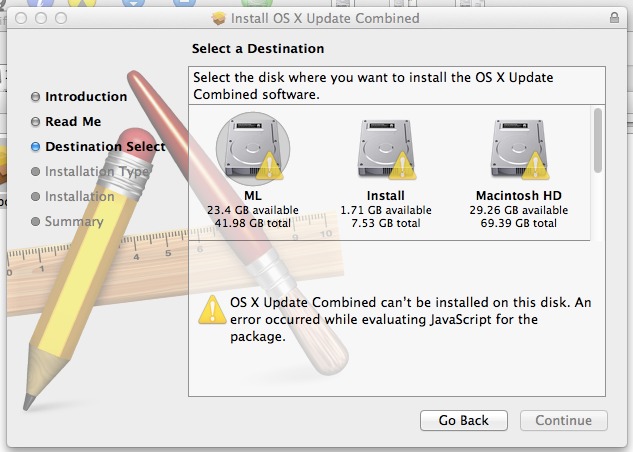
You need to apply update to your ml hdd then rebbot wirh install disk and go tu utilities mlpostfactor and apply to tour hdd with 10.83 being selectedCan anyone tell me what I do with the combo update? I've got it downloaded (10.8.3), I'm currently runnng the MLPF again and this time I've selected 10.8.3. But how does it know I have the file for 10.8.3 on my desktop? I'm just confused as to how to actually apply the update. I was happy enough to leave my MacBook on 10.8 but I can't use iPhoto unless I have 10.8.3
Thanks.
Last edited:
You need to apply update to your ml hdd then rebbot wirh install disk and go tu utilities mlpostfactor and apply to tour hdd with 10.83 being selected
Thanks for the reply, whenever I try apply the update, I get the message I posted in the photo above. Says "OS X Combined update can't be installed on this disk. An error occurred while evaluating JavaScript for the package". Am I applying it wrong? I've downloaded the Combo 10.8.3 DMG from Apple, then double click it to install whilst I'm on the ML partition. But it just won't let me 😕
I think I need a recovery partition perhaps? That's what it seems from googling. Also, Find My Mac says it needs recovery partition (I'm not bothered for find my mac though). I have a recovery partition which I think will be for Lion.
I have a working 0.2 install. Is there a method to update to 0.3?
I know clean install is preferred, but just wondering.
I would advice to do a clean one I have 2 install now 0.22 and 0.3
I created a diskimage for them with carboncopy cloner so when I want to use any of them I restore it to my usb hdd🙂
----------
What are the prospects of seeing the kextcache issue fixed (so I can run LittleSnitch, etc) in the next version?
Well in my case on both 0.22 and 0.3 kextcache is working...
Are u sure you repaired your disk...
You can try this
Step 1 : Clear the dynamic loader shared cache
So First: boot in safe mode by restarting your mac by holding the SHIFT key immediately after hearing the boot chime. When you reach the login window, dont even log in, just hit restart.
Step 2 : Rebuild Kernel Extension Caches
Open a terminal window and type the following commands:
sudo chown root:admin /
(the system will ask your password to grant access to the sudo chown command as this requires admin privileges)
sudo kextcache -system-prelinked-kernel
sudo kextcache -system-caches
Thats all there is to it! You can now reboot and enjoy a faster booting Mac.
I'm stuck on this trying to install the update, I get the same with 10.8.3 and 10.8.4 🙁 Not sure what I'm doing wrong?
Image
Answer to your problem maybe???
Comes from apple support
As others have noted, your Java's fine. It's the installers javascript thats borked, most likely due to a corrupt DL. DL it again,