
Got a tip for us?
Let us know
Become a MacRumors Supporter for $50/year with no ads, ability to filter front page stories, and private forums.
[Guide] Success! Install 10.8 on old unsupported Mac
- Thread starter hackerwayne
- Start date
- Sort by reaction score
You are using an out of date browser. It may not display this or other websites correctly.
You should upgrade or use an alternative browser.
You should upgrade or use an alternative browser.

53kyle
macrumors 65816
After the ML install gets done and I try to reboot, I get the following message from "Choose Startup Disk": "Building boot caches on boot helper partition failed"
How can I fix this? Anyone else see this?
Thanks.
Reboot holding the option key and select the mountain lion drive. After it boots and you are set up you can change your startup disk from system preferences (I think)

Hi Hackerwayne - could you briefly describe what exactly you're doing to modify Mountain Lion to get it to boot?
I'm attempting to boot Mountain Lion on my ThinkPad (hackintosh) with no luck. I used your tool, and installed Chameleon on the partition in which I'm trying to boot. It looks like it's trying to boot in 64-bit mode, which is giving me kernel panics on almost every kext it tries to load.
Maybe you could provide in the first post, a technical overview of what exactly this tool is doing to our Mountain Lion installers.
I will try my best to explain it here.
Before i get very technical, lets do a basic overview of what "Mountain Lion" is.
What is Mountain Lion. What makes it so different comparing to Lion?
Alright, Mountain Lion is the 8th version of OS10. What makes it so different comparing to Lion? Before i get to that, let me explain what "Kexts" is. Kexts is Kernel Extensions in short, it basically like Drivers on Windows. There are 2 versions of kexts. 1 is 32-bit the other is 64-bit. Lion uses mostly 32-bit kexts where as Mountain Lion uses mostly 64-bit kexts.
32-bit kexts vs 64-bit kexts
I took some time to create these 2 charts/pictures.
Picture explains everything.
Kernel Architecture
Basically explains how the kernel works.
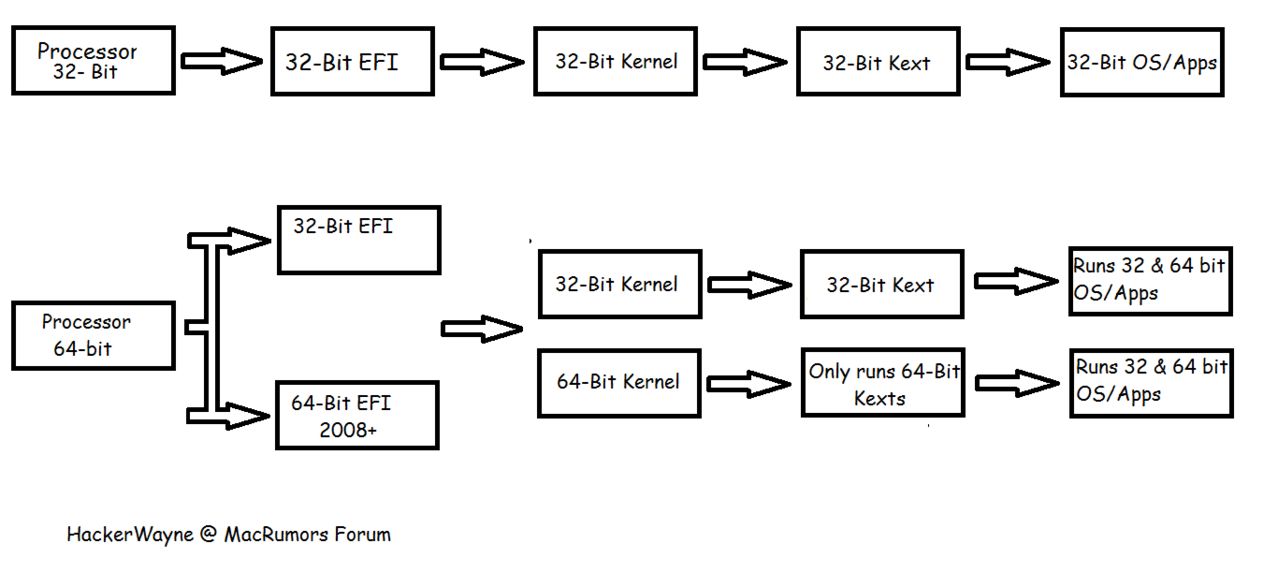
Direct Link to view it larger -> http://postimg.org/image/vcdw5zvhz/
OS Architecture.
Lion versus Mountain Lion versus MLPostFactor.
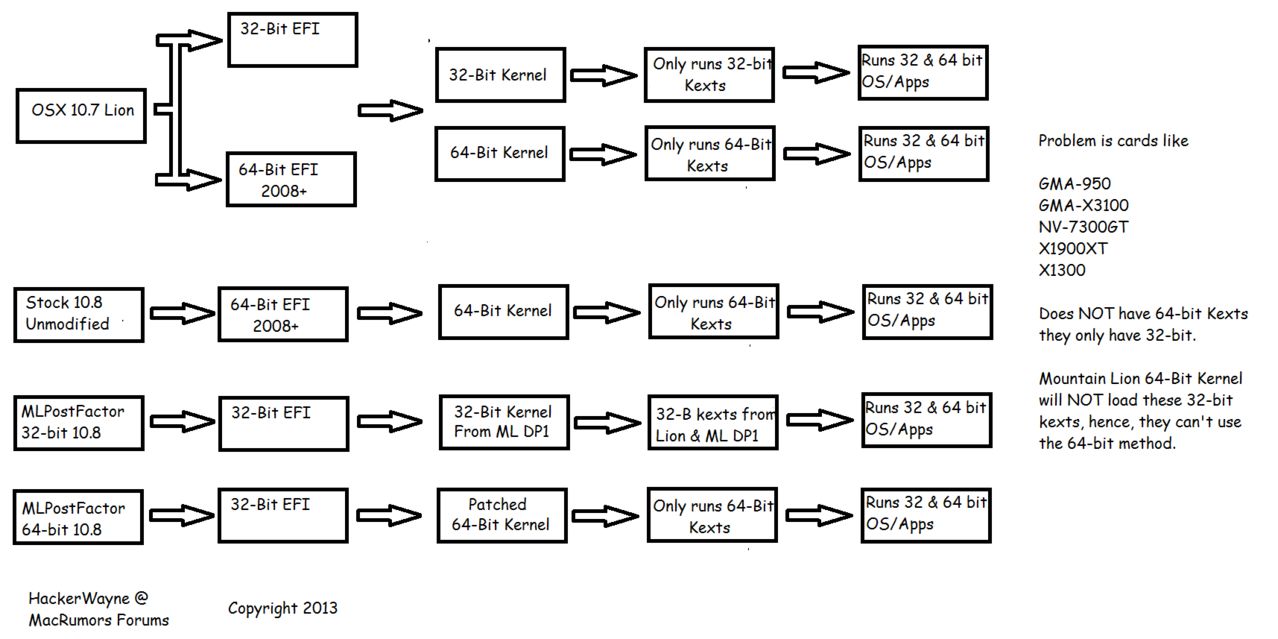
Direct Link to view it larger ->http://postimg.org/image/tnh0j2qaf/
Obviously, this is a simplified version.. REALLY REALLY simplified for newbies.
You need to understand the above before you understand what im trying to explain next.
In MLPostFactor 32-bit, we use some kexts from 10.7.5, some from Mountain Lion DP1, which is similar to Lion. Then, we modified the kernel so it loads on our older system. My advice is if you plan to use it for hackintoshes, try to use Chameleon from DP1 or Lion 10.7.5 and set the boot arch to i386 so its forced to boot 32-bit. Hope this helps
LifeHacker covered our app! Whoo hoo!
Link: http://lifehacker.com/5994204/mlpostfactor-installs-mountain-lion-on-older-macs
Last edited:
All working perfectly now on Mac Mini 1,1 thanks to clear instructions !!
Still some files permissions to sort out, but this is really minor !!
Thanks again & please think about the Airplay mirroring stuff.
"Nothing is impossible" 😉
Airplay has been fixed! Fix coming in V0.3! However, AFP (Apple File Transfer Protocol) doesn't work.
Yes, i believe "Nothing is impossible" 🙂
monwentworth
macrumors newbie
Working great!
Did a clean install on my macbook 3.1 using 10.8.3 and works great. I can finally use my magic mouse again. Isight does lose some frames but since I never use it, I couldn't care less. I have to say though, that I see those "graphic glitches" in Safari while scrolling, but the only pages where I can reproduce that behavior is on Facebook and Twitter. Other web pages look just fine.
Finally I don't know if it is mentioned anywhere but I formatted to stock Lion 10.7.0 before installing Mountain Lion and MLPostfactor always said that I didn't have the Install OSX app on the App folder, when it actually was. Anyway, I upgraded to 10.7.5 and it found the App. So it's safe to say that you have to run MLPostfactor on 10.7.5 right?
All around, a very very good job! I will be donating some dough because you gave my old dusty Macbook a new life.
Thanks!
Did a clean install on my macbook 3.1 using 10.8.3 and works great. I can finally use my magic mouse again. Isight does lose some frames but since I never use it, I couldn't care less. I have to say though, that I see those "graphic glitches" in Safari while scrolling, but the only pages where I can reproduce that behavior is on Facebook and Twitter. Other web pages look just fine.
Finally I don't know if it is mentioned anywhere but I formatted to stock Lion 10.7.0 before installing Mountain Lion and MLPostfactor always said that I didn't have the Install OSX app on the App folder, when it actually was. Anyway, I upgraded to 10.7.5 and it found the App. So it's safe to say that you have to run MLPostfactor on 10.7.5 right?
All around, a very very good job! I will be donating some dough because you gave my old dusty Macbook a new life.
Thanks!
Last edited:
Any chance you could get a kext from 10.6/10.7 to get the graphics recognized properly?!
Awesome!!😱
Mate, need ya help. Would you mind removing the content of post #2? (as quoted above) Because now im using post #3 to add informations about MLPostFactor. Your post might confuse some new comers. Thanks.
EDIT: Just put there "Original post deleted, to prevent confusion"
Last edited:
Error while getting ready...
Hi, thanks Wayne and ML4All for your work:
But i've encountered a problem:
4/10/13 6:36:01.838 PM installd: PackageKit: Install Failed: Error Domain=PKInstallErrorDomain Code=110 "An error occurred while extracting files from the package MLPostFactor." UserInfo=0x7fda79d2f340 {NSLocalizedDescription=An error occurred while extracting files from the package MLPostFactor., NSURL=file://localhost/Applications/MLPostFactor.app/Contents/Resources/MLPostFactor.mpkg#Restore.pkg, PKInstallPackageIdentifier=com.tonymacx86.xMove-MountainLion.app.pkg, NSUnderlyingError=0x7fda79d107f0 "The file couldnt be opened because it isnt in the correct format."} {
NSLocalizedDescription = "An error occurred while extracting files from the package \U201cMLPostFactor\U201d.";
NSURL = "file://localhost/Applications/MLPostFactor.app/Contents/Resources/MLPostFactor.mpkg#Restore.pkg";
NSUnderlyingError = "Error Domain=NSCocoaErrorDomain Code=259 \"The file couldn\U2019t be opened because it isn\U2019t in the correct format.\"";
PKInstallPackageIdentifier = "com.tonymacx86.xMove-MountainLion.app.pkg";
}
It doesn't work for some reason after getting the app from mediafire and the app store. Help!
Thanks.😕
Hi, thanks Wayne and ML4All for your work:
But i've encountered a problem:
4/10/13 6:36:01.838 PM installd: PackageKit: Install Failed: Error Domain=PKInstallErrorDomain Code=110 "An error occurred while extracting files from the package MLPostFactor." UserInfo=0x7fda79d2f340 {NSLocalizedDescription=An error occurred while extracting files from the package MLPostFactor., NSURL=file://localhost/Applications/MLPostFactor.app/Contents/Resources/MLPostFactor.mpkg#Restore.pkg, PKInstallPackageIdentifier=com.tonymacx86.xMove-MountainLion.app.pkg, NSUnderlyingError=0x7fda79d107f0 "The file couldnt be opened because it isnt in the correct format."} {
NSLocalizedDescription = "An error occurred while extracting files from the package \U201cMLPostFactor\U201d.";
NSURL = "file://localhost/Applications/MLPostFactor.app/Contents/Resources/MLPostFactor.mpkg#Restore.pkg";
NSUnderlyingError = "Error Domain=NSCocoaErrorDomain Code=259 \"The file couldn\U2019t be opened because it isn\U2019t in the correct format.\"";
PKInstallPackageIdentifier = "com.tonymacx86.xMove-MountainLion.app.pkg";
}
It doesn't work for some reason after getting the app from mediafire and the app store. Help!
Thanks.😕
Did a clean install on my macbook 3.1 using 10.8.3 and works great. I can finally use my magic mouse again. Isight does lose some frames but since I never use it, I couldn't care less. I have to say though, that I see those "graphic glitches" in Safari while scrolling, but the only pages where I can reproduce that behavior is on Facebook and Twitter. Other web pages look just fine.
Finally I don't know if it is mentioned anywhere but I formatted to stock Lion 10.7.0 before installing Mountain Lion and MLPostfactor always said that I didn't have the Install OSX app on the App folder, when it actually was. Anyway, I upgraded to 10.7.5 and it found the App. So it's safe to say that you have to run MLPostfactor on 10.7.5 right?
All around, a very very good job! I will be donating some dough because you gave my old dusty Macbook a new life.
Thanks!
Umm.. Glad that it helped you 🙂. For the error, maybe becuz MLForAll compiled it on 10.7.5.. Thanks for the heads up mate, we don't have a 10.7.0 installer so we couldn't test. Ill update the guide to say update to 10.7.5 before installing MLPostFactor.
----------
Hi, thanks Wayne and ML4All for your work:
But i've encountered a problem:
4/10/13 6:36:01.838 PM installd: PackageKit: Install Failed: Error Domain=PKInstallErrorDomain Code=110 "An error occurred while extracting files from the package “MLPostFactor”." UserInfo=0x7fda79d2f340 {NSLocalizedDescription=An error occurred while extracting files from the package “MLPostFactor”., NSURL=file://localhost/Applications/MLPostFactor.app/Contents/Resources/MLPostFactor.mpkg#Restore.pkg, PKInstallPackageIdentifier=com.tonymacx86.xMove-MountainLion.app.pkg, NSUnderlyingError=0x7fda79d107f0 "The file couldn’t be opened because it isn’t in the correct format."} {
NSLocalizedDescription = "An error occurred while extracting files from the package \U201cMLPostFactor\U201d.";
NSURL = "file://localhost/Applications/MLPostFactor.app/Contents/Resources/MLPostFactor.mpkg#Restore.pkg";
NSUnderlyingError = "Error Domain=NSCocoaErrorDomain Code=259 \"The file couldn\U2019t be opened because it isn\U2019t in the correct format.\"";
PKInstallPackageIdentifier = "com.tonymacx86.xMove-MountainLion.app.pkg";
}
It doesn't work for some reason after getting the app from mediafire and the app store. Help!
Thanks.😕
Are you on 10.7.5? Or are you on MLPostFactor V0.1?
Last edited:
Can't reboot into Install
Hi, i've followed everything to step, i put the ML on the apps folder, installed ML post factor, and everything went well, but now when i try to reboot there's no option to reboot to install partition, only my default partition and recovery.
What could be wrong?
Hi, i've followed everything to step, i put the ML on the apps folder, installed ML post factor, and everything went well, but now when i try to reboot there's no option to reboot to install partition, only my default partition and recovery.
What could be wrong?
burnout8488
macrumors 6502a
Mate, need ya help. Would you mind removing the content of post #2? (as quoted above) Because now im using post #3 to add informations about MLPostFactor. Your post might confuse some new comers. Thanks.
EDIT: Just put there "Original post deleted, to prevent confusion"
Done!
I'm running 10.7.5 with Core 2 Duo 1.83 GHz, iMac 5,2 with GMA 950 (64 MB).
I'm using V 0.2.2 of the app, NOT v0.1.
Also, my story is concurrent with the person below as well...
Help us both? 🙁
Thanks Guys! 😀
I'm using V 0.2.2 of the app, NOT v0.1.
Also, my story is concurrent with the person below as well...
Hi, i've followed everything to step, i put the ML on the apps folder, installed ML post factor, and everything went well, but now when i try to reboot there's no option to reboot to install partition, only my default partition and recovery.
What could be wrong?
Help us both? 🙁
Thanks Guys! 😀
Last edited:
Your in the wrong place entirely mate! Your also asking for a novel and not a small reply. No need to be using any DP1 parts. You can try app I helped develop here (also a beta release). If not allowed, mods feel free to remove link. Good luck.Hi Hackerwayne - could you briefly describe what exactly you're doing to modify Mountain Lion to get it to boot?
I'm attempting to boot Mountain Lion on my ThinkPad (hackintosh) with no luck. I used your tool, and installed Chameleon on the partition in which I'm trying to boot. It looks like it's trying to boot in 64-bit mode, which is giving me kernel panics on almost every kext it tries to load.
Maybe you could provide in the first post, a technical overview of what exactly this tool is doing to our Mountain Lion installers.
Windows 7 and Windows 8 64b should theoretically supports GPT.
See this: http://en.wikipedia.org/wiki/GUID_Partition_Table#Windows:_64-bit_versions
Mac uses EFI similar to UEFI. So 64 bit Windows should boot in GUID Partition Table. Or GPT.
Well i could try Windows 7 64 Bit, but i doubt that it'll work. I guess thats why Apple made Bootcamp.
Right. To finalized things up (that will be fixed/patched in the nx version)
Fixed
1. Issues with Bonjour resolved. AFP however, its not tested (yet)
2. Issues with Disk Utility not repairing permission solved.
3. Issues with system running in root solved
In Progress
1. OpenGL issues reported by some users on 10.8.3
2. Issues with Kextcache during the installation caused the install to fail.
Might not fixed (Complicated issues)
1. Issues with NumLock Illumination & iSight low frame rates. (Rather minor issue)
------------------------------------------------------------------------------------------------------------------------------------
Reason for why it can't be fixed
In layman term speaking. iSight, Numlock (the keyboard), sleep & Bluetooth is controlled by IOHIDFamily.kext. In MLP V0.1, we used kexts from 10.7.5. The result? Bluetooth and Sleep not working. In MLP V0.2.2, we used kexts from 10.8 DP1. Result? NumLock lights issue & iSight not working properly. To make it easier to understand:
IOHIDFamily.kext (10.7.5): No sleep & bluetooth
IOHIDFamily.kext (10.8 Developer Preview 1): Numlock issue & iSight issue
IOHIDFamily.kext (10.8.x): No 32-bit support, hence, all the above don't work.
Solution?
Frankly, we don't know. We wanted to combine 10.7.5 & 10.8 DP1 kexts but don't know how. So theres no solution for this problem at the moment till we figure something out. Frankly speaking, these issues are rather minor.
------------------------------------------------------------------------------------------------------------------------------------
ETA Release Date for MLPostFactor V0.3 & 64 bit version?
Generally speaking, as usual. We don't give a "exact date" because if we can't make it, we will receive a lot of "you promised to release today" or "Wheres the download link?". The rough estimated time is within this 1 or 2 weeks.
OFF TOPIC
Little note
Hmm.. Color makes the post more interesting huh.. xD
Who agrees with me?
Vote by posting:
* I want color on Wayne's reply/posts to identify it from other users. (makes it easier to read)
* I don't want color because...
I found a workaround to control the LEDs of caps lock and num lock
https://github.com/busyloop/maclight
But I don't know how to use it :/
Maybe any of you know the coding can help?
Thanks in advance!
WOW!!! I wasn't expecting that. Thanks a bunch for that explanation. I haven't checked the first post yet, but I recommend putting that there (maybe in a "spoiler" section or something?). Thanks again.I will try my best to explain it here.
Before i get very technical, lets do a basic overview of what "Mountain Lion" is.
Well, not exactly. I actually have a Lenovo T61 Lion 10.7.5 Hackintosh working perfectly. But I can't upgrade to Mountain Lion for the same reason real Macs cannot - I have x3100 graphics. So just like hackerwayne explained above, I need to run either in 32-bit or use the buggy 64-bit 10.6.2 kext for x3100 graphics.Your in the wrong place entirely mate! Your also asking for a novel and not a small reply. No need to be using any DP1 parts. You can try app I helped develop here (also a beta release). If not allowed, mods feel free to remove link. Good luck.
I tried using MLPostFactor along with Chameleon, but I'm running into a problem when i try to boot with i386 architecture. Chameleon complains about "mach-0 bad magic number" or something. I know I'm getting extremely off-topic, so I'll stop here. But if anyone has any ideas, feel free to post it here.
I'm going to continue to mess with this over the week. If I make any progress, I'll post here. I think this is the solution for us x3100 hackintosh users.
Last edited:
BTW, AFP sorta works if /System/Library/Filesystems/Appleshare/ has contents replaced by those from Lion. The DP1 versions are still 64bit only. This will allow you to see AFP shares in finder, but once authenticated and try to access contents, it will give an error. Same with SMB. Also a few FS kext in S/L/E that are 64bit only in DP1. No indication on client side's logs (MacBook) that there is a problem and it thinks it's connected from what I can tell. Server side seems it may be seeing multiple connects/reconnects so ignores it. SSH session via terminal fails after 3rd attempt at entering password with "Permission denied (publickey,keyboard-interactive)". I should try making a public key and see if it will connect to narrow down to whats transmitted as clear text, I know this was issue with older NAS and other servers connecting in early ML releases, but wouldn't expect it to effect so many sharing protocols. VNC/Screen Share which works fine has totally different set of extensions and frameworks. If remaining issue is not with the FS stuff, I would guess it's with the authentication, IDK, just guessing ATM or it would already be fixed 🙂
Win 7 and Win 8 64bit both support GPT, it's just Win installer sucks and will throw an error no matter what...Even on reformed drive (done by Win Installer) have to disconnect every other HD completely from my PC before it not give that same error. Not issue specific to this modified ML setup, so can look at any Apple Bootcamp support forums for any other workaround.Well i could try Windows 7 64 Bit, but i doubt that it'll work. I guess thats why Apple made Bootcamp.
Before MLPostFactor was released, I installed 10.8.2 with MLHack10.8.2.zip and X1600Fix.zip according to the guide posted on the page 1.
I don't know which version of IOHIDFamily.kext was used then? Can you remember that, wayne? 😕
With that method, my MacBookPro 2,2 can sleep normally, num lock LED is normal, iSight is normal. I didn't test blue tooth because I don't use any blue tooth devices on my laptop.
Can I get back only the effected kext and fix them?
I don't know which version of IOHIDFamily.kext was used then? Can you remember that, wayne? 😕
With that method, my MacBookPro 2,2 can sleep normally, num lock LED is normal, iSight is normal. I didn't test blue tooth because I don't use any blue tooth devices on my laptop.
Can I get back only the effected kext and fix them?
Might not fixed (Complicated issues)
1. Issues with NumLock Illumination & iSight low frame rates. (Rather minor issue)[/B]
------------------------------------------------------------------------------------------------------------------------------------
Reason for why it can't be fixed
In layman term speaking. iSight, Numlock (the keyboard), sleep & Bluetooth is controlled by IOHIDFamily.kext. In MLP V0.1, we used kexts from 10.7.5. The result? Bluetooth and Sleep not working. In MLP V0.2.2, we used kexts from 10.8 DP1. Result? NumLock lights issue & iSight not working properly. To make it easier to understand:
IOHIDFamily.kext (10.7.5): No sleep & bluetooth
IOHIDFamily.kext (10.8 Developer Preview 1): Numlock issue & iSight issue
IOHIDFamily.kext (10.8.x): No 32-bit support, hence, all the above don't work.
Solution?
Frankly, we don't know. We wanted to combine 10.7.5 & 10.8 DP1 kexts but don't know how. So theres no solution for this problem at the moment till we figure something out. Frankly speaking, these issues are rather minor.
Your right on the GPU limitation, but it's not because of no 64bit GPU kext that old macs cannot run ML, it's because: 32bit EFI so can't even boot, then no SMBIOS to change model info so it knows platform is unsupported, fixable things, but different set of challenges that go beyond just GPU kext. MLPostFactor, besides having the 32bit DP1 kernel and extensions available with it, has zero of the other things you'll need (fakesmc, nullcpupowermanagement for install, DSDT if you want native PM) I can go on. ML can be made to run on your Hack no problem,and you can still install regular ML since no 32bit EFI, just won't have graphics acceleration and need GE=No at boot. Swap kernel and extensions, open CL/GL from that point, along with add back fakesmc and any other patched kext u need for hardware. So you may find it useful as a post install tool, but not of any use in helping with initial installation, QE/CI are of no benefit during the 10 mins your in the installer, which can even be ran in safe mode with all GPU kexts disabled if need be. Feel free to post at InsaleyMac with any thoughts or help questions as I'm sure there are others with similar hardware that would be interested in results and offer to help.WOW!!! I wasn't expecting that. Thanks a bunch for that explanation. I haven't checked the first post yet, but I recommend putting that there (maybe in a "spoiler" section or something?). Thanks again.
Well, not exactly. I actually have a Lenovo T61 Lion 10.7.5 Hackintosh working perfectly. But I can't upgrade to Mountain Lion for the same reason real Macs cannot - I have x3100 graphics. So just like hackerwayne explained above, I need to run either in 32-bit or use the buggy 64-bit 10.6.2 kext for x3100 graphics.
I tried using MLPostFactor along with Chameleon, but I'm running into a problem when i try to boot with i386 architecture. Chameleon complains about "mach-0 bad magic number" or something. I know I'm getting extremely off-topic, so I'll stop here. But if anyone has any ideas, feel free to post it here.
I'm going to continue to mess with this over the week. If I make any progress, I'll post here. I think this is the solution for us x3100 hackintosh users.
Last edited:
Your right on the GPU limitation, but besides having the DP1 kernel and extensions available with it, it has zero of the other things you'll need (fakesmc, nullcpupowermanagement for install, DSDT if you want native PM) I can go on. ML can be made to run on your Hack no problem,and you can still install regular ML since no 32bit EFI, just won't have graphics acceleration and need GE=No at boot. Swap kernel and extensions, open CL/GL from that point, along with add back fakesmc and any other patched kext u need for hardware.
Yeah, I also applied all of my custom kexts that I used on my Lion install. I'd rather install this "hybrid" version of ML because QE/CI is pretty important to me.
I would like to talk to you more about this, if you could possibly help. I tried to PM you, but I couldn't find that option on your account. Not trying to hijack a thread here (sorry hackerwayne).
Boot Cache problems
The computer refuses to boot from the ML partition, telling me that there is a problem with the ML partition.Option/Booting from ML just gets me a prohibited sign.Reboot holding the option key and select the mountain lion drive. After it boots and you are set up you can change your startup disk from system preferences (I think)
53kyle
macrumors 65816
The computer refuses to boot from the ML partition, telling me that there is a problem with the ML partition.Option/Booting from ML just gets me a prohibited sign.
Did you install MLPostFactor on the ML drive after the install completed?
No PM since here I am "noob". Also apologies to hackerwayne. I am admin at InsanelyMac, can PM me there.Yeah, I also applied all of my custom kexts that I used on my Lion install. I'd rather install this "hybrid" version of ML because QE/CI is pretty important to me.
I would like to talk to you more about this, if you could possibly help. I tried to PM you, but I couldn't find that option on your account. Not trying to hijack a thread here (sorry hackerwayne).
WOW!!! I wasn't expecting that. Thanks a bunch for that explanation. I haven't checked the first post yet, but I recommend putting that there (maybe in a "spoiler" section or something?). Thanks again.
Well, not exactly. I actually have a Lenovo T61 Lion 10.7.5 Hackintosh working perfectly. But I can't upgrade to Mountain Lion for the same reason real Macs cannot - I have x3100 graphics. So just like hackerwayne explained above, I need to run either in 32-bit or use the buggy 64-bit 10.6.2 kext for x3100 graphics.
I tried using MLPostFactor along with Chameleon, but I'm running into a problem when i try to boot with i386 architecture. Chameleon complains about "mach-0 bad magic number" or something. I know I'm getting extremely off-topic, so I'll stop here. But if anyone has any ideas, feel free to post it here.
I'm going to continue to mess with this over the week. If I make any progress, I'll post here. I think this is the solution for us x3100 hackintosh users.
Its in post #3 now
Transparent Dock
Hi I installed this and it worked perfectly but after rebooting, setting up users, etc. The dock is transparent. I tried "killall Dock", creating new user, etc. Nothings working. Anybody have an idea?
Pic is here: http://imgur.com/agngoqE
Hi I installed this and it worked perfectly but after rebooting, setting up users, etc. The dock is transparent. I tried "killall Dock", creating new user, etc. Nothings working. Anybody have an idea?
Pic is here: http://imgur.com/agngoqE