Got a tip for us?
Let us know
Become a MacRumors Supporter for $50/year with no ads, ability to filter front page stories, and private forums.
'Home' Button in mac
- Thread starter chan2004
- Start date
- Sort by reaction score
You are using an out of date browser. It may not display this or other websites correctly.
You should upgrade or use an alternative browser.
You should upgrade or use an alternative browser.

Eraserhead
macrumors G4
Command Up will take you to the top of the document, Fn-Up will advance you up one page of the document.


Siron
macrumors 6502
Command Up will take you to the top of the document, Fn-Up will advance you up one page of the document.
You learn something new every day on this Forum 😀
thefastnfurious
macrumors newbie
Command+Shift+H
Its really easy. Command+Shift+H. If you go up to "Help" in the safari toolbar, and type in home it will come up.
Its really easy. Command+Shift+H. If you go up to "Help" in the safari toolbar, and type in home it will come up.

GGJstudios
macrumors Westmere
Its really easy. Command+Shift+H. If you go up to "Help" in the safari toolbar, and type in home it will come up.
1. This is a 2 year old thread.
2. Your suggestion doesn't work. They don't mean "home page". They mean "home".
nselfridge
macrumors newbie
No success for me - Home Key/End Key
I'm working on an excel spreadsheet, and need to find the equivalent to the Home Key and the End Key to bring me to the very first and very last cells.
I tried: fn up arrow and i tried: command up arrow and i tried: shift command up arrow
No success. Any more ideas?
I'm working on an excel spreadsheet, and need to find the equivalent to the Home Key and the End Key to bring me to the very first and very last cells.
I tried: fn up arrow and i tried: command up arrow and i tried: shift command up arrow
No success. Any more ideas?

GGJstudios
macrumors Westmere
I'm working on an excel spreadsheet, and need to find the equivalent to the Home Key and the End Key to bring me to the very first and very last cells.
I tried: fn up arrow and i tried: command up arrow and i tried: shift command up arrow
No success. Any more ideas?
Home = control+fn+left arrow
End = control+fn+right arrow

Mal
macrumors 603
Home = control+fn+left arrow
End = control+fn+right arrow
Remove the Control key from the shortcuts and you've got it. Home is just Fn-Left arrow and End is Fn-Right arrow.
jW

satcomer
Suspended
GGJstudios
macrumors Westmere
Not in Excel. fn+left arrow only goes to the beginning of the row, not the first cell in the spreadsheet.Remove the Control key from the shortcuts and you've got it. Home is just Fn-Left arrow and End is Fn-Right arrow.
jW
Because the answer isn't there.Why didn't anyone point this user to Mac OS X keyboard shortcuts?
Mal
macrumors 603
Not in Excel. fn+left arrow only goes to the beginning of the row, not the first cell in the spreadsheet.
Because the answer isn't there.
That'll teach me not to answer questions about products I don't use. Sorry.
jW
Found it in Microsoft Mac Office forum
This was from Bob J. over at this link
Using a laptop or other 'condensed' keyboard? If so, in order to get the left arrow key to work as the Home key you need to use the fn key as well, so the stroke would be: fn+Cmd+Left Arrow or fn+Ctrl+Left Arrow - either will work.
The Notes at the top of the Help page JE pointed you to clarify the point that keystroke combinations may vary depending on style of keyboard.
This was from Bob J. over at this link
Using a laptop or other 'condensed' keyboard? If so, in order to get the left arrow key to work as the Home key you need to use the fn key as well, so the stroke would be: fn+Cmd+Left Arrow or fn+Ctrl+Left Arrow - either will work.
The Notes at the top of the Help page JE pointed you to clarify the point that keystroke combinations may vary depending on style of keyboard.
GGJstudios
macrumors Westmere
If you took the time to read the thread before resurrecting it, you would see this was answered a year ago.~snip~
The post was not answered until I responded
Sorry GG, I contest your assertion. Using a condensed mac keyboard, none of the options in this post worked for going home. I submitted my post so that others would find a true answer if they stumbled upon this thread.
If you took the time to read the thread before resurrecting it, you would see this was answered a year ago.
Sorry GG, I contest your assertion. Using a condensed mac keyboard, none of the options in this post worked for going home. I submitted my post so that others would find a true answer if they stumbled upon this thread.

simsaladimbamba
Guest
Sorry GG, I contest your assertion. Using a condensed mac keyboard, none of the options in this post worked for going home. I submitted my post so that others would find a true answer if they stumbled upon this thread.
So CMD+ARROW UP does not work for you? Strange, it worked on all the Macs I tried it with, though I only tried that in the last seven years. Maybe something changed the time-space-continuum somehow. Dammit.
GGJstudios
macrumors Westmere
You didn't read carefully enough. Your post:Sorry GG, I contest your assertion. Using a condensed mac keyboard, none of the options in this post worked for going home. I submitted my post so that others would find a true answer if they stumbled upon this thread.If you took the time to read the thread before resurrecting it, you would see this was answered a year ago.
Posted August 3, 2010:Using a laptop or other 'condensed' keyboard? If so, in order to get the left arrow key to work as the Home key you need to use the fn key as well, so the stroke would be: fn+Cmd+Left Arrow or fn+Ctrl+Left Arrow - either will work.
Home = control+fn+left arrow
End = control+fn+right arrow
garycurtis
macrumors 6502
1) where is the fn key on my keyboard?
2) in Excel there is a keyboard shortcut to go to Cell 1 in Row 1, Col 1. Excel does have a keyboard map either in Help or in Tools.
2) in Excel there is a keyboard shortcut to go to Cell 1 in Row 1, Col 1. Excel does have a keyboard map either in Help or in Tools.
simsaladimbamba
Guest
1) where is the fn key on my keyboard?
2) in Excel there is a keyboard shortcut to go to Cell 1 in Row 1, Col 1. Excel does have a keyboard map either in Help or in Tools.
1.
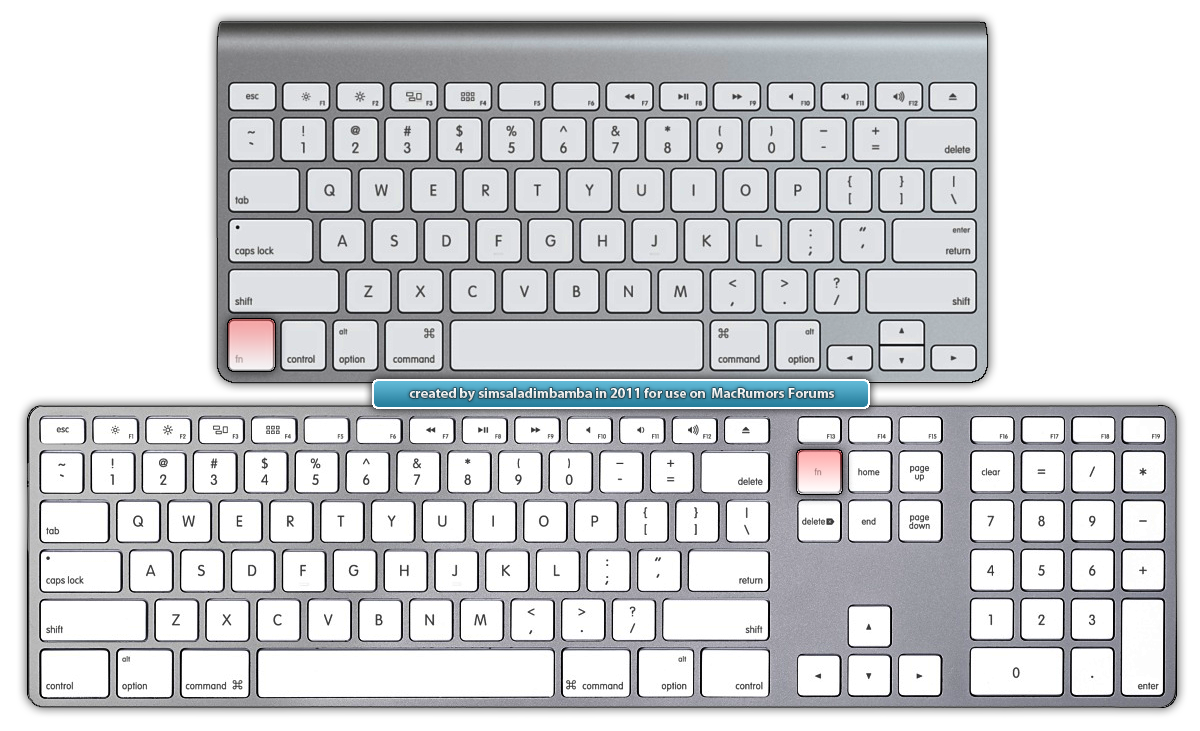
2. Is that a question or statement? If it is the former, what does "Col 1" mean? Column 1?
garycurtis
macrumors 6502
simsaladimbamba
Guest
sorry, I meant Row1, Col 1.
My keyboard is 4 years old (PPc) and doesn't have a fn key.
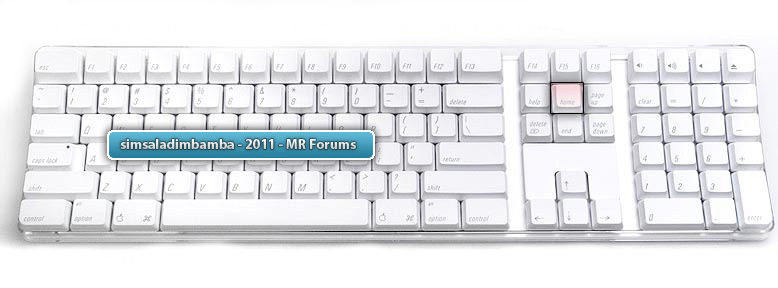
Is it this keyboard?

If so, isn't this the home key?