
Got a tip for us?
Let us know
Become a MacRumors Supporter for $50/year with no ads, ability to filter front page stories, and private forums.
Horrible Thermal Paste in Brand New MBP
- Thread starter nikhsub1
- Start date
- Sort by reaction score
You are using an out of date browser. It may not display this or other websites correctly.
You should upgrade or use an alternative browser.
You should upgrade or use an alternative browser.

swingerofbirch
macrumors 68040
To the OP, so sorry that was your first Mac experience. I hope that you let Apple have it, even though you were able to fix it yourself.
Out of curiosity, when they put so much paste on, would it necessarily stay in place? Does it set hard?
Out of curiosity, when they put so much paste on, would it necessarily stay in place? Does it set hard?
Ugh, that really is way, way too much. Makes me want to crack open my MBP and reapply the thermal paste, but I don't want to void my warranty and lose the Applecare I paid for.
For people that don't want to open their own machines, you can always complain and try to make Apple fix it for you 🙂 Good luck. I think other than this issue, the MBP is a great machine.

Thanks but it is hardly my first mac experience! Have been using Apple since 1979. Naw, I didnt let apple have it, I'm sure they are not even aware of it... maybe now they will be though. Yes it gets a bit crusty the paste they use, likely shin-etsu (very good paste BTW).To the OP, so sorry that was your first Mac experience. I hope that you let Apple have it, even though you were able to fix it yourself.
Out of curiosity, when they put so much paste on, would it necessarily stay in place? Does it set hard?

4np
macrumors 6502a
Yeah it sure looks messy and a 20 degrees difference is quite a lot as well. I remember the same discussion from the first revision MBPs; probably it's not feasible to apply proper thermal paste in the factory due to longer manufacturing times. I assume it's a tradeoff between short manufacture times and heat production.
So for the daring among us this action might help reduce the heat production. I used to use arctic silver for my desktop pc's; it contains 99.9% pure silver:
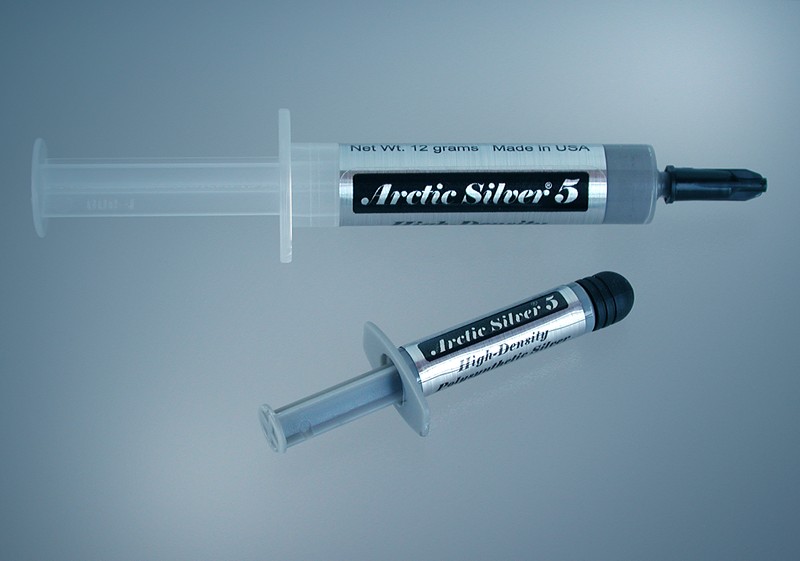
So for the daring among us this action might help reduce the heat production. I used to use arctic silver for my desktop pc's; it contains 99.9% pure silver:
Thermal Conductance:
>350,000W/m2 °C (0.001 inch layer)
Thermal Resistance:
<0.0045°C-in2/Watt (0.001 inch layer)
Average Particle Size:
<0.49 microns <0.000020 inch
Extended Temperature Limits:
Peak: 50°C to >180°C Long-Term: 50°C to 130°C
Performance:
3 to 12 degrees centigrade lower CPU full load core temperatures than standard thermal compounds or thermal pads when measured with a calibrated thermal diode imbedded in the CPU core.
Coverage Area:
Arctic Silver 5 is sold in 3.5 gram and 12 gram tubes. The 3.5 gram tube contains enough compound to cover at least 15 to 25 small CPU cores, or 6 to 10 large CPU cores, or 2 to 5 heat plates. At a layer 0.003" thick, the 3.5 gram tube will cover approximately 16 square inches.
4np
macrumors 6502a
What did you use to clean off the original thermal paste?
Rich.
You can clean it by using Acetone (commonly used as nailpolish remover) and a couple of cotton sticks.
Applying new thermal paste can easily be done by using a credit card so a real thin layer of thermal paste stays on the processors.
Read this manual for more information on applying thermal paste...
Nightkrawler
macrumors regular
Im wondering if pads like "liquid metal pad" would be better, since they are easier to handle 😕
some sites say they transport heat even better than arctic silver. Can anyone confirm this?
http://www.coollaboratory.com/en/product_metalpad.shtml
some sites say they transport heat even better than arctic silver. Can anyone confirm this?
http://www.coollaboratory.com/en/product_metalpad.shtml
4np
macrumors 6502a
Searching for the heatpipe brand in the heatsink photograph (Fujikura Pipe) I stumbled across this Flickr album of someone who also disassembled his (may 2006?) MBP. This thermal paste issue has been a topic of discussion in earlier MBP models as you can see below:
Somebody applied a bit too much thermal paste:

Welcome to hell (literally and thermo wise 😉):

Playing around with Acetone and Cotton sticks:

Applying the thermal paste the proper way:

Somebody applied a bit too much thermal paste:
Welcome to hell (literally and thermo wise 😉):
Playing around with Acetone and Cotton sticks:
Applying the thermal paste the proper way:
Im wondering if pads like "liquid metal pad" would be better, since they are easier to handle 😕
some sites say they transport heat even better than arctic silver. Can anyone confirm this?
http://www.coollaboratory.com/en/product_metalpad.shtml
I would stay away from "liquid metal" pads or thermal paste in general mainly because some of them are corrosive to aluminum and other metals. I'm not sure about that specific brand, but others can eat away at the heatsinks on desktop CPUs, and it's not really worth the risk
Well I'm a graphics guy and really have limited knowledge of the inner workings of a computer... but it totally BLOWS MY MIND that this king of shoddy work could even happen once, let alone keep happening through several generations of MBPs. I mean with all the heating issues Apple has dealt with since day 1 of these machines, why wouldn't they look at correcting this situation first as a means of rectifying the issue? Seems like the easiest fix to me...
Bunsen Burner
macrumors regular
I did this on my Core Duo machine in early-mid April, '06 (a couple of days after I received it) and it's still running strong and cool.
BB
BB

odinsride
macrumors 65816
Question for the OP - just out of curiosity, about how many screws and cables/etc did you have to remove to get the logic board out of there? Including those that had to be removed just to get to the logic board. Also, what type of screws? Philips? Torx?
I'm still considering doing this myself. The tinkering side of me is screaming YES! But the sensible side of me is saying no :/
I'm still considering doing this myself. The tinkering side of me is screaming YES! But the sensible side of me is saying no :/

brewno
macrumors 6502
I found this on the net:
http://www.powerbookmedic.com/Manuals/15-inch-macbook-pro-manual.pdf
Might be useful for those with a lot of guts. 😀
Page 16 says how to remove the logic board.
http://www.powerbookmedic.com/Manuals/15-inch-macbook-pro-manual.pdf
Might be useful for those with a lot of guts. 😀
Page 16 says how to remove the logic board.
How long did the whole process take? I'll eventually take my MBP apart when I upgrade the hard drive.
I'm still kind of scared because I don't want to end up messing a $2500 notebook up 😛
but I have done my share of watercooling and removing the IHS off cpu's just to get lower temps 😛
I'm still kind of scared because I don't want to end up messing a $2500 notebook up 😛
but I have done my share of watercooling and removing the IHS off cpu's just to get lower temps 😛
There are 10 small philips screws round the outside of the base of the machine, you can see them, 4 on each side and 2 in the back. There are 4 more long screws in the bottom, then once you remove the battery you have 4 more screws and 2 torx (size 6). Once that is done the whole top (keyboard) comes off, there is one cable from keyboard to logic board. That was the easy part. There are many small cables and wires attached to the board - the fan plugs lift UP, i gently got under them with a very small flathead and pried up. The superdrive must come out, it is 3 screws, I think torx. The fans need not come out at all. Once al cables are disconnected remove all the torx screws in the PCB of the board. You must then completely take the board out of the machine as the chips are on the underside... start on the LEFT side (by the A key) and UNDER the far left side is one cable, i believe it is power for the board, remove it. Now the board should come out. Remember that all the components on the RIGHT side are attached to the board, the DVI and firewire etc, you cant lift the board straight up, you need to get it out at an angle.Question for the OP - just out of curiosity, about how many screws and cables/etc did you have to remove to get the logic board out of there? Including those that had to be removed just to get to the logic board. Also, what type of screws? Philips? Torx?
I'm still considering doing this myself. The tinkering side of me is screaming YES! But the sensible side of me is saying no :/
The process took about 2-3 hours but I took my time (as anyone should because the first time there is a learning curve). If I did it again I could do it much quicker as I know exactly what to do now.How long did the whole process take? I'll eventually take my MBP apart when I upgrade the hard drive.
I'm still kind of scared because I don't want to end up messing a $2500 notebook up 😛
but I have done my share of watercooling and removing the IHS off cpu's just to get lower temps 😛
As someone who worked as a Mac Genius for longer than I'd like to admit, speculation like this bugs me quite a bit. There is no doubt that applying Arctic Silver 5 by hand is going to lower your idle temp somewhat. The same is true for practically any mass produced computer. I can tell you from experience, however, that in most situations it's not going to be worth tearing the machine apart. Maybe a couple degrees. The guy that started this whole rumor with his thread about the first MBPs didn't plug in a temp sensor on the underside of the board when he reassembled it, so his fans ran all the time. Of course it's going to be cooler if the fans are running more.
We would "dev null" these machines for an hour on a hard desktop (running memtest simultaneously, no less) and they would never get excessively hot on the underside and would never settle at a temp higher than the normal operating temp for the processor. There were maybe 2 or 3 exceptions out of 100. I don't call that bad QC. I guess what I'm saying is that these days one person on the internet has a legitimate issue with their machine, but it easily snowballs into a large number of people thinking they have an issue as well. It's a frustrating thing to deal with from the other end, I assure you.
We would "dev null" these machines for an hour on a hard desktop (running memtest simultaneously, no less) and they would never get excessively hot on the underside and would never settle at a temp higher than the normal operating temp for the processor. There were maybe 2 or 3 exceptions out of 100. I don't call that bad QC. I guess what I'm saying is that these days one person on the internet has a legitimate issue with their machine, but it easily snowballs into a large number of people thinking they have an issue as well. It's a frustrating thing to deal with from the other end, I assure you.
I can tell you from experience, however, that in most situations it's not going to be worth tearing the machine apart. Maybe a couple degrees. The guy that started this whole rumor with his thread about the first MBPs didn't plug in a temp sensor on the underside of the board when he reassembled it, so his fans ran all the time. Of course it's going to be cooler if the fans are running more.
I will agree that for every 'bad apple' there are going to be 'good apple' counterexamples. MBPs are in generally a really awesome product. But the original poster seemed to have a really fair test (can't blame it on a fan setting) and pretty significant improvement.
somestuff, I truly can appreciate the work that you do, as I am in the same line of work. I know that this issue CAN become a nightmare for you - I hope it does not and this was not my intention. What I hope can come from all of this is perhaps some better QC with the thermal paste application. Don't think for a SECOND that mine is the only one like this! In my particular case there was an abnormal amount of paste - seriously it is a disgrace really. My original estimate of 40x too much paste could possibly be doubled to 80x too much. I am attaching the SAME picture that I did in my OP but this time i didnt shrink it, i left it at actual image size, I just cropped it. Have a look at how much paste is actually ON THE CHIPS never mind the excess around them.

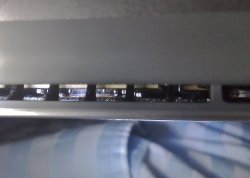
From looking in the back of my C2D MBP i am worried that it may have too much thermal paste. It'd be really helpful if someone would look at this pic and tell me if there is too much. My suspicion is that there is a little too much but not loads (the pic is of the middle chip and the other two have a tiny bit more on them.)
sorry the pic is bad, its not easy to get a pic through the vents.
thanks in advance,
hugo
sorry the pic is bad, its not easy to get a pic through the vents.
thanks in advance,
hugo
Attachments

UltraNEO*
macrumors 601
Haha.. we both broke into our macs for a different reason.. but here's my photos,
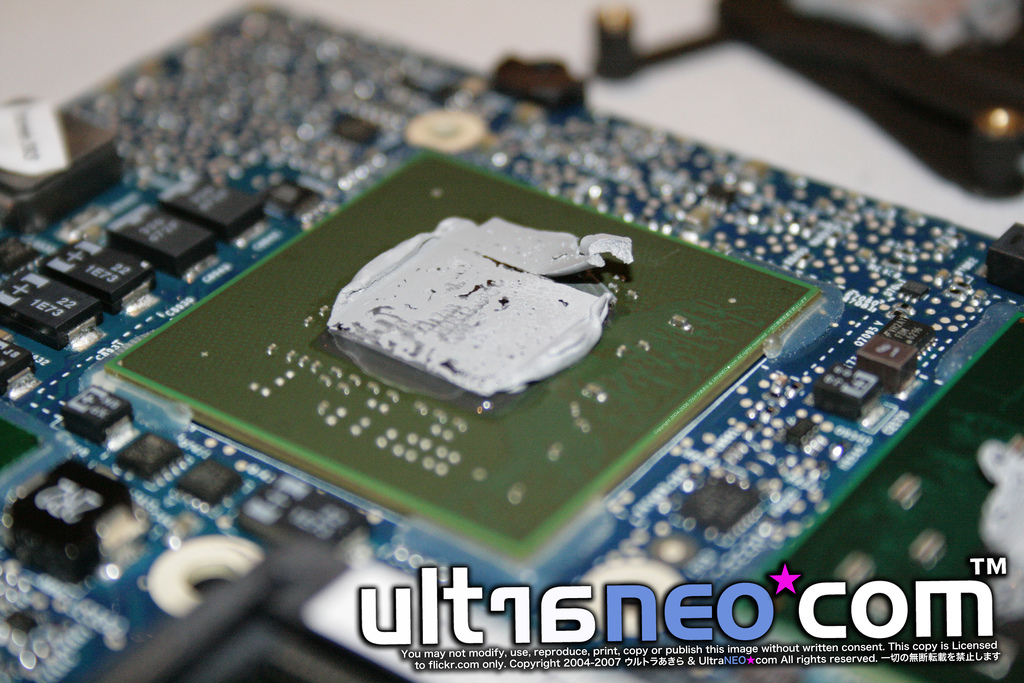
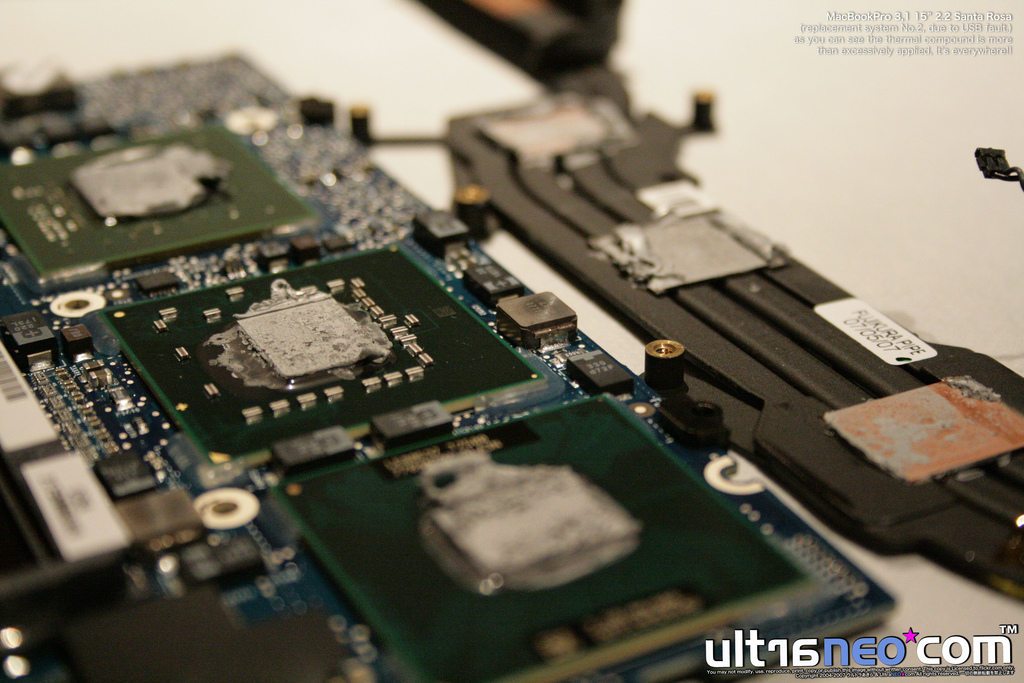
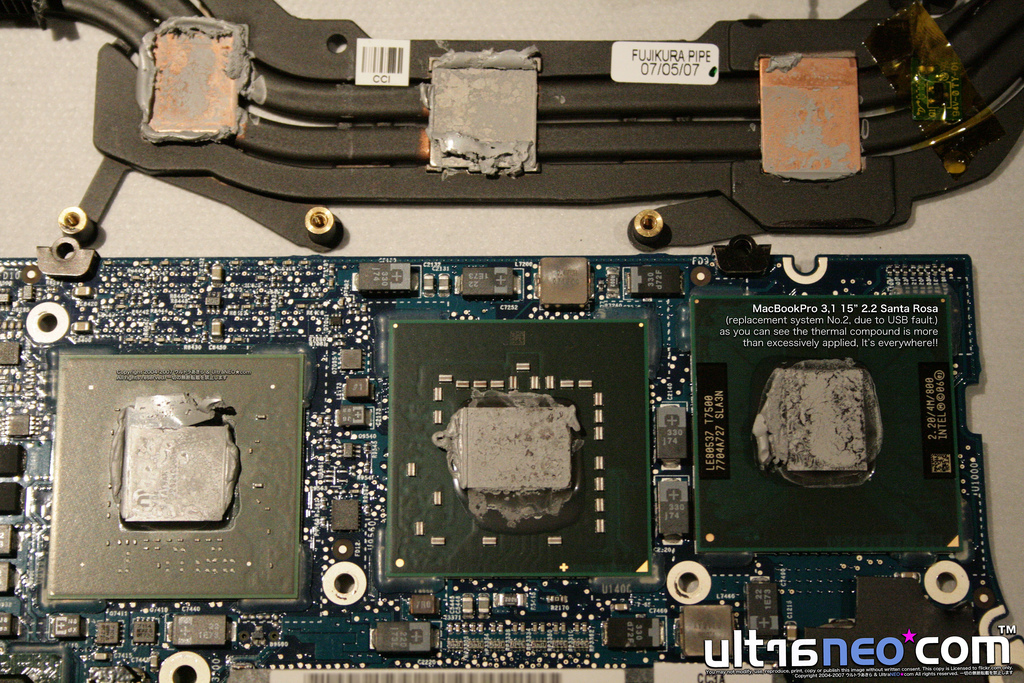
Lots more here:
http://flickr.com/photos/ultraneo/sets/72157600394244303/
P.S: If you like to use my photos, please send me a flickr mail first.
It's polite to ask first and please link me. Unlike those rude sites.
Lots more here:
http://flickr.com/photos/ultraneo/sets/72157600394244303/
P.S: If you like to use my photos, please send me a flickr mail first.
It's polite to ask first and please link me. Unlike those rude sites.
So what's the normal operating temperature for the processor and the GPU? Enlighten us please.As someone who worked as a Mac Genius for longer than I'd like to admit, speculation like this bugs me quite a bit.
I just popped open the top of the case to do some scouting (that was easy enough). I was totally freaked out by the number of connectors on the logic board. There is a whole pile of that yellow tape (at least different 4 widths used). Any advice as to how to remove all the connectors? Any special tools?
P.S. The odd side effect of the top removal is that now I see a half dozen more wifi networks that I couldn't before. Go figure.
P.S. The odd side effect of the top removal is that now I see a half dozen more wifi networks that I couldn't before. Go figure.
i'd also like to point out that it seems like running PowerPC programs (as opposed to Universal Binaries) will run up the CPU temp very quickly.
i played Bejeweled! and my cpu temp shot up to 72 (from roughly 60 degrees)
(but Office 2004 didn't change a thing, though)
just something to think about
i played Bejeweled! and my cpu temp shot up to 72 (from roughly 60 degrees)
(but Office 2004 didn't change a thing, though)
just something to think about
Any one of you noted the chipset marking on NB?
@UltraNEO*, nikhsub1 or anyone who reapplied thermal paste on SR MBP, have you noted down the chipset marking on NB? If Apple uses the 965GM, it will be slightly hotter than 965PM due to the default TDP. You can also obtain the reading from Intel Chipset Tool or CPU-Z.
@UltraNEO*, nikhsub1 or anyone who reapplied thermal paste on SR MBP, have you noted down the chipset marking on NB? If Apple uses the 965GM, it will be slightly hotter than 965PM due to the default TDP. You can also obtain the reading from Intel Chipset Tool or CPU-Z.