
Got a tip for us?
Let us know
Become a MacRumors Supporter for $50/year with no ads, ability to filter front page stories, and private forums.
How can I turn off the 'Other' user login in High Sierra GM?
- Thread starter aide199
- Start date
- Sort by reaction score
You are using an out of date browser. It may not display this or other websites correctly.
You should upgrade or use an alternative browser.
You should upgrade or use an alternative browser.
petterihiisila
macrumors 6502
Can anyone please tell me how I can turn off the 'Other' user login at startup on High Sierra GM.
The "Other" entry available on login screen often means that the root account has somehow become enabled. Normally it should be disabled. You'll find the enable/disable toggle by following this: https://support.apple.com/en-us/HT204012


macrlz9
macrumors 6502a
This is weird, I can't get rid of this duplicated Guest User. Instructions to enable/disable root user doesn't work.
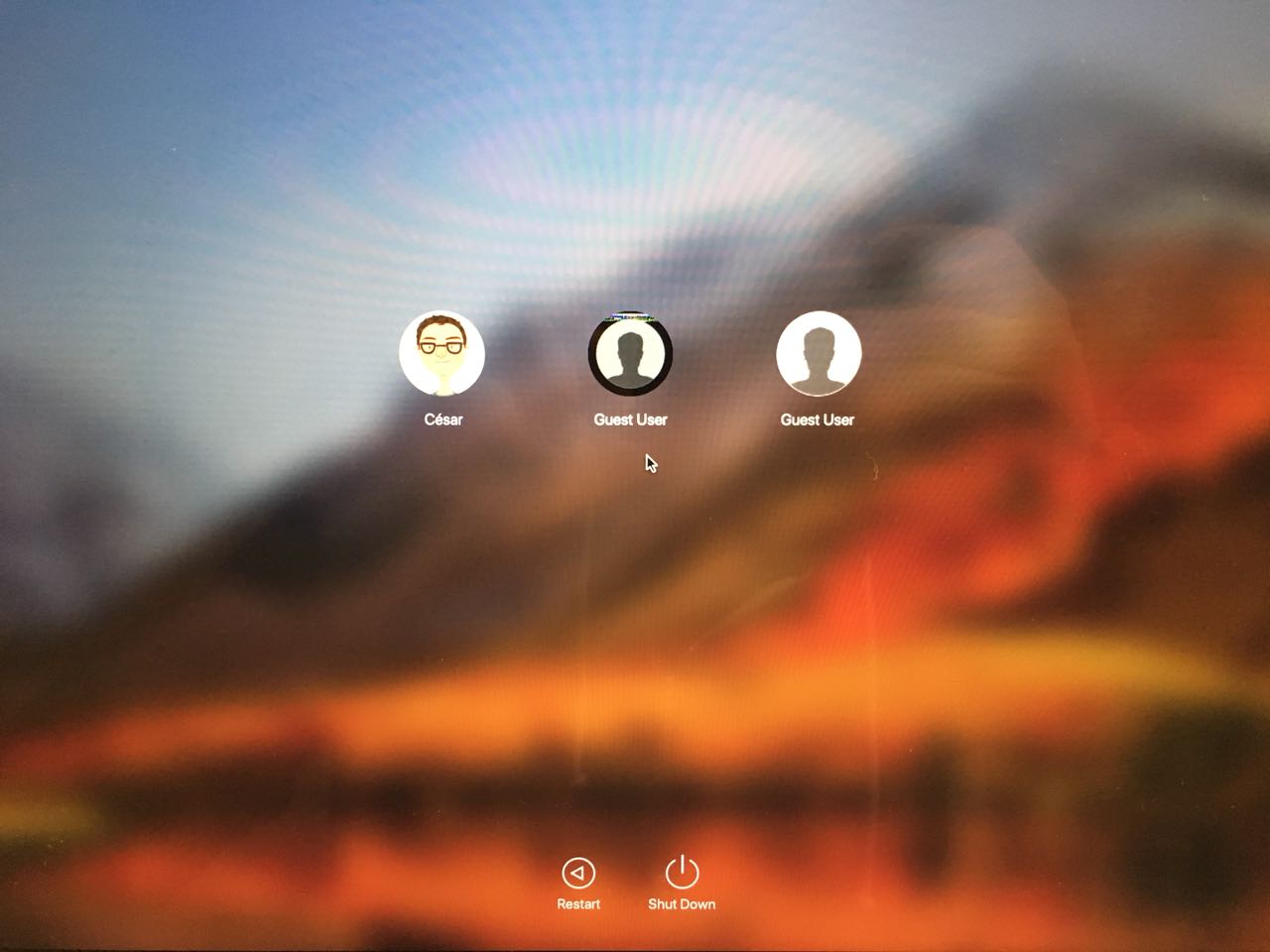
This is my exact issue! Graphical glitch on the icon as well.

caesarius
macrumors newbie
Currently I'm following the instructions found here: https://discussions.apple.com/thread/7252923?language=en
Decryption process takes ages to complete, I'll post the results once I finish the process.
Decryption process takes ages to complete, I'll post the results once I finish the process.

GoncaloCdM
macrumors newbie
I'm experiencing the exact same issue:
• TWO “Guest” users on the login screen (the 1st being the one protected with password and that bugged “avatar” image; the 2nd being the regular guest user) — this is still UNDER INVESTIGATION.
• A “Disk Password” user (with a circularly cropped “avatar” image) — which is a KNOWN ISSUE and is expected to be fixed on a future macOS update coming soon.
• A fifth login option: “Other” — which is ALSO a KNOWN ISSUE and, according to Apple Care, is expected to be fixed on a future update coming soon.
I have tried the following with no success:
• Disabling FileVault.
• Re-enabling FileVault.
• Reformatting my MacBook Pro using APFS (Non-Encrypted) and reinstalling macOS High Sierra without enabling FileVault.
• Reformatting my MacBook Pro using APFS (Encrypted) and reinstalling macOS High Sierra with FileVault enabled.
• Reformatting my MacBook Pro using APFS (Encrypted) and reinstalling macOS High Sierra without enabling FileVault.
Considering NONE of the above solved the problem, the issue has been escalated for further investigation by Apple Engineers as we assume this is a software problem with High Sierra.
Please don't waste your time repeating these procedures. They are very time consuming and you'll not solve the problem whatsoever.
• TWO “Guest” users on the login screen (the 1st being the one protected with password and that bugged “avatar” image; the 2nd being the regular guest user) — this is still UNDER INVESTIGATION.
• A “Disk Password” user (with a circularly cropped “avatar” image) — which is a KNOWN ISSUE and is expected to be fixed on a future macOS update coming soon.
• A fifth login option: “Other” — which is ALSO a KNOWN ISSUE and, according to Apple Care, is expected to be fixed on a future update coming soon.
I have tried the following with no success:
• Disabling FileVault.
• Re-enabling FileVault.
• Reformatting my MacBook Pro using APFS (Non-Encrypted) and reinstalling macOS High Sierra without enabling FileVault.
• Reformatting my MacBook Pro using APFS (Encrypted) and reinstalling macOS High Sierra with FileVault enabled.
• Reformatting my MacBook Pro using APFS (Encrypted) and reinstalling macOS High Sierra without enabling FileVault.
Considering NONE of the above solved the problem, the issue has been escalated for further investigation by Apple Engineers as we assume this is a software problem with High Sierra.
Please don't waste your time repeating these procedures. They are very time consuming and you'll not solve the problem whatsoever.

SaSaSushi
macrumors 601
Considering NONE of the above solved the problem, the issue has been escalated for further investigation by Apple Engineers as we assume this is a software problem with High Sierra.
Please don't waste your time repeating these procedures. They are very time consuming and you'll not solve the problem whatsoever.
The Disk Password user issue has been positively connected to installing High Sierra to APFS Encrypted volumes by some users and they have have reported the issue resolved by installing to a non-encrypted volume and then enabling FileVault.
I'm sorry to hear about your experiences. Have you tried formatting the volume as HFS+ and then letting High Sierra do the conversion in the install as it is designed to?
These issues also do not occur with High Sierra upgrades (FileVault enabled or otherwise).
Last edited:
sequential
Cancelled
I just want to say that I'm having the same problem. It's something with FileVault because I also disabled FileVault (and waited hours for it to decrypt), restarted and then guest account was gone. I did another reboot, logged in and waited hrs for it to encrypt again just to find it it back (while still disabled) on another reboot... I'm on a clean install on a mbp 2017... beta software...
edit: the following command in terminal found in another thread seemed to have solved it for me.
dscl localhost delete /Local/Default/Users/Guest
edit: the following command in terminal found in another thread seemed to have solved it for me.
dscl localhost delete /Local/Default/Users/Guest
Last edited:

ipodlover77
macrumors 65816
Put me down for the same issue. A "other user" option is shown in my login screen. File encryption has always been set to off for me though.
The "other user" for me is because the root user is enabled by High Sierra install somehow. I turned it off again with command "dsenableroot -d" and it's gone.

mhoutman
macrumors 6502
This happened with me too after a PRAM reset
With 10.12 and earlier I only had to enable 'Find my Mac' en disable 'Allow guests to log in to this computer' to see any other user with start up.
With 10.13 the Other Users comes as an extra, one cannot get rid off (toggling isable 'Allow guests to log in to this computer' doe snot help.
With 10.12 and earlier I only had to enable 'Find my Mac' en disable 'Allow guests to log in to this computer' to see any other user with start up.
With 10.13 the Other Users comes as an extra, one cannot get rid off (toggling isable 'Allow guests to log in to this computer' doe snot help.
I just want to say that I'm having the same problem. It's something with FileVault because I also disabled FileVault (and waited hours for it to decrypt), restarted and then guest account was gone. I did another reboot, logged in and waited hrs for it to encrypt again just to find it it back (while still disabled) on another reboot... I'm on a clean install on a mbp 2017... beta software...
edit: the following command in terminal found in another thread seemed to have solved it for me.
dscl localhost delete /Local/Default/Users/Guest
Thank you!!! However, you must first enable the root account using the instructions here: https://support.apple.com/en-us/HT204012, log out of the admin account, log in with the newly enabled root account, open terminal, VERY CAREFULLY enter "dscl localhost delete /Local/Default/Users/Guest" exactly (without the quotation marks), log out of root, DISABLE the root account using the reverse procedure above, and all is good in the High Sierra world again regarding the ghost guest account with the artifact icon.
[doublepost=1506842992][/doublepost]
You must enable root user, log in as root, and type "dscl localhost delete /Local/Default/Users/Guest" without quotes in terminal using my instructions in another reply to fix this annoying issue that I also had. Remember to disable the root account when done.This is weird, I can't get rid of this duplicated Guest User. Instructions to enable/disable root user doesn't work.

alejoid
macrumors newbie
This work for me, disable root account in Directory Utility (search in Spotlight)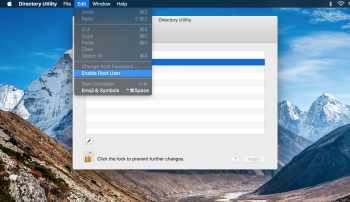 , restart and done!
, restart and done!
thiskiwicanfly
macrumors member
This is weird, I can't get rid of this duplicated Guest User. Instructions to enable/disable root user doesn't work.
Same here! I see you managed to fix it by turning off FileVault (in your later post) - did they reappear when you turned FileVault back on?
[doublepost=1506928306][/doublepost]
I'm experiencing the exact same issue:
• TWO “Guest” users on the login screen (the 1st being the one protected with password and that bugged “avatar” image; the 2nd being the regular guest user) — this is still UNDER INVESTIGATION.
• A “Disk Password” user (with a circularly cropped “avatar” image) — which is a KNOWN ISSUE and is expected to be fixed on a future macOS update coming soon.
• A fifth login option: “Other” — which is ALSO a KNOWN ISSUE and, according to Apple Care, is expected to be fixed on a future update coming soon.
I have tried the following with no success:
• Disabling FileVault.
• Re-enabling FileVault.
• Reformatting my MacBook Pro using APFS (Non-Encrypted) and reinstalling macOS High Sierra without enabling FileVault.
• Reformatting my MacBook Pro using APFS (Encrypted) and reinstalling macOS High Sierra with FileVault enabled.
• Reformatting my MacBook Pro using APFS (Encrypted) and reinstalling macOS High Sierra without enabling FileVault.
Considering NONE of the above solved the problem, the issue has been escalated for further investigation by Apple Engineers as we assume this is a software problem with High Sierra.
Please don't waste your time repeating these procedures. They are very time consuming and you'll not solve the problem whatsoever.
Wow after you trying all that and still not resolving it!!! I can be certain there's no point trying any of that for myself. I think I'll wait for a High Sierra update to fix this.

Smoovejayy
Cancelled
I just got off the phone with Apple and they suggested running this command in terminal: sudo fdesetup remove -user Guest. It will then ask for the administrator password. Afterward, reboot your machine and the account should be gone. It was gone from my 2017 MacBook Pro and another 2016 MacBook Pro.
Edit: They are still looking into this issue and will provide an update to remedy, but for now they suggested users should just run that command.
Edit: They are still looking into this issue and will provide an update to remedy, but for now they suggested users should just run that command.

cubbie5150
macrumors 6502a
I just got off the phone with Apple and they suggested running this command in terminal: sudo fdesetup remove -user Guest. It will then ask for the administrator password. Afterward, reboot your machine and the account should be gone. It was gone from my 2017 MacBook Pro and another 2016 MacBook Pro.
Edit: They are still looking into this issue and will provide an update to remedy, but for now they suggested users should just run that command.
Nice!!! Thanks for sharing this. It fixed things for me.

SachaKama
macrumors newbie
Gone! Thank you STQ - it took me 10 seconds with your command line. If like me you didn't use encryption, you just use the command line and your "other" at login will be gone because you have properly, and without clicking a hundred times, de-activated "root".The "other user" for me is because the root user is enabled by High Sierra install somehow. I turned it off again with command "dsenableroot -d" and it's gone.
I just got off the phone with Apple and they suggested running this command in terminal: sudo fdesetup remove -user Guest. It will then ask for the administrator password. Afterward, reboot your machine and the account should be gone. It was gone from my 2017 MacBook Pro and another 2016 MacBook Pro.
Edit: They are still looking into this issue and will provide an update to remedy, but for now they suggested users should just run that command.
this ! ! !
worked. best advice of all.
in terminal:
sudo fdesetup remove -user Guest
thanks
Thank you. This was driving me absolutely insane. Disabling the root account made this "Other" account go away.The "Other" entry available on login screen often means that the root account has somehow become enabled. Normally it should be disabled. You'll find the enable/disable toggle by following this: https://support.apple.com/en-us/HT204012

AetherMass
macrumors newbie
I just got off the phone with Apple and they suggested running this command in terminal: sudo fdesetup remove -user Guest. It will then ask for the administrator password. Afterward, reboot your machine and the account should be gone. It was gone from my 2017 MacBook Pro and another 2016 MacBook Pro.
Edit: They are still looking into this issue and will provide an update to remedy, but for now they suggested users should just run that command.
Thank you. Quick Fix. This was triggering my OCD =)