Become a MacRumors Supporter for $50/year with no ads, ability to filter front page stories, and private forums.

mr.jerffrey

macrumors newbie
Original poster
I tried logging out but I'm still getting little pop up messages from MacRumors. I find it disruptive. If I want to learn what's going on I will log on to this site-- I don't want these messages popping up on my desktop daily. Can someone -- perhaps a Moderator -- explain hot to disable this function?

Thanks
 
do you mean the notifications that flash player needs to be updated?

If so then you can change the settings in System Preferences > Flash Player, and set it to either install updates automatically or ignore them.
 
I tried logging out but I'm still getting little pop up messages from MacRumors. I find it disruptive. If I want to learn what's going on I will log on to this site-- I don't want these messages popping up on my desktop daily. Can someone -- perhaps a Moderator -- explain hot to disable this function?

Thanks

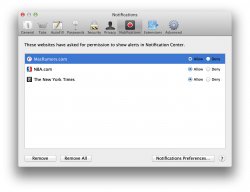
Go to Safari -> Preferences -> Notifications

And "Deny" from MacRumors.com
 

Attachments

  • Screen Shot 2014-01-14 at 10.02.44 AM.jpg
    Screen Shot 2014-01-14 at 10.02.44 AM.jpg
    186.2 KB · Views: 155
Register on MacRumors! This sidebar will go away, and you'll see fewer ads.