Become a MacRumors Supporter for $50/year with no ads, ability to filter front page stories, and private forums.
yes, an edid editor would probably work but I don't look forward to having to carry an extra piece of HW just for the "just in case".
I guess I'm still not ready to leave my Windows laptop at home 🙂

If someone has some clues on how to force a different resolution via BetterDisplay, please let me know!
 
Try SwitchResX which is simpler than BetterDisplay. Add custom modes for the lower resolutions if the modes are not automatically created for you.
https://www.madrau.com/usage/custom

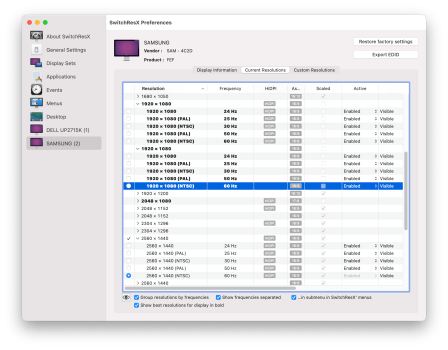
In the current resolutions list, it should show which modes are scaled or not scaled, and which modes are HiDPI or not HiDPI (low resolution). You want a non-scaled non-HiDPI (low resolution) 1920x1080 mode as I've high-lighted in the attached screenshot.
The HiDPI mode outputs 3840x2160. It is not scaled (the TV is 4K) but HiDPI has twice as many pixels vertically and horizontally.
HDMI 1080p list.png

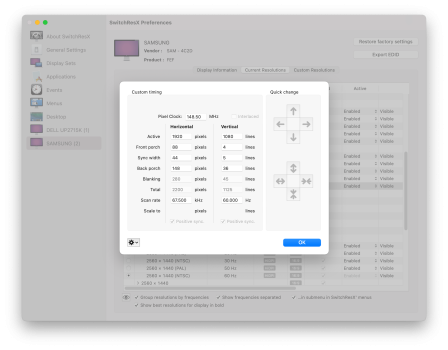
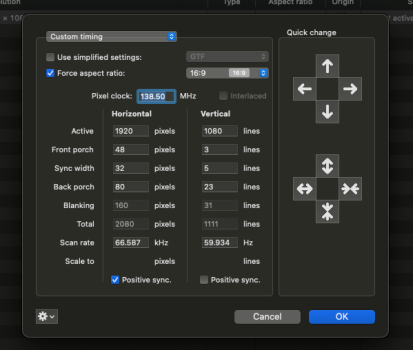
Double-click the resolution to verify the timing. HDMI 1080p is supposed to be 148.5 MHz (half of 297 MHz for 4K30 which is half of 594 MHz for 4K60).
HDMI 1080p timing.png

I haven't tried this on an Apple Silicon Mac. Post some pictures if you see something different.
 
  • Like
Reactions: rb2112 and SpotOnT
Thanks @joevt

That worked!

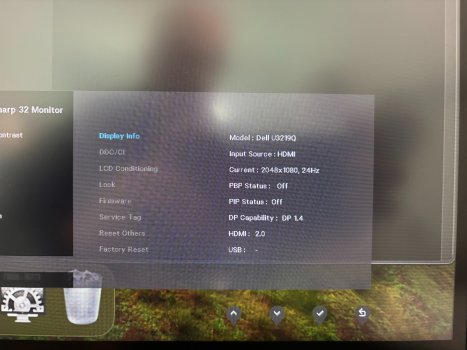
For the first time my monitor received a non-native resolution!

IMG_0506.jpeg

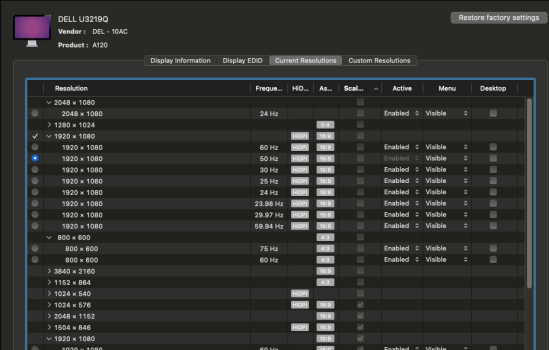
Can I add a specific resolution? I don't need to do any changes on my current setup but I see that there are very few "non scaled/non HiDPI" resolutions and 1920x1080 is not one of them.

I'd imagine if I ever needed to send a non-native resolution to something it's going to be one of the standard ones.

SCR-20260517-jltu.png

Finally, does anybody know if this could be done with BetterDisplay? Just trying to optimise the amount of apps running, that's it!

Thanks so much!
 
  • Like
Reactions: ignatius345
Can I add a specific resolution? I don't need to do any changes on my current setup but I see that there are very few "non scaled/non HiDPI" resolutions and 1920x1080 is not one of them.
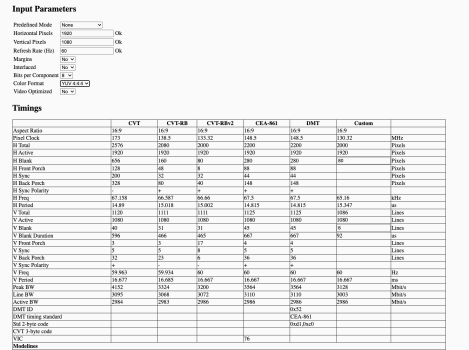
Add modes (scaled or not scaled) using the Custom Resolutions tab in SwitchResX. Select CVT-RB to calculate the timing parameters for a resolution/refresh rate combo. Or look up the timing parameters for the mode you want and enter them manually. CVT-RB is not the same as HDMI but most HDMI displays can accept CVT-RB timings. CVT-RB2 allows for slightly higher pixel clocks by reducing the blanking periods even further than CVT-RB. HDMI has rather large blanking periods.

I'd imagine if I ever needed to send a non-native resolution to something it's going to be one of the standard ones.
It doesn't need to be a standard mode.

You should enable the "Show best resolutions for display in bold" option in SwitchResX for each display. These are usually the non-scaled modes (HiDPI and non-HiDPI) which match a mode defined in the display's EDID. SwitchResX Custom Resolutions works by adding modes to an override EDID stored in a file in the /Library/Displays/Contents/Resources/Overrides folder.

Finally, does anybody know if this could be done with BetterDisplay? Just trying to optimise the amount of apps running, that's it!
I don't know. I use BetterDisplay for DDC stuff and SwitchResX for display mode stuff.
 
  • Like
Reactions: rb2112
It doesn't need to be a standard mode.

Thanks
What I meant was "I will probably only need to run standard resolutions" if I ever needed to. Force 1080p and things like that. Nothing crazy.

I tried adding a 1080p resolution following a calculator I found online but it seems to be invalid. What am I doing wrong?
 

Attachments

  • SCR-20260517-tbcz.png
    SCR-20260517-tbcz.png
    170.5 KB · Views: 24
  • SCR-20260517-tact.png
    SCR-20260517-tact.png
    97.4 KB · Views: 20
What I meant was "I will probably only need to run standard resolutions" if I ever needed to. Force 1080p and things like that. Nothing crazy.
So the 1080p60 resolution existed in SwitchResX without you having to create it because it is a standard mode included in the EDID of the display.

I tried adding a 1080p resolution following a calculator I found online but it seems to be invalid. What am I doing wrong?
It appears that you are creating a CVT-RB version of the 1080p60 mode. It looks like you entered everything correctly.
I'm not sure what you mean by invalid.
You press tab to tab out of the current edit field, click OK, press Command-S to save the changes (applies the custom timings to the display override file).
Then click "Activate Immediately" to have the system reload the overrides. Or disconnect the display, wait a couple seconds, and reconnect.

SwitchResX has a built-in CVT-RB calculator that should produce the same result.
Select "Use simplified settings", and select CVT-RB from the corresponding menu. Enter 1980 for the Active horizontal width. Enter 1080 for the Active vertical lines. Enter 60 for the vertical scan rate Hz.
All the other values are calculated for you.

If the system doesn't accept a timing, maybe it's because a similar timing already exists, such as the built-in 1080p60 mode from the display's original EDID? I'm not sure how Apple Silicon chooses what modes to keep.
You may wish to experiment with a custom resolution that doesn't exist in the Current Resolutions list to verify that the Custom Resolutions feature is working in SwitchResX on Apple Silicon.
You could also try a 1080p mode with a refresh rate that doesn't exist in the Current Resolutions list.
 
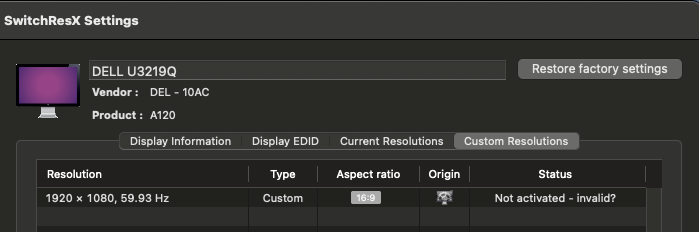
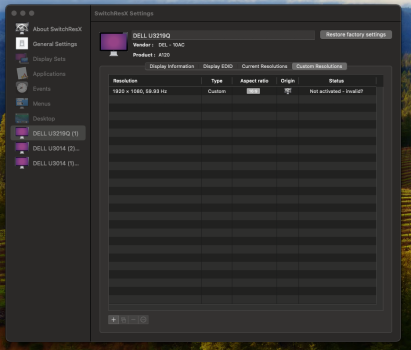
With "invalid" I mean this:

Ok. That means the system isn't adding it to the list of current resolutions. Did you try all of these?
1) Click "Activate Immediately" to have the system reload the overrides.
2) Disconnect the display, wait a couple seconds, and reconnect.
3) Restart.
Try creating a mode that is more different than existing modes (change refresh rate or resolution enough that the OS doesn't think they're too similar).
 
I cannot find an "Activate immediately" option?
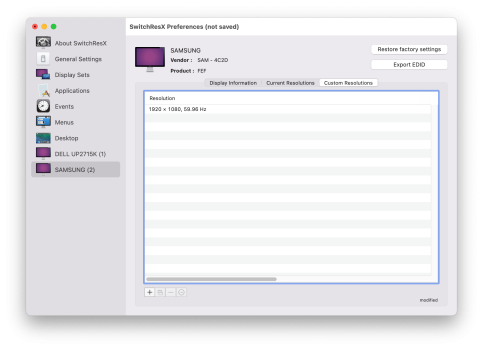
When you make changes to Custom Resolutions, SwitchResX says "modified".
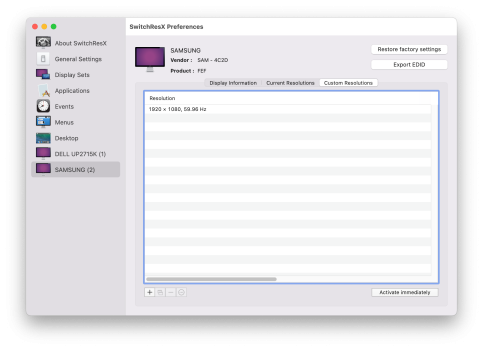
SwitchResX modified.png

Press Command-S to save the changes.
Then the "Activate Immediately" button appears.
SwitchResX saved.png

I'm not sure if it's the same with Apple Silicon. If not, then you have the other methods to try (reconnect the display or restart).
 
I used SwitchResX to send 1920x1080 to my 27" 4K Alienware 360Hz display (it was a gaming "dual" display so I could set the display itself to 1920x1080). I was using my 2019 Intel MBP with Vega 20 GPU and was hoping it wouldn't heat up so much if it just sent 1920x1080 worth of data to the display. Even when I switched the display's settings to 1920x1080 on the display, the MBP still recognized it as 4K. SwitchResX fixed that hurdle. But I found that the scaling macOS did (displaying 1920x1080 on 4K) was smoother and better than the pixelated mess that resulted from using the Alienware's onboard settings. Don't know what my point was in sharing this story, lol. I now have an M5 Pro with ASD and no more issues and loving 5K.
 
@joevt

I don't see that I'm afraid. Maybe it's because of the "invalid" tag?
 

Attachments

  • SCR-20260519-jgex.png
    SCR-20260519-jgex.png
    233.6 KB · Views: 0
Register on MacRumors! This sidebar will go away, and you'll see fewer ads.