
Got a tip for us?
Let us know
Become a MacRumors Supporter for $50/year with no ads, ability to filter front page stories, and private forums.
How to fix my split Fusion Drive (iMac) using Mojave
- Thread starter lawful
- Start date
- Sort by reaction score
You are using an out of date browser. It may not display this or other websites correctly.
You should upgrade or use an alternative browser.
You should upgrade or use an alternative browser.

casperes1996
macrumors 604
What drive or drives did the technician install? I ask because I think there is only one physical drive shown there.
Look at the screenshot up in post #19 and see where it shows two "physical" drives there? I'm not seeing that with yours.
Good point; That is rather curious. Hadn't even spotted that.
I've PM'ed Ellie some instructions but that is an interesting curiosity; But then in Ellie's case, what is /dev/disk1? Cause aside from it not being listed as "Physical" it otherwise looks like an independant hardware drive.


Not sure and that is why I asked the follow up. I am also suspicious the reset Fusion command seems to only see one physical drive.But then in Ellie's case, what is /dev/disk1?
casperes1996
macrumors 604
Not sure and that is why I asked the follow up. I am also suspicious the reset Fusion command seems to only see one physical drive.
Right but resetFusion is known to not always work with disks that didn't come as a Fusion to begin with. If the IDs of the drives just don't clearly identify them as a pair of Solid State and rotational.
Told Ellie to use the diskutil ap createContainer -main <disk> -secondary <disk>
to manually specify SSD and HDD, but yeah it's a little weird that it's not labelled as physical. But it also is clearly not a synthesised container or anything, it's a disk that holds a container of its own and its internal. Bit odd, but I guess we'll find out 🙂
Diegosan12346
macrumors newbie
Can you help with a problem im having with my 2017 mac i used bootcamp and idk what happened but now i think the drives are messed up i dont know what to do since im not good with this type of stuff this is how my disk utility looks if that gives you an ideo of whats wrongNot sure and that is why I asked the follow up. I am also suspicious the reset Fusion command seems to only see one physical drive.
Can you help with a problem im having with my 2017 mac i used bootcamp and idk what happened but now i think the drives are messed up i dont know what to do since im not good with this type of stuff this is how my disk utility looks if that gives you an ideo of whats wrong.
Open Terminal and run each of the commands below, then tell me the output of both.
Code:
diskutil cs list

diskutil list
Also, what version of macOS are you on?
Diegosan12346
macrumors newbie
Thats what i got and idk what macos im on i tried to download the macos in the recovery and it didnt work so idk before it got messed up i was on catalinaOpen Terminal and run each of the commands below, then tell me the output of both.
Code:diskutil cs list diskutil list
Also, what version of macOS are you on?
Last edited:
Thats what i got and idk what macos im on i tried to download the macos in the recovery and it didnt work so idk before it got messed up i was on catalina
How to fix a split Fusion Drive - Apple Support
If your Fusion Drive appears as two drives instead of one in the Finder, it's no longer working as a Fusion Drive. Here's how to fix it.
Try this... reboot then hold command-option-r to get to Internet recovery. You should see a spinning grey globe while it downloads. Once in recovery, run the command below in Terminal. That should rebuild the Fusion drive. Once that is done, close Terminal and reinstall the OS.
Code:
diskutil resetFusionObviously, this will wipe any data that was there, so make sure you have a backup.
Diegosan12346
macrumors newbie
It worked, thank you for the help I guess all i had to do was do command option r and that made it so resetfusion worksHow to fix a split Fusion Drive - Apple Support
If your Fusion Drive appears as two drives instead of one in the Finder, it's no longer working as a Fusion Drive. Here's how to fix it.support.apple.com
Try this... reboot then hold command-option-r to get to Internet recovery. You should see a spinning grey globe while it downloads. Once in recovery, run the command below in Terminal. That should rebuild the Fusion drive. Once that is done, close Terminal and reinstall the OS.
Code:diskutil resetFusion
Obviously, this will wipe any data that was there, so make sure you have a backup.
Diegosan12346
macrumors newbie
I am having a problem with my windows partition again yesterday i was using windows it was working fine i turn off my computer to go to bed today i try to turn it on hold alt to open the windows drive but it doesnt work do you know whats happening or if i can fix itHow to fix a split Fusion Drive - Apple Support
If your Fusion Drive appears as two drives instead of one in the Finder, it's no longer working as a Fusion Drive. Here's how to fix it.
Try this... reboot then hold command-option-r to get to Internet recovery. You should see a spinning grey globe while it downloads. Once in recovery, run the command below in Terminal. That should rebuild the Fusion drive. Once that is done, close Terminal and reinstall the OS.
Code:diskutil resetFusion
Obviously, this will wipe any data that was there, so make sure you have a backup.
casperes1996
macrumors 604
I am having a problem with my windows partition again yesterday i was using windows it was working fine i turn off my computer to go to bed today i try to turn it on hold alt to open the windows drive but it doesnt work do you know whats happening or if i can fix it
Can be many explanations. What exactly do you mean with "it doesn't work"? Do you not see the boot-picker at all, or do you get to it, but Windows is not on the list anymore?
If it is the latter, I would assume it is a partition table issue - Bootcamp creates a hybrid MBR table inside the GPT to which Windows is installed - however, MBR is limited to 3 volumes, so if Windows update or something attempts to add an extra volume it can go wrong, since Apple already maps its Macintosh HD volume into the hybrid MBR (at least they used to when it was HFS+ - haven't checked if they still do now that there's no reading it from within Windws) and something else I've forgotten as well. - Last time I dealt with this I had to use GDisk to rewrite the partition tables, recreating the MBR pointers to only point to the Windows and Macintosh HD volumes
If the former, try with a wired keyboard

Hi there!
I know this is an old thread but I have a similar issue. Made a new account cause I'm stumped. "diskutil resetFusion" didn't work and tried doing other fixes I found on google. I've backed everything up already so I'm ok with wiping the entire drive.
I'm on the latest version of Big Sur.
I know this is an old thread but I have a similar issue. Made a new account cause I'm stumped. "diskutil resetFusion" didn't work and tried doing other fixes I found on google. I've backed everything up already so I'm ok with wiping the entire drive.
I'm on the latest version of Big Sur.
Attachments
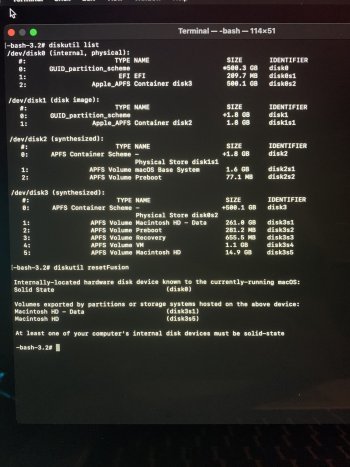
Unless I am missing something, all I see there is a 500GB hard drive and I don't think you ever had a Fusion drive.
Can you explain what happened to cause you to do this and what you have done so far. Also the model and tear Mac you have.
I have a 2014 MacBook Pro. I upgraded to Catalina but my main program that I use for video editing wouldn't launch (I know, stupid of me). So I downgraded to High Sierra, at this point is when my fusion drive was split. I used it for months like this just cause I needed to do some video editing and had no time to troubleshoot this. I ended up forgetting about the split completely but now I'm running out of space so here we are. I ended up getting a new version of my editing software so I decided to upgrade to Big Sur.
casperes1996
macrumors 604
I have a 2014 MacBook Pro. I upgraded to Catalina but my main program that I use for video editing wouldn't launch (I know, stupid of me). So I downgraded to High Sierra, at this point is when my fusion drive was split. I used it for months like this just cause I needed to do some video editing and had no time to troubleshoot this. I ended up forgetting about the split completely but now I'm running out of space so here we are. I ended up getting a new version of my editing software so I decided to upgrade to Big Sur.
No laptop Apple has made has ever come with a fusion drive and unless you frankensteined an external+internal setup you cannot even make a fusion drive setup happen on the 2014 MBP.
I am mistaken, wow. My apologies, you are right. I know for a fact I had 1TB of flash storage on it but it failed and had to get it replaced. I never really bothered checking to see if it was in fact a 1TB storage that was replaced. But now I'm starting to think they replaced it with a 512GB drive and I just assumed something happened during the OS upgrade. So now I got a completely separate problem. Thanks for clearing that up!
casperes1996
macrumors 604
I am mistaken, wow. My apologies, you are right. I know for a fact I had 1TB of flash storage on it but it failed and had to get it replaced. I never really bothered checking to see if it was in fact a 1TB storage that was replaced. But now I'm starting to think they replaced it with a 512GB drive and I just assumed something happened during the OS upgrade. So now I got a completely separate problem. Thanks for clearing that up!
Sorry for your issue but yeah that's a 512GB drive
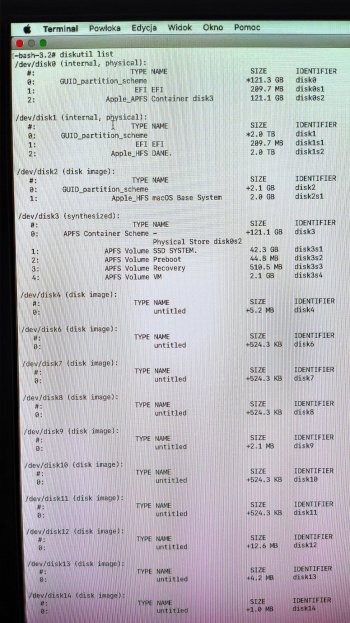
Hi. I know it's an old post, but only you can help me. Tried following the previous tips but nothing helps. I have a problem with my Fusion Drive, how can I merge the drives? I am sending a picture from diskutil list, please help. Mac mini Mojave.
Attachments
Last edited by a moderator:
How to fix a split Fusion Drive - Apple Support
If your Fusion Drive appears as two drives instead of one in the Finder, it's no longer working as a Fusion Drive. Here's how to fix it.
Follow the steps in this page under the Mojave section.
Hi All,Thats what i got and idk what macos im on i tried to download the macos in the recovery and it didnt work so idk before it got messed up i was on catalina View attachment 948048
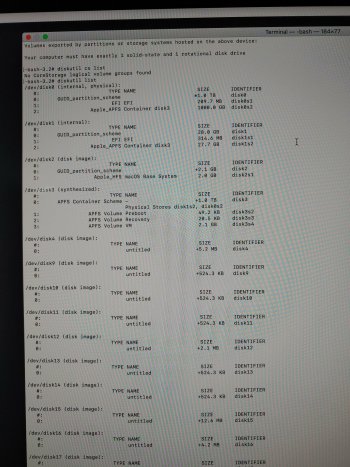
I'm having a similar problem to Jafrican in Post #15 and Diegosan123456 above with my wife 2017 27" iMac. I erased the Fusion drive and tried to reinstall Mojave, but the Fusion disk isn't found.
Found this thread and tried diskutil resetFusion but it doesn't work as there are 27 disks! I then tried diskutil ap deleteContainer disk18 (for example) and there error message states, "you must specify either an AFPS Container Reference or Physical Store. Any help will be much appreciated.
Attachments
I think it's sorted. I had Mojave on the computer but the Apple instructions for "How to fix a split Fusion Drive" for High Sierra seemed to work. I'm reinstalling the OS and will see. One issue I see is I had to format it as jhfs+ but think I need APFS? I want to upgrade to Catalina.Hi All,
I'm having a similar problem to Jafrican in Post #15 and Diegosan123456 above with my wife 2017 27" iMac. I erased the Fusion drive and tried to reinstall Mojave, but the Fusion disk isn't found.
Found this thread and tried diskutil resetFusion but it doesn't work as there are 27 disks! I then tried diskutil ap deleteContainer disk18 (for example) and there error message states, "you must specify either an AFPS Container Reference or Physical Store. Any help will be much appreciated.
casperes1996
macrumors 604
I think it's sorted. I had Mojave on the computer but the Apple instructions for "How to fix a split Fusion Drive" for High Sierra seemed to work. I'm reinstalling the OS and will see. One issue I see is I had to format it as jhfs+ but think I need APFS? I want to upgrade to Catalina.
macOS will be able to automatically convert jHFS+ to APFS when necessary 🙂