

Become a MacRumors Supporter for $50/year with no ads, ability to filter front page stories, and private forums.

MacRumors

macrumors bot
Original poster


Apple is phasing out support for Rosetta 2, which is a feature that allows Intel-based apps to run on Apple silicon Macs. Rosetta is going to stop working for most apps in macOS 28, and when that happens, apps that use it will stop working.
macos-27-rosetta-apps-support.jpg

Apple began warning customers and companies about the upcoming sunsetting of Rosetta with macOS Tahoe, and the warnings go even further in macOS Golden Gate.

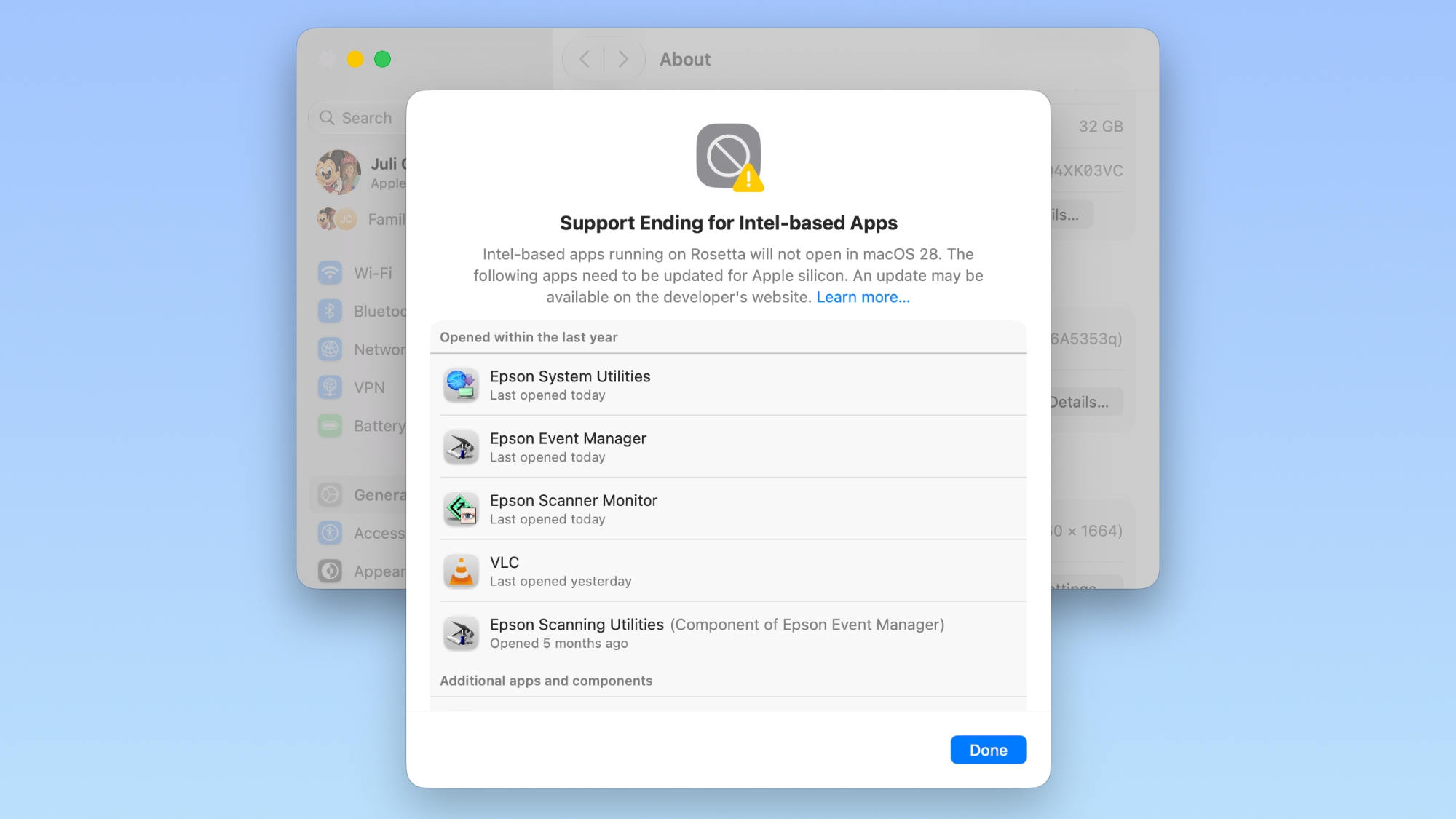
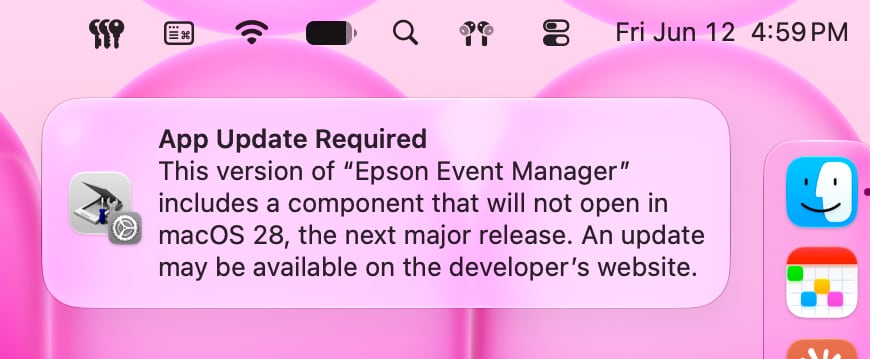
If you have apps that still use Rosetta, you'll get a warning every time you restart your Mac or open an Intel app. macOS Golden Gate also adds a new list where you can check which apps are going to stop working in the future.

You can get to the list by going to Settings > General > About > Intel-Based apps and clicking on the "Details" option.

The interface lists all of the apps that are going to stop working, giving Mac users plenty of time to contact app developers or find alternative apps.
macos-27-rosetta-warning.jpg

macOS Golden Gate does not install Rosetta automatically, so if you still have these outdated Intel apps, there will be a short installation when you try to open one for the first time after upgrading to Golden Gate. Authentication plugins and other pre-login utilities that require Rosetta fail to load in macOS Golden Gate because of the limitation.

Apple designed Rosetta to help users and developers transition from Intel to Apple silicon, but Apple phased out the last Intel-based Mac years ago. Apple only sells Apple silicon Macs, and it is slowly ending support for Intel-based models.

macOS Tahoe was the final version of macOS available for Intel Macs, and macOS Golden Gate requires a Mac with an Apple silicon chip.

Article Link: How to See Which Mac Apps Will Stop Working After macOS Golden Gate
 
  • Sad
  • Like
Reactions: Z-4195 and KeithBN
Last time when Apple phased out 32-bit application support, Mojave didn’t support 32-bit application as well compared to High Sierra. This time, I’m not sure how it will go. Will Rosetta 2 start being gutted in Golden Gate like last time or people should just stick to Tahoe for full Intel app support with Apple silicon Mac?
 
Last time when Apple phased out 32-bit application support, Mojave didn’t support 32-bit application as well compared to High Sierra. This time, I’m not sure how it will go. Will Rosetta 2 start being gutted in Golden Gate like last time or people should just stick to Tahoe for full Intel app support with Apple silicon Mac?
I recall it was Catalina that finally dropped 32-bit support. I stayed on Mojave for an extra year specifically because of that.
 
Last time when Apple phased out 32-bit application support, Mojave didn’t support 32-bit application as well compared to High Sierra. This time, I’m not sure how it will go. Will Rosetta 2 start being gutted in Golden Gate like last time or people should just stick to Tahoe for full Intel app support with Apple silicon Mac?
If you're using ANY software that isn't updated to current standards, updating the OS is always a risk. The danger of using dead software is that any OS update could introduce new bugs. If the dev isn't there to fix it you can run into issue.
 
  • Like
Reactions: hans1972
you can _manually_ install Rosetta 2 in the terminal, as a bandaid. I imagine it will probably still possible in OS28 too as the URL won't go away to maintain OS27 support for a few years.

That said there are apps from as late as '23 that I've found which were shipped as intel only. thats just being a bad dev to be that far into M series world and not have dual binary. Its literally just a switch on the Xcode settings to enable it, and been there for 3 years at that point.

the worse part are older device drivers for serial ports that run DMX, MIDI, industrial things, epson, HP and canon printers. I've found bits of CUPS drivers from 2015, intel only for vintage printers. So there is a whole world of older hardware that could stop working if they don't recompile for ARM64.
 
I recall it was Catalina that finally dropped 32-bit support. I stayed on Mojave for an extra year specifically because of that.
For me, since I must maintain major version consistency across my Mac iPhone and iPad, I can’t upgrade my iPhone iPad without my Mac also in the latest version, which because of dropping Intel support, I can’t do. I’ll be stuck on Tahoe for a couple years until I can have enough funds to upgrade my M1 MacBook Pro, and I can’t upgrade to iOS 28 or newer either.

Or, I fish out all Intel apps and find alternatives to replace or remove, though this may not work depending on the app. Iirc adobe **** still have some components relying on Rosetta 2 to work, among some other apps.
 
  • Haha
Reactions: Astuces iOS
That said there are apps from as late as '23 that I've found which were shipped as intel only. thats just being a bad dev to be that far into M series world and not have dual binary. Its literally just a switch on the Xcode settings to enable it, and been there for 3 years at that point.
I think people should really stop accusing devs of not flipping that magical switch to “convert apps”. If it is that easy all intel apps that are still maintained today would’ve gone to Apple silicon support, at least in a basic level (cough, electro app, cough).

This kind of automation rarely works for most people. I’m not promoting lazy developers, but there are always more to that. Sometimes for certain bits it’s just not possible to convert. You never know.
 
Im an app developer and I’m basically unable to upload new update for my app to app store connect after new macos 27 update. It doesnt accept app binary from xcode 27 beta and if I use xcode 26 to compile, it still doesnt allow because my os version natively blocks xcode 26. I run it from terminal to compile but app store connect still somehow understands that im on incompatible os version. Only option seems to be xcode cloud which i dont want to share my code on github even if its private repo. So what to do? Am i supposed to wait until september to distribute new version of my app? Lol apple.
 
  • Disagree
Reactions: hagar
If you're using ANY software that isn't updated to current standards, updating the OS is always a risk. The danger of using dead software is that any OS update could introduce new bugs. If the dev isn't there to fix it you can run into issue.
That’s what I’m worried about and hence the realisation that I need to get new MacBooks to use golden gate and beyond. That’s just how it goes sadly. I can’t risk upgrading to golden gate and suddenly a bunch of my application stops working.
 
Never, ever, and they don’t care.
Respectfully, does the PC hardware industry care about gaming anymore?

The YouTubers and their communities who take gaming seriously have been asking those questions over the last year.

Looks to me like Nvidia and AMD are marginalizing gamers at best, and possibly abandoning them at worst. Gamers aren't where the money is. It's all about money, you know?
 
Register on MacRumors! This sidebar will go away, and you'll see fewer ads.