
Got a tip for us?
Let us know
Become a MacRumors Supporter for $50/year with no ads, ability to filter front page stories, and private forums.
How to See Which Mac Apps Will Stop Working After macOS Golden Gate
- Thread starter MacRumors
- Start date
- Sort by reaction score
You are using an out of date browser. It may not display this or other websites correctly.
You should upgrade or use an alternative browser.
You should upgrade or use an alternative browser.

Digital Dude
macrumors 68000


You are indeed confused.I'm confused as I understood Intel apps (like our HP printer's app) will stop working with Golden Gate? If so, I hope HP updates its drivers for their printers since it's been quite some time since that happened.
Golden Gate will only run on Apple Silicon machines but Rosetta will continue to work so you can run Intel Apps
macOS28 (which comes out in 1.5 years) will no longer be able to run Intel Apps.

im_to_hyper
macrumors 65816
So this is where Apple forces me to buy a Windoze machine because I can't carry on using the Mac version of Garmin Basecamp.
Do they have a virtualization layer yet to run older versions of macOS outside the threat zone of real hardware and Apple IDs?
Or is that a VMWare Thing?

Abydos
macrumors 6502a
ok, I am immune from this, I don't do web searches on my phone, but it sounds ghastly
im_to_hyper
macrumors 65816
Well, this thread compelled me to drag out old Betsy, one of the earliest Intel MacBook Pros. Ahh, those were the good old days. 💻
Is this one of the Santa Rosa models? Those could run OpenCL 1.0 I believe…
Dang. That’s old but also dang that’s cool.
If it’s 64-bit, CachyOS will run and when the AUR isn’t a firestorm, the nVidia 340 drivers, OpenGL, OpenCL, etc install and bloop you’ve got a MATE desktop, add Planck for a dock, move your menus and BAM classic ‘nix look.

Compote
Suspended
It doesn't matter that the app is native of not, as it's completely reliant on Rosetta2 to even work!End of Crossover unless they create an ARM native app.
The games aren't native! Crossover IS Rosetta2.
Compote
Suspended
Games rely on GPTK, so that's also Rosetta2. Game Porting Toolkit is also going down the *******.WINE might have a similar fate...
Wine is doomed.
It's like updating your Twitter/Reddit client when neither works anymore.

BornAgainMac
macrumors 604
I would prefer developers just make native Mac games running Metal and let the Windows platform get single digit marketshare. In 2028, it is time for Windows gaming to end and let Macs and Linux get the native games.End of Crossover unless they create an ARM native app.

M4irmidnight
Suspended
Bye bye Google earth pro….. If only your developer wasn’t so small and constrained.
Apple is phasing out support for Rosetta 2, which is a feature that allows Intel-based apps to run on Apple silicon Macs. Rosetta is going to stop working for most apps in macOS 28, and when that happens, apps that use it will stop working.
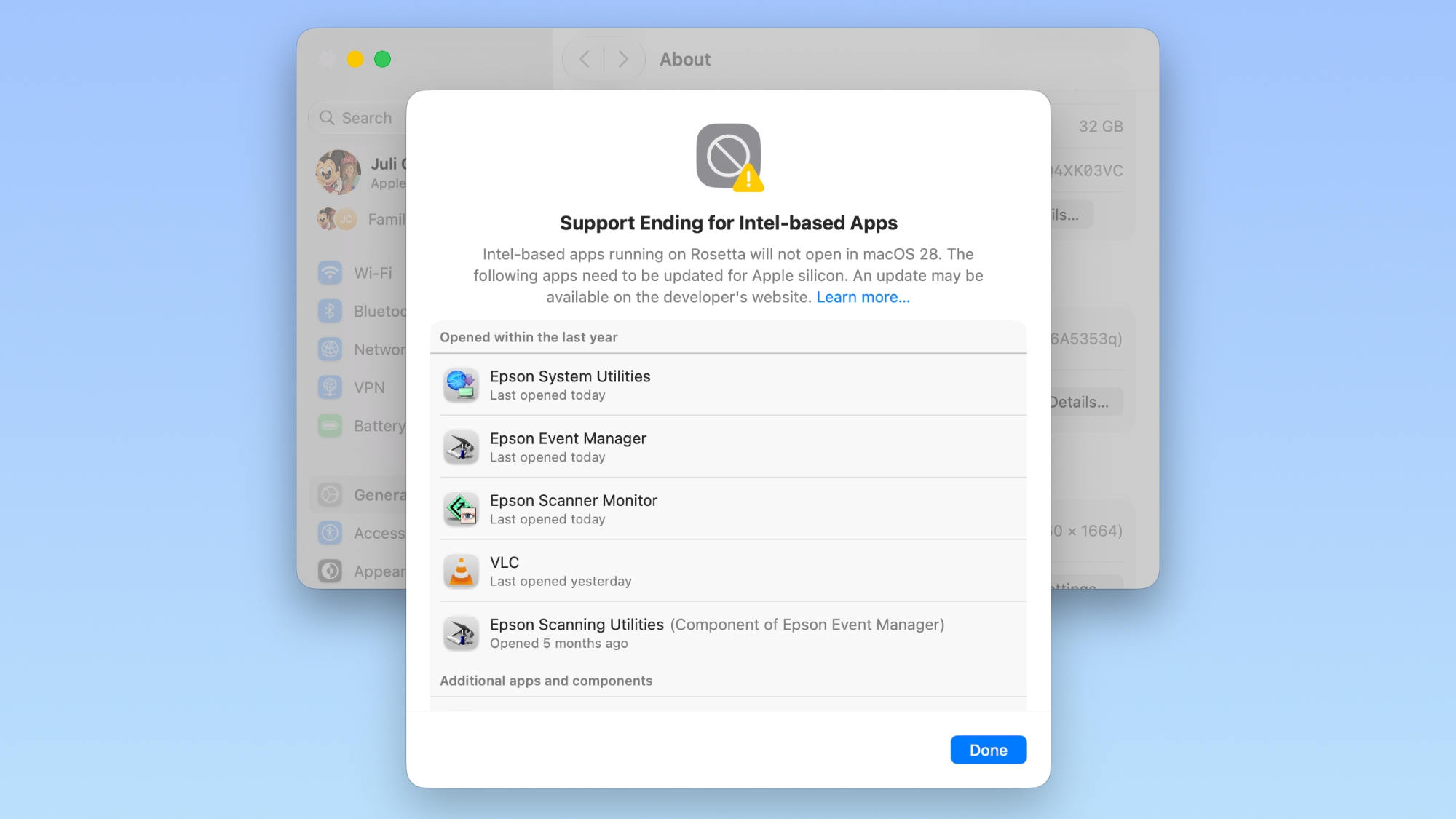
Apple began warning customers and companies about the upcoming sunsetting of Rosetta with macOS Tahoe, and the warnings go even further in macOS Golden Gate.
If you have apps that still use Rosetta, you'll get a warning every time you restart your Mac or open an Intel app. macOS Golden Gate also adds a new list where you can check which apps are going to stop working in the future.
You can get to the list by going to Settings > General > About > Intel-Based apps and clicking on the "Details" option.
The interface lists all of the apps that are going to stop working, giving Mac users plenty of time to contact app developers or find alternative apps.
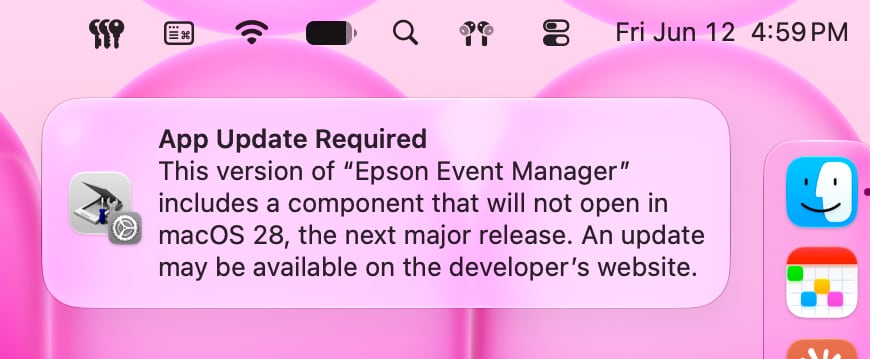
macOS Golden Gate does not install Rosetta automatically, so if you still have these outdated Intel apps, there will be a short installation when you try to open one for the first time after upgrading to Golden Gate. Authentication plugins and other pre-login utilities that require Rosetta fail to load in macOS Golden Gate because of the limitation.
Apple designed Rosetta to help users and developers transition from Intel to Apple silicon, but Apple phased out the last Intel-based Mac years ago. Apple only sells Apple silicon Macs, and it is slowly ending support for Intel-based models.
macOS Tahoe was the final version of macOS available for Intel Macs, and macOS Golden Gate requires a Mac with an Apple silicon chip.
Article Link: How to See Which Mac Apps Will Stop Working After macOS Golden Gate


QuarterSwede
macrumors G4
Apple has already said that Game Porting Toolkit will continue to be developed beyond Golden Gate.It doesn't matter that the app is native of not, as it's completely reliant on Rosetta2 to even work!
The games aren't native! Crossover IS Rosetta2.

jasnw
macrumors 65816
I have heard this idea elsewhere, that post-apocalypse a user can manually install Rosetta 2 and just keep on keepin' on with Intel apps. Is this idea supported by any statements from Apple, or is this just hoping against hope?you can _manually_ install Rosetta 2 in the terminal, as a bandaid. I imagine it will probably still possible in OS28 too as the URL won't go away to maintain OS27 support for a few years.

Black_Mage
Contributor
I had a MacBook Pro with that keyboard. I loved it. Good times.Well, this thread compelled me to drag out old Betsy, one of the earliest Intel MacBook Pros. Ahh, those were the good old days. 💻

freedomlinux
macrumors 6502
I didn't recall that happening, so I just checked it & the result is surprising:When you go to the VLC website, clicking "Download VLC" will always pull the Intel64 version of VLC even on an Apple Silicon Mac. If you want the ARM64 version you have to click the dropdown menu and manually select it. So I imagine a lot of people accidentally get the Intel (Rosetta 2) version this way. 🫤
- in Firefox, the VLC homepage detects & gives me the Apple Silicon version by default
- in Chrome, it also gives the Apple Silicon version by default
- in Safari, it doesn't detect properly & gives me the Intel version by default
My suspicion was that the user-agent string in Firefox/Chrome but not Safari says something about arm64, but ... no. Actually all 3 browsers specifically mention
Intel Mac OS X 10.15 in the user-agent. So I'm not sure how the VLC website is doing it, but is only doesn't work on Safari. I've seen ways to do the CPU detection in JavaScript but it's possible Safari specifically doesn't implement / doesn't allow that code.The other problem is that the VLC updater won't automatically switch you (I think) from the x86 version to the arm64 version. The first version for Apple Silicon appears to be VLC 3.0.12.1 from Jan 2021, so users who installed it before that time are likely to still be on the Intel version now.

MysteriousStain
macrumors 6502

Shirasaki
macrumors P6
Yes I know it’s all about money. Gamers accelerated the hardware evolution and now it is the turn of AI, however bubbly it may be.Respectfully, does the PC hardware industry care about gaming anymore?
The YouTubers and their communities who take gaming seriously have been asking those questions over the last year.
Looks to me like Nvidia and AMD are marginalizing gamers at best, and possibly abandoning them at worst. Gamers aren't where the money is. It's all about money, you know?
I guess selling cards to gamers aren’t worth their money anymore. Everyone turns into B2B and we customers get scraps and endless subscription in return.

skymovieguy
macrumors newbie
Why should it switch platform? It’s an update, changing platform is not an update.I didn't recall that happening, so I just checked it & the result is surprising:
- in Firefox, the VLC homepage detects & gives me the Apple Silicon version by default
- in Chrome, it also gives the Apple Silicon version by default
- in Safari, it doesn't detect properly & gives me the Intel version by default
My suspicion was that the user-agent string in Firefox/Chrome but not Safari says something about arm64, but ... no. Actually all 3 browsers specifically mentionIntel Mac OS X 10.15in the user-agent. So I'm not sure how the VLC website is doing it, but is only doesn't work on Safari. I've seen ways to do the CPU detection in JavaScript but it's possible Safari specifically doesn't implement / doesn't allow that code.
The other problem is that the VLC updater won't automatically switch you (I think) from the x86 version to the arm64 version. The first version for Apple Silicon appears to be VLC 3.0.12.1 from Jan 2021, so users who installed it before that time are likely to still be on the Intel version now.
platinumaqua
macrumors 65816


oldMacGenius
macrumors regular
Maybe I am beginning to become a luddite.
I always was intrigued by the lowendmac.com community and their dedication to keeping old PowerPC stuff running for years past the expiration date of system support. I judged it as niche I think I understand the appeal of it now. Each release starting with Mavericks, I have stated to ask myself if there is any meaningful change that would make my experience better. Maybe this is where I hop off the train. I keep going for security reasons, but it’s truly a waste of perfectly good hardware / software to stay up to date.
I am annoyed that some of my apps went from a perpetual license that I paid for, to a subscription model.
Some of these apps are Intel for the version that I paid for. I know that I am not forced to upgrade, but not upgrading is a challenge too.
If I want to keep these applications, I’ll be forced to subscribe to the app. I am not allergic to buying software again, but I prefer perpetual licensing.
The horrors of tracking my subscription spend each month/year has become a game of “I opened/used this (x) times a month. Is the value it provides worth $4.99 a month?” 99% of the time the answer is no. I begin to search for replacement products.
I am trying to get apps/services subscription spend down to around $100 a month and I am almost there.
I always was intrigued by the lowendmac.com community and their dedication to keeping old PowerPC stuff running for years past the expiration date of system support. I judged it as niche I think I understand the appeal of it now. Each release starting with Mavericks, I have stated to ask myself if there is any meaningful change that would make my experience better. Maybe this is where I hop off the train. I keep going for security reasons, but it’s truly a waste of perfectly good hardware / software to stay up to date.
I am annoyed that some of my apps went from a perpetual license that I paid for, to a subscription model.
Some of these apps are Intel for the version that I paid for. I know that I am not forced to upgrade, but not upgrading is a challenge too.
If I want to keep these applications, I’ll be forced to subscribe to the app. I am not allergic to buying software again, but I prefer perpetual licensing.
The horrors of tracking my subscription spend each month/year has become a game of “I opened/used this (x) times a month. Is the value it provides worth $4.99 a month?” 99% of the time the answer is no. I begin to search for replacement products.
I am trying to get apps/services subscription spend down to around $100 a month and I am almost there.