Become a MacRumors Supporter for $50/year with no ads, ability to filter front page stories, and private forums.

CrisBCT

macrumors newbie
Original poster
Monterey is the newest MacOS that I can use on my old MacMini (late 2014). But although I purchased Numbers years ago, and it's now free, Apple have now fixed things so I can no longer download a version of Numbers which works on Monterey.

I need a version of Numbers that works on Monterey - Version 12 I think. Is there anywhere where I can download it. Link please.
 
You should be able to log into the App Store on Monterey and review your purchased/downloaded apps. Click on your profile in the top right corner or bottom left corner.. wherever it is in that version of the App Store. Monterey compatible version of Numbers should be in the list of your purchased/downloaded apps.
 
  • Like
Reactions: CrisBCT and frou
You should be able to log into the App Store on Monterey and review your purchased/downloaded apps. Click on your profile in the top right corner or bottom left corner.. wherever it is in that version of the App Store. Monterey compatible version of Numbers should be in the list of your purchased/downloaded apps.
Yep, and this will offer to download Numbers 13.1 which is the last compatible version.
 
  • Like
Reactions: CrisBCT
Thanks for the suggestions. I've actually done this.

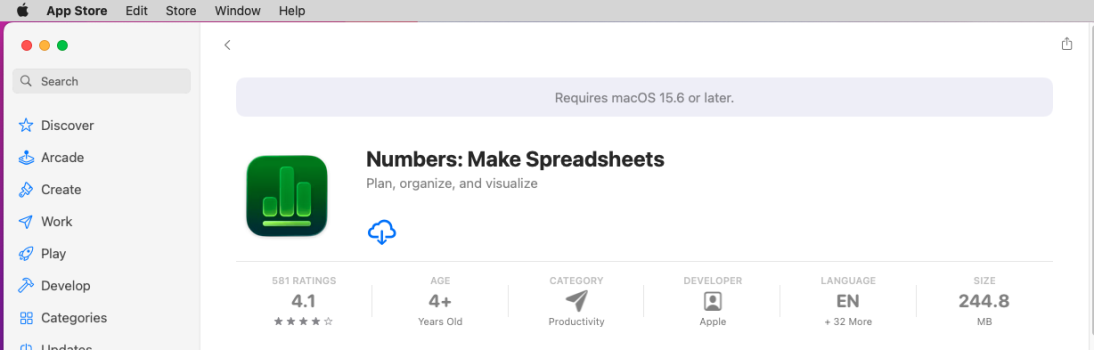
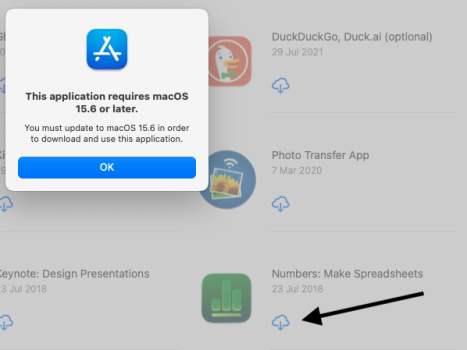
An Apple advisor helped me navigate through the required steps, but Apple have recently updated the Numbers version available to needing MacOS 15.6 or later. He didn't know why, but Apple do want to encourage people to buy more hardware...

But my obsolete late 2014 MacMini won't run anything later than Monterey, MacOS 12.7.6. Hence my need for a Numbers dmg...

All help to resolve this perplexing question would be gratefully received.
 

Attachments

  • Numbers requires MacOS 15.6 or later.png
    Numbers requires MacOS 15.6 or later.png
    73.9 KB · Views: 65
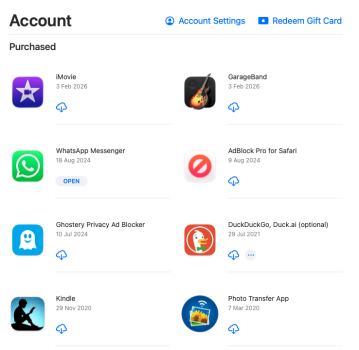
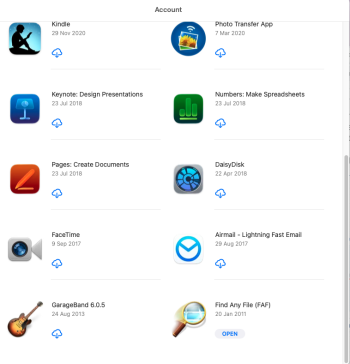
Thanks frou. the purchases page in the AppStore only lists the one numbers app and that needs macOS 15.6. see attachments.

The link you gave unfortunately only has the Numbers 14.5 dated January 28 - which needs macOS 15.6.

any further ideas would be greatly appreciatedApp Store purchases 1.pngApp Store purchases 2.png
 
Here's what happens on my Monterey Mac:

Screenshot 2026-02-10 at 18.11.26.png


^^^ Click the download icon anyway

Screenshot 2026-02-10 at 18.11.47.png


^^^ OK. Numbers 13.1 gets installed ↓

Screenshot 2026-02-10 at 18.14.01.png


Don't think I can share the .app because they have some kind of receipt/DRM that binds them to the AppleID that downloaded them from the App Store.
 
  • Like
Reactions: CrisBCT and BigBlur
Unfortunately, it doesn't look like you have the old version (now renamed to Numbers 14.5) linked to your account/purchase history. Numbers 14.5 requires macOS 14.0 or newer (Sonoma). Do you have access to a Mac running Sonoma or newer...perhaps a friend or family member? If so, log into that Mac with your Apple Account and download the app to get it into your purchase history. Then go back to your Monterrey Mac and you should be able to download it as mentioned above. It'll download the latest compatible version. It's crazy that Apple makes us jump through hoops like this.

Otherwise, you can always use the web version of Numbers at iCloud.com, and could add it to your dock and use it as a PWA app.
 
  • Like
Reactions: CrisBCT and frou
Thanks frou. I actually did the use-another-apple thing with the help of an apple advisor. He said this used to work but Apple stopped it working a little while ago - which ties in with the January 28 date now on Numbers.

In point of fact, I purchased Numbers many years ago before they introduced the App Store concept, and Numbers is even free nowadays. So I think Apple's stance on this is execrable, the total opposite of user friendly.

Pretty please, if you're willing frou, I'd very much like to try to install the Numbers 13.1 version you have. If that dmg doesn't work, then at least we'll have tried and I guess I'll have to rethink my whole spreadsheet usage.
 
Hi frou, In the past I've found it easy to send a large file, such as a dmg, with sendspace.com.

Your continued help with this unfortunate issue would be greatly appreciated.
 
Sorry, I don't want to share the Numbers.app because it has info tying it to me baked into it (as do all apps when they are installed from the Mac App Store, AFAIK). It's shame that DRM creates these situations.
 
Last edited:
  • Like
Reactions: !!! and CrisBCT
Thanks for the help anyway. I'll have to try to think of something else. any suggestions
 
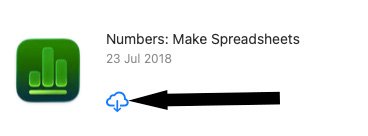
From the image in post 6 it’s clear that you have downloaded Numbers from the App Store on 23 July 2018.
What happens when you click on its download button?

Numbers.jpg
 
  • Like
Reactions: CrisBCT
From the image in post 6 it’s clear that you have downloaded Numbers from the App Store on 23 July 2018.
What happens when you click on its download button?

View attachment 2604568
This would have been from an install on an iPhone or iPad. With the last update Apple did, they added macOS support to that one, and discontinued the original macOS-only version of Numbers (now called Numbers 14.5). There are two App Store listings for Numbers, and they're technically different apps with their own Bundle ID. CrisBCT needs the other one that had support for Monterey.
 
  • Like
Reactions: !!! and CrisBCT
ASIDE: Why are Apple so cack-handed that they renamed the old app in the App Store to "Numbers 14.5"? It seems much more logical to rename it to "Numbers 14"
 
  • Love
Reactions: CrisBCT
Thanks, bogdanw

When I click on that Numbers icon in the App store, it refuses saying I need MacOS 15.8 or later. But my MacMini, late 2014, won't run anything later than Monterey MacOS 12.7.6. see attached screenshot
 

Attachments

  • Screenshot 2026-02-15 at 16.24.10.png
    Screenshot 2026-02-15 at 16.24.10.png
    82.8 KB · Views: 39
Thanks again, bogdanw,

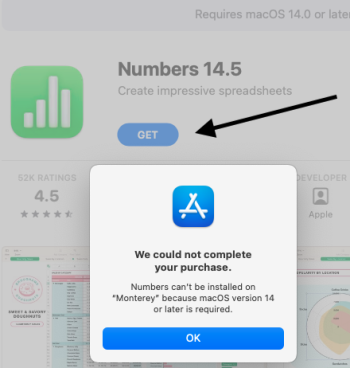
I've also just gone to Numbers https://apps.apple.com/app/numbers/id409203825

That page also doesn't allow me to download numbers, it says MacOS 14 is required. but my MacMini won't run anything later than Monterey MacOS 12.7.6.

All further suggestions greatly appreciated, I'm at a loss to know what to do...
 

Attachments

  • Screenshot 2026-02-15 at 16.32.24.png
    Screenshot 2026-02-15 at 16.32.24.png
    96 KB · Views: 63
You can try with mas-cli. Download and install mas-4.1.2-x86_64.pkg https://github.com/mas-cli/mas/releases/tag/v4.1.2 then run from Terminal

Code:
mas install 09203825

If that doesn’t work, you can install macOS 14 in a virtual machine, “purchase” Numbers 14.5 from there and then try again to download it in Monterey.

VMware Fusion is now free. You have to register with Broadcom or you can directly download the dmg from SoftPedia.

VMware Fusion Pro for Mac https://www.vmware.com/products/desktop-hypervisor/workstation-and-fusion

How to Install VMware Fusion Pro for Personal Use https://services.tctc.edu/TDClient/323/InfoTech/KB/ArticleDet?ID=21304

VMware Fusion dmg https://mac.softpedia.com/get/System-Utilities/VMware-Fusion.shtml
 
  • Love
Reactions: CrisBCT
Thanks again, @bogdanw, you now suggest:

"If that doesn’t work, you can install macOS 14 in a virtual machine, “purchase” Numbers 14.5 from there and then try again to download it in Monterey."

Will getting it like this be any different from my previous attempt to get Numbers 14.5 using the url .../id409203825 which you gave me that failed saying it needs MacOS 14, see this screenshot.

If there's even a remote possibility that it might indeed work to instead give me the latest older version of Numbers 13.1 which does run in Monterey, then I'm willing and indeed eager to try this route.

Numbers attempt 2026-02-15 at 16.32.24.png
 
Give this link a go: (not read thread closely - if you've already had this link, sorry!)

Thanks, adrianlondon, I've explored this link and it seems to need Numbers to be already loaded which is what I'm trying to do. Apple and Monterey are not currently cooperating, in fact they're being very difficult...
 
  • Like
Reactions: adrianlondon
Thanks a bunch adrianlondon. YES, YES.

I downloaded Numbers from here and it's now loaded and working on my Monterey Mac.

it says it's version 10.3.9 (7029.9.8) and loading a Numbers ss from before my Monterey upgrade gives this popup

Numbers popup 2026:02:16.png


And the latest Numbers in Monterey is 13.1, dare I try to upgrade this one to 13.1 and if so, how?
 
  • Like
Reactions: adrianlondon
Thanks a bunch adrianlondon. YES, YES.

I downloaded Numbers from here and it's now loaded and working on my Monterey Mac.

it says it's version 10.3.9 (7029.9.8) and loading a Numbers ss from before my Monterey upgrade gives this popup

View attachment 2605462

And the latest Numbers in Monterey is 13.1, dare I try to upgrade this one to 13.1 and if so, how?

Try:
Open the app store and hope for the best
Use the link I gave in the post before
Search "archive" for a later version: https://archive.org/search?query=iwork

At least you've got one running!
 
  • Love
Reactions: CrisBCT
Register on MacRumors! This sidebar will go away, and you'll see fewer ads.