Become a MacRumors Supporter for $50/year with no ads, ability to filter front page stories, and private forums.

transmaster

Contributor
Original poster
Since macOS 26, I have had an annoying bug. This does not affect the functionality of the Mac Studio; it's just irritating. Every time I restart or shut it down and reboot, the computer comes up with this. The Mac Studio is the only computer on this network. I have tried changing the name of this computer on the EERO router and on the computer. This is on both the Ethernet side and the unused WiFi side. This started with macOS 26. Called Apple Support, and it got to a second-tier support, and the "A" hole (this is a first for me from Apple Support) blamed it on my EERO router. The Computer is where this problem is originating. Is there a setting I need to adjust? Looking this up, and it has been an issue for a long time.

Screenshot 2026-04-24 at 10.46.00.png
 
I have not had this happen with any computer in a while. It can be caused by the client and router not clearing DHCP caches/leases properly.

One thing you can do if the problem persists is to go into your router setting and reserve the Mac Studio's ethernet and WIFI IP addresses so that they never change.

You can turn off DHCP and then manually assign IP addresses for every client that connects to the router. But it is generally easier to leave DHCP on and then reserve certain IP addresses for a few clients.

Sometimes DHCP servers have a brain fart and don't clear the DHCP cache correctly. DHCP can act goofy from time to time.
 
"Sequoia changes the host name (secretly)"
"My Mac keeps changing its name"
"Coverage still updating/Computer name change"
 
  • Like
Reactions: Starfia
Your EERO router can not "change" the host name of your computer. My DSL router lets you name devices by MAC address, but also can not change the host name of an external device.

My guess is Bigwaff is correct in that you need to use either wired or wireless. Since you are feeding both from the EERO, the computer sees a conflict from the other port.

Although to be honest, on show site I have had my laptop connected to wireless and wired and not seen this, also using an EERO router.

Funny, the host name on my home EERO router does not show the correct one for my Mac Pro; lol, I disconnected and connected again and now it is right. ha ha.

Weird.
 
Using both wired and WFI should not cause an issue. I have been running both on my Mac minis for years from a 2010, 2018, and M4 Mac mini without any issue. I've been doing the same with Windows computers since Windows 7 without issues.

This is most likely a DHCP issue that could be something on the computer or the router.
 
The message shown in the opening post does suggest an interplay between the two interfaces. I can imagine the following scenario. The mac, when setting up the second interface sees its name already in use and responding to mDNS requests on the previously set up first interface. I don't believe your router or DHCP is the problem.

I queried Claude a bit about this and it confirmed my general understanding in part of the conversation:

mDNS / Zeroconf (e.g., Bonjour): On local networks without a central DNS server, the client itself runs a conflict-detection protocol. When a machine announces laptop.local via multicast, other devices can challenge that claim. If a conflict is detected, the new arrival has to rename itself (often laptop-2.local). This is entirely peer-to-peer and DHCP is not involved at all.

It strikes me that your mac is fighting against itself due to some timing issue. Recreating the interfaces might be something to try in order to clean it up.
 
If it is not a DHCP issue then it could very well be a DNS issue. Most home routers that have a DHCP server also have a built in DNS server.
 
I uploaded the exact message to Claude and it confirmed it’s a bonjour mDNS issue. So it’s not DNS or DHCP that is causing this.

The message says the name is in use on the network. That means it’s in use at that very moment by another device or the very same device, which is having a problem. When the computer brings up the interface, it sends a broadcast out looking for any other computer that might be using that name and it’s getting a positive answer. Something is responding to an MDNS query for that name at that very moment when the error pops up.
 
uploaded the exact message to Claude and it confirmed it’s a bonjour mDNS issue. So it’s not DNS or DHCP that is causing this.

That is still a DNS service no matter if its on the Mac or on the router.

PS. Claude and other AI is not 100% correct and know to be wrong at times.
 
That is still a DNS service no matter if its on the Mac or on the router.

PS. Claude and other AI is not 100% correct and know to be wrong at times.
Ah. I misunderstood you. It is a DNS issue. The particular DNS is mDNS. Name resolution is done without the participation of a common DNS server.

This is undeniably a Bonjour (aka mDNS) issue. I’ve been studying and home lab-ing networking for decades. I shouldn’t have quoted AI since it can breed doubt.
 
There is a chance the Eero is responsible. Since the Eero is a mesh network device, it has to handle forwarding mDNS broadcasts in some way to its peers. If there is some bug there, that functionality could be the source of the problem. Definitely reboot all of your Eero routers.
 
  • Like
Reactions: BSDnostalgia
There is a chance the Eero is responsible. Since the Eero is a mesh network device, it has to handle forwarding mDNS broadcasts in some way to its peers. If there is some bug there, that functionality could be the source of the problem. Definitely reboot all of your Eero routers.

That is definitely a possibility.

Running a mesh network or even a second router as an access point can sometimes cause issues. I ran into that with my Ambient Weather station when running a second router in AP mode. The weather station would not connect to the network until I shut off the second router/AP.
 
It sounds like your Eero is remembering the name and not recognizing that your computer is the same one that already had that name when it reconnects after a reboot. Try turning off all networking and restarting your Mac, then wait a bit before reconnecting to wifi. If you have another device from which you can manage your Eero, I'd take a look at the list of devices it says are connected or that it remembers while your Mac Studio is still not connected to the network. If possible, try either forgetting/deleting or renaming the Studio in that list to something different. It should be tied to your MAC address, but sometimes odd things happen especially with some of the unique MAC addresses that might be generated for privacy. That's another thing I'd look at on your Mac, if it's using a unique or rotating MAC address with your home network it may not realize that this is the same Mac it had already in its list.
 
I had to turn the Bluetooth back on on the Mac Studio; my Apple Watch needs it to turn on the Mac. It also shows the iPhone.
 
Checked the EERO on the iPhone, and it shows the Mac with the name Kenneth. I changed the Mac's name to Kenneth. We will see what happens.
 
I give up, I am not going to waste any more time on this. Changed the name to "Kenneth" and it posted this after restart.

Screenshot 2026-04-27 at 09.25.21.png
 
Make sure you have turned off rotating mac addresses for WiFi. The Eero is probably thinking your mac is a new computer every time it reconnects to the network since it doesn't find your new mac address in its cache. Instead it has the name known for the old mac address there.

I use rotating mac addresses and my Asus mesh routers don't have this problem, but maybe they identify my computer differently.

If you're having this problem when WiFi is off and you're only using ethernet, then this is not relevant.
 
Some routers forward mDNS across subnets/VLANs, so if your Mac's WiFi interface is on one subnet/VLAN and Ethernet is on another, that would cause this problem.

I know this because I have a… complex home network. I use many VLANs to segment off the unholy spawn that is all IoT/smarthome gear. Unfortunately, with HomeKit, you need to forward mDNS (Bonjour) across the VLANs or it doesn't work well. This isn't a problem—I think—if your WiFi and Ethernet interfaces are on the same VLAN, but if they're on different ones (e.g. for "guest" WiFi or various other reasons like a VLAN for each WiFi version / band), the Mac gets confused and doesn't realize it's talking to itself.

I'm not sure why the mDNS response packet can't include a node-unique identifier (like a UUID initialized on boot) that the node then uses to realize it just said hello, er, bonjour, to itself across a network… Maybe I should put that in a feedback ticket.
 
  • Like
Reactions: svenmany
Open Terminal and set the hostnames manually. This stops the machine renaming itself.

sudo scutil --set HostName
sudo scutil --set LocalHostName
sudo scutil --set ComputerName
dscacheutil -flushcache
sudo killall -HUP mDNSResponder
Reboot
 
  • Like
Reactions: transmaster
Open Terminal and set the hostnames manually. This stops the machine renaming itself.

sudo scutil --set HostName
sudo scutil --set LocalHostName
sudo scutil --set ComputerName
dscacheutil -flushcache
sudo killall -HUP mDNSResponder
Reboot

The instructions given are probably trying to address a name caching issue on the Mac rather than the Eero. It makes sense to try it.

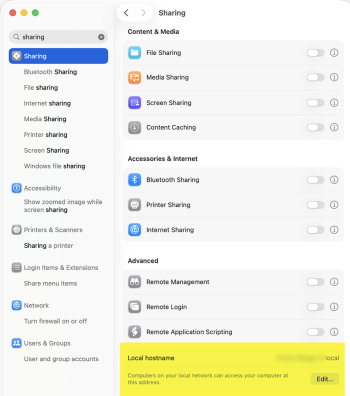
If there is an actual naming conflict on the network then allowing it to remain would be pretty bad. Setting LocalHostName is assigning the mDNS name. I would have thought this is just the command-line way of setting that rather than using System Settings. Do you have any reference that suggests this use of scutil disables subsequent conflict detection or prevents the Mac from renaming itself if it detects that?
 
Register on MacRumors! This sidebar will go away, and you'll see fewer ads.