
Got a tip for us?
Let us know
Become a MacRumors Supporter for $50/year with no ads, ability to filter front page stories, and private forums.
iMac 5k Screen burn-in (High Sierra)
- Thread starter 4004786
- Start date
- Sort by reaction score
You are using an out of date browser. It may not display this or other websites correctly.
You should upgrade or use an alternative browser.
You should upgrade or use an alternative browser.
Commands should be run on SSD partition not USB installer.
Use installer only for disable / enable SIP.
Try create the file on Desktop then move it to /Library/Preferences
sudo defaults write /Users/dac/Desktop/com.apple.CoreDisplay useMetal -boolean no
sudo defaults write /Users/dac/Desktop/com.apple.CoreDisplay useIOP -boolean no
Replace "dac" with your username.
Keep SIP disabled for the time being.
Use installer only for disable / enable SIP.
Try create the file on Desktop then move it to /Library/Preferences
sudo defaults write /Users/dac/Desktop/com.apple.CoreDisplay useMetal -boolean no
sudo defaults write /Users/dac/Desktop/com.apple.CoreDisplay useIOP -boolean no
Replace "dac" with your username.
Keep SIP disabled for the time being.
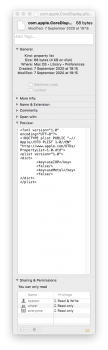
If plist file preview looks like mine, Metal should be disabled. You can now enable SIP.
It seems to me that Metal is somehow "injuring" LCD cells; this injury cures gradually in time, so image retention should appear less and less as days go by. Try to use your mac normally for a few days.
For example: I have a dual boot setup High Sierra and Windows 7. Before disabling Metal, image retention in Windows was as bad as in MacOS; now, after disabling Metal, somehow, image retention disappeared in Windows as well. This is only possible if there is some long term effect of using Metal.
Image retention is not completely gone, but it is way less without Metal (like 100x) and easily removed by a few minutes of screensaver or watching youtube in full screen.
It seems to me that Metal is somehow "injuring" LCD cells; this injury cures gradually in time, so image retention should appear less and less as days go by. Try to use your mac normally for a few days.
For example: I have a dual boot setup High Sierra and Windows 7. Before disabling Metal, image retention in Windows was as bad as in MacOS; now, after disabling Metal, somehow, image retention disappeared in Windows as well. This is only possible if there is some long term effect of using Metal.
Image retention is not completely gone, but it is way less without Metal (like 100x) and easily removed by a few minutes of screensaver or watching youtube in full screen.
It will improve even further, just give it some time.
I think since Mojave, MacOSes require Metal to work.
🤷♂️ I think that Mojave and up cannot run without Metal (OpenGL is deprecated since). Do you really need it?
I would have even downgraded to MacOS Sierra (supports only OpenGL so no need to disable Metal), but I like the Unlock with Apple Watch feature (available from High Sierra)...
I would have even downgraded to MacOS Sierra (supports only OpenGL so no need to disable Metal), but I like the Unlock with Apple Watch feature (available from High Sierra)...

ThugFreak
Suspended
I prefer Mojave. I use the "Accessibility Keyboard" with a mouse instead of the physical keyboard when watching videos.
I sit about 6 feet away from the iMac when watching videos.
Sierra doesn't have "Accessibility Keyboard". In High Sierra, the letters are too small to see from a distance.
The letters are large in Mojave.
I know... first world problems...
I sit about 6 feet away from the iMac when watching videos.
Sierra doesn't have "Accessibility Keyboard". In High Sierra, the letters are too small to see from a distance.
The letters are large in Mojave.
I know... first world problems...
Last edited:

ThugFreak
Suspended
Yes. That keyboard is what I used years ago when I had a iMac on Snow Leopard.Is this large enough?
Can it be activated using "Hot Corners"? Do you still need to click a flag on the menu bar?
Last edited:
ThugFreak
Suspended
In the end, I went back to Mojave. I'm now using a "image retention" trick that really works.I have a dual boot setup High Sierra and Windows 7. Before disabling Metal, image retention in Windows was as bad as in MacOS; now, after disabling Metal, somehow, image retention disappeared in Windows as well. This is only possible if there is some long term effect of using Metal.
Image retention is not completely gone, but it is way less without Metal (like 100x) and easily removed by a few minutes of screensaver or watching youtube in full screen.
With this trick, there is no image retention at all. Try it and see if it works.
I don't remember who posted this, but here it is:
FINALLY! A FIX for Screen Ghosting / Persistance / Retention
Hello,
Firstly, I know this is an old issue that most probably does not affect the majority of current macbook users. However, I thought I would post here just in case this helps someone, as a current MBPR 2012 owner this issue has been driving me crazy but I've finally figured out a way to stop it from happening. And it's really simple:
Go to System Preferences -> Displays -> (Built-in Retina Display) Color tab -> Calibrate...
In Calibration, drag the white point slider to the far right (most blue light). This causes the screen to become extremely blue, so to cancel this out:
Select Night shift, adjust warmth to preferred level (far right for best results), and set up the night shift schedule to always be on.
Essentially what this does is makes the display dimmer by applying two filters that counter act each other. As a result, the pixels themselves emit less 'light' or color, and are not driven to the point at which color retention occurs.
Thank you for reading!