Become a MacRumors Supporter for $50/year with no ads, ability to filter front page stories, and private forums.
This reminds me I need to order a replacement cable before they’re gone.

Or give up the iMac. Right now it’s sitting in a closet. I moved in to a smaller home shortly after I bought it and have no place or need for it right now.
Whaddaya mean? Everybody’s got a kitchen table. Plop it down in the middle & run a background of your wife’s favorite flower bouquet.


A winner for sure! :D
 
  • Like
Reactions: bobesch and z970
This reminds me I need to order a replacement cable before they’re gone.

Or give up the iMac. Right now it’s sitting in a closet. I moved in to a smaller home shortly after I bought it and have no place or need for it right now.
Sadly there comes a time when you realize, space or not, having so many systems sitting around doesn't make sense. I recently thinned out my computer collection by "rehoming" all but one of my G5s, all of my PowerBooks, a couple of Mac Books (older models), and some of my earlier Mac Pro's. While I didn't need the space and they weren't in the way I just decided after many years of barely any use (which is really just a short way of saying I powered them on just for the sake of it) I decided to thin out my collection and find them new homes where they may see more regular use.
 
Last edited:
Sadly there comes a time when you realize, space or not, having so many systems sitting around doesn't make sense. I recently thinned out my computer collection by "rehoming" all but one of my G5s, all of my PowerBooks, a couple of Mac Books (older models), and some of my earlier Mac Pro's. While I didn't need the space and they weren't in the way I just decided after many years of barely any use (which is really just a short way of saying I powered them on just for the sake of it) I decided to thin out my collection and find them new homes where they may see more regular use.

I’ve thought of that! I live in south Texas and it sure if they’ll find a good home down here. I bought the G4 in Houston and the G5 in Austin, I think.

I do have a project planned for the G5. I just need to get it done.
 
Hello blast from the past. I just picked up a second-hand iMac G4 myself: a 20" widescreen model that had not been opened since the day it came home from the Apple Store with its first owner.

I was only planning to upgrade the internal RAM module, but once I opened it and saw how dirty it was, I had to do a deep clean.

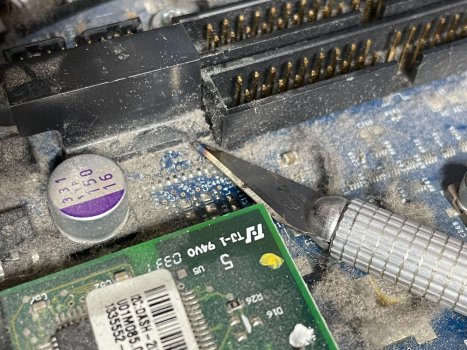
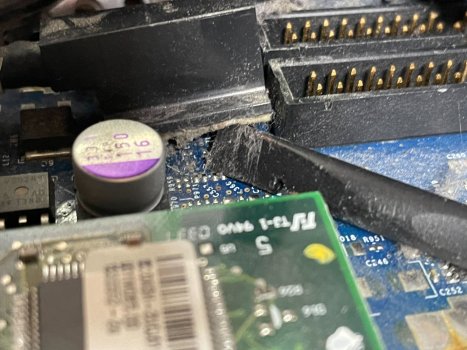
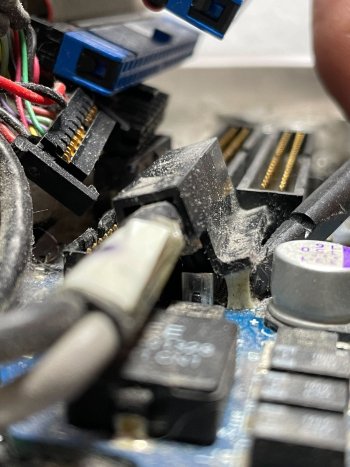
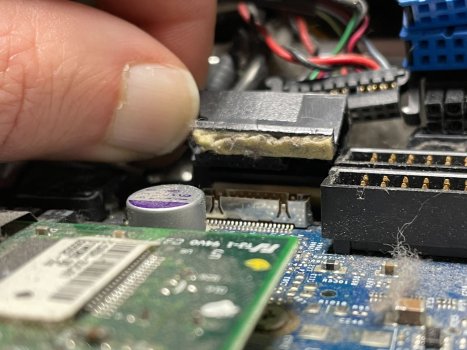
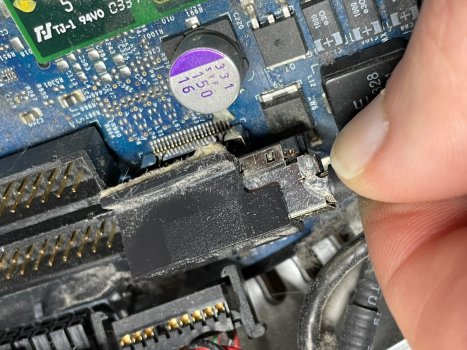
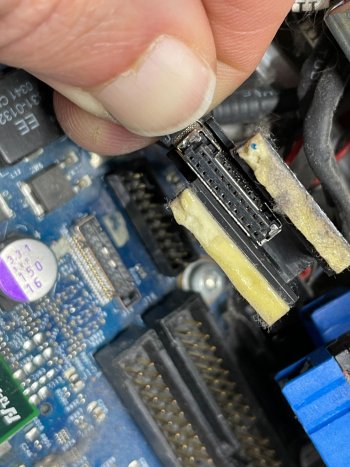
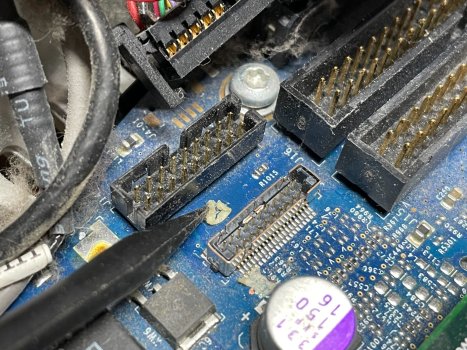
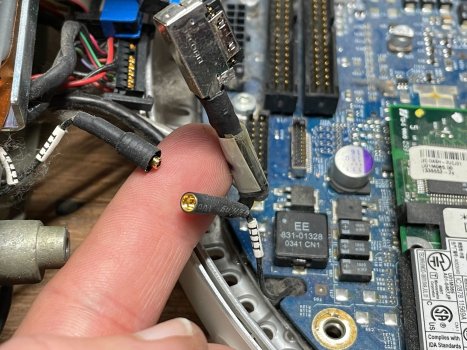
At this stage of disassembly, I've unplugged everything except the TDMS display connector. It has a protective plastic cover, which is stuck to the PCB with a thick strip of some double-sided material (possibly 3M VHB?), which had gotten so gummy it was very difficult to remove.

I had to use an X-Acto knife and a nylon spudger to carefully lift it. There aren't any good photos of this process or the underlying connector online, so I figured I should document it for posterity.

BE VERY CAREFUL with the X-Acto knife. Go slow, and make your cuts as close to parallel with the board as possible so you don't gouge the PCB, and only insert the knife about 1/8". You won't be able to cut the tape much on the other side, so concentrate on the one side and lift it up.

Due to the lack of references images and removal technique on Apple Service Source and iFixit — the OP's post has the only known reference to the level of difficulty involved — it took me a solid 15 minutes to figure out how to remove this thing surgically without causing any damage.
 

Attachments

  • IMG_9499.jpg
    IMG_9499.jpg
    611.1 KB · Views: 93
  • IMG_9500.jpg
    IMG_9500.jpg
    433.9 KB · Views: 88
  • IMG_9502.jpg
    IMG_9502.jpg
    434 KB · Views: 86
  • IMG_9505.jpg
    IMG_9505.jpg
    395.7 KB · Views: 95
  • IMG_9506.jpg
    IMG_9506.jpg
    538.3 KB · Views: 89
  • IMG_9507.jpg
    IMG_9507.jpg
    415.4 KB · Views: 76
  • IMG_9508.jpg
    IMG_9508.jpg
    656.9 KB · Views: 95
  • IMG_9509.jpg
    IMG_9509.jpg
    512.2 KB · Views: 88
Last edited:
Hello blast from the past. I just picked up a second-hand iMac G4 myself: a 20" widescreen model that had not been opened since the day it came home from the Apple Store with its first owner.

I was only planning to upgrade the internal RAM module, but once I opened it and saw how dirty it was, I had to do a deep clean.

At this stage of disassembly, I've unplugged everything except the TDMS display connector. It has a protective plastic cover, which is stuck to the PCB with a thick strip of some double-sided material (possibly 3M VHB?), which had gotten so gummy it was very difficult to remove.

I had to use an X-Acto knife and a nylon spudger to carefully lift it. There aren't any good photos of this process or the underlying connector online, so I figured I should document it for posterity.

BE VERY CAREFUL with the X-Acto knife. Go slow, and make your cuts as close to parallel with the board as possible so you don't gouge the PCB, and only insert the knife about 1/8". You won't be able to cut the tape much on the other side, so concentrate on the one side and lift it up.

Due to the lack of references images and removal technique on Apple Service Source and iFixit — the OP's post has the only known reference to the level of difficulty involved — it took me a solid 15 minutes to figure out how to remove this thing surgically without causing any damage.
Great job and good luck!

So this is how poorly protected electronic-equipment will look like,
when exposed to Mars-environment for about a couple of months ...?
 
Hello blast from the past. I just picked up a second-hand iMac G4 myself: a 20" widescreen model that had not been opened since the day it came home from the Apple Store with its first owner.

I was only planning to upgrade the internal RAM module, but once I opened it and saw how dirty it was, I had to do a deep clean.

At this stage of disassembly, I've unplugged everything except the TDMS display connector. It has a protective plastic cover, which is stuck to the PCB with a thick strip of some double-sided material (possibly 3M VHB?), which had gotten so gummy it was very difficult to remove.

I had to use an X-Acto knife and a nylon spudger to carefully lift it. There aren't any good photos of this process or the underlying connector online, so I figured I should document it for posterity.

BE VERY CAREFUL with the X-Acto knife. Go slow, and make your cuts as close to parallel with the board as possible so you don't gouge the PCB, and only insert the knife about 1/8". You won't be able to cut the tape much on the other side, so concentrate on the one side and lift it up.

Due to the lack of references images and removal technique on Apple Service Source and iFixit — the OP's post has the only known reference to the level of difficulty involved — it took me a solid 15 minutes to figure out how to remove this thing surgically without causing any damage.
Hi, good post and very helpful photos! I'm always pleased to see new refurbishers of G4 iMac's, and in your case having found a 20" it's the best of the series.
Back in 2017 I too ran into the problem of removing that connector boot (link HERE), and after the help offered in the thread succeeded in it's removal by careful use of a craft knife. So you did well to renew & highlight the problem to others.
Incidently I hadn't seen posts #15 & #16 of the above link at the time, so didn't get a chance to answer that the 'white stuff' referred to on the PSU circuitry is in fact RTV silicone adhesive that helps prevent component vibration and excess movement that can add to the chances of broken solder joints.
When you've completed the refurbishment, could you please post some photos. Do you plan to add an ssd or not? They don't significantly improve the boot time but certainly do enhance performance in general - especially with the addition of Sorbet Leopard.:)
 
Last edited:
  • Like
Reactions: bobesch
Hello blast from the past. I just picked up a second-hand iMac G4 myself: a 20" widescreen model that had not been opened since the day it came home from the Apple Store with its first owner.

I was only planning to upgrade the internal RAM module, but once I opened it and saw how dirty it was, I had to do a deep clean.

At this stage of disassembly, I've unplugged everything except the TDMS display connector. It has a protective plastic cover, which is stuck to the PCB with a thick strip of some double-sided material (possibly 3M VHB?), which had gotten so gummy it was very difficult to remove.

I had to use an X-Acto knife and a nylon spudger to carefully lift it. There aren't any good photos of this process or the underlying connector online, so I figured I should document it for posterity.

BE VERY CAREFUL with the X-Acto knife. Go slow, and make your cuts as close to parallel with the board as possible so you don't gouge the PCB, and only insert the knife about 1/8". You won't be able to cut the tape much on the other side, so concentrate on the one side and lift it up.

Due to the lack of references images and removal technique on Apple Service Source and iFixit — the OP's post has the only known reference to the level of difficulty involved — it took me a solid 15 minutes to figure out how to remove this thing surgically without causing any damage.
Thank you so much for taking the time to document this. I balked at removing this connector on my 17" iMac, becuase it was stuck so firmly to the motherboard.
 
I'm diving into my iMac G41.25 USB 2, and appreciate every post like this wherever found.
I also appreciate YOUR appreciation for the English language, i.e. "scarce" vs. "rare." Well played!
I also appreciate the right (write? Sorry: I suffer from punitis!) word. "It's" is the contraction of "it is." Always. Every time. "Its" is the possessive of "it."
As a former teacher of writing, my eye is (too) finely tuned to word-choices.
Thanks for your fine write up. Learned a few new things about the well-loved iMac G4
 
  • Like
Reactions: CooperBox
Apologies, a bit off topic, but I have one of these G4's, with Wicknix's Lubuntu Remix installed, but I am totally unable to get any sound on the various browsers I have. Deezer, BBC sounds, etc etc. FM radio's. Does anyone have streaming sound? Please let me know.
 
Last edited:
Apologies, a bit off topic, but I have one of these G4's, with Lubuntu Remix installed, but I am totally unable to get any sound on the various browsers I have. Deezer, BBC sounds, etc etc. FM radio's. Does anyone have streaming sound? Please let me know.
If you don't have the original Speakers installed, there's no sound available from within the iMacG4.
You may attach a USB-Soundcard instead and connect external speakers of your choice (via USB-Soundcard-Klinke3,5).
 
If you don't have the original Speakers installed, there's no sound available from within the iMacG4.
You may attach a USB-Soundcard instead and connect external speakers of your choice (via USB-Soundcard-Klinke3,5).
No, I have speakers. It's just the sound from any websites that is completely absent. So if anyone has Lubuntu internet sound on a G4 working , I'd like to know.
 
Last edited:
Below shows the StarTech IDE/SATA adapter which I believe came with the double Molex cable attached. I noted that the jumper on the adapter had already been set to 'master'. This is something to check whilst installing, because if set to slave, I believe the iMac wouldn't correctly boot. Note: OS Leopard was installed to the SSD using firwire from this Mac just prior to this refurbishment.

If the SSD is precisely positioned as shown in the r/h photo and firmly attached with double-sided tape, there will be no interference with the fan or other top housing components. (On YTube there is at least one video where an SSD is placed on top the optical drive carrier, flapping in the breeze without being fastened down - that made me cringe, as it could severely damage the fan blades).
View attachment 894355 View attachment 894357

One point of particular note. That StarTech adapter I've linked to, is a near perfect match, as the iMac's original IDE ribbon cable P/No FC80K B4-0A-0411 can still be retained as there is adequate length to reach it's mating connector on the logic board.
Prior to the setup shown above I tried using 2 other IDE/SATA adapters I'd bought for a G4Cube SSD upgrade. On this iMac the offset pin slot in the IDE adapter didn't allow positioning the IDE ribbon cable in a way where the opposite end would reach the logic board connector. See photos below. These IDE/SATA adapters therefore are NOT recommended for this iMac - unless one wishes to make up a longer compatible IDE ribbon cable.
Having said that, I'm sure in the past I've installed a green-coloured adapter to a 17" iMac, so perhaps I got lucky and the connector offset pin slot just happened to match. Although it's a little more expensive, I'd say go for the red StarTech.
View attachment 894363 View attachment 894365


Care should be taken when re-installing the SSD/optical drive carrier assy back into the upper housing. There's now a little more room for manouevre without the bulkier original hard drive, and when the assembly feels to be correctly located, the x4 19mm Torx screws can be inserted and partially tightened down. At this point one needs to check that the small locating pins alongside two of the 4 Torx screws are perfectly lined-up. Any necessary adjustment can be made by wiggling the drive carrier assy to suit. When correctly aligned, all 4 Torx screws can be fully tightened down. Shown below one of the 2 locating pins correctly aligned:
View attachment 894404
I should add that it's possible to tighten down the SSD/optical drive carrier even with those 2 locating pins incorrectly positioned, but the result would be that one couldn't fully insert a CD or DVD disc. So after re-installing the drive carrier assy I always immediately perform a trial insert of a disc. If ok, at this point the EMI shield together with it's original copper tape can be re-fitted.

Below - Ref the logic board/lower housing assy.
After cleaning dried thermal paste residue from the CPU, a small pea-size amount of new paste should be applied (not shown), and the heat-sink re-installed. Note: New 3.6v back-up lithium battery installed.
Then thermal paste should be applied to the heat-sink end blocks as shown - just prior to refitment of the lower housing.
View attachment 894370 View attachment 894369

Don't forget to re-install the inner memory stick, (PC-2700 184pin SDRAM on this model, with PC-2700 200pin SO-DIMM at the outer location - below end cover).


iMac completed and booted sucessfully.
View attachment 894405

Do you have sound from yr browsers ?
 
As an Amazon Associate, MacRumors earns a commission from qualifying purchases made through links in this post.
  • Like
Reactions: CooperBox
You may be interested to know that as I have several G4 iMacs, on finding that Juicy Crumb do a modified motherboard that transform a G4 iMac into an external display, I purchased the mboard, installed it to one of my 17" G4's and harnessed to an out-of-sight MacMini M2Pro which can obviously run the latest and future Apple OS's. Ref my related links:
https://forums.macrumors.com/attachments/imacg4m2pro-jpg.2490306/

https://forums.macrumors.com/media/imacg4m2pro_2-jpg.1035986/full

In it's original config the G4 iMac used to be an interesting topic of conversation with visitors, but since the modification, after powering up the machine I've noticed more than one jaw drop with amazement.
I also have a 20" iMac but have yet to perform a similar mod to it. Incidently the modified motherboard can be installed without any 'butchering', so if/when required the machine can be returned to it's original configuration. A definite win-win!
 
Last edited:
You may be interested to know that as I have several G4 iMacs, on finding that Juicy Crumb do a modified motherboard that transform a G4 iMac into an external display, I purchased the mboard, installed it to one of my 17" G4's and harnessed to an out-of-sight MacMini M2Pro which can obviously run the latest and future Apple OS's. Ref my related links:
https://forums.macrumors.com/attachments/imacg4m2pro-jpg.2490306/

https://forums.macrumors.com/media/imacg4m2pro_2-jpg.1035986/full

In it's original config the G4 iMac used to be an interesting topic of conversation with visitors, but since the modification, after powering up the machine I've noticed more than one jaw drop with amazement.
I also have a 20" iMac but have yet to perform a similar mod to it. Incidently the modified motherboard can be installed without any 'butchering', so if/when required the machine can be returned to it's original configuration. A definite win-win!
That's good to know. Thank you. I'm actually using Lubuntu Remix but have come up short as I am unable to get any sound from any of the browsers available so I might just have to go down the Juicy Crumb road.
 
That's good to know. Thank you. I'm actually using Lubuntu Remix but have come up short as I am unable to get any sound from any of the browsers available so I might just have to go down the Juicy Crumb road.
Prior to installing Lubunto did you have sound on the iMac? I've never had a problem with sound when using OS Tiger, Leopard or Sorbet Leopard on any of my G4 iMacs.
 
Register on MacRumors! This sidebar will go away, and you'll see fewer ads.