I feel like I've been having a significant increase in battery drain since upgrading a week or two ago. Has anyone else noticed a similar problem? I'm on a M4 24gb 1Tb base MBP. Thanks.

Got a tip for us?
Let us know
Become a MacRumors Supporter for $50/year with no ads, ability to filter front page stories, and private forums.
Increasing Battery Drain after 26.4 Tahoe
- Thread starter dizmonk
- Start date
- Sort by reaction score
You are using an out of date browser. It may not display this or other websites correctly.
You should upgrade or use an alternative browser.
You should upgrade or use an alternative browser.


Steve Adams
macrumors 68020
I don't have a mac, but on my windows and linux systems when updates happen, there is a period where the system is organizing and optimizing things in the background. So for a few days the battery life and performance take a little hit. after that, it's all back to normal or better than normal.I feel like I've been having a significant increase in battery drain since upgrading a week or two ago. Has anyone else noticed a similar problem? I'm on a M4 24gb 1Tb base MBP. Thanks.
Okay I'm gonna bump my own post because I'm stumped about something. So as I mentioned, since upgrading my M4 MBP battery is draining much faster. I'm in the 14 day return window with a M5 MBA. The battery is much better. The battery on my M4 MBP is at 99% capacity with only like 125 cycles or something. It's almost a year old. I can't understand why the M5 MBA would be getting better battery life. Any ideas? Suggestions? I'm trying to decide whether or not to keep the Air or my M4 MBP. Thanks.
Have a look at activity monitor and energy tab. Is your MBP on low power mode?Okay I'm gonna bump my own post because I'm stumped about something. So as I mentioned, since upgrading my M4 MBP battery is draining much faster. I'm in the 14 day return window with a M5 MBA. The battery is much better. The battery on my M4 MBP is at 99% capacity with only like 125 cycles or something. It's almost a year old. I can't understand why the M5 MBA would be getting better battery life. Any ideas? Suggestions? I'm trying to decide whether or not to keep the Air or my M4 MBP. Thanks.
No it's not. Never has been.Have a look at activity monitor and energy tab. Is your MBP on low power mode?
Try it in Low Power Mode and see how you go. Check Energy tab to see what is draining it. To be honest it sounds like you want the air.No it's not. Never has been.
I do want to keep the Air. I just can't figure out what the hell happened to my M4 MBP.Try it in Low Power Mode and see how you go. Check Energy tab to see what is draining it. To be honest it sounds like you want the air.
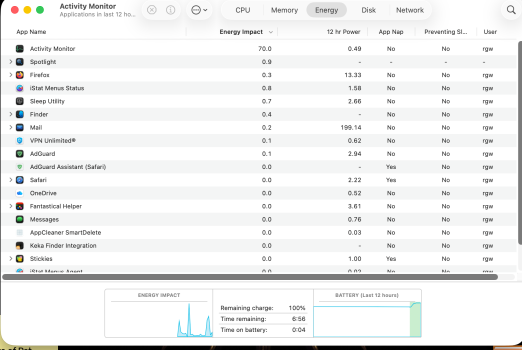
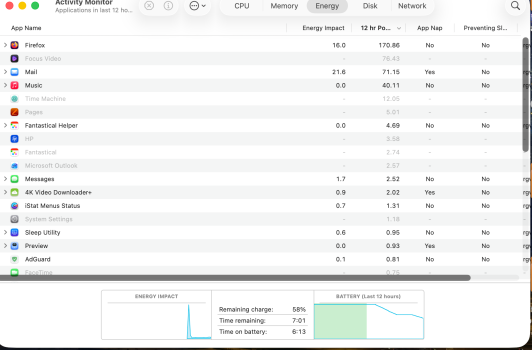
First screenshot M4 MBP fully charged - 2nd Screenshot M5 MBA with less than 60% left. I have NO idea wtf is going on.I do want to keep the Air. I just can't figure out what the hell happened to my M4 MBP.
Attachments

capamac
macrumors 6502a
I'm on Sequoia ... no changes in battery drain rate. :^)
Someone speculated somehwere on the internet that the extra translucency effects in Liquid Glass was burning more CPU cycles than prior OS versions. Try turning off as many of the effects as possible and see if that improves the situation.
Someone speculated somehwere on the internet that the extra translucency effects in Liquid Glass was burning more CPU cycles than prior OS versions. Try turning off as many of the effects as possible and see if that improves the situation.
The problem is the macOS 26. If you can downgrade to Sequoia, that’s pretty much solve most of the problems.
Unfortunately that disables the 120Hz on these Macbooks.and use Low Power Mode
capamac
macrumors 6502a
Naturally, computing graphics 120 times per second is going to drain the battery faster than computing graphics 60 times per second.
He can’t have it all.Unfortunately that disables the 120Hz on these Macbooks.
Steve Adams
macrumors 68020
There has to be something running in the background somewhere. You are getting roughly the same I am with my i7 1165G7. 6-8 hrs of screen on usage. Less if I push it. But you have some software somewhere that is doing something in the background.First screenshot M4 MBP fully charged - 2nd Screenshot M5 MBA with less than 60% left. I have NO idea wtf is going on.

Herr Podspro
Suspended
My M1 Pro definitely runs through its juice faster than before. Even in constant low power mode.
Wish I could.. Firefox has been my go-to browser for years. Can't let it go. Too good.Delete Firefox and use Safari and use Low Power Mode
But i thought Apple changed the process years ago where we can't downgrade. Am I wrong? I was suspecting it was a Tahoe issue.The problem is the macOS 26. If you can downgrade to Sequoia, that’s pretty much solve most of the problems.
You can downgrade on a system that did not come with Tahoe. Try Safari for a day and see if it improves.But i thought Apple changed the process years ago where we can't downgrade. Am I wrong? I was suspecting it was a Tahoe issue.
Second this. You can’t downgrade on iOS / iPadOS.You can downgrade on a system that did not come with Tahoe. Try Safari for a day and see if it improves.
You can downgrade on iOS / iPadOS if you use 3rd-party backup software such as iMazing.Second this. You can’t downgrade on iOS / iPadOS.

I just leave my MacBook Air plugged into power all the time now. Tired of the constant low power alerts.I feel like I've been having a significant increase in battery drain since upgrading a week or two ago. Has anyone else noticed a similar problem? I'm on a M4 24gb 1Tb base MBP. Thanks.
Honestly, I'm starting to not appreciate the new Apple course. I like Apple Silicon, iPhone, Macs and iPad but they're giving their efforts only to hardware and forget how important the OS optimization is.