Become a MacRumors Supporter for $50/year with no ads, ability to filter front page stories, and private forums.
when can we get 3d support like 4xvr
It's still tagged as a "wishlist" item on Firecore's suggestion forum. So there's still a good chance that 3D support will be added, but it doesn't seem to be a high priority. We just need to keep requesting it so it doesn't fall off their radar. 🙂

With 3D support, Infuse would be my absolute favorite and most-used app on Vision Pro. Since Infuse currently only supports 2D video, 4XVR is my go-to app for 3D content. 4XVR works very well, but it's nowhere near as polished as Infuse and has almost zero library management/content organization features.
 
  • Like
Reactions: Macaholic868
Infuse 8.3.7 is now available with a number of fixes and improvements. 💪


837.jpg
 
Infuse 8.3.7 is now available with a number of fixes and improvements. 💪


View attachment 2601767
add 3d support
 
Infuse 8.3.8 with a handful of fixes and improvements is now available! 🙌


838.jpg
 
Infuse 8.3.8 with a handful of fixes and improvements is now available! 🙌


View attachment 2605182
add 3d
 
  • Like
Reactions: inlvnv and ryanmcv
Infuse 8.3.9 is now available! 🔥

Added ‘Are you still watching?’ prompt on Apple TV, improved connection support for fnOS, fixed missing search results for cast & crew, optimizations for Trakt sync, plus other improvements and fixes.


Still-Watching.jpg
 
  • Like
Reactions: ryanmcv
We’re pleased to announce that Infuse 8.4 is available today, bringing a host of powerful new features and improvements to iPhone, iPad, Apple TV, Mac, and Vision Pro.

This release introduces support for browsing and playing extras, community-powered skipping for intros and credits, home screen favorites on more devices, and a major upgrade to Infuse’s playback core. Together, these updates make enjoying your library in Infuse better than ever before!

Extras, deleted scenes, trailers, and more

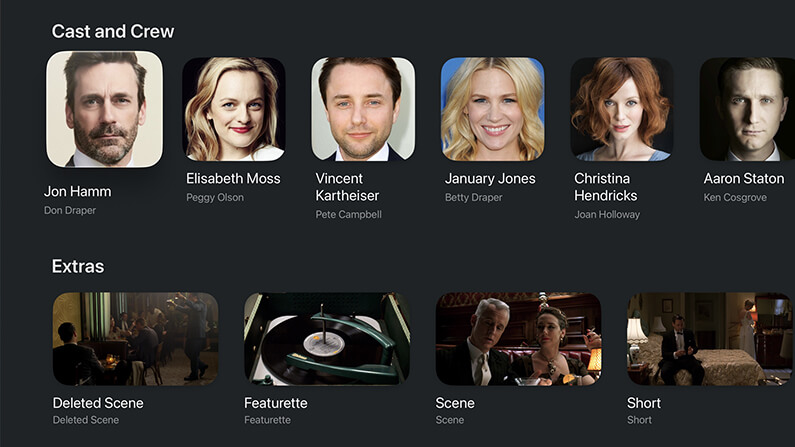
Infuse 8.4 adds support for browsing and playing a variety of additional local content for movies and TV shows, including deleted scenes, featurettes, shorts, trailers, and more.

These extras can be pulled from Emby, Jellyfin, and Plex or from directly connected folders, network shares, and cloud services. When available, these extras will appear directly on the title’s details page, making it easy to discover and enjoy even more from your library without ever having to leave Infuse. Learn more about naming and organizing extras.

Extras, deleted scenes, trailers, and more...


Skip intros, credits, and recaps

When binge-watching, nothing should get in the way of the story and now it’s now easy to skip intros, credits, recaps, and more.

This feature is powered by two new — but fast-growing — community-driven databases: IntroDB.app and TheIntroDB.org. Similar to TMDB, which Infuse uses for movie and TV metadata and artwork, these services rely on contributions from the community. Creating a free account and submitting timestamp data helps improve the experience for everyone.

Skip features are available for all share types and can be set to skip automatically or manually. Settings to adjust (or disable) these features can be found in Infuse > Settings > Playback.

Skip intros & credits


Home screen favorites on every platform

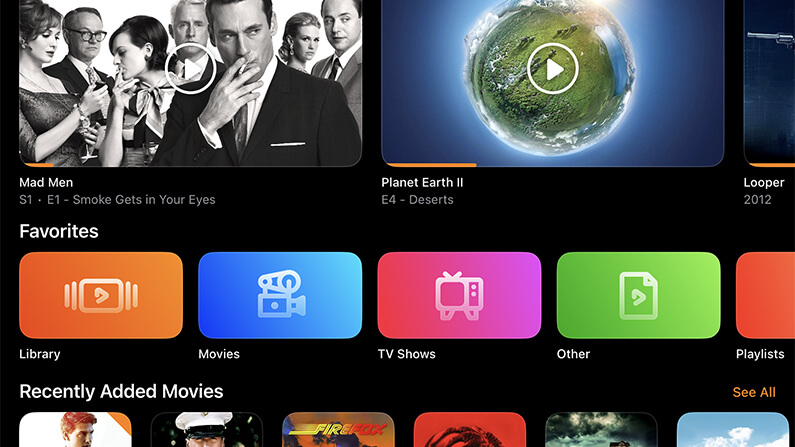
Pinning favorites to the Infuse home screen is one of the easiest ways to keep your most-used folders and library categories close at hand. This has long been available on Apple TV, and now it’s available on iPhone, iPad, Mac, and Vision Pro as well.

The Favorites row is added by default and can be customized by choosing which favorites appear and where the row is placed on the home screen. Prefer a cleaner look? It can be hidden too.

Home screen favorites


A supercharged playback core

At the heart of Infuse is a powerful playback engine built to handle just about any video file you throw at it. Today, that playback core receives a major upgrade with a wide range of improvements, fixes, and optimizations.

This update touches nearly every aspect of how Infuse accesses and plays video, resulting in an even better playback experience across the board. Also included is initial support for the relatively new VVC (H.266) codec, which is beginning to appear more frequently in the wild.

Note: VVC decoding is currently handled in software, so performance may vary depending on the device being used.

Supercharged playback core


More improvements throughout

In addition to these major features, Infuse 8.4 includes a number of other enhancements, refinements, and fixes. Be sure to check out the full release notes for a complete look at everything that’s new in this update.

Thanks!

We always love hearing your comments, feedback, and suggestions, so please feel free to continue the conversation in our community forum.

Thanks so much for using Infuse! 🧡
 
I have my UHDs backed up (full folder rip/backup) and currently play them with an Oppp.

Can Infuse play these? If so, can it handle Dolby vision?

And if playing the backup folder isn't an option, can it play MKVs? Same question about Dolby Vision - also Atmos?

Thanks!
 
Last edited:
Infuse supports most Dolby Vision profiles, including Profile 5, Profile 7, and Profile 8.

Profile 5 and Profile 8 can be played in full Dolby Vision on most recent Apple devices.

Profile 7 videos will be played in HDR, as Apple does not currently support the Dolby Vision content contained in this profile.

For devices that do not support Dolby Vision or HDR, Infuse can use tone-mapping so the colors appear correct. This can help when playing these videos on older Apple devices, or when connected to TVs that do not support Dolby Vision or HDR.
 
Infuse supports most Dolby Vision profiles, including Profile 5, Profile 7, and Profile 8.

Profile 5 and Profile 8 can be played in full Dolby Vision on most recent Apple devices.

Profile 7 videos will be played in HDR, as Apple does not currently support the Dolby Vision content contained in this profile.

For devices that do not support Dolby Vision or HDR, Infuse can use tone-mapping so the colors appear correct. This can help when playing these videos on older Apple devices, or when connected to TVs that do not support Dolby Vision or HDR.

Thank you! I figured Profile 7 was off the table. I assume Atmos is as well, due to non-infuse-related limitations of the ATV itself? But formatwise, can infuse read the UHD full backup folders created with makemkv - or does it need to be in a different format (iso, mkv, etc)?
 
Yes, Infuse can read a Blu-ray backup folder created with makemkv. MKV and ISO files are also supported.

Some flavors of Atmos are supported and more info can be found in this guide.

 
Yes, Infuse can read a Blu-ray backup folder created with makemkv. MKV and ISO files are also supported.

Some flavors of Atmos are supported and more info can be found in this guide.

fantastic, thank you!
 
Infuse 8.4.1 with a handful of improvements and fixes is now rolling out on the App Store. 🙂


841.jpg
 
Infuse 8.4.2 now available! 🙌

New Bwdif deinterlacing option (highest quality), improved handling of extras and bonus content, better support for PiP features, and more!


842.jpg
 
Infuse 8.4.3 is now available! 👌

Reorder home screen favorites, mark multiple items as watched/unwatched, better handling of subtitles, and many other improvements.


843.jpg
 
Infuse 8.4.4 is now available! 👏

New APIs for 3rd party developers, improved indexing of TV series and extras, plus many other various fixes and improvements.


844.jpg
 
Infuse 8.4.5 is now available! 👊

Custom artwork for home screen favorites, improved language support for metadata and artwork, better support for 115 Cloud Drive, and a number of other improvements and fixes.


845.jpg
 
Infuse 8.4.6 is now available! 💪

Add secondary addresses for Emby and Jellyfin, new API additions for playback start/resume times, custom favorite artwork additions, improved language handling, and more!


846.jpg
 
Infuse 8.4.7 is now available! 👌

Display Dolby Atmos tags for Jellyfin & Plex content, library performance improvements, better handling of subtitles with embedded fonts, and more!

 
Register on MacRumors! This sidebar will go away, and you'll see fewer ads.