Become a MacRumors Supporter for $50/year with no ads, ability to filter front page stories, and private forums.
Infuse 8.3.5 with a handful of fixes and improvements is now available. 💪


Merry Christmas and Happy Holidays! 🎄🎅

835.jpg
 
Long time time Infuse lover here... is it possible to add the 'accessibility' option to highlight choices with the white line to also be used when in a movie or series title?
i.e. all the Play, Trailer, watched toggle etc etc options - to be highlighted) - currently they suffer a bit from the dreaded Glass fiasco so minimal difference between the option you're currently 'on' vs the others... so it wuld operate as below screenshot with TV shows being the active element (ps i'd love an option for that outline highlight to be Infuse Orange ;-) )

For those unaware, in the ATV settings - Accessibility - Display - Focus Style >>change from Default to High Contrast will show up the white border around selected screen option.

infuse.jpg
 
Last edited:
Long time time Infuse lover here... is it possible to add the 'accessibility' option to highlight choices with the white line to also be used when in a movie or series title?
i.e. all the Play, Trailer, watched toggle etc etc options - to be highlighted) - currently they suffer a bit from the dreaded Glass fiasco so minimal difference between the option you're currently 'on' vs the others... so it wuld operate as below screenshot with TV shows being the active element (ps i'd love an option for that outline highlight to be Infuse Orange ;-) )

For those unaware, in the ATV settings - Accessibility - Display - Focus Style >>change from Default to High Contrast will show up the white border around selected screen option.

View attachment 2590554
Thanks for the suggestion. We can try and look into this.
 
Hi
does anyone know if its possible to play video content stored in my Google Drive through Infuse on apple 4k tv? Until now i've now been using a Nvidia shield but google drive content is no longer accessible through x-plorer app, it seems Google is cracking down on third party plugins but I've no idea if Infuse is also affected.
Thanks
 
Hi
does anyone know if its possible to play video content stored in my Google Drive through Infuse on apple 4k tv? Until now i've now been using a Nvidia shield but google drive content is no longer accessible through x-plorer app, it seems Google is cracking down on third party plugins but I've no idea if Infuse is also affected.
Thanks
Google Drive is supported on Apple TV, but the connection first needs to be made on iPhone, iPad, Mac, or Vision.

Once this is done the connection will sync to the Apple TV via iCloud and it can be used normally.
 
  • Like
Reactions: Te0SX and roronl
I have a weird issue with refreshing the library. Until recently when I launched Infuse, it would automatically refresh the library (which is hosted on an SMB file server). Now the progress indicator just spins for a second and then stops without actually refreshing, as if it couldn't access the server. Starting a refresh manually yields the same result. Only when I force quit Infuse from the ATV home screen and then relaunch, it properly refreshes the library. This has probably started a few weeks or months ago (I only recently noticed it because I haven't been adding a lot of content). Anyone else?
 
I have a weird issue with refreshing the library. Until recently when I launched Infuse, it would automatically refresh the library (which is hosted on an SMB file server). Now the progress indicator just spins for a second and then stops without actually refreshing, as if it couldn't access the server. Starting a refresh manually yields the same result. Only when I force quit Infuse from the ATV home screen and then relaunch, it properly refreshes the library. This has probably started a few weeks or months ago (I only recently noticed it because I haven't been adding a lot of content). Anyone else?
Maybe try today's 8.3.6 update to see if that helps. If the issue persists, please drop us a note from within the app and we can investigate further.
 
Infuse 8.3.6 is now live! 🚀

Features support for Plex Home (managed) users, initial support for Jellyfin 10.12, playback improvements, better handling of subtitles, and many other changes.


836.jpg
 
I have a weird bug where the continue watching top shelf shows media from the main user not the current one selected. It happens even if I switch Apple TV profiles. I uninstalled the app and deleted the Plex share already and it keeps happening.
 
I have a weird bug where the continue watching top shelf shows media from the main user not the current one selected. It happens even if I switch Apple TV profiles. I uninstalled the app and deleted the Plex share already and it keeps happening.
This is related to a tvOS system bug we have reported to Apple. We're hopeful they can get things fixed up in one of the upcoming versions of tvOS.
 
  • Like
Reactions: firewire9000
Infuse 8.3.7 is now available with a number of fixes and improvements. 💪


837.jpg
 
Infuse 8.3.8 with a handful of fixes and improvements is now available! 🙌


838.jpg
 
Is there an easy way to "refresh" the link between Infuse and Plex server so I don't keep getting HTTP 503 (service unavailable) messages? Right now, I have to delete the Plex share and re-add it. It should last much longer, yes?
 
Is there an easy way to "refresh" the link between Infuse and Plex server so I don't keep getting HTTP 503 (service unavailable) messages? Right now, I have to delete the Plex share and re-add it. It should last much longer, yes?
You shouldn’t have to delete the Plex Share link in Infuse And re-add. It should be a set and forget. Something is wrong with your setup if Infuse is consistently losing the share link. Is your Apple TV connected via Ethernet or WiFi?
 
Infuse 8.3.9 is now available! 🔥

Added ‘Are you still watching?’ prompt on Apple TV, improved connection support for fnOS, fixed missing search results for cast & crew, optimizations for Trakt sync, plus other improvements and fixes.


Still-Watching.jpg
 
We’re pleased to announce that Infuse 8.4 is available today, bringing a host of powerful new features and improvements to iPhone, iPad, Apple TV, Mac, and Vision Pro.

This release introduces support for browsing and playing extras, community-powered skipping for intros and credits, home screen favorites on more devices, and a major upgrade to Infuse’s playback core. Together, these updates make enjoying your library in Infuse better than ever before!

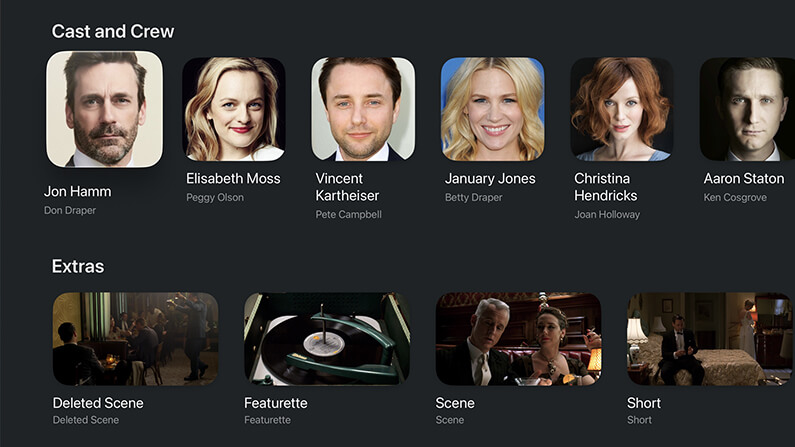
Extras, deleted scenes, trailers, and more

Infuse 8.4 adds support for browsing and playing a variety of additional local content for movies and TV shows, including deleted scenes, featurettes, shorts, trailers, and more.

These extras can be pulled from Emby, Jellyfin, and Plex or from directly connected folders, network shares, and cloud services. When available, these extras will appear directly on the title’s details page, making it easy to discover and enjoy even more from your library without ever having to leave Infuse. Learn more about naming and organizing extras.

Extras, deleted scenes, trailers, and more...


Skip intros, credits, and recaps

When binge-watching, nothing should get in the way of the story and now it’s now easy to skip intros, credits, recaps, and more.

This feature is powered by two new — but fast-growing — community-driven databases: IntroDB.app and TheIntroDB.org. Similar to TMDB, which Infuse uses for movie and TV metadata and artwork, these services rely on contributions from the community. Creating a free account and submitting timestamp data helps improve the experience for everyone.

Skip features are available for all share types and can be set to skip automatically or manually. Settings to adjust (or disable) these features can be found in Infuse > Settings > Playback.

Skip intros & credits


Home screen favorites on every platform

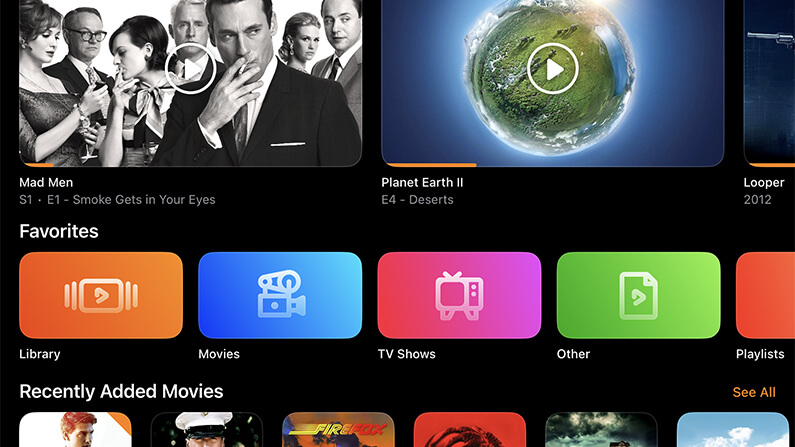
Pinning favorites to the Infuse home screen is one of the easiest ways to keep your most-used folders and library categories close at hand. This has long been available on Apple TV, and now it’s available on iPhone, iPad, Mac, and Vision Pro as well.

The Favorites row is added by default and can be customized by choosing which favorites appear and where the row is placed on the home screen. Prefer a cleaner look? It can be hidden too.

Home screen favorites


A supercharged playback core

At the heart of Infuse is a powerful playback engine built to handle just about any video file you throw at it. Today, that playback core receives a major upgrade with a wide range of improvements, fixes, and optimizations.

This update touches nearly every aspect of how Infuse accesses and plays video, resulting in an even better playback experience across the board. Also included is initial support for the relatively new VVC (H.266) codec, which is beginning to appear more frequently in the wild.

Note: VVC decoding is currently handled in software, so performance may vary depending on the device being used.

Supercharged playback core


More improvements throughout

In addition to these major features, Infuse 8.4 includes a number of other enhancements, refinements, and fixes. Be sure to check out the full release notes for a complete look at everything that’s new in this update.

Thanks!

We always love hearing your comments, feedback, and suggestions, so please feel free to continue the conversation in our community forum.

Thanks so much for using Infuse! 🧡

 
Infuse 8.4.1 with a handful of improvements and fixes is now rolling out on the App Store. 🙂


841.jpg
 
Infuse 8.4.2 now available! 🙌

New Bwdif deinterlacing option (highest quality), improved handling of extras and bonus content, better support for PiP features, and more!


842.jpg
 
Infuse 8.4.3 is now available! 👌

Reorder home screen favorites, mark multiple items as watched/unwatched, better handling of subtitles, and many other improvements.


843.jpg
 
So I got a 3rd gen apple tv to run infuse and stream 4k HDR / dolby atmos to my tv from my mac mini which works a dream tbh (plus I have a samsung q80r soundbar if it matters) - Do i have to live with the "handshake" from the apple tv to the tv every time I switch res formats or I could I just leave the apple in dolby ?

Gemini said

"A "black screen" for 2–3 seconds when starting a video is called an HDMI Resync. It happens when the Apple TV changes its output to match a movie's specific Dynamic Range (SDR to HDR/Dolby Vision) or Frame Rate (60Hz to 24fps). The TV and Apple TV have to "re-handshake" to agree on the new signal.

If your Apple TV is set to "Always-On Dolby Vision" with "Match Content" turned OFF, the handshake is skipped. The Apple TV forces everything (menus and apps) into a permanent Dolby Vision container so the transition is instant and seamless.

  • Match Content ON: Best accuracy. The TV handles the raw signal, but you get the "annoying" black blink every time you hit play.
  • Match Content OFF: Best convenience. No black blinks and instant navigation, but the Apple TV does the color processing itself.
Summary: On modern OLEDs like the LG B9, the quality difference is negligible. If the black blink bothers you, keeping Match Content OFF is the way to go."

I tried it with always on dolby vision on permanently and couldnt see much difference tbh - your thoughts ?
 
So I got a 3rd gen apple tv to run infuse and stream 4k HDR / dolby atmos to my tv from my mac mini which works a dream tbh (plus I have a samsung q80r soundbar if it matters) - Do i have to live with the "handshake" from the apple tv to the tv every time I switch res formats or I could I just leave the apple in dolby ?

Gemini said

"A "black screen" for 2–3 seconds when starting a video is called an HDMI Resync. It happens when the Apple TV changes its output to match a movie's specific Dynamic Range (SDR to HDR/Dolby Vision) or Frame Rate (60Hz to 24fps). The TV and Apple TV have to "re-handshake" to agree on the new signal.

If your Apple TV is set to "Always-On Dolby Vision" with "Match Content" turned OFF, the handshake is skipped. The Apple TV forces everything (menus and apps) into a permanent Dolby Vision container so the transition is instant and seamless.

  • Match Content ON: Best accuracy. The TV handles the raw signal, but you get the "annoying" black blink every time you hit play.
  • Match Content OFF: Best convenience. No black blinks and instant navigation, but the Apple TV does the color processing itself.
Summary: On modern OLEDs like the LG B9, the quality difference is negligible. If the black blink bothers you, keeping Match Content OFF is the way to go."

I tried it with always on dolby vision on permanently and couldnt see much difference tbh - your thoughts ?
It's a little bit of personal preference, but overall the summary of the 2 options is correct.

Having Match Dynamic Range on would technically provide better color accuracy, whereas having it off will avoid the signal switching which can be more convenient.

The Match Frame Rate option may have more of an impact, as you could see some 'stuttering' at times when playing 24 fps videos (most movies and many TV shows) as the video's frame rate would not match what the Apple TV is sending to your TV. Some people are very sensitive to this while others aren't able to notice any difference.

Overall, if things look good to you with these options off then that may be the best option.
 
  • Like
Reactions: roronl
Yeah Gemini did mention that and I have set TruMotion: Set to User. and De-Judder: to 2 which tbh has sorted out fallout in 4k as I did notice a few stutters on the earlier episodes which my partner didnt (and never does on anything tbh) but now it looks great - thanks for your advice !

I think originally I just liked seeing dolby vision and HDR appear on the tv as I was unsure what I was getting video wise when i first got it and Infuse but now I think its putting everything through as it should so I will just leave it with Dolby permanently on and see how we go either way its a massive step up from Plex running as an app on my 7 year old LG B9 tv
 
  • Like
Reactions: firecore
Infuse 8.4.4 is now available! 👏

New APIs for 3rd party developers, improved indexing of TV series and extras, plus many other various fixes and improvements.


844.jpg
 
  • Like
Reactions: iccb and RMMediccc
Register on MacRumors! This sidebar will go away, and you'll see fewer ads.