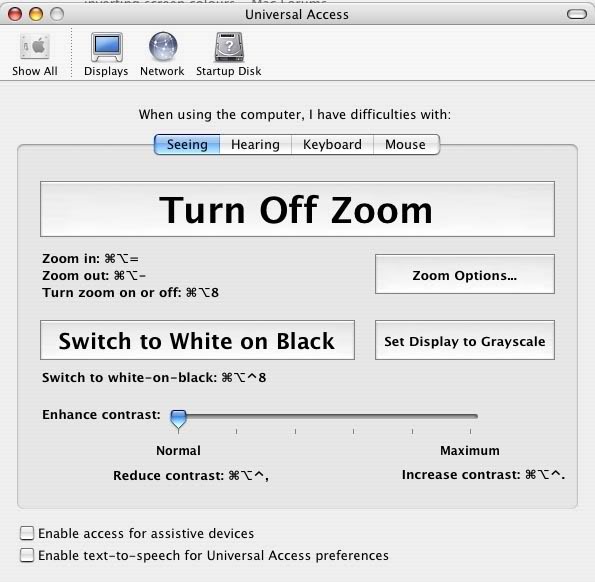
using apple ctrl alt and 8
it used to invert my screen but recently it only goes to grayscale
i know i can change it in universal access but does anyone know how i can reset it so that the key shorcut will go to inverted?
in the menu the inverted colour is called white on black
when i press the shortcut it goes inverted for a brief moment and then goes onto grayscale
it only stays on inverted colours when i do it thru the menu
Guess I should have asked which OS-X version you are running - is this 10.3 or earlier?
Did this behavior happen after installing or upgrading any software?
I'm sorry - I don't remember if 10.3 has this, but you can try and look in System Preferences > Keyboard & Mouse > Keyboard Shortcuts and see if all the shortcuts for Universal Access are enabled and set correctly. It also has a "restore defaults" button.
I could be wrong, but I thought only Tiger would invert the colours, but Panther and earlier versions of OSX would behave like yours is. Did you used to have Tiger on this machine? 🙂
i cant remember what i had but it definately used to work
white on black is the inverted thing mine keeps on going to grays scale
id like to know what caused it not to work anymore
i cant remember what i had but it definately used to work
white on black is the inverted thing mine keeps on going to grays scale
id like to know what caused it not to work anymore