Last edited:

Got a tip for us?
Let us know
Become a MacRumors Supporter for $50/year with no ads, ability to filter front page stories, and private forums.
iOS 11.2 Lockscreen control center indicator line should be OPTIONAL
- Thread starter Another Day
- Start date
- Sort by reaction score
You are using an out of date browser. It may not display this or other websites correctly.
You should upgrade or use an alternative browser.
You should upgrade or use an alternative browser.

QquegChristian
macrumors 6502a


itsmemuffins
macrumors 68040
It’s a very inelegant solution to a problem no one asked about.
In my humble opinion, what they should have gone is. When you turn on the screen. The signal strength wifi, and battery icons, give a little bounce. Just to let you know there is more there.
That ugly line, is just plain ugly. At least make it fade away after a couple of seconds.
In my humble opinion, what they should have gone is. When you turn on the screen. The signal strength wifi, and battery icons, give a little bounce. Just to let you know there is more there.
That ugly line, is just plain ugly. At least make it fade away after a couple of seconds.
Last edited:

maka344
macrumors 68020
Are you all talking about the little ugly, pointless line or the big ugly, pointless line?
Big ugly ones obviouslyAre you all talking about the little ugly, pointless line or the big ugly, pointless line?
TinaBelcher
macrumors 65816
It’s hideous! We already have one as a replacement for the physical home button. A monkey could manage without the lines.

Gathomblipoob
macrumors 603

TechNismo
macrumors 6502
Based on? Hard to say much when it comes to vast majority of typical users who don't even know about these forums (or that there's even such a thing as online forums), for example.It’s absolutely useless to almost everyone...
[doublepost=1512240379][/doublepost]
Why? Seems like it's intentional.I don’t know how this made it pass beta...
Gathomblipoob
macrumors 603
It’s absolutely useless to almost everyone...
The line actually doesn't bother me that much, but it really isn't necessary.

CharlesShaw
macrumors 68030
The line is not persistent and doesn't harm anything. I'm guessing it was added because enough users were not swiping down from the right spot.
itsmemuffins
macrumors 68040
CharlesShaw
macrumors 68030
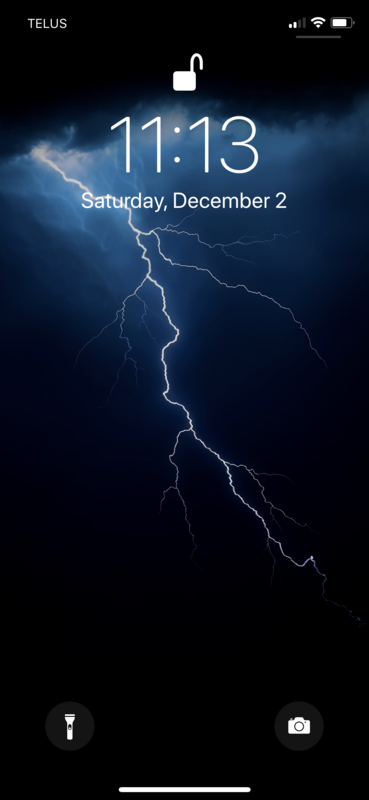
We are talking about the new lock screen control centre indicator line.
Exactly. Why are we talking about this? 😀

Apple_Robert
Contributor

Knowlege Bomb
macrumors G4
It makes no sense. If it’s there to indicate functionality then why isn’t there one on the left to clue you in to where NC is as well?
Potentially because that is essentially the same as it's been for quite a while now (short of just the right side now applying to Control Center).It makes no sense. If it’s there to indicate functionality then why isn’t there one on the left to clue you in to where NC is as well?
Knowlege Bomb
macrumors G4
I was under the impression stuff like this was for new users rather than people that are familiar with how the OS works. One being there while the other is absent is contradictory either way, just like how CC and NC have completely different interfaces while the method of access is identical. Seems to be typical of Apple lately.Potentially because that is essentially the same as it's been for quite a while now (short of just the right side now applying to Control Center).


PhillyGuy72
macrumors 68040
The line is so not needed and should be an option to turn this off. I actually would like an option to make that lock / unlock icon smaller too. Two little minimal things but they bother me.
CharlesShaw
macrumors 68030
One being there while the other is absent is contradictory either way, just like how CC and NC have completely different interfaces while the method of access is identical.
Control Center is currently the only way to view a few items that were once on the status bar, so letting the average user know there's something to swipe on will review the battery percentage, etc. and save some customer service calls, perhaps.

mcdj
macrumors G3
Hang on folks...I just took a screenshot, zoomed and cropped it, and you’re not gonna believe this.
Look very close...

Look very close...
Last edited: