Become a MacRumors Supporter for $50/year with no ads, ability to filter front page stories, and private forums.

MacRumors

macrumors bot
Original poster


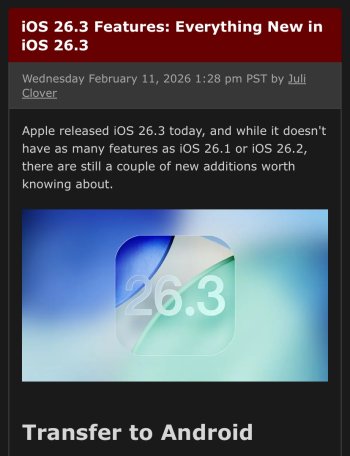
Apple released iOS 26.3 today, and while it doesn't have as many features as iOS 26.1 or iOS 26.2, there are still a couple of new additions worth knowing about.
iOS-26.3-Feature.jpg

Transfer to Android

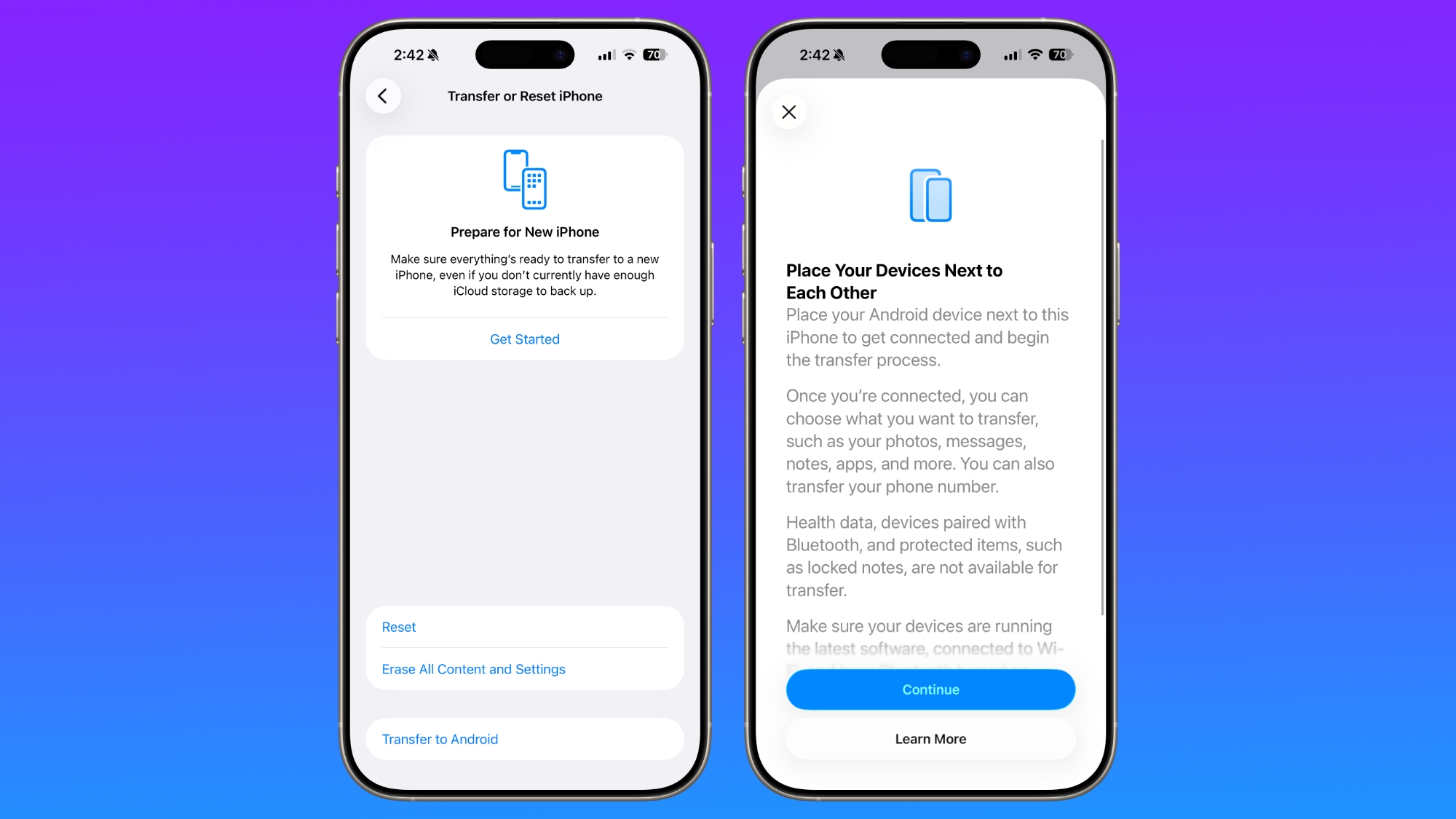
Apple is making it easier for iPhone users to transition to an Android smartphone in iOS 26.3, introducing a new transfer tool that lets an iPhone user place their device next to an Android device to initiate a transfer process.
ios-26-3-android-transfer.jpg

With the two smartphones connected, users can opt to move over photos, messages, notes, apps, passwords, phone number, and more. Data transfers occur with no need to download and use a separate app, making the process simpler.

Health data, devices paired with Bluetooth, and protected items like locked notes are not transferred over to the new device. Google has also implemented a similar feature for transferring data from an Android to an iPhone, so it is a two-way process between the two platforms.

Weather Wallpaper

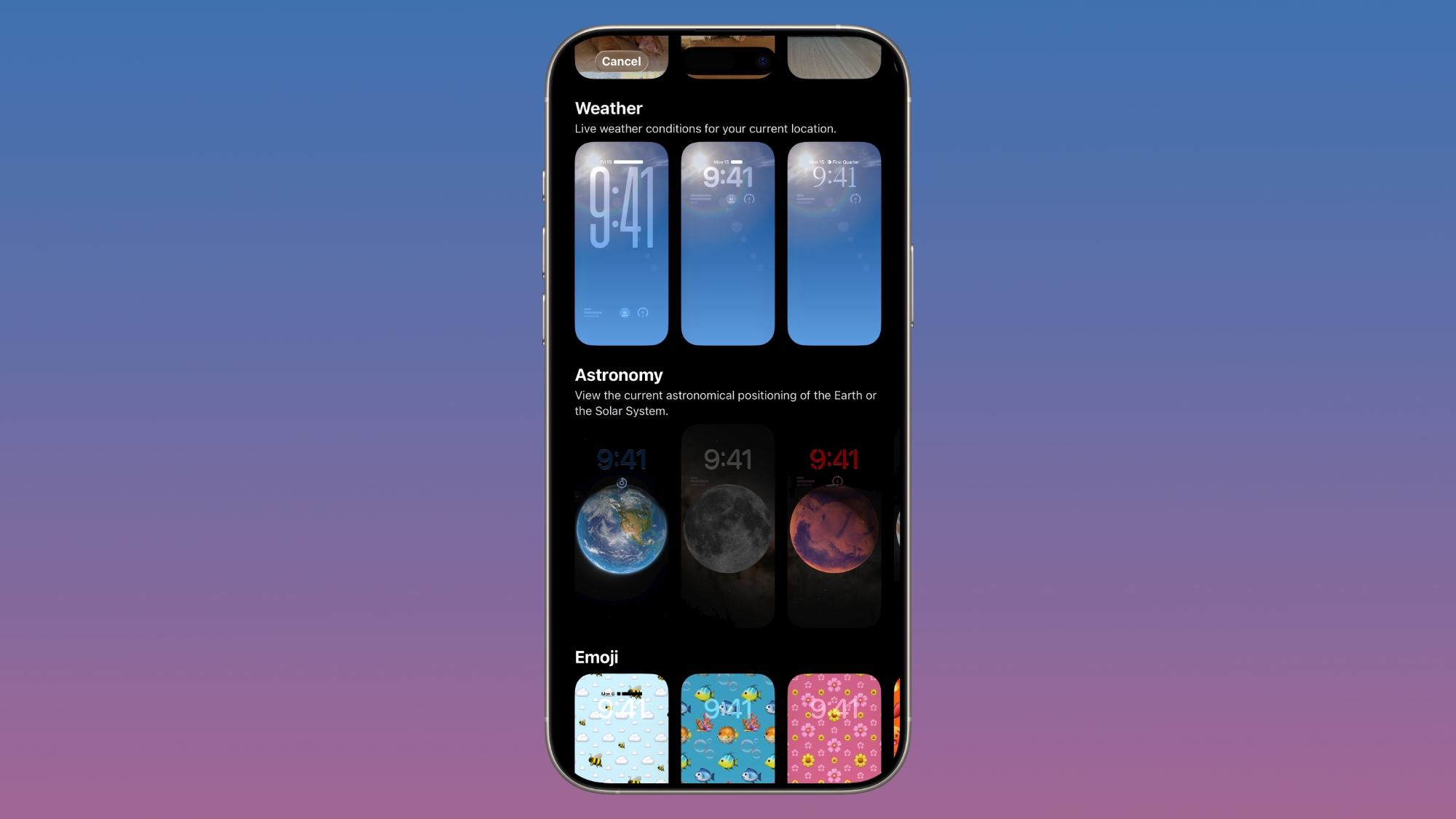
There is a new Weather wallpaper section in the Lock Screen customization options. Previously, Apple had a combined section for Weather and Astronomy, but Weather was split out into its own category.
ios-26-3-weather.jpg

There are now three pre-designed Weather wallpapers with different fonts for the time and different weather widgets to give users a better idea of how the Weather wallpaper can be used.

Limit Precise Location

iOS 26.3 includes a setting to limit carrier location tracking for carriers that add support for the feature. It's an option that only works with the C1 and C1X modems, which are in the iPhone 16e and iPhone Air.
iOS-26-Phone-App-Features.jpg

Mobile networks determine location based on the cellular towers that a device connects to, but with the setting enabled, some of the data typically made available to mobile networks will be restricted. Rather than being able to see location down to a street address, carriers will instead be limited to the neighborhood where a device is located, for example.

In the United States, only Boost Mobile is supporting the feature as of now. EE and BT in the UK offer it, as does Telekom in Germany and AIS and True in Thailand.

You can enable the setting on a compatible device by opening the Settings app, tapping on your cellular service, tapping on Mobile Data Options, and then toggling on Limit Precise Location. You'll need to restart your device when turning the setting on or off.

Signs of M5 Chips

The iOS 26.3 release candidate featured references to unreleased M5 Max and M5 Ultra chips that could be used in upcoming Macs over the course of the next month or two.

Notification Forwarding - EU Only

In the iOS 26.3 beta, Apple tested a new "Notification Forwarding" setting that allows incoming notifications on an iPhone to be forwarded to a third-party wearable device like an Android smartwatch, but it was not included in the launch version of the software. It will likely come in a future iOS update.
ios-26-3-notification-forwarding.jpg

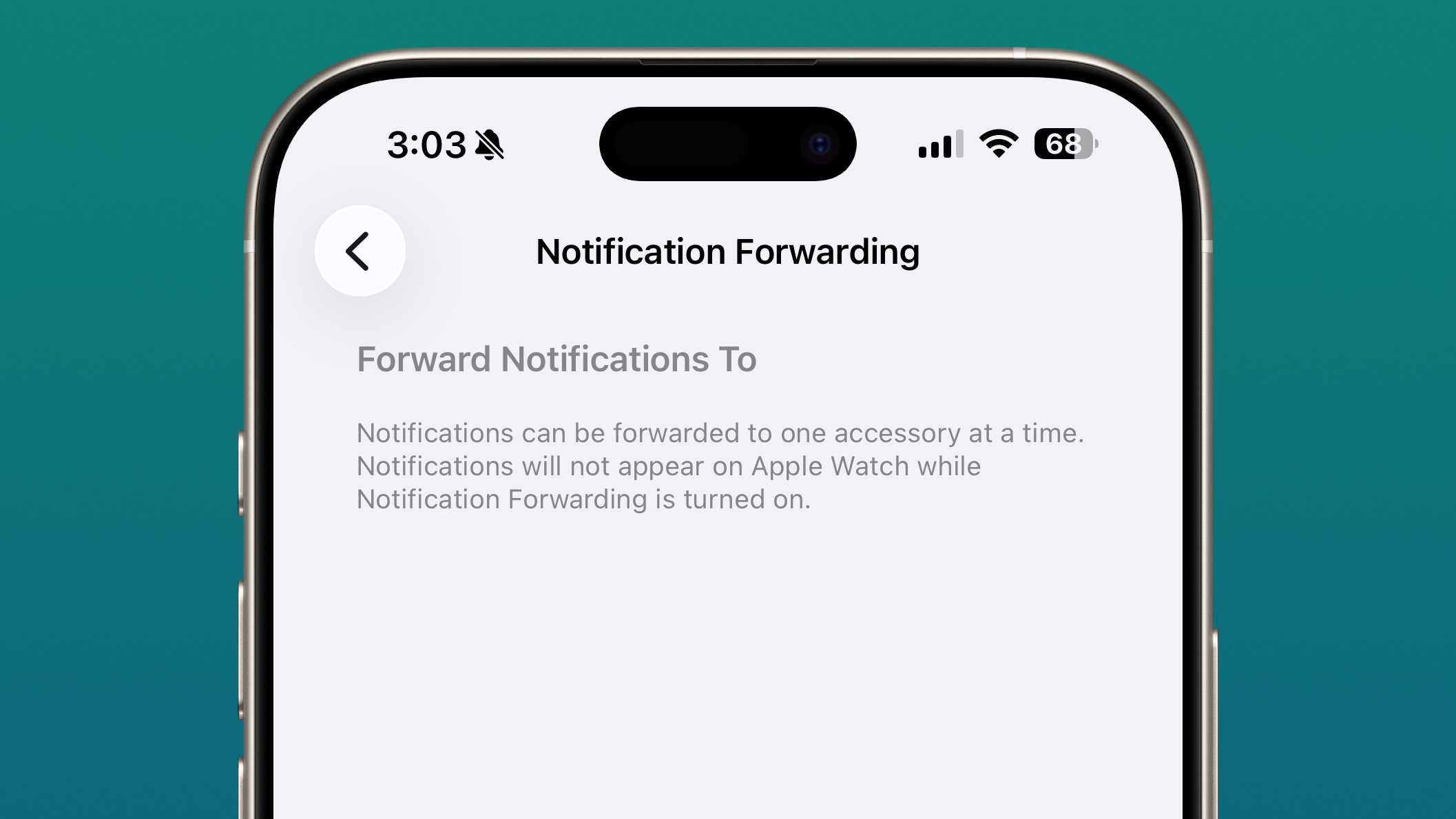
The setting was available in the Notification section of the Settings app under a new "Notification Forwarding" option. Notifications can only be forwarded to a single device at a time, so if Notification Forwarding is enabled with a third-party wearable, the Apple Watch won't be able to receive and display notifications.

Apple is adding this feature to address antitrust complaints suggesting that third-party wearables should have the same access to notifications and other features as the Apple Watch. It is limited to the European Union.

Proximity Pairing - EU Only

In the iOS 26.3 beta, Apple tested other Europe-only changes for third-party wearables, which were shared by the European Commission. Devices like headphones and smartwatches are able to use some of the same functionality available to the AirPods and the Apple Watch going forward.

Proximity pairing allows third-party devices to pair with an iOS device in an AirPods-like one-tap way by bringing an accessory close to an iPhone or an iPad. This too is not yet enabled in iOS 26.3 and will likely be implemented later.

Security Updates

iOS 26.3 addresses dozens of security vulnerabilities, including one bug that was known to be actively exploited.

Apple says that a vulnerability in the dyld dynamic link editor allowed for the execution of arbitrary code. The bug may have been used in an "extremely sophisticated attack" against targeted individuals in versions of iOS before iOS 26.

There are several other vulnerabilities that were fixed too, across apps and services. A CoreAudio bug could allow a maliciously crafted media file to terminate an app, and a bug with Game Center could allow users to view sensitive information. A vulnerability in Messages could allow a shortcut to bypass sandbox restrictions, and an issue in Photos could allow someone with physical access to an iOS device to get to photos from the Lock Screen.

Now that the vulnerabilities have been publicized by Apple, even those that were not exploited before might be taken advantage of now. Apple recommends all users update their devices to iOS 26.3, iPadOS 26.3, and macOS Tahoe 26.3 as soon as possible.

How to Update

You can install iOS 26.3 by opening up the Settings app, tapping into the General section, and navigating to Software Update.

Compatibility

iOS 26.3 is available on all iPhones that support iOS 26, which includes the iPhone 11 and later.

What's Next

Apple is likely to release the first beta of its next update, iOS 26.4, in two weeks.

Article Link: iOS 26.3 Features: Everything New in iOS 26.3
 
Last edited:


Apple released iOS 26.3 today, and while it doesn't have as many features as iOS 26.1 or iOS 26.2, there are still a couple of new additions worth knowing about.

iOS-26.3-Feature.jpg

Transfer to Android

Apple is making it easier for iPhone users to transition to an Android smartphone in iOS 26.3, introducing a new transfer tool that lets an iPhone user place their device next to an Android device to initiate a transfer process.

ios-26-3-android-transfer.jpg

With the two smartphones connected, users can opt to move over photos, messages, notes, apps, passwords, phone number, and more. Data transfers occur with no need to download and use a separate app, making the process simpler.

Health data, devices paired with Bluetooth, and protected items like locked notes are not transferred over to the new device. Google has also implemented a similar feature for transferring data from an Android to an iPhone, so it is a two-way process between the two platforms.

Weather Wallpaper

There is a new Weather wallpaper section in the Lock Screen customization options. Previously, Apple had a combined section for Weather and Astronomy, but Weather was split out into its own category.

ios-26-3-weather.jpg

There are now three pre-designed Weather wallpapers with different fonts for the time and different weather widgets to give users a better idea of how the Weather wallpaper can be used.

Limit Precise Location

iOS 26.3 includes a setting to limit carrier location tracking for carriers that add support for the feature. It's an option that only works with the C1 and C1X modems, which are in the iPhone 16e and iPhone Air.

iOS-26-Phone-App-Features.jpg

Mobile networks determine location based on the cellular towers that a device connects to, but with the setting enabled, some of the data typically made available to mobile networks will be restricted. Rather than being able to see location down to a street address, carriers will instead be limited to the neighborhood where a device is located, for example.

In the United States, only Boost Mobile is supporting the feature as of now. EE and BT in the UK offer it, as does Telekom in Germany and AIS and True in Thailand.

You can enable the setting on a compatible device by opening the Settings app, tapping on your cellular service, tapping on Mobile Data Options, and then toggling on Limit Precise Location. You'll need to restart your device when turning the setting on or off.

Signs of M5 Chips

The iOS 26.3 release candidate featured references to unreleased M5 Max and M5 Ultra chips that could be used in upcoming Macs over the course of the next month or two.

Notification Forwarding - EU Only

In the iOS 26.3 beta, Apple tested a new "Notification Forwarding" setting that allows incoming notifications on an iPhone to be forwarded to a third-party wearable device like an Android smartwatch. Apple may have decided to delay this functionality until iOS 26.4.

ios-26-3-notification-forwarding.jpg

The setting was available in the Notification section of the Settings app under a new "Notification Forwarding" option. Notifications can only be forwarded to a single device at a time, so if Notification Forwarding is enabled with a third-party wearable, the Apple Watch won't be able to receive and display notifications.

Apple is adding this feature to address antitrust complaints suggesting that third-party wearables should have the same access to notifications and other features as the Apple Watch. It is limited to the European Union.

Proximity Pairing - EU Only

In the iOS 26.3 beta, Apple added other Europe-only changes for third-party wearables, which were shared by the European Commission. Devices like headphones and smartwatches are able to use some of the same functionality available to the AirPods and the Apple Watch going forward.

Proximity pairing allows third-party devices to pair with an iOS device in an AirPods-like one-tap way by bringing an accessory close to an iPhone or an iPad.

Security Updates

iOS 26.3 addresses dozens of security vulnerabilities, including one bug that was known to be actively exploited.

Apple says that a vulnerability in the dyld dynamic link editor allowed for the execution of arbitrary code. The bug may have been used in an "extremely sophisticated attack" against targeted individuals in versions of iOS before iOS 26.

There are several other vulnerabilities that were fixed too, across apps and services. A CoreAudio bug could allow a maliciously crafted media file to terminate an app, and a bug with Game Center could allow users to view sensitive information. A vulnerability in Messages could allow a shortcut to bypass sandbox restrictions, and an issue in Photos could allow someone with physical access to an iOS device to get to photos from the Lock Screen.

Now that the vulnerabilities have been publicized by Apple, even those that were not exploited before might be taken advantage of now. Apple recommends all users update their devices to iOS 26.3, iPadOS 26.3, and macOS Tahoe 26.3 as soon as possible.

How to Update

You can install iOS 26.3 by opening up the Settings app, tapping into the General section, and navigating to Software Update.

Compatibility

iOS 26.3 is available on all iPhones that support iOS 26, which includes the iPhone 11 and later.

What's Next

Apple is likely to release the first beta of its next update, iOS 26.4, in two weeks.

Article Link: iOS 26.3 Features: Everything New in iOS 26.3
4.24 GB M1 2020 MB Air
 
4.24 GB M1 2020 MB Air
8.44 GB coming from 15.7.4 on M4 Pro MBP.
Not seeing anything worth upgrading for. Don't care about new shortcuts, phone app, Genmoji, nor Apple Games.
Safari seems snappier!!!
Wait a tick. Okay, maybe I'll upgrade for faster Safari.

But I'll wait until after the semester. Don't want to introduce new bugs that possibly impact Docker or my development tools.
 
  • Like
Reactions: Big_D
Sooo… no features 👍🏼

Hope they fixed the full screen album artwork glitching
Or the glitch on the top of the screen on "photos" when you switch between "library" and "collection".

This happens with motion on. With motion off, it's all good.

I have this from lots of early versions and betas...
 
8.44 GB coming from 15.7.4 on M4 Pro MBP.
Not seeing anything worth upgrading for. Don't care about new shortcuts, phone app, Genmoji, nor Apple Games.

Wait a tick. Okay, maybe I'll upgrade for faster Safari.

But I'll wait until after the semester. Don't want to introduce new bugs that possibly impact Docker or my development tools.
Docker works fine. Every dev tool I have installed works fine.
 
  • Like
Reactions: NeonNights
You missed the most useful feature (at least for me) -- improved handling of sites and apps that use multiple authentication codes from different sources. For example, Flightaware has a code in the code generator in the Passwords app, and it also sends a code in email -- and it wants them in a specific order. In previous versions, you'd only get the opportunity to insert the one from the authenticator app, but it wanted the emailed code first.

Now, both codes get displayed side by side....
 
  • Like
Reactions: Kimba and fbadini
I would really appreciate MacRumors to report on the keyboard issue ongoing since 26.1, even if they don't have it. Many people do have it
I think this issue has been going on since before then, but here’s a great video explaining it:


I definitely think it deserves more coverage and I hope Apple fixes it ASAP. This was something that definitely didn’t need to be changed, and seems to have been messed with and overthought to the point of making it worse (and incredibly frustrating to use).
 
More software additions equals exponentially more critical security openings. The good old days, software that is paid for and changed every three or four years. Gives one time to learn and leverage the new software. The good old days.
 
Or the glitch on the top of the screen on "photos" when you switch between "library" and "collection".

This happens with motion on. With motion off, it's all good.

I have this from lots of early versions and betas...
Haven’t experienced that. I have experienced a glitch in messages. I open a thread and send a message and it’ll glitch where the thread will be in between the bold ‘messages’ icon and the blank space up top.

That & album artwork are glitches I experience frequently.
 
Is the oozing glass gone yet? Or the many keyboard quirks? Or... (Insert broken thing here)?

The keyboard is a total hot smoking mess. It always seems to think I’m typing a different letter than I actually am.

The keyboard used to work just fine. Now it’s a disaster. If Apple had this keyboard when they were trying to slay RIM we may still have BlackBerry’s around.
 
Notification Forwarding was a placebo in 26.3 Beta 1 and was removed with 26.3 Beta 2. It's not in the Release Version of 26.3 in the European Union!
 
  • Like
Reactions: Beepster
The keyboard is a total hot smoking mess. It always seems to think I’m typing a different letter than I actually am.

It knows what key you've pressed and it changes it anyway. YouTubers have done high-speed camera recordings and it shows iOS acknowledging the correct key press, but changing it to something else in the letter and producing an incorrectly spelled word.

This is definitely something Apple has changed, because it did not used to be like this.
 
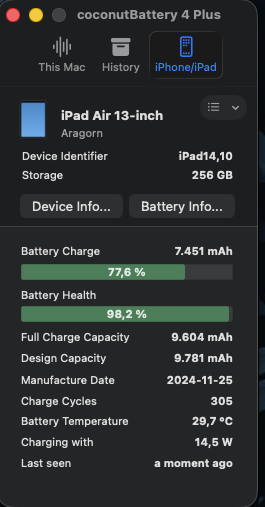
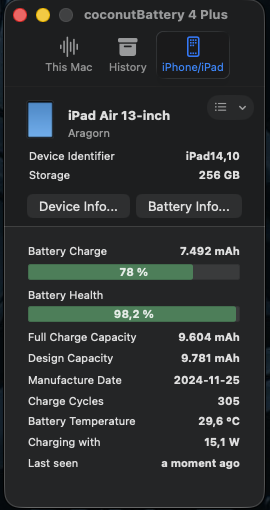
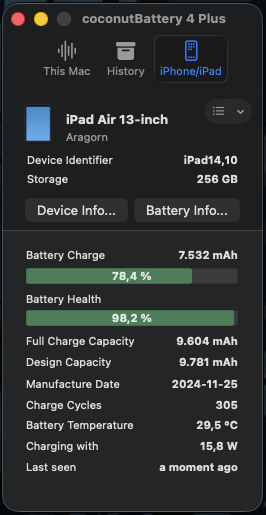
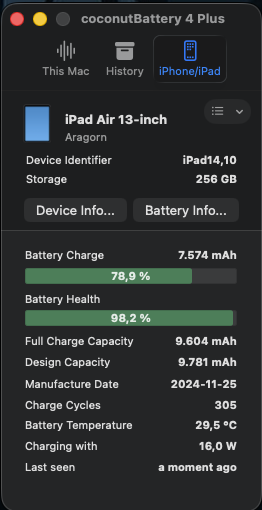
Oh yes, the bug that causes the charging current to keep increasing instead of decreasing as you approach the charging limit is still there! Look at "Battery Charge" and "Charging With".

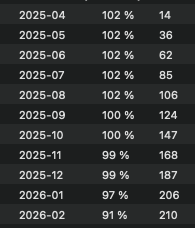
It may be that the 80% charging limit is ignored, in which case the battery will suffer serious damage. My iPad Mini A17 Pro dropped in the last two weeks from 98.6% maximum capacity to now 84.7%, caused by that bug!

The reporting was done via coconutBattery Plus.

The bug was introduced with iPadOS 26.2.1 and appears to have been carried over to iPadOS 26.3.

Of course, Apple's own battery health indicator claims that the battery still has 98% capacity! 🫠

Bildschirmfoto 2026-02-11 um 23.21.28.pngBildschirmfoto 2026-02-11 um 23.22.16.pngBildschirmfoto 2026-02-11 um 23.22.53.pngBildschirmfoto 2026-02-12 um 01.34.12.pngBildschirmfoto 2026-02-12 um 01.39.00.png
 
Register on MacRumors! This sidebar will go away, and you'll see fewer ads.