17 Pro, 90% LTE, 10% WiFiWhat device @cigz? WiFi, 4/5G?

Got a tip for us?
Let us know
Become a MacRumors Supporter for $50/year with no ads, ability to filter front page stories, and private forums.
iOS 26 battery life thread.
- Thread starter goldmac2006
- Start date
- Sort by reaction score
You are using an out of date browser. It may not display this or other websites correctly.
You should upgrade or use an alternative browser.
You should upgrade or use an alternative browser.


James6s
macrumors 68030
That’s pretty bad for a 17 Pro! Doing worse than my Air17 Pro, 90% LTE, 10% WiFi

That’s pretty bad for a 17 Pro! Doing worse than my Air
💯. Ain’t my ratio of all cellular I use!17 Pro, 90% LTE, 10% WiFi
James6s
macrumors 68030
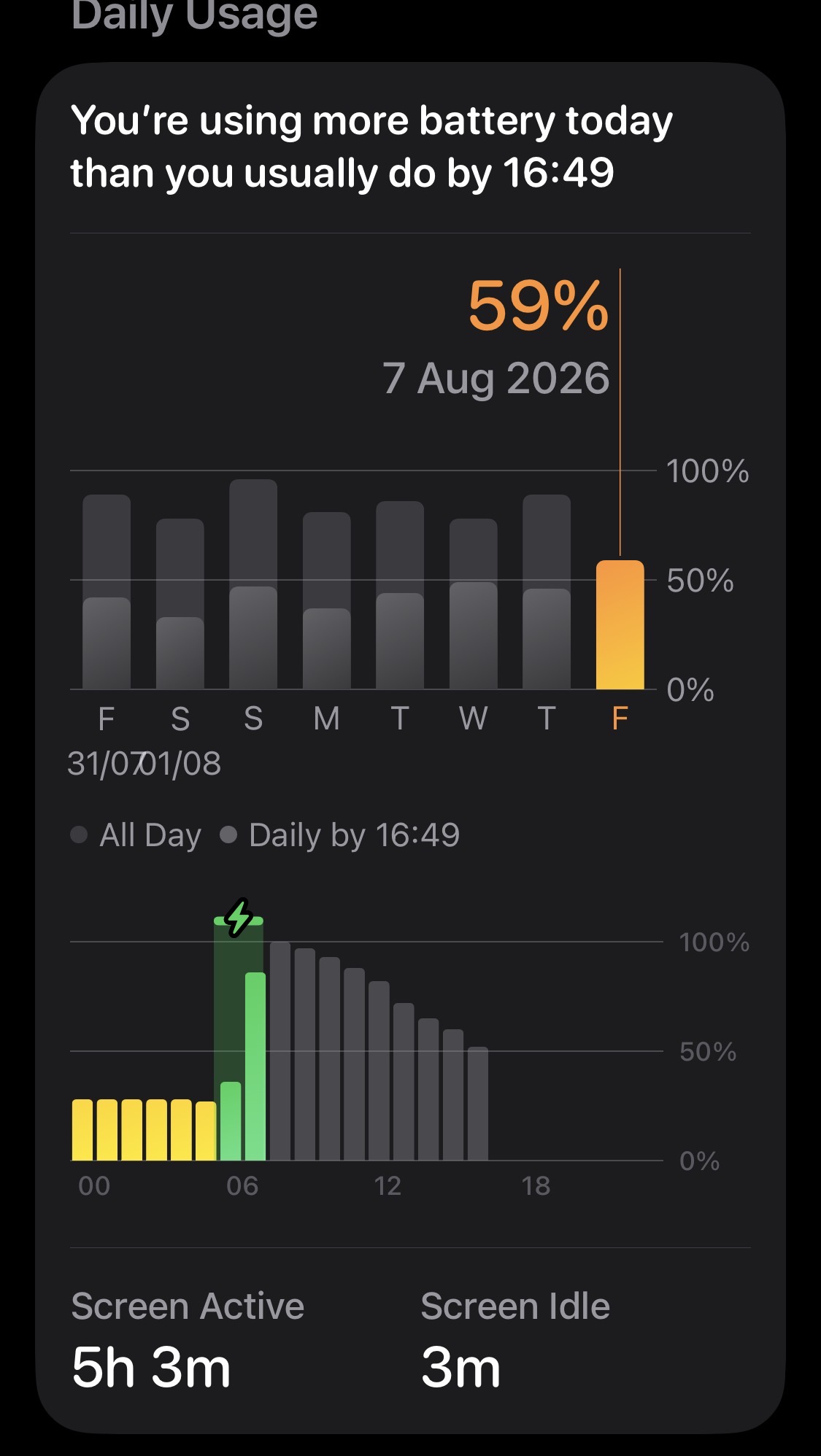
Using more battery today as I’ve been out and about mostly on 4/5G networks.

FeliApple
macrumors 603
Wow. 1-2% is rather normal for a new iPhone on its original iOS version, 4-5% is beyond awful.It was consistently around 4-5% sitting idle whilst I was asleep. Now it’s 1-2% at the most.
I am not sure how iOS 26 iPhones (the 17 series) fare in terms of standby (I only have your result and it changed with 26.6), but as I mentioned a couple of times, my iPhone Xʀ on iOS 12 and my iPad Air 5 are very poor, with the iPhone Xʀ losing about 6% every 24 hours (maybe the iPad is a little better), but when I upgraded to the 16 Plus and the 11th-gen iPad on iOS/iPadOS 18, the difference was massive.
They are far better, barely dropping on standby and getting something that is a little closer to the golden days of iOS’ standby days.
I have absolutely no idea why this happened. iOS 9 on my 6s and 9.7-inch iPad Pro (when Apple allowed me to run it) was marvellous, matching the battery life of early 32-bit iPads, they just didn’t drop.
When I upgraded I found myself using quite annoyed honestly. Fully optimised settings and you drop 6% per day? And I could never fix it. I was very curious to see what would happen when I upgraded again, and when it happened last year, I was very pleased.
I have seen quite a lot of bashing with 26 when it comes to this, but mostly due to older devices being killed. This, as you can imagine, cannot be compared with my devices, as they all run original iOS versions.
Good to see that at least for you, iOS 26.6 gives some sort of good standby battery life, as it should be.

Reverend Benny
macrumors 68000
So people on iOS 26.6 or 26.6.1, has everyone seen improved battery management?
I haven't had issues on earlier versions and its pretty much the same on an average day for me, maybe a slight improvement with 26.6 on my 16PM and 16 and iPad Pro M1. What I did notice is a slight boost on stand-by time as well.
What struck me when away on holidays is how different wifi networks seem to have an impact on the phone. Have tried to analyze to see if it's the different frequency (2.4 or 5 Ghz) that has a difference or if its related to Wifi 5, Wifi6 or Wifi6E. There are certain techniques that comes with newer WiFI standards that may improve battery life but haven't really had the time to dig into it as battery life isn't an issue really. And there are so many things to take into consideration, not only different WiFi standards and Ghz.
I haven't had issues on earlier versions and its pretty much the same on an average day for me, maybe a slight improvement with 26.6 on my 16PM and 16 and iPad Pro M1. What I did notice is a slight boost on stand-by time as well.
What struck me when away on holidays is how different wifi networks seem to have an impact on the phone. Have tried to analyze to see if it's the different frequency (2.4 or 5 Ghz) that has a difference or if its related to Wifi 5, Wifi6 or Wifi6E. There are certain techniques that comes with newer WiFI standards that may improve battery life but haven't really had the time to dig into it as battery life isn't an issue really. And there are so many things to take into consideration, not only different WiFi standards and Ghz.
James6s
macrumors 68030
So people on iOS 26.6 or 26.6.1, has everyone seen improved battery management?
I haven't had issues on earlier versions and its pretty much the same on an average day for me, maybe a slight improvement with 26.6 on my 16PM and 16 and iPad Pro M1. What I did notice is a slight boost on stand-by time as well.
Definitely some improvements to battery life & management (at last!) both active use and idle drain are lower on my Air, 26.6.1 has continued this thankfully.
I added this to the other thread yesterday showing the screen time.
7-8 hours of screen time is possible 100-0%.

The_Smarti
macrumors regular
It’s a huge step backward in terms of the display. On iOS 18, you could see exactly when the screen was in use. On iOS 26/27, you can clearly see battery usage, but there’s no way to tell if the screen was actually on at that time...
FeliApple
macrumors 603
Yeah this was discussed throughout the iOS 26 beta thread. The battery section in settings is practically useless now. I cannot understand how they approved this pathetic change.It’s a huge step backward in terms of the display. On iOS 18, you could see exactly when the screen was in use. On iOS 26/27, you can clearly see battery usage, but there’s no way to tell if the screen was actually on at that time...
It’s as if the developers couldn’t read their own screen, or they are deliberately obscuring battery information (which I’m inclined to believe). Who knows how much battery life you get with iOS 26 if you can’t see it?
FeliApple
macrumors 603
I can’t explain it any better than I did here: https://forums.macrumors.com/thread...-section-of-settings-utterly-useless.2459556/The graph literally shows you the battery drain and it clearly states screen active time and screen idle time, including the amount of screen time each app has had. What are you struggling with?
James6s
macrumors 68030
I can’t explain it any better than I did here: https://forums.macrumors.com/thread...-section-of-settings-utterly-useless.2459556/
Counting bars and then taking it off the screen time shown because it’s been carried over from a previous day cycle etc seems a bit complicated in a way? The whole interface looks messy IMO.
I can see what you mean about tracking usage since the last full charge with no reset of the time overnight.
iOS 26 has simplified it by covering a rolling 24 hour period, 12am-12am. It’s always easy to see what time and what charge level you unplugged your iPhone at, and the amount of screen time you’ve had is shown clearly at all times.
FeliApple
macrumors 603
But it isn’t simplified. I have no information. The only relevant number is battery life since last full charge.Counting bars and then taking it off the screen time shown because it’s been carried over from a previous day cycle etc seems a bit complicated in a way? The whole interface looks messy IMO.
View attachment 2652687
I can see what you mean about tracking usage since the last full charge with no reset of the time overnight.
iOS 26 has simplified it by covering a rolling 24 hour period, 12am-12am. It’s always easy to see what time and what charge level you unplugged your iPhone at, and the amount of screen time you’ve had is shown clearly at all times.
See what I say below that:
“A hypothetical: I plug my phone in after using it until 2am. I unplug it at 7 am. I plug it back in at 8 pm after using it. The SOT number 00:00-23:59 would show SOT from THREE different cycles: the end of the first cycle (00:00-02:00), the whole-day cycle (07:00-20:00), and the usage that I add while charging (20:00-23:59), with NO possibility to ascertain SOT per cycle.”
Why would a 24-hour rolling period (00:00-23:59) be relevant? It can include partial cycles, three cycles in one period, etc. All people want is battery life since last full charge.
James6s
macrumors 68030
Maybe I’m being thick lol but if you plugged in and unplugged your charger that many times hypothetically on the old iOS it would constantly show a different “last charge level” number each time? Making it a fuss to count bars etc for each charge cycle.But it isn’t simplified. I have no information. The only relevant number is battery life since last full charge.
See what I say below that:
“A hypothetical: I plug my phone in after using it until 2am. I unplug it at 7 am. I plug it back in at 8 pm after using it. The SOT number 00:00-23:59 would show SOT from THREE different cycles: the end of the first cycle (00:00-02:00), the whole-day cycle (07:00-20:00), and the usage that I add while charging (20:00-23:59), with NO possibility to ascertain SOT per cycle.”
Why would a 24-hour rolling period (00:00-23:59) be relevant? It can include partial cycles, three cycles in one period, etc. All people want is battery life since last full charge.
I see what you mean with the two Graphs which separates charging & drain and a separate one for screen time.
FeliApple
macrumors 603
Sure, but the start and end times are trivial to figure out: you look at the screen for the “last charge level” (initial percentage of the cycle) and look at your battery level when you plug it back in (the battery life you have left). Add the individual bars in the middle of those two periods and boom! You have screen-on time since last full charge.Maybe I’m being thick lol but if you plugged in and unplugged your charger that many times hypothetically on the old iOS it would constantly show a different “last charge level” number each time? Making it a fuss to count bars etc for each charge cycle.
I see what you mean with the two Graphs which separates charging & drain and a separate one for screen time.
Can you do that now? No.
James6s
macrumors 68030
No suppose not! 😃Sure, but the start and end times are trivial to figure out: you look at the screen for the “last charge level” (initial percentage of the cycle) and look at your battery level when you plug it back in (the battery life you have left). Add the individual bars in the middle of those two periods and boom! You have screen-on time since last full charge.
Can you do that now? No.
How I do it on iOS 26…. let’s say 15 mins of screen time when I wake up, emails quick social media scroll etc, plug it in and get ready for the day, at the end of the day it’s showing 6h15min of active screen time… I’d then take off the 15 mins to give me a rough estimate of the battery used from the time & percentage it was unplugged stated in battery settings, which would give me 6hours
FeliApple
macrumors 603
Yeah, if you know you barely used it in the period between 00:00 and whenever you started the current cycle (and if the cycle doesn’t last more than a day), then that would be accurate. I suppose you could keep track of the total SOT used in the current period before the current cycle started and get SOT since last full charge (as long as we are within the same day), but it is ridiculously convoluted.No suppose not! 😃
How I do it on iOS 26…. let’s say 15 mins of screen time when I wake up, emails quick social media scroll etc, plug it in and get ready for the day, at the end of the day it’s showing 6h15min of active screen time… I’d then take off the 15 mins to give me a rough estimate of the battery used from the time & percentage it was unplugged stated in battery settings, which would give me 6hours
And sure, if you add and track the time manually and start using the phone after the first unplug you can even track multiple-day cycles… but you need the circumstances and unplug times to be ideal and your usage while charging has to be 0 and it needs to be the first charge of the day and…
Way too many factors to get the same information that was trivial to get before. All drawbacks and no advantages in this horrific, pathetic change that anyone with a modicum of understanding could’ve prevented. I can’t understand why they did this and I can’t see what they were hoping to accomplish, honestly. I’m perplexed and I have been ever since I saw what they did.
FeliApple
macrumors 603
Yeah, with that usage pattern it’s far more useful, but mine doesn’t match sometimes (many times actually). Sometimes I charge during the morning; if on some occasion I, say, leave in the afternoon I’ll charge my phone so that it is full before I leave. I like to track battery life, this would render it pretty much impossible unless the whole timing matches.I’m always fast asleep before midnight lol so there’s no actual usage until I wake up around 6am. Most mornings there’s around 15 mins (give or take) of screen time accumulated before it’s at my charge level for the day, unplugged & starting the true cycle.
And take iPads. I might use the iPad with whatever battery life it has early in the morning and charge it later in the day. This mechanism makes it pretty much impossible for me to determine battery life. I do not use iPads like I use iPhones, I would pretty much never know my battery life with this.
I’ve been tracking battery life (out of interest) since iOS 5, for about 15 years. iOS 26’s method would mostly render it impossible.

pahk1na
macrumors newbie
What data settings are people using? I’m using 5g auto, but I have hard time choosing between data modes “normal” and “allow more data on 5g”. I think that the latter uses more battery (obviously), but I don’t know if the difference really is noticeable or if it’s just placebo…
Does anyone have a great battery life with “allow more data on 5g” enabled?
Does anyone have a great battery life with “allow more data on 5g” enabled?
To me it isn't a huge difference when I was on 26.5 but I felt more rapid drain in iOS 27 beta 4. My iPhone 15 Pro hit 20% more oftenWhat data settings are people using? I’m using 5g auto, but I have hard time choosing between data modes “normal” and “allow more data on 5g”. I think that the latter uses more battery (obviously), but I don’t know if the difference really is noticeable or if it’s just placebo…
Does anyone have a great battery life with “allow more data on 5g” enabled?
James6s
macrumors 68030
I updated to the new build of iOS 26.6.1 last night from the RC, and I charged to 100% this morning to check battery life today.
I had 18mins of active screen time showing when I unplugged at 100% about 6:15am, checked again a little later and it was showing 1hr 16mins, just checked again and it’s showing only 57mins. Not sure why screen active time has gone down?
I had 18mins of active screen time showing when I unplugged at 100% about 6:15am, checked again a little later and it was showing 1hr 16mins, just checked again and it’s showing only 57mins. Not sure why screen active time has gone down?
Reverend Benny
macrumors 68000
How odd, sounds strange that those numbers would be recalculated.I updated to the new build of iOS 26.6.1 last night from the RC, and I charged to 100% this morning to check battery life today.
I had 18mins of active screen time showing when I unplugged at 100% about 6:15am, checked again a little later and it was showing 1hr 16mins, just checked again and it’s showing only 57mins. Not sure why screen active time has gone down?
Edit: Second thought, could it be a fix/change that's provided in 26.6.1 that's been applied? Longshot but since you updated last night and it was a fairly large update it may be what's caused the slight hiccup.
Interesting to see if it happens again.
Last edited:
James6s
macrumors 68030
Very odd! For some reason it’s recalculated and took some screen time off… screen time should continue to increase until 23:59PM 🤔How odd, sounds strange that those numbers would be recalculated.