Become a MacRumors Supporter for $50/year with no ads, ability to filter front page stories, and private forums.

MacRumors

macrumors bot
Original poster


The upcoming iOS 27 update that Apple unveiled last week includes some new features and enhancements for Apple's Notes app on the iPhone.
iOS-27-and-Notes-Feature.jpg

iOS 27 is currently available as a developer beta, with a public beta to follow in July. The update is expected to be released to all users in September.

Below, we have outlined four additions to Apple's Notes app on iOS 27.

Siri AI
iOS-27-Adds-Four-New-Features-to-Apples-Notes-App-Article-4.jpg

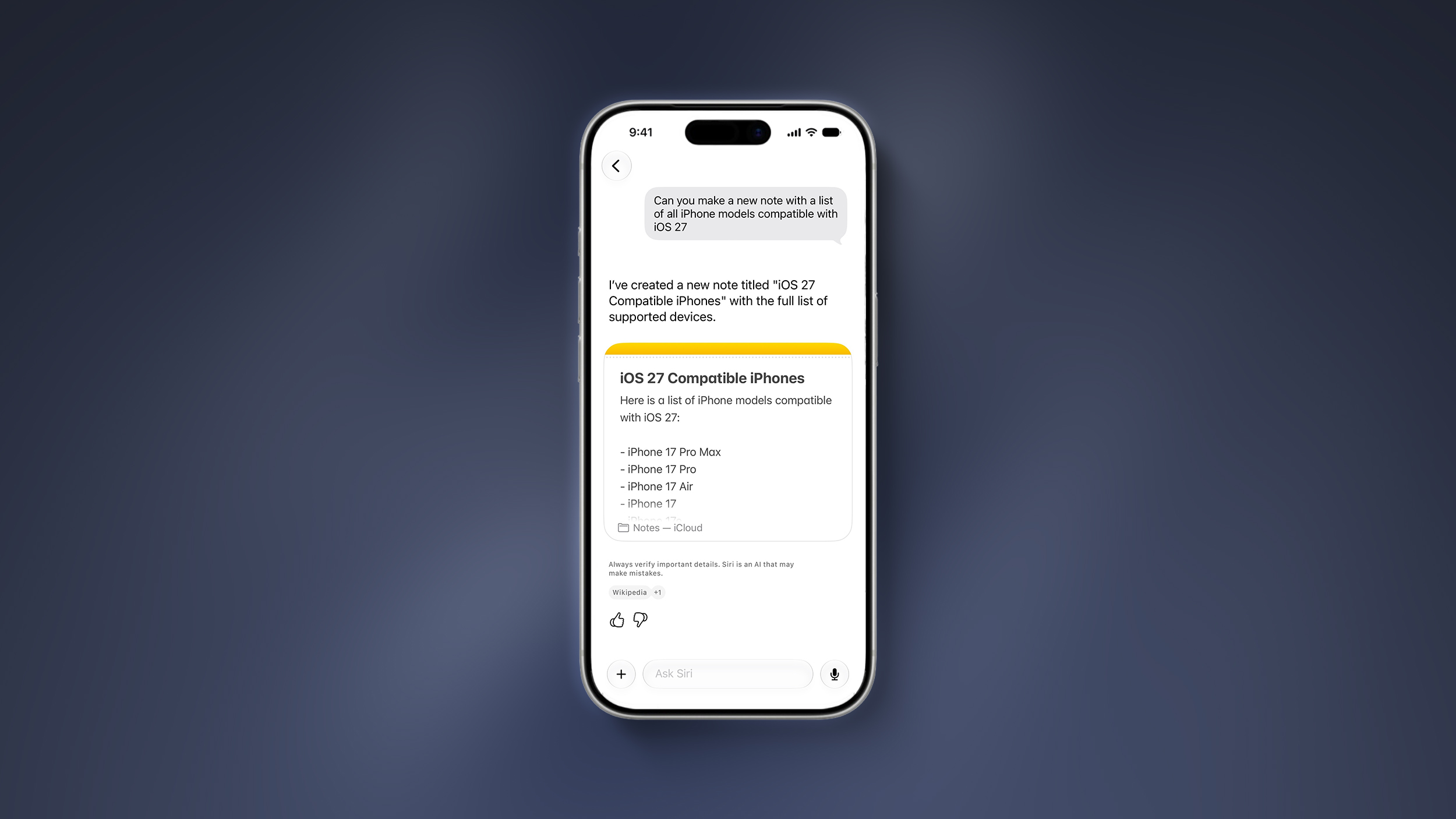
On the iPhone 15 Pro and newer, the more intelligent and personal version of Siri known as "Siri AI" can create notes with generated content. For example, you can ask Siri AI to create a note with a list of all iPhone models that are compatible with iOS 27, and it will do so after retrieving this information from the internet.

On iOS 26 and earlier, Siri can only create notes based on the words you actually say.

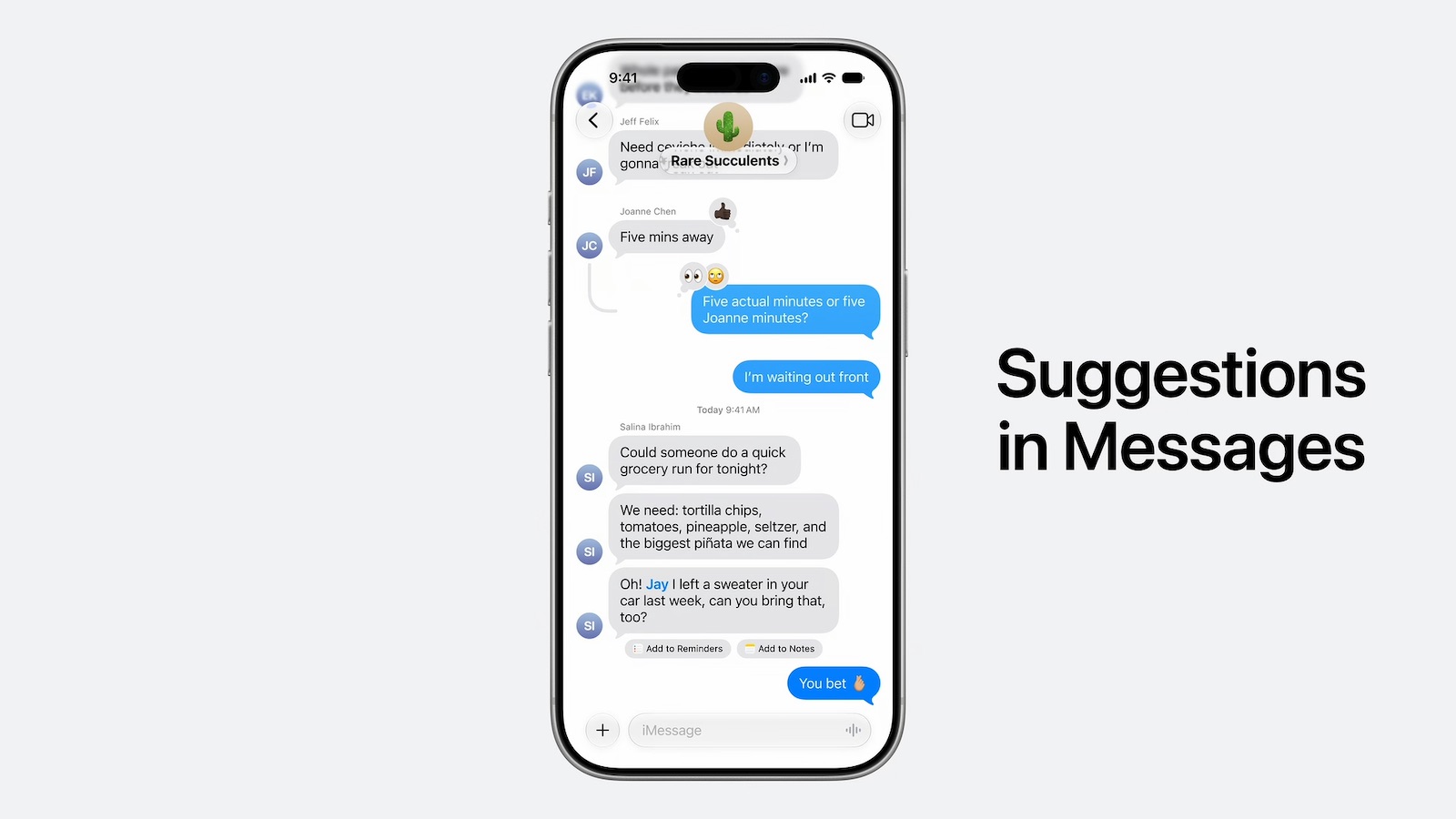
In addition, Siri AI will intelligently show an "Add to Notes" shortcut below certain messages in the Messages app based on the context of the conversation.
iOS-27-Messages-Notes-Suggestion.jpeg

Copy and Paste in Markdown

iOS-27-Adds-Four-New-Features-to-Apples-Notes-App-Article-3.jpg

iOS 27 introduces the ability to copy and paste text that is formatted in the Markdown language, created by well-known Apple commentator John Gruber.

Markdown lets you add formatting to text without using HTML:
  • Bold text: **bold**
  • Italic text: *italic*
  • Linked text: [Apple](https://apple.com)
  • List item: - Example
For example, if you paste "Apple's next CEO is **John Ternus**" into the Notes app on iOS 27, "John Ternus" will appear in bold text.

In reverse, if you select formatted text in the Notes app and tap on the right arrow in the Cut/Copy/Paste menu that pops open, there is a new "Copy as Markdown" option on iOS 27. If you tap on this option, any rich text formatting in your selection will automatically be converted to Markdown that can be pasted elsewhere.

Apple Notes already gained support for importing and exporting Markdown files on iOS 26.

Divider Lines
iOS-27-Adds-Four-New-Features-to-Apples-Notes-App-Article-2.jpg

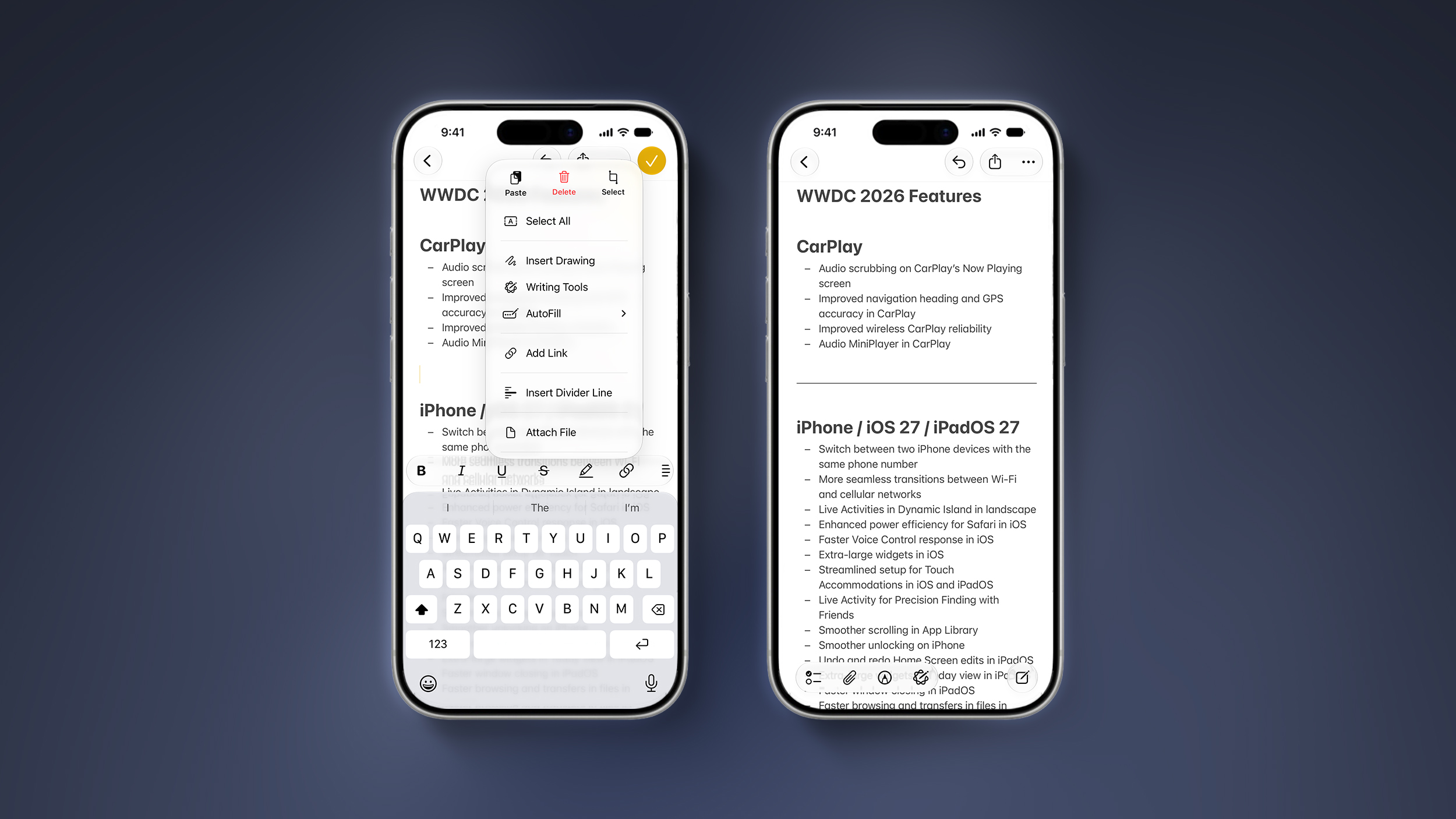
iOS 27 lets you organize notes with divider lines. Simply place the text cursor where you want the line to be inserted, tap on the right arrow in the Cut/Copy/Paste menu that pops open, and tap on the new "Insert Divider Line" option.

Section Links
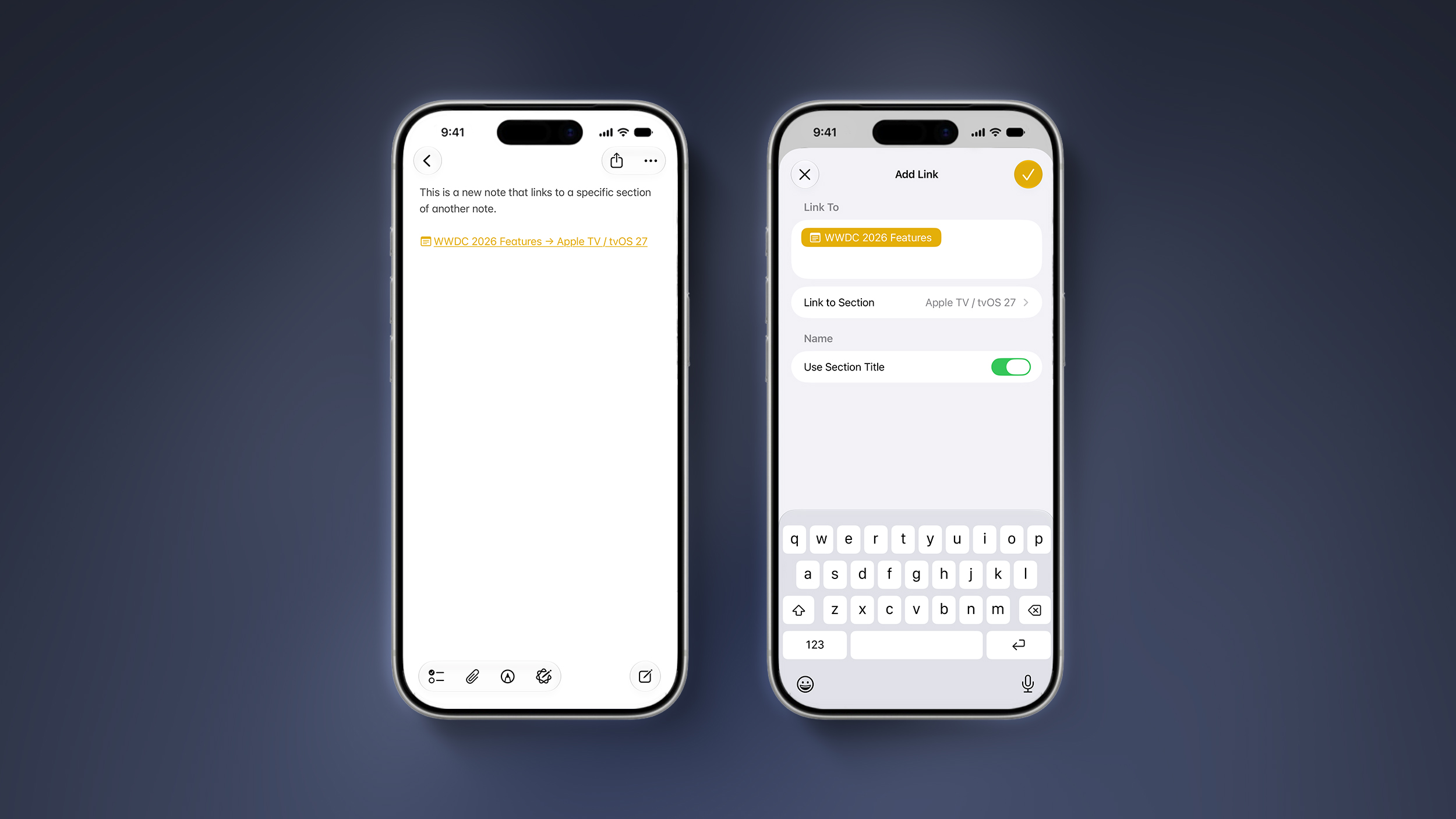
iOS-27-Adds-Four-New-Features-to-Apples-Notes-App-Article-1.jpg

You can now add a link to a specific section of a note. When you tap on the link, the Notes app automatically jumps to that section of text.

For example, you could create a new note that links back to a section of a previous note.

Article Link: iOS 27 Adds Four New Features to Notes App, Including Markdown Copy-and-Paste
 
  • Haha
  • Like
Reactions: Z-4195 and cateye
I moved from evernote to onenote, and then to Notes for the past 6 or so years and have been pleased with the updates. What I miss most about onenote is how it handled drawings using the iPad and Pencil, its a bit clunky and not as versatile.
 
I canceled my Evernote account, which I’d been paying for since 2008 just last week. The combination of the exorbitant price hike, refusal to fix very basic UI bugs and instead focus on A.I. finally drove me to Apple Notes. One thing would make me truly happy: the ability to edit the ‘created date’ in Notes. I like the new divider feature, but have no use for the markdown and AI features.
 
As someone who shares grocery lists via notes the divider lines will be welcomed when having to go to more than 1 store/location
"As someone who uses the notes app for grocery lists instead of using the reminders app..."

😘

I mean, come on my guy. You pull your grocery list up on your watch and check off each item you get as you shop...why would you make it more difficult?

Do you keep your calendar in Numbers...??
 
I canceled my Evernote account, which I’d been paying for since 2008 just last week. The combination of the exorbitant price hike, refusal to fix very basic UI bugs and instead focus on A.I. finally drove me to Apple Notes. One thing would make me truly happy: the ability to edit the ‘created date’ in Notes. I like the new divider feature, but have no use for the markdown and AI features.
I'd like to preemptively warn you about putting PDFs into notes and then annotating those PDFs. I, and my brother, have wasted hours and hours and hours of work because the app is unreliable in this specific way.
 
Last edited:
  • Like
Reactions: reinem85
I love Notes! It's my only go to app to take all sorts of notes and I can use it on all my apple devices. Over the years I must have created several thousand notes, and most of the time I have at around 90 notes that I keep for six months or longer. Personal notes, grocery list, recipes, plans, work or hobby notes, trip plans, trip plans, etc etc.

Do you know what I used for years and years before Notes?? Word Doc... yeah...it was like using a stone tablet.


.
 
Copy / Paste in Markdown is an excellent feature add— this will make it much easier to use notes in conjunction with Markdown apps like Ulysses and iAWriter. Divider lines will be super useful, too.
"As someone who uses the notes app for grocery lists instead of using the reminders app..."

😘

I mean, come on my guy. You pull your grocery list up on your watch and check off each item you get as you shop...why would you make it more difficult?

Do you keep your calendar in Numbers...??
Reminders is useful for reoccurring grocery lists but the fact that you can't freeform in it is sometimes a pain so I use Notes, too, for that purpose.
 
Yeah but will dragging and dropping checklist items ever be fixed? For years now, if you drag and drop a checklist item to move it to a different position in the list, you have no idea if it'll move it, or duplicate it.
 
I'm a little averse to testing it out when I need my devices for work - but that's good news to hear I'm keen to try it out thanks for letting me know that!
Gotcha.
I also put in on some old things like iPhone 11 and 13, which are NOT mission critical 🤣, and they are overall much more responsive - despite the fact that they are still indexing because the indexing system is entirely new and has to index every damn thing on the machine.
(For example, the ancient iPhone 11 no longer stutters as it did with 26 and prior iOS versions)
 
Last edited:
Drawings just got a bit less clunky in 27. Have you tried it?
I wonder if there will be better integration with Freeform in the future ie a natural link to inserting a Freeform project (and returning back to the note). It's possible now, but requires the clunky sharing mechanism to make it work. Would break if you are printing notes.
 
  • Like
Reactions: roguefury and xmach
Register on MacRumors! This sidebar will go away, and you'll see fewer ads.