I use Apple Maps frequently. Always works great for me.

Got a tip for us?
Let us know
Become a MacRumors Supporter for $50/year with no ads, ability to filter front page stories, and private forums.
iOS 27: All the New Apple Maps Features
- Thread starter MacRumors
- Start date
- Sort by reaction score
You are using an out of date browser. It may not display this or other websites correctly.
You should upgrade or use an alternative browser.
You should upgrade or use an alternative browser.

gummybear2026
Suspended
Waze is more accurate than Apple Maps.We bought a '26 Hyundai Palisade (Hybrid AWD Calligraphy) in May, for road trips. Our salesperson said we should try Waze. I've downloaded it but haven't tried it yet. Is it really all that compelling? We're going on a road trip from St. Louis to Frisco, CO in a few weeks.
abdullamac77
macrumors member
The proper definition of living in a 3rd-world country is a country that DOESN’T have turn-by-tun navigation working in Apple Maps. Google Maps is still the undisputed No.1 Maps App because turn-by-turn navigation actually works globally.
The Maps app didn't get as many iOS 27 updates as some of Apple's other apps, but there are still several useful features worth knowing about.
Flyover Improvements
Apple is upgrading Flyover in iOS 27, making it more detailed than before. It combines aerial imagery with Vision Intelligence models to add more texture and sharper visuals for trees, architecture, and more.
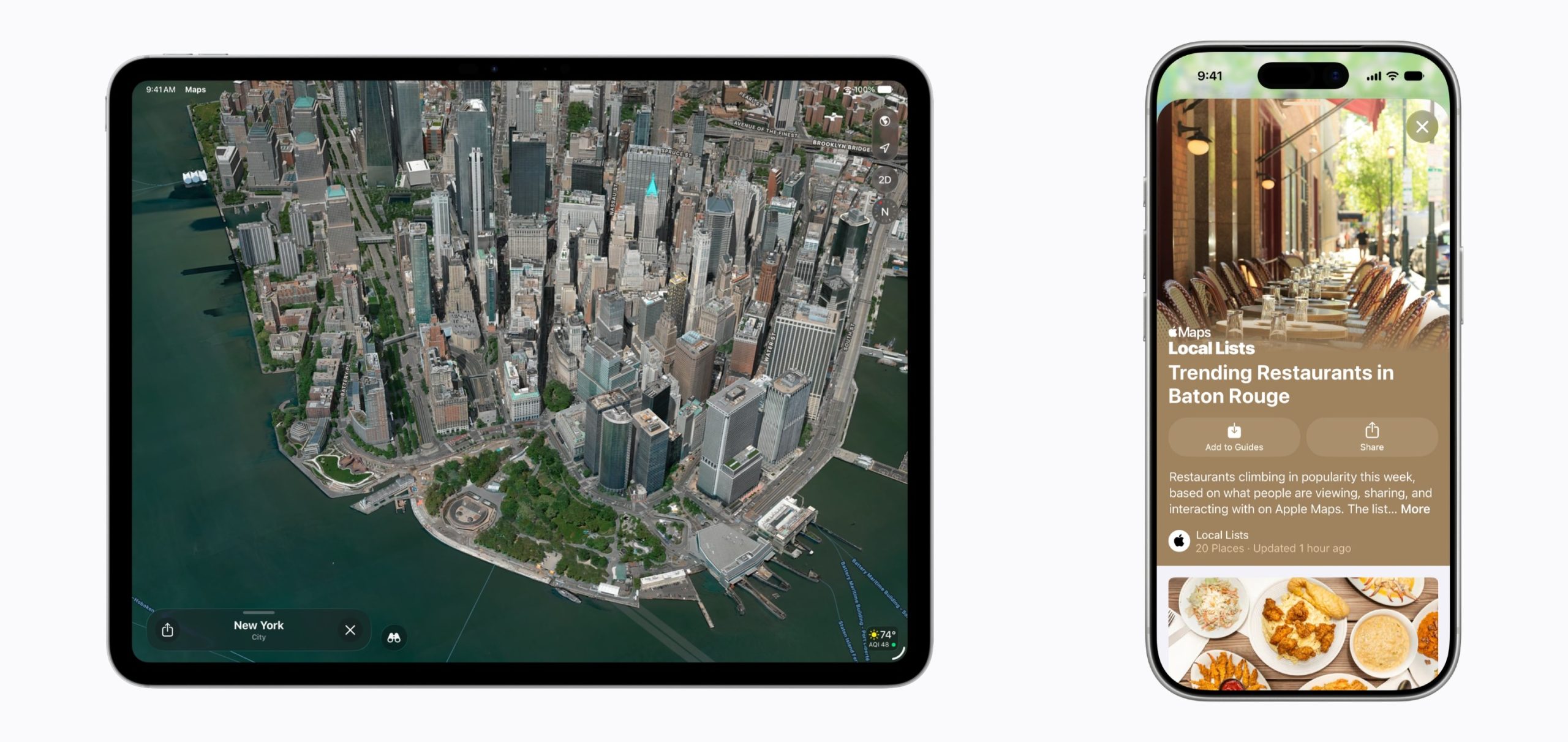
Apple says select cities around the world are rendered in sharper, more lifelike detail with improvements to everything from the "shapes of individual trees to the way light reflects off the glass of skyscrapers."
Flyover is an Apple Maps feature that offers detailed 3D landmarks, roads, parks, buildings, and more in more than 350 cities. The current version of Flyover uses aerial imagery captured by planes, but the new iOS 27 version improves the quality using AI.
New Maps Icon
Apple updated several of its Liquid Glass app icons in iOS 27 to add more glass-like layers. Icons have more depth, and the Maps app icon makes the difference especially clear.
Local Lists
Local Lists uses intelligent insights from what's trending around you for suggestions on places you should visit. Maps surfaces locally relevant collections of places to make it easier to find popular and interesting locations to visit.
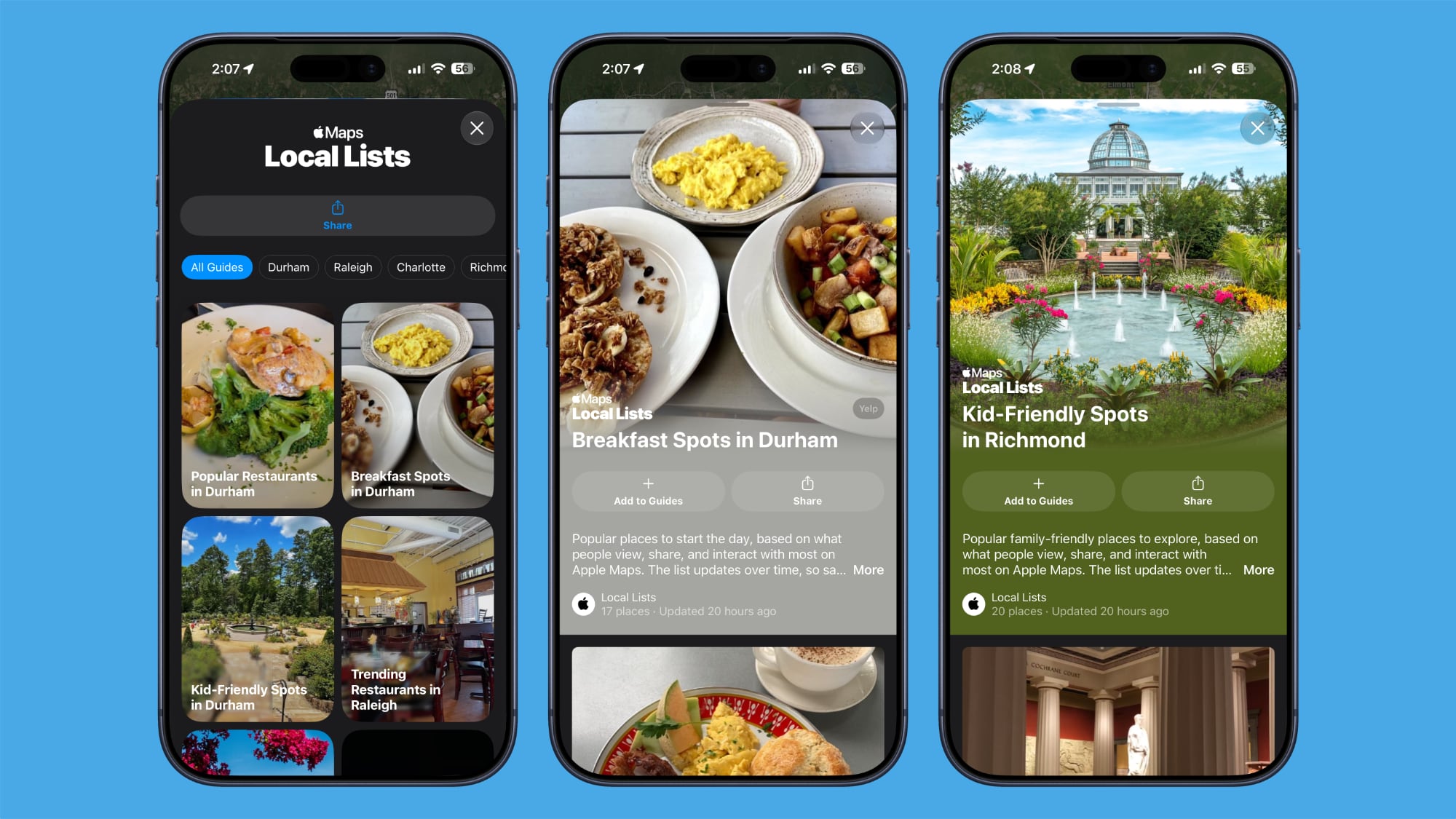
Local Lists is privacy-focused and does not use information tied to individual users. It is a U.S.-only feature.
Trending Restaurants
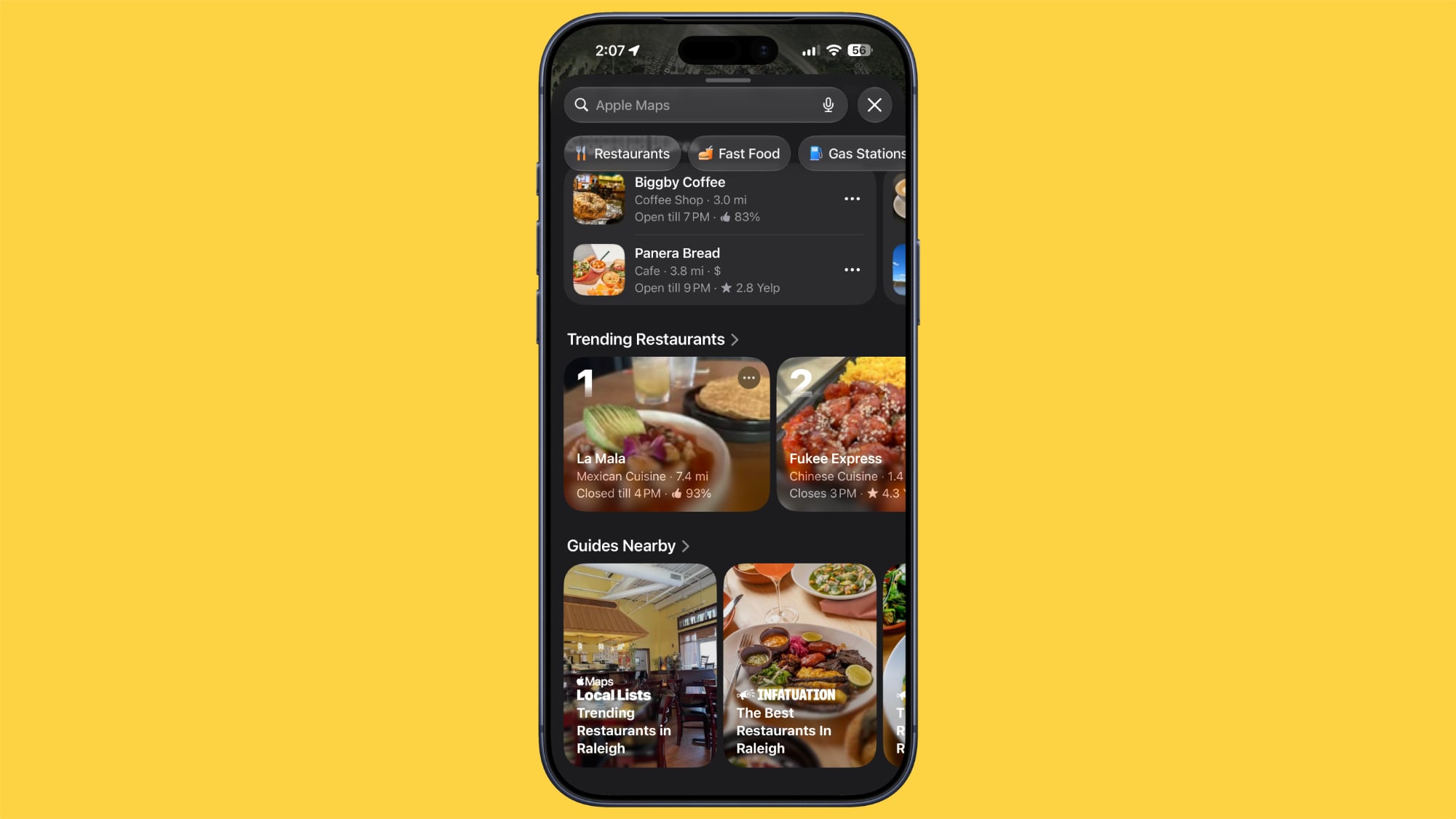
In the Search interface, there's a Trending Restaurants section that shows you the top restaurants in the area you're in.
Natural Language Search Expansion
Natural language search in Maps now lets you ask for directions that avoid toll roads or highways.
Widgets
On the Apple Watch, there's a new Parked Car widget in the Smart Stack so you can easily see your car's last known location, with info synced from the iPhone.
Offline Maps
Apple says Offline Maps have improved in iOS 27. More locations are shown on the map, labels are darker and clearer, and there are icons that are easier to view at a glance. When you tap on a location, like a town, it will zoom into the area automatically so you can see what's there.
Visited Places
The Visited Places feature is more accurate in iOS 27 and less likely to miss locations. Visited Places keeps track of locations you've been to, organizing stops by category and location. It's accessible by tapping on your profile picture, choosing Places, and selecting Visited Places.
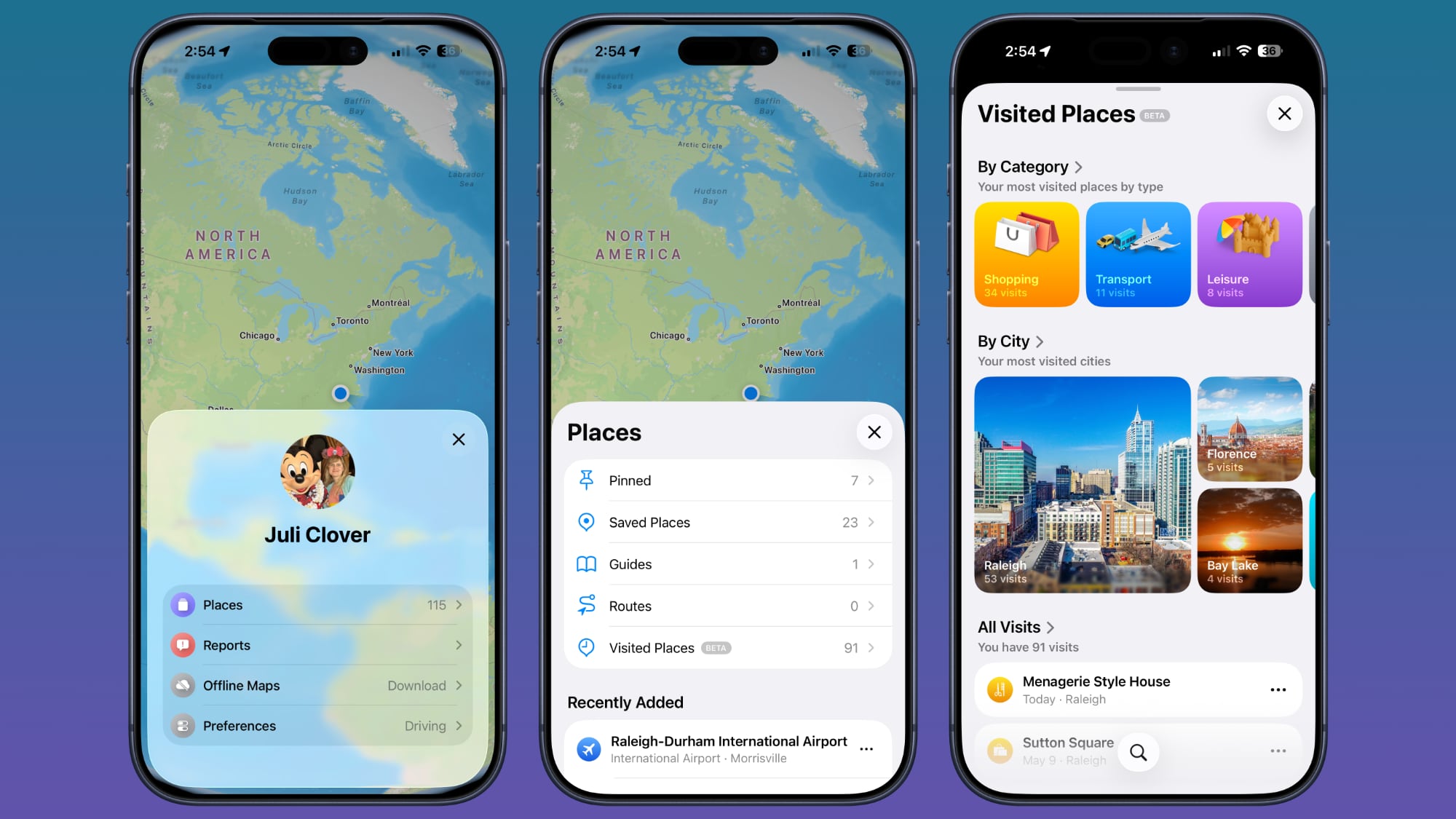
Visited Places is also expanding to more locations in iOS 27.
More iOS 27 Features
For more on what's new in iOS 27, we have a dedicated roundup.
Article Link: iOS 27: All the New Apple Maps Features

gummybear2026
Suspended
Sponsored crap is coming to Apple Maps very soon.Google Maps still looks like ass, though, and last time I tried Waze it was even worse and totally encrusted with sponsored crap. I will admit Google has better POI data, hands down, but I find Apple Maps navigation totally on par with Google Maps, and with better prompts.
segfaultdotorg
macrumors 68020
I'm confused. Was iPhoneOS 27 released already? They normally don't release it until the new iProPhone drops in the fall.

DocMultimedia
macrumors 68030
Has Yelp vanished from reviews yet? I'm really tired of 10 year old restaurant reviews.
DocMultimedia
macrumors 68030
No. But MR needs posts. It won't be officially released until mid September.I'm confused. Was iPhoneOS 27 released already? They normally don't release it until the new iProPhone drops in the fall.

johnsawyercjs
macrumors 68000
The Local Lists feature seems to be just doing more of the same as it was doing prior to iOS 27 beta, which is to show a bunch of big photos of idealized meals prepared by local restaurants that Apple Maps, much less Siri AI, has no reason to believe I'd want to visit, since neither has any record of me visiting any local restaurant, since I haven't. All that space could be used for other things, like consistently showing me my home location when I need directions back home after visiting some nearby location. As it is, my home location appears only sometimes, and when it doesn't appear, I have to manually enter my home address to get it to display.
fzJNotIBOxgnbqejSeVCvJScL
macrumors regular

These statements like, 'making it easier to' means they are going to stream more ads to you.
'trending restaurants' means the ones they have offered to the most people.
I don't see anything better here.
'trending restaurants' means the ones they have offered to the most people.
I don't see anything better here.
Last edited:
If you have Carplay then for most of us, Apple maps wins hands down.Google Maps still looks like ass, though, and last time I tried Waze it was even worse and totally encrusted with sponsored crap. I will admit Google has better POI data, hands down, but I find Apple Maps navigation totally on par with Google Maps, and with better prompts.
On both my cars, Carplay gives me turn by turn navigation in the heads up display. Google and Waze don't.
It's definitely at least as good in every other way except street view I believe.

kurtfoster
Contributor
Has anybody noticed that the maps in CarPlay looks a little washed out as far as the contrast goes?

widestload
macrumors 6502a
So basically ads and some nice 3D visuals in an incredibly limited number of places, gotcha!
Dont get me wrong, i like the look of the improved 3D, but i would much rather they spent the money updating the Arieal images and getting the basic 3D function out to 100% overage first. Where i live has no 3D coverage and the photos must be getting on for 5 years old
Dont get me wrong, i like the look of the improved 3D, but i would much rather they spent the money updating the Arieal images and getting the basic 3D function out to 100% overage first. Where i live has no 3D coverage and the photos must be getting on for 5 years old
unregbaron
macrumors 6502
I’m usually presented with three routes. The “faster” one is nearly always shoved to the top, because apparently Maps has appointed itself my transportation manager. My preferred route occasionally appears, usually second, like an afterthought.Oh? I do the following...
1. Enter place name.
2. Click result.
3. Click the Walk/Drive button.
That's it.
Directions/route load and are active the second I tap the walk/drive button.
Then, while I’m listening to a podcast, Maps barges in to announce that I can save three whole minutes by taking its “faster” route. If I do not immediately object, it helpfully chooses that route for me. Because silence, apparently, is consent.
The irritating part is that I know my route. It is two minutes faster and three miles shorter than Maps’ allegedly “faster” route. But why let facts interfere with an algorithm’s little performance?
I use Maps because it can warn me about delays and traffic problems before I hit them. That part is useful. What is less useful is having my location data apparently hawked to every fast-food chain within a five-mile radius when all I want is scrambled eggs and bacon. Instead, I get sponsored sludge clogging the search results while I try to work out whether I have already driven past the turnoff.
Choice is in the eye of the beholder. Advertising is glaucoma of the brain.

I really want to use Apple Maps because I prefer to use an app that comes with the OS rather than install a third-party app on every new device when I get it (in my case Google Maps) but to switch I really want Apple to do two things, the second one being a very big ask that I am pretty much sure will never happen but I'll put it on the list anyway because it really would be a game-changer for me...
1 - Proper mode management. Maybe this is changed in OS 27 but right now on my iPhone and Apple Watch Apple Maps aways runs in whatever mode (light or dark) I have my system set to. I run my iPhone in dark mode because for pretty much everything I prefer that aesthetically and it saves a bit of battery on OLED devices but for some reason I just can't cope with a map display as well if it is not in light mode, maybe because I find it so much easier to quickly interpret if it looks like an old-school printed map that I spend the first few decades of my life using. Plenty of other apps have mode settings that offer the choice of Light, Dark or follow-system-default and I wish Apple Maps had that flexibility so that I could set it to always run in light mode. In my opinion that choice of a light/dark/system-default mode setting for an app should be standard practice (required functionality) for all Apple apps that is enforced within Apple's software teams.
2 - This is the one that won't happen but with two deals that we know about between Apple and Google - Google as the default Safari search engine and the Gemini/Apple-AI deal - I really wish they could add a third (licensing) deal where Apple licenses Google's mapping ground truth for use within Apple Maps. Google's ground truth is so much better than Apples, at least outside of the USA (I'm in the UK) for things like opening and closing times and reviews for shops/entertainment venues etc. Google is also a lot quicker than Apple in terms of updating databases to reflect businesses that have recently opened or have closed down. Google's Street View coverage is also better (available for more locations) than Apple's equivalent.
The Apple Maps interface (if Apple fixed my point 1 above) and the deep OS integration coupled with Google Maps ground truth would be pretty much mapping perfection for me.
1 - Proper mode management. Maybe this is changed in OS 27 but right now on my iPhone and Apple Watch Apple Maps aways runs in whatever mode (light or dark) I have my system set to. I run my iPhone in dark mode because for pretty much everything I prefer that aesthetically and it saves a bit of battery on OLED devices but for some reason I just can't cope with a map display as well if it is not in light mode, maybe because I find it so much easier to quickly interpret if it looks like an old-school printed map that I spend the first few decades of my life using. Plenty of other apps have mode settings that offer the choice of Light, Dark or follow-system-default and I wish Apple Maps had that flexibility so that I could set it to always run in light mode. In my opinion that choice of a light/dark/system-default mode setting for an app should be standard practice (required functionality) for all Apple apps that is enforced within Apple's software teams.
2 - This is the one that won't happen but with two deals that we know about between Apple and Google - Google as the default Safari search engine and the Gemini/Apple-AI deal - I really wish they could add a third (licensing) deal where Apple licenses Google's mapping ground truth for use within Apple Maps. Google's ground truth is so much better than Apples, at least outside of the USA (I'm in the UK) for things like opening and closing times and reviews for shops/entertainment venues etc. Google is also a lot quicker than Apple in terms of updating databases to reflect businesses that have recently opened or have closed down. Google's Street View coverage is also better (available for more locations) than Apple's equivalent.
The Apple Maps interface (if Apple fixed my point 1 above) and the deep OS integration coupled with Google Maps ground truth would be pretty much mapping perfection for me.
Mine had a nightclub on it that closed 10(?) 20(?) years before Apple Maps launchedPlease Apple, spend all the money on keeping the Maps up to date instead of these new features. Every time I accidentally open Apple Maps instead of Google, I see some error. Yesterday, I saw a Starbucks marked near my house that's been closed for four years now.
Onelifenofear
macrumors 65816
Waze is more accurate than Apple Maps.
Utterly depends where you live.
Onelifenofear
macrumors 65816
It needs draggable direction pins like google. I hate the google interface for the most part... but this is the main reason I use it.

phuklok1
macrumors regular
I wish they gave you the option of using off-line maps with online traffic data. if I keep driving through the same area, I don’t need Maps wasting gigabytes of data a month downloading the same map area over and over again every time. I would love for it to just refer to my off-line map and give me the option of receiving just traffic data over cellular which would result in just megabytes of data a month.