

Become a MacRumors Supporter for $50/year with no ads, ability to filter front page stories, and private forums.

MacRumors

macrumors bot
Original poster


Safari is one of the apps that Apple focused on in iOS 27, and it includes multiple new Apple Intelligence features. From automatically organizing tab groups to custom extensions, Safari is getting useful new capabilities.
Whats-New-in-Safari-on-iOS-27-Feature.jpg

Automatic Tab Organization

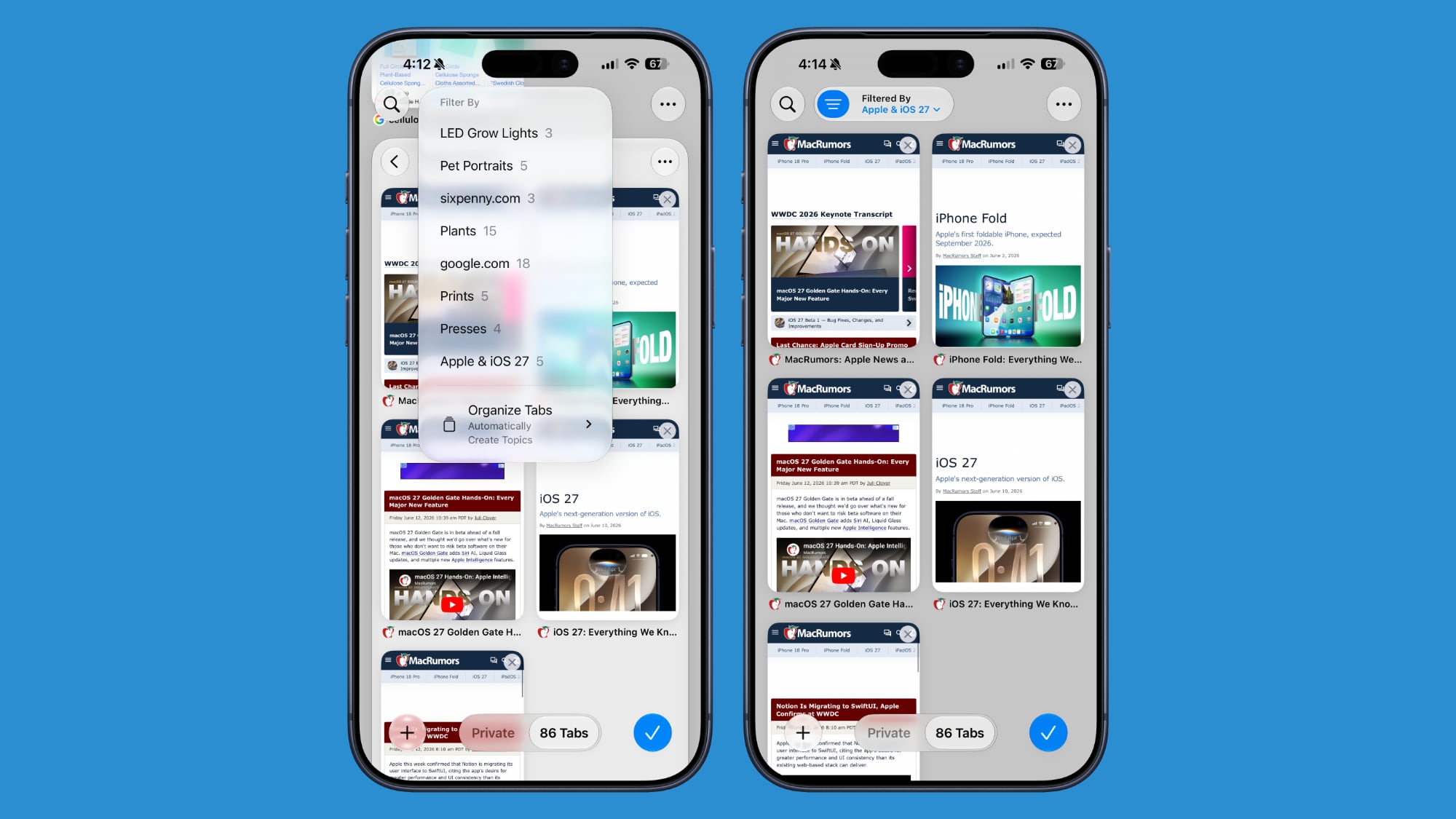
Safari uses Apple Intelligence to organize your open tabs into relevant topics, grouping like concepts together to make it easier to browse your open tabs.
ios-27-safari-tab-grouping.jpg

If you're searching for a new couch while also planning a weekend trip, websites that you open for each topic are grouped together. Automatic sorting can be enabled by tapping on the icon with three lines in the upper right of the display while in tab view and turning on the Automatically Create Topics setting.

This same Safari menu also lets you see all of the groups and filter by topic so you can open just the tabs related to a specific topic while avoiding the other tabs.

There is a new "Resume Browsing" section of the Start Page that lets you continue browsing topics you recently closed or topics you have open on other devices.

You can also group pages you've saved to Bookmarks and Reading List by topic.

Custom Extensions

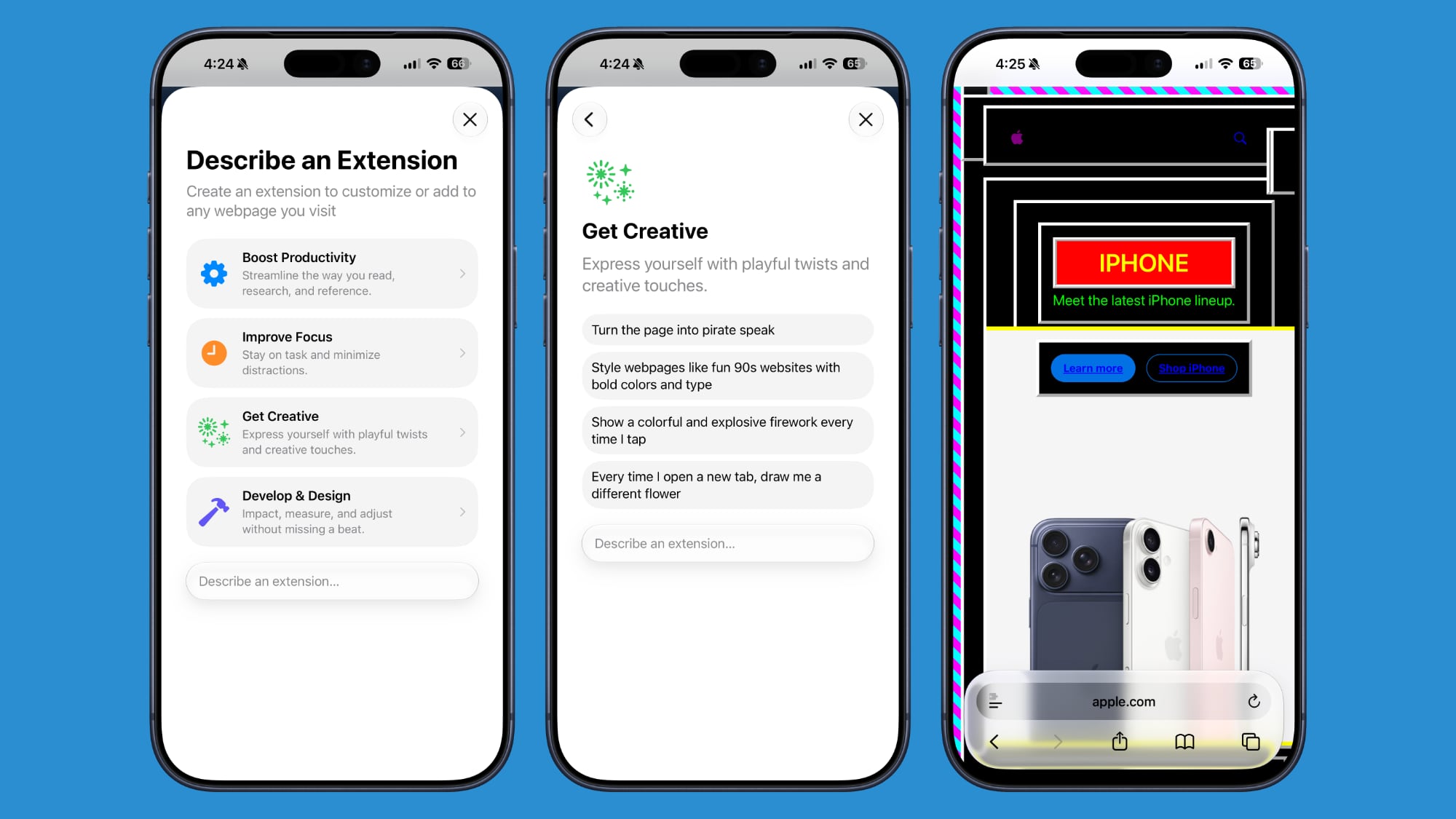
You can use AI to create Safari Extensions in iOS 27 with Apple's new Create an Extension option.
ios-27-safari-describe-extension.jpg

In the Safari settings accessible from the left of the URL bar, tapping into Create an Extension brings you to an interface where you can type in whatever you want an extension to do. Apple also includes suggestions in categories that include Boost Productivity, Improve Focus, Get Creative, and Develop and Design. Some of Apple's extension suggestions:
  • Create a citation for the current webpage and copy it to my clipboard
  • Create a 3-minute focus timer for the page
  • Set the minimum font size to 14pt
  • Turn the page into pirate speak
  • Style websites like 90s websites with bold colors and type
  • Every time I open a new tab, draw me a different flower
  • Highlight and show the dimensions of webpage elements when I tap on them
  • Enter the design mode for a website so that I can edit the contents
Notify Me

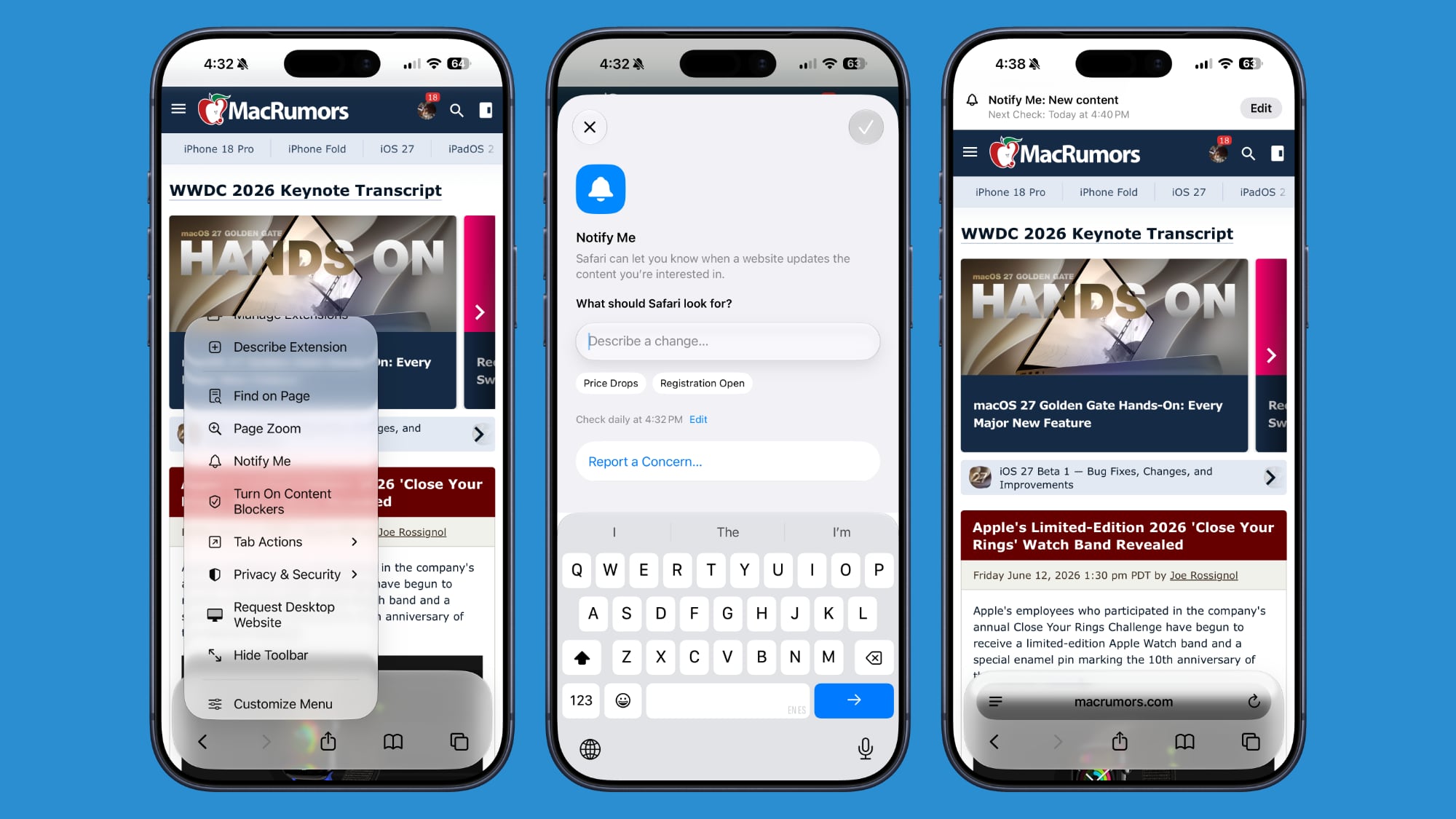
Safari can monitor a website for changes and alert you when new information is detected. Apple says it's useful for monitoring when concert tickets go on sale or watching for a product to be restocked.
ios-27-safari-notify-me.jpg

To use it, navigate to a website, then tap on the settings icon to the left of the URL bar, and choose the Notify Me option. You can type in what you want Safari to watch for and set a frequency and a time.

At most, Safari will check websites once per day at a set time, with weekly and monthly checks also available.

Passwords

The Passwords app can use Safari to automatically change flagged weak and compromised passwords, turning them into strong passwords.
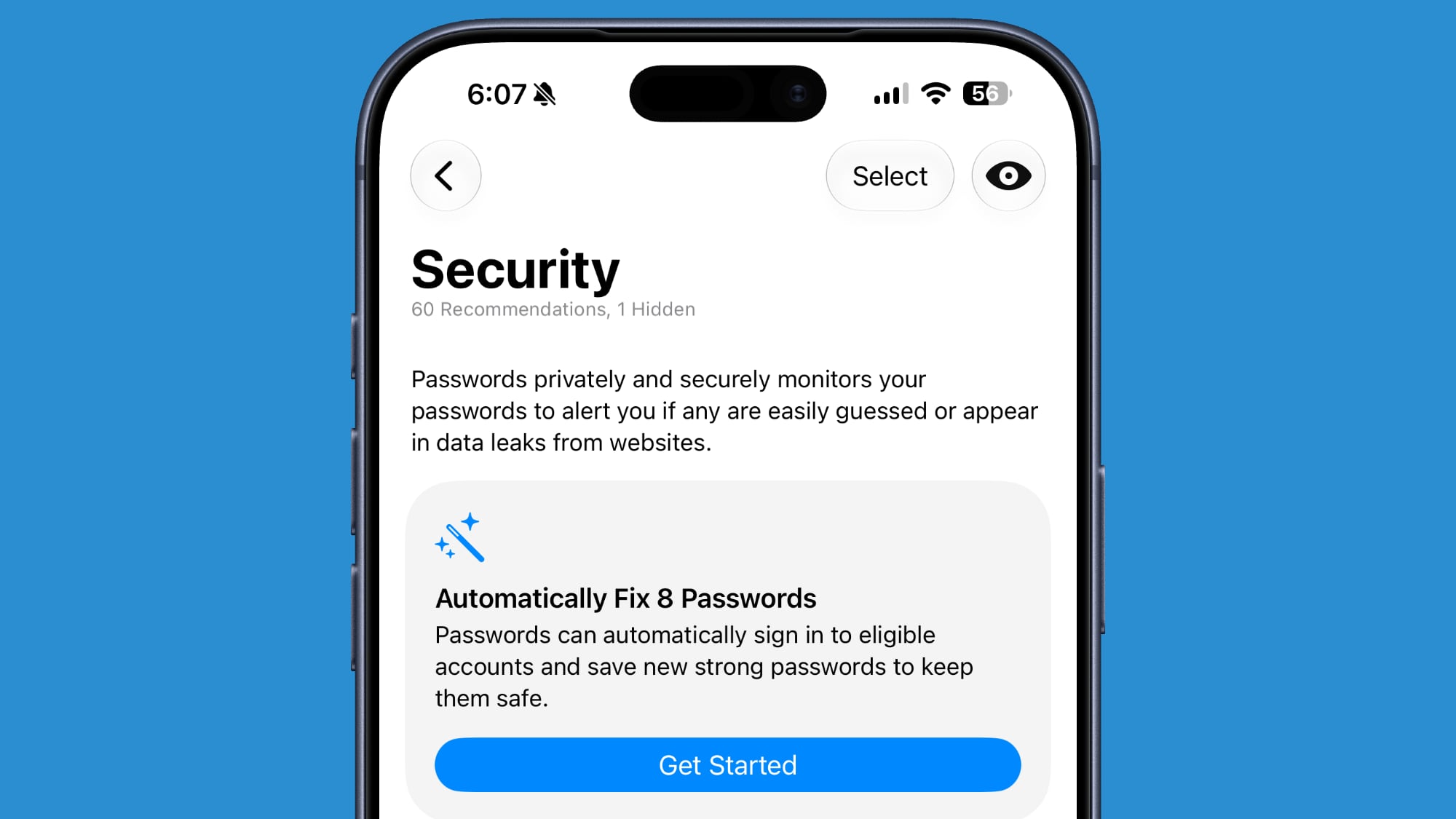
ios-27-passwords-auto-fix.jpg

The feature uses Apple Intelligence to automatically navigate to eligible websites, sign in, and update your password with a tap.

Ask to Browse

Apple added new parental controls in iOS 27, including an "Ask to Browse" feature that requires children to get parental approval before visiting a new website.

Performance Improvements

Apple says Safari's power efficiency has improved, so it will drain less battery. Web apps and start page content load faster, JavaScript handling is faster, and animations and graphics are smoother.

Compatibility

Safari features like automatic tab grouping, custom extensions, and custom notifications require Apple Intelligence. Apple Intelligence is available on the iPhone 15 Pro and later.

Availability

iOS 27 is in beta, and it is set to launch in fall 2026 alongside new iPhone models.

Article Link: iOS 27: All the New Safari Features
 
I didn't see the new screenshot capabilities listed. If you do a screenshot, it offers to do just the screen or the whole web page. That was a nightmare before.
 
  • Like
Reactions: DailySlow
MacRumours’ Safari icon looks better than the one we’ve been stuck with since iOS 7. Too bad it’s not one of the what’s new features.
Hard disagree. I don’t understand why macrumors makes these wack-ass graphics. Why not just use the real app icon? The drop shadow makes no sense, needle cut out of the compass, and the glass is bringing the blurred bg into focus, which is the opposite of what the glass effect does in the OSes. I don’t get what macrumors is trying to accomplish with these designs. Working hard to make it look worse
 
Fortunately the Safari team put a huge focus on the core of the browser this time around. Fixing defects and improving compatibility where Safari was starting to significantly lag behind and becoming a pain to develop for.

A interesting talk at WWDC with the details.
 
AI custom plugins sounds interesting but I'll probably never use it. Maybe I can have AI create a plugin to detect a photo of a pretty woman in a bikini. I can have Siri AI say "Men of culture, we meet again."
 
Safari desperately need a "rotate video" button. For when we have the screen orientation set to locked.

Been asking for this feature since iOS 7.
 
What’s the point to notify me if it only updates once a day max. Oh thanks for letting me know that restock happened 12 hours ago and is out again
Restock checks would have to be every couple seconds to be of any real use and Apple isn't going to give that processing power away for free, assuming it's done on their servers, if it's done locally that many checks would likely get your IP blocked or use all your data.
 
  • Like
Reactions: tc56a
Restock checks would have to be every couple seconds to be of any real use and Apple isn't going to give that processing power away for free
Yeah, depending on the demand for the thing you are looking for, you might want it to be pretty frequent - certainly a couple times an hour at least.

I'd suspect this feature is more suited to "slow" moving content, ex: reminding you that a blog you like but doesn't update much has finally updated today.
 
Took me a few minutes to see they moved the bookmarks in iOS to the top. All to make way for this miraculous AI tab bonanza.
I remember Bonanza. Ol’ Ben kept tabs on his brood so he could boost their productivity on the ranch. I liked the episode where they went on safari, maintaining a close-knit grouping to avoid being taken by surprise by leopards and other big cats. But when Hoss began delivering all his lines in pirate speak, that’s where I drew the line and created a focus extension to minimize his appearances to down below the fenceline.
 
The only big flaw about notify me is half of the pages I want it to notify me of updates it refuses to do so. It says it can’t fulfill the request privately and will refuse to do it.
 
Automatic sorting can be enabled by tapping on the icon with three lines in the upper right of the display while in tab view and turning on the Automatically Create Topics setting.
That icon consists of three dots following a single horizontal line. It's commonly referred to as a 3-dot menu. Isn't it?
 
  • Like
Reactions: Lyrics23
Still no possibility to use a custom (please, read and understand this well before replying) search engine without using some stupid redirect hack 🤷🏻‍♂️
 
A complicated new AI feature to automatically group tabs that needs fairly recent hardware to even run and yet Apple still can't provide a decent implementation of vertical tabs - one that doesn't require you to keep the sidebar permanently open thus creating visual clutter and wasting a ton of horizontal space. Annoying.
 
  • Like
Reactions: LuisNeto
Register on MacRumors! This sidebar will go away, and you'll see fewer ads.