Become a MacRumors Supporter for $50/year with no ads, ability to filter front page stories, and private forums.

MacRumors

macrumors bot
Original poster


Siri is getting a major overhaul in iOS 27, but Apple also has some big updates planned for apps like Camera, Photos, and Wallet. There are multiple new AI features in the works, plus some non-AI upgrades.
iOS-27-All-the-New-App-Features.jpg

Camera

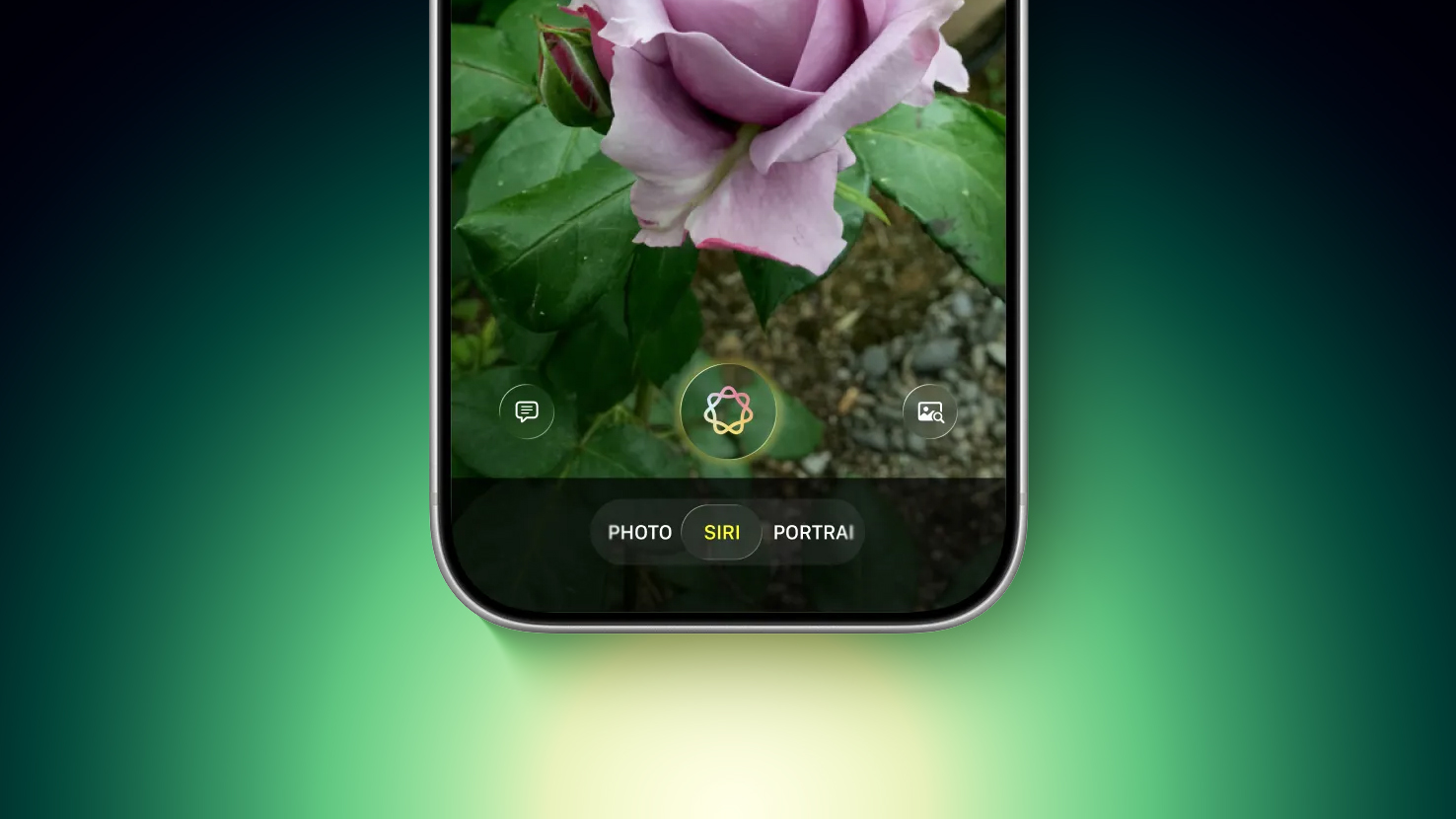
Apple is moving Visual Intelligence from the Camera Control button to the Camera app in iOS 27. There will be a Siri mode that will be available alongside the existing Photo, Video, Portrait, and Panorama modes. When in Siri mode, the existing Camera app shutter button will feature the Apple Intelligence logo, letting users know the Siri features are available.

sweeping-AI-driven-upgrades-feature.jpg
Image via Bloomberg

Siri mode is a renaming of Visual Intelligence, and it will make the feature more visible. Accessing Visual Intelligence in iOS 26 requires users to hold down the Camera Control button or assign the feature to the Action button, and many people may not even know it exists.

Visual Intelligence can identify objects, plants, animals, art, books, and more, searching for whatever the user snaps on Google Image Search. In iOS 27, Siri will be able to answer questions about what a user is looking at, providing information from the web.

Apple is adding new Visual Intelligence capabilities in iOS 27, and they will be available through the Camera app Siri mode.
  • Nutrition - Users can scan nutrition labels on food packaging for calorie and macronutrient tracking using the Health app.
  • Contacts - Visual Intelligence will let users scan phone numbers and addresses on business cards and other print media, adding the information to the Contacts app.
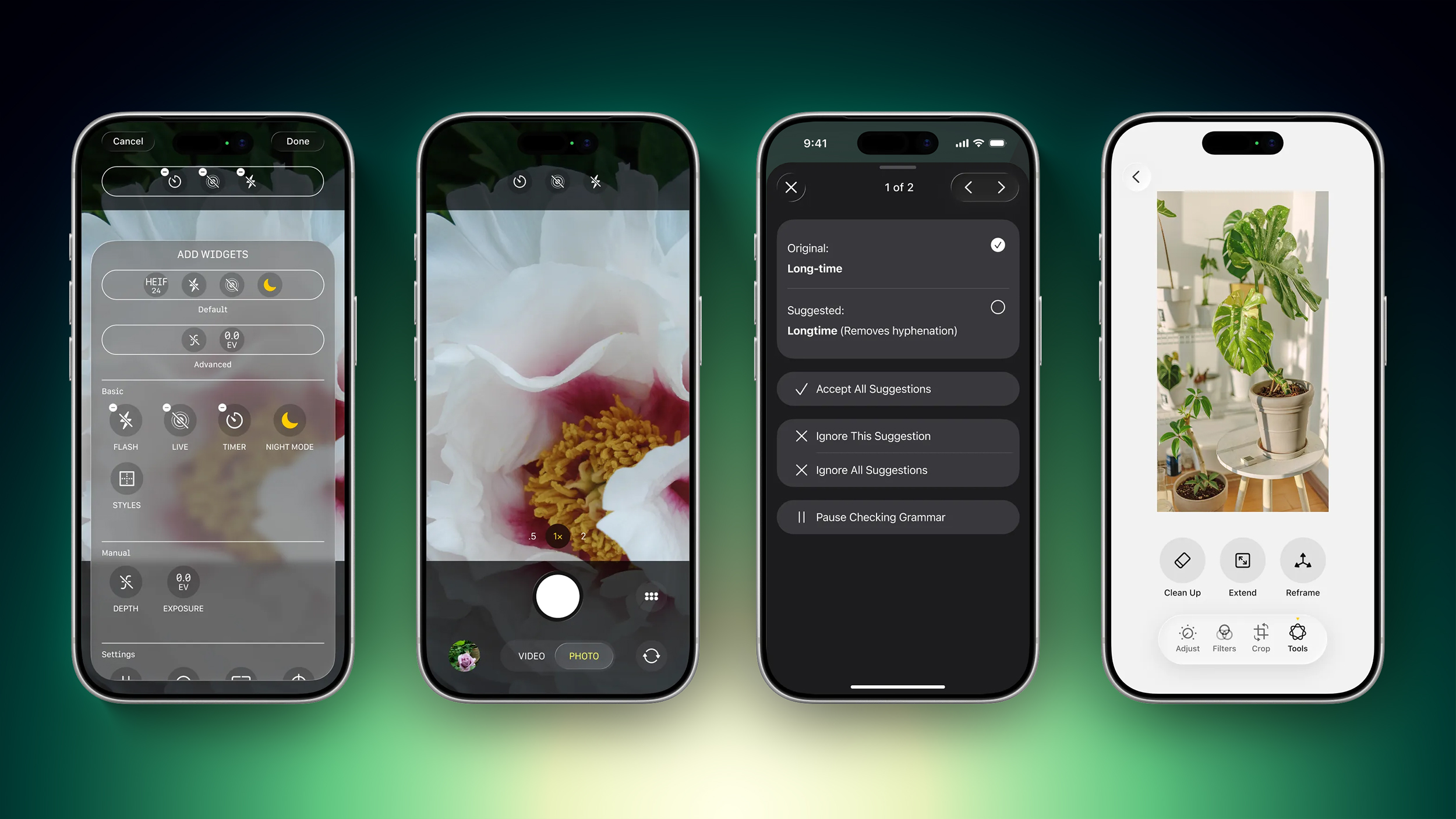
Apple plans to make the Camera app more customizable in iOS 27. iPhone users will be able to replace the top row of camera shortcuts with options of their choosing, selecting features like flash, exposure, timer, depth of field, photo styles, and resolution.

Camera controls, now labeled as widgets, can be placed at the top of the Camera interface in any order. Users can select widgets from a transparent widget tray that comes up from the bottom of the app and organizes widgets into categories like basic, manual, and settings.

The Camera app will have the same default layout that's available now with quick tap buttons for flash, Live Photos, and Night Mode, but the customizable widget interface will be added as an advanced layout that will appeal to professional users.

sweeping-AI-driven-upgrades-article.jpg
Image via Bloomberg

iPhone users can currently tap on an icon at the top right of the Camera app to access all of the Camera controls, but Apple is moving that view to the right of the shutter button in iOS 27.

The Camera app is also going to get new grid and level options that will join the existing features.

Photos

The Photos app will have an Apple Intelligence Tools section when editing an image with new Extend and Reframe options.
  • Extend - Extend generates additional image content beyond the original frame of the photo, filling in scenery when changing the crop of an image. This tool will support expanding the edges of an image with zoom gestures.
  • Reframe - When used with spatial photos, Reframe will let users change the perspective of an image after it's captured.
Apple is also testing an AI photo editing feature that lets users request edits using natural language. Users would be able to tweak color, lighting, cropping, and other image parameters without having to use manual tools. The voice-based photo editing feature may not arrive in the first version of iOS 27.
Shortcuts

The iOS 27 Shortcuts app will support using natural language to create a shortcut with AI. Users will be able to tell Siri what they want to accomplish with a multi-step shortcut, and Siri will generate it.

The Shortcuts app will open with a prompt that says "What do you want your shortcut to do?" with a text field to enter a description. Shortcuts that are created using AI are then automatically installed and immediately available for use.

Wallet

The Wallet app is getting a "Create a Pass" option so users can generate digital passes from scans of physical items like movie tickets, concert passes, and gym membership cards.

Users can tap on the "+" button in the Wallet app and then scan a QR code on a pass or ticket if one is available. If there is no QR code available, there will be an option to create a custom pass.

There are three pass types in Create a Pass, each with a different color. Apple is using purple for events, blue for memberships, and orange for other types of passes. Users can customize images, colors, style, and text on the digital passes.

Apple is also adding an AI bill-splitting feature that will work with Apple Cash. iPhone users will be able to take a photo of a receipt and generate Apple Cash payment requests for different people.

Image Playground and Genmoji

Apple is updating the Image Playground app. The interface for generating a new image has fewer controls and a "describe a change" option for editing images that are created. Previously created images are displayed in a grid with more rounded edges, and instead of a New Image button, there's a "+" button.

Apple has also been testing new models that produce more lifelike images, so we could see new image generation capabilities in iOS 27 with better image quality.

Genmoji is also getting an update so it will use fewer resources, causing less battery drain and fewer heat problems. Genmoji will be better quality with a new Genmoji model, and a Suggested Genmoji feature will bring up custom emoji ideas based on your media and text history.

Writing Tools

Apple is testing an expanded version of Writing Tools that will do more rewriting and text generation than the current version. There is a "Write with Siri" toggle at the top of the keyboard, along with a "Hel... Click here to read rest of article

Article Link: iOS 27: All the Rumored App Features
 
The two most important things are not on this list:

1. GET RID of Image Playground & Genmoji
2. New keyboard (including putting anyone and everyone currently involved in the current keyboard in a gulag - WITH their families and known associates.)

That's all.
 
  • Love
  • Like
Reactions: Huck and shpankey
I sure hope mark "the gur" gurman is right about it being a snow leopard style update. Of the things in this post that's the only one I'm interested in.
 
  • Like
Reactions: Huck
what I want from the camera app:
. give me full control over which lens I choose (and don't change it for no apparent reason)
. let me choose the resolution and don't adjust it
. if there are conditions that prevent one of the above, alert me with what it is, don't make changes for me
. give me a file format that is un-processed (ProRAW is processed)
 
  • Like
Reactions: fatTribble
Ke


Siri is getting a major overhaul in iOS 27, but Apple also has some big updates planned for apps like Camera, Photos, and Wallet. There are multiple new AI features in the works, plus some non-AI upgrades.

iOS-27-All-the-New-App-Features.jpg

Camera

Apple is moving Visual Intelligence from the Camera Control button to the Camera app in iOS 27. There will be a Siri mode that will be available alongside the existing Photo, Video, Portrait, and Panorama modes. When in Siri mode, the existing Camera app shutter button will feature the Apple Intelligence logo, letting users know the Siri features are available.


sweeping-AI-driven-upgrades-feature.jpg


Image via Bloomberg

Siri mode is a renaming of Visual Intelligence, and it will make the feature more visible. Accessing Visual Intelligence in iOS 26 requires users to hold down the Camera Control button or assign the feature to the Action button, and many people may not even know it exists.

Visual Intelligence can identify objects, plants, animals, art, books, and more, searching for whatever the user snaps on Google Image Search. In iOS 27, Siri will be able to answer questions about what a user is looking at, providing information from the web.

Apple is adding new Visual Intelligence capabilities in iOS 27, and they will be available through the Camera app Siri mode.
  • Nutrition - Users can scan nutrition labels on food packaging for calorie and macronutrient tracking using the Health app.
  • Contacts - Visual Intelligence will let users scan phone numbers and addresses on business cards and other print media, adding the information to the Contacts app.
Apple plans to make the Camera app more customizable in iOS 27. iPhone users will be able to replace the top row of camera shortcuts with options of their choosing, selecting features like flash, exposure, timer, depth of field, photo styles, and resolution.

Camera controls, now labeled as widgets, can be placed at the top of the Camera interface in any order. Users can select widgets from a transparent widget tray that comes up from the bottom of the app and organizes widgets into categories like basic, manual, and settings.

The Camera app will have the same default layout that's available now with quick tap buttons for flash, Live Photos, and Night Mode, but the customizable widget interface will be added as an advanced layout that will appeal to professional users.


sweeping-AI-driven-upgrades-article.jpg


Image via Bloomberg

iPhone users can currently tap on an icon at the top right of the Camera app to access all of the Camera controls, but Apple is moving that view to the right of the shutter button in iOS 27.

The Camera app is also going to get new grid and level options that will join the existing features.

Photos

The Photos app will have an Apple Intelligence Tools section when editing an image with new Extend and Reframe options.
  • Extend - Extend generates additional image content beyond the original frame of the photo, filling in scenery when changing the crop of an image. This tool will support expanding the edges of an image with zoom gestures.
  • Reframe - When used with spatial photos, Reframe will let users change the perspective of an image after it's captured.
Apple is also testing an AI photo editing feature that lets users request edits using natural language. Users would be able to tweak color, lighting, cropping, and other image parameters without having to use manual tools. The voice-based photo editing feature may not arrive in the first version of iOS 27.
Shortcuts

The iOS 27 Shortcuts app will support using natural language to create a shortcut with AI. Users will be able to tell Siri what they want to accomplish with a multi-step shortcut, and Siri will generate it.

The Shortcuts app will open with a prompt that says "What do you want your shortcut to do?" with a text field to enter a description. Shortcuts that are created using AI are then automatically installed and immediately available for use.

Wallet

The Wallet app is getting a "Create a Pass" option so users can generate digital passes from scans of physical items like movie tickets, concert passes, and gym membership cards.

Users can tap on the "+" button in the Wallet app and then scan a QR code on a pass or ticket if one is available. If there is no QR code available, there will be an option to create a custom pass.

There are three pass types in Create a Pass, each with a different color. Apple is using purple for events, blue for memberships, and orange for other types of passes. Users can customize images, colors, style, and text on the digital passes.

Apple is also adding an AI bill-splitting feature that will work with Apple Cash. iPhone users will be able to take a photo of a receipt and generate Apple Cash payment requests for different people.

Image Playground and Genmoji

Apple is updating the Image Playground app. The interface for generating a new image has fewer controls and a "describe a change" option for editing images that are created. Previously created images are displayed in a grid with more rounded edges, and instead of a New Image button, there's a "+" button.

Apple has also been testing new models that produce more lifelike images, so we could see new image generation capabilities in iOS 27 with better image quality.

Genmoji is also getting an update so it will use fewer resources, causing less battery drain and fewer heat problems. Genmoji will be better quality with a new Genmoji model, and a Suggested Genmoji feature will bring up custom emoji ideas based on your media and text history.

Writing Tools

Apple is testing an expanded version of Writing Tools that will do more rewriting and text generation than the current version. There is a "Write with Siri" toggle at the top of the keyboard, along with a "Hel... Click here to read rest of article

Article Link: iOS 27: All the Rumored App Features
Keep the ai trash out of camera app please.
 
  • Like
Reactions: Huck
what I want from the camera app:
. give me full control over which lens I choose (and don't change it for no apparent reason)
. let me choose the resolution and don't adjust it
. if there are conditions that prevent one of the above, alert me with what it is, don't make changes for me
. give me a file format that is un-processed (ProRAW is processed)
So much yes. Let me take a photo that looks exactly like what the view finder sees.
 
  • Love
Reactions: repoman016
The two most important things are not on this list:

1. GET RID of Image Playground & Genmoji
2. New keyboard (including putting anyone and everyone currently involved in the current keyboard in a gulag - WITH their families and known associates.)

That's all.
Yes please do a decent keyboard including numbers & common stuff (@. !, ?, etc) on the same screen
 
  • Like
Reactions: Huck
ios still doesn't support macOS supported keyboard layout.
It's been almost 20 years since ios launched, but I can't type with the keyboard layout I use. (Korean SeBulSik-390)

I wish I was faithful to the basics rather than the new ones.
 
Register on MacRumors! This sidebar will go away, and you'll see fewer ads.