

Become a MacRumors Supporter for $50/year with no ads, ability to filter front page stories, and private forums.

MacRumors

macrumors bot
Original poster


The Shortcuts app can be intimidating to casual iPhone users, but with iOS 27, it's a lot easier to use. With Apple Intelligence integration, shortcuts can be created using natural language, and they're much more accessible to the average person.
Shortcuts-Feature.jpg

Describe a Shortcut

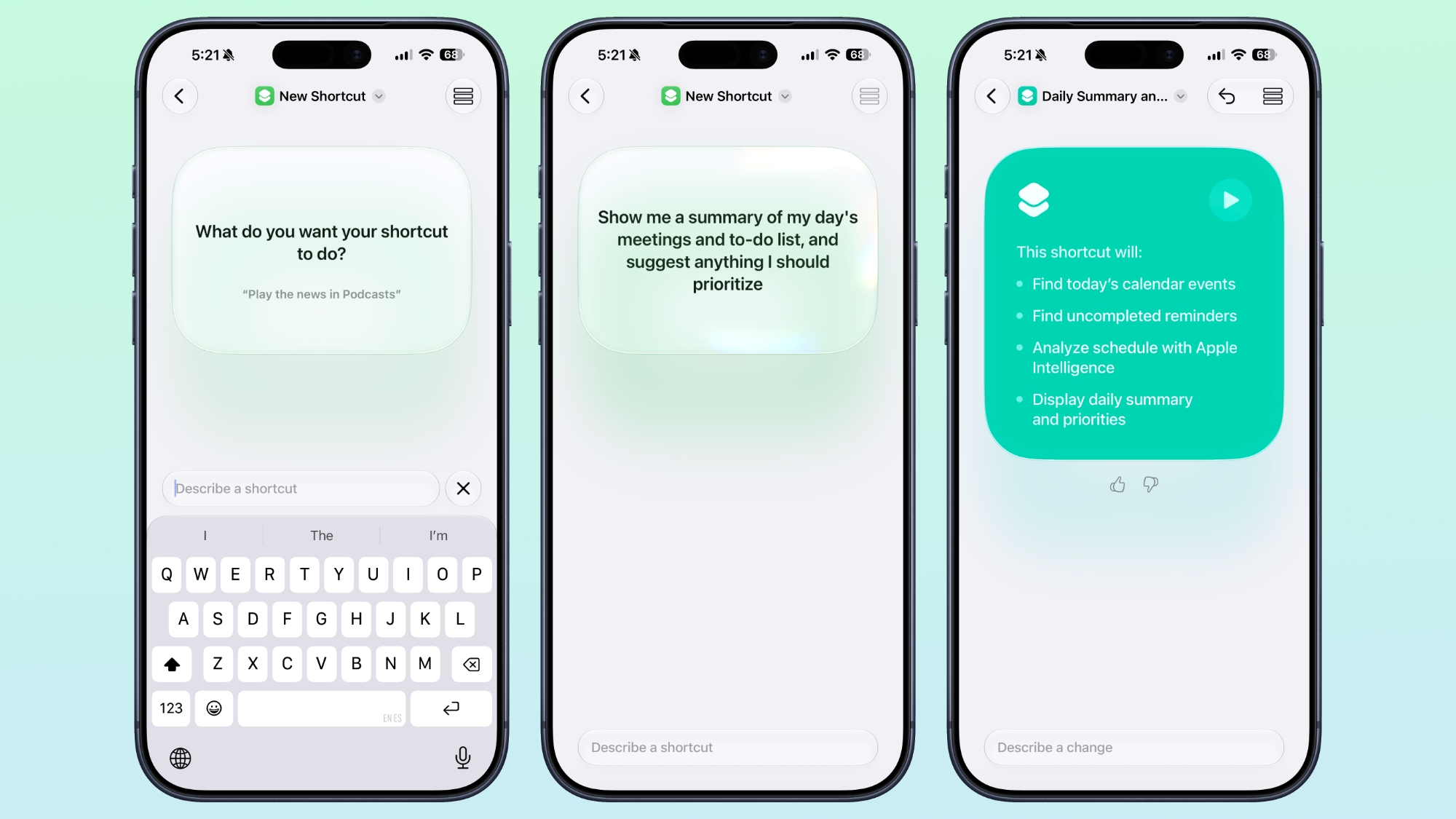
When you tap on the New Shortcut button in the iOS 27 Shortcuts app, it opens to the Describe a Shortcut interface.
ios-27-describe-shortcut.jpg

There's a text box that asks you what you want your shortcut to do, and you can describe what you need in natural language. You can start with a single step, or add in multiple parameters. Apple Intelligence selects the correct actions, creates the automations, and folds it all into a completed shortcut. A few examples of what you can do:
  • Each evening, set tomorrow's alarm based on my first Calendar event, turn on Sleep Focus, and dim the bedroom lights.
  • Every morning, show me my first meeting, today's weather, and my Reminders due today.
  • Turn on the porch lights at night when you get a notification that food delivery is arriving.
  • Text my partner an ETA when I leave work, then start playing my podcast.
  • Show me a summary of my day's meetings and to-do list, and suggest anything I should prioritize.
  • When I open YouTube, turn off orientation lock. Turn it back on when I close the app.
  • Give me a three-line summary of today's tech news.
Shortcuts and automations can run based on time of day, location, an app action, a system feature like a screenshot, an incoming notification, and more. Shortcuts can do all kinds of things, from accessing system features to opening and running apps.

Add Refinements

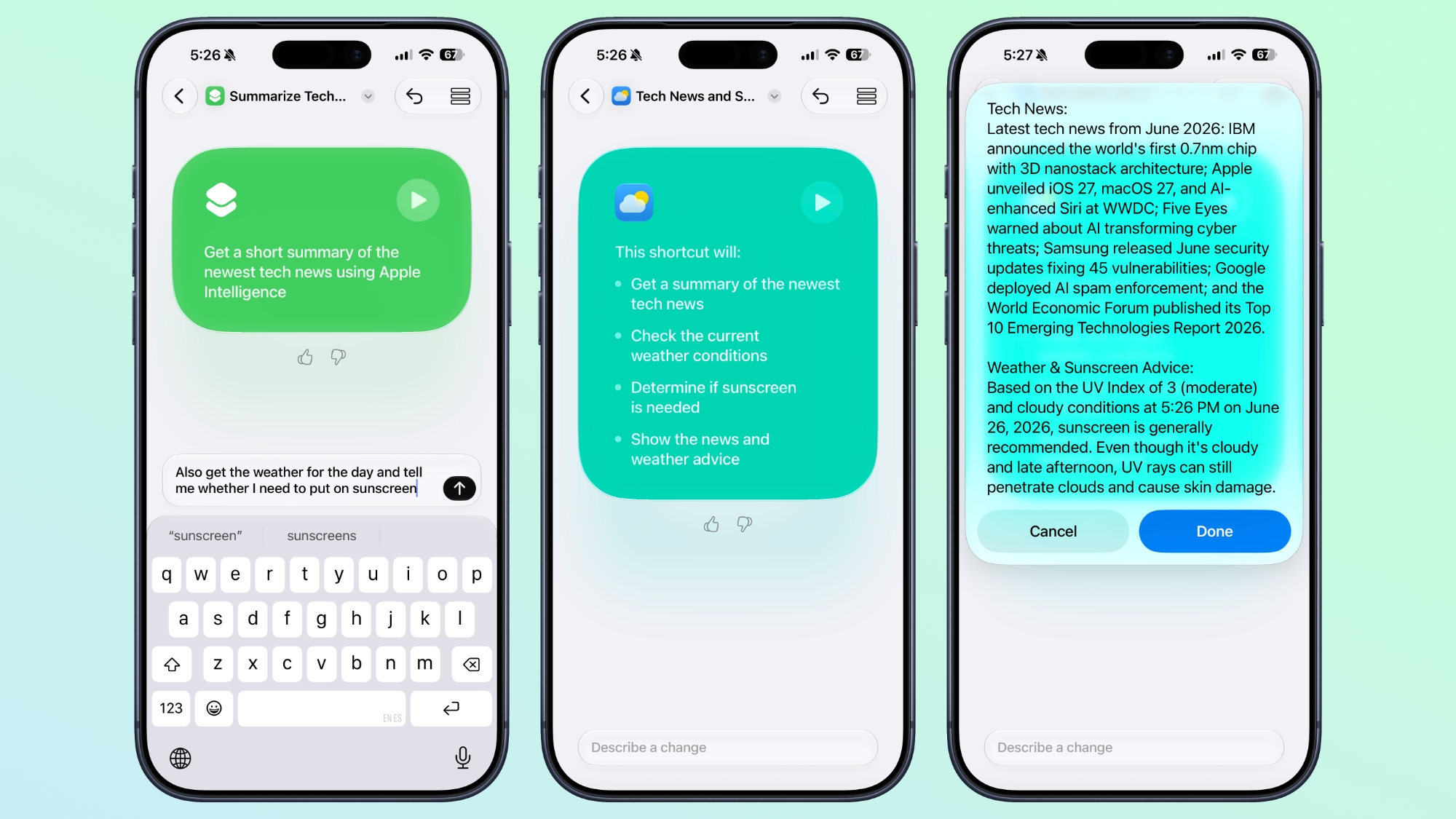
After dictating a shortcut, the app will outline each of the actions the shortcut will perform. If it's what you want, you can tap on the play button to test it. It will be added automatically to your personal shortcuts.
ios-27-shortcut-refine.jpg

If it's not quite what you want or you want to add more features, you can use the "Describe a change" interface. You can type in what you want to tweak, and go through multiple rounds of refinement until you get exactly what you want.

Shortcuts can be used from Siri, the app, Control Center, the Action Button, and more.

Edit Manually

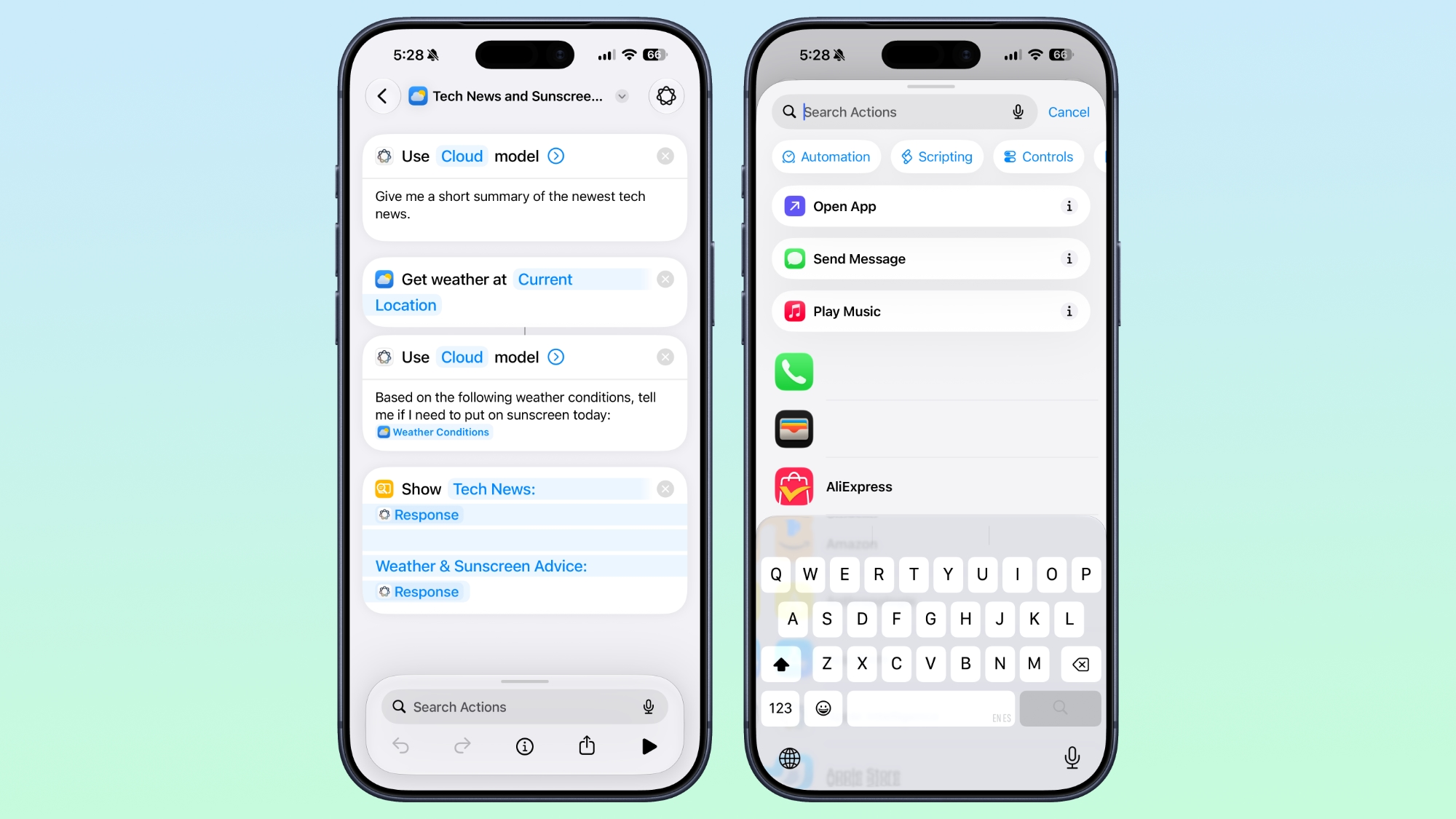
Once created, you can tap into a manual editing interface if you want to add more complicated actions or tweak without using Apple Intelligence. AI Shortcuts is in beta and it's not always perfect, so sometimes manual edits are required to get the end result you want.
ios-27-shortcut-edit-manual.jpg

You can also open any shortcut and use the Apple Intelligence mode to make edits.

New Automation Triggers

  • When a notification is received
  • When a screenshot is captured
  • When a keyboard is connected
  • When an Apple Watch workout starts

New Actions

There are several new actions in the Shortcuts app.
  • Automate a recording in Notes
  • Send messages to a group conversation
  • Updated Get What's On Screen option that gets context information from the display (e.g. text, title, or links)
  • Choose an item from a list
  • Delete conversations or messages in Messages
  • Mark as read in Messages
  • Search in Messages
  • Open Messages inbox
  • Send Tapback
  • Auto Enhance Photo
  • Delete albums and photos
  • Favorite photos
  • Hide photos
  • Open photo
  • Create Group in Reminders
  • Create Section in Reminders
  • Delete groups, lists, and sections in Reminders
  • Edit list in Reminders
  • Toggle Hearing Aid Mute
  • Toggle Vehicle Motion Cues
Improved Apple Intelligence Models

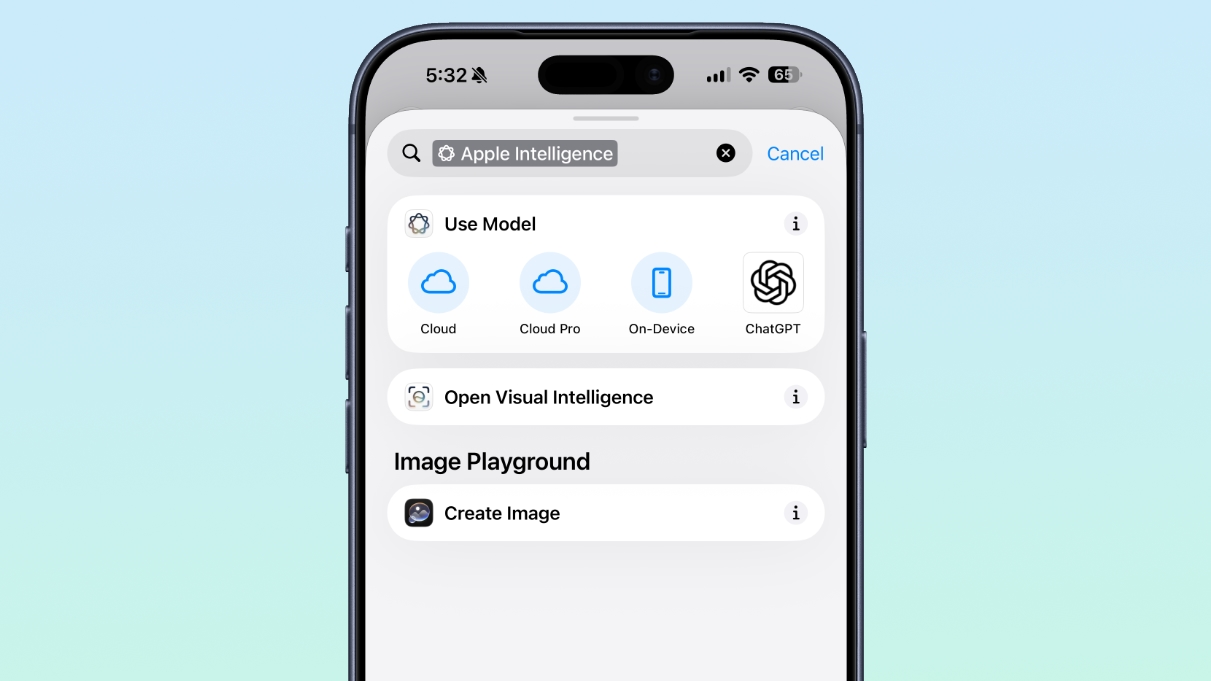
Shortcuts can use improved Apple Intelligence models that have access to broad world knowledge, which means the model can search the web to get information.
ios-27-shortcuts-apple-intelligence.jpg

There are now Cloud, Cloud Pro, and on-device models that can be used in shortcuts. Cloud Pro is able to search the web, and is used for queries that need information from the internet.

Data Storage

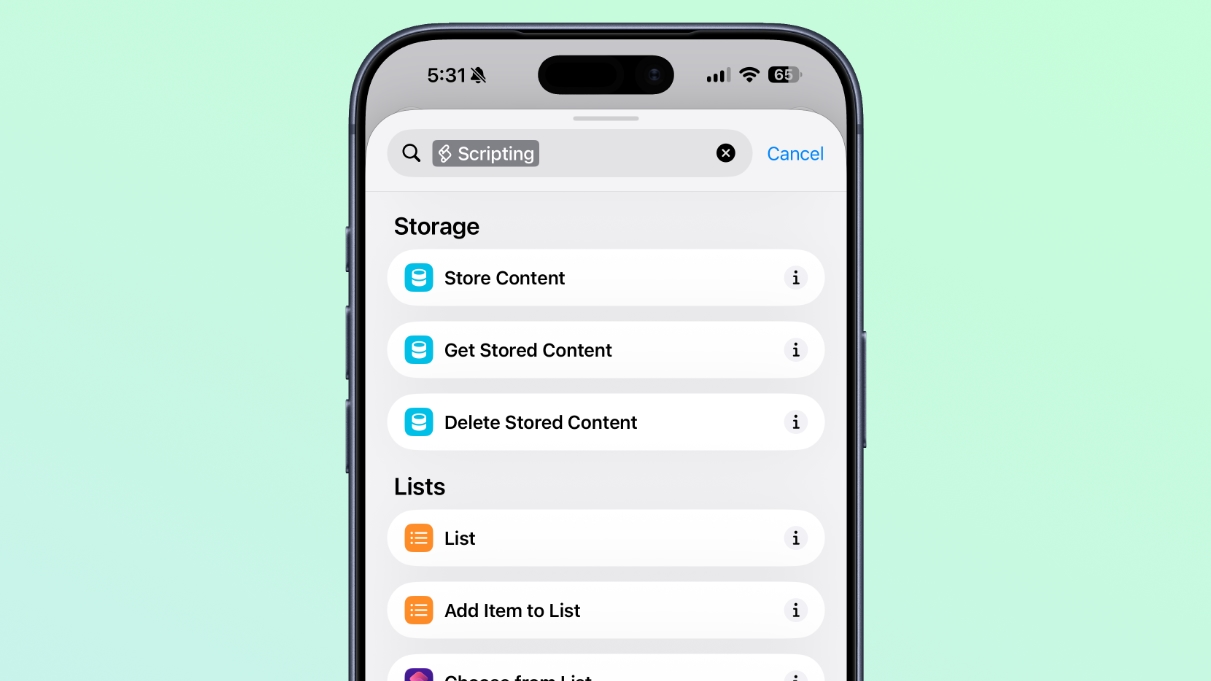
Shortcuts can store and update data, so you can do things like add items to a list or keep a tally.
ios-27-shortcuts-data-storage.jpg

Automation Updates

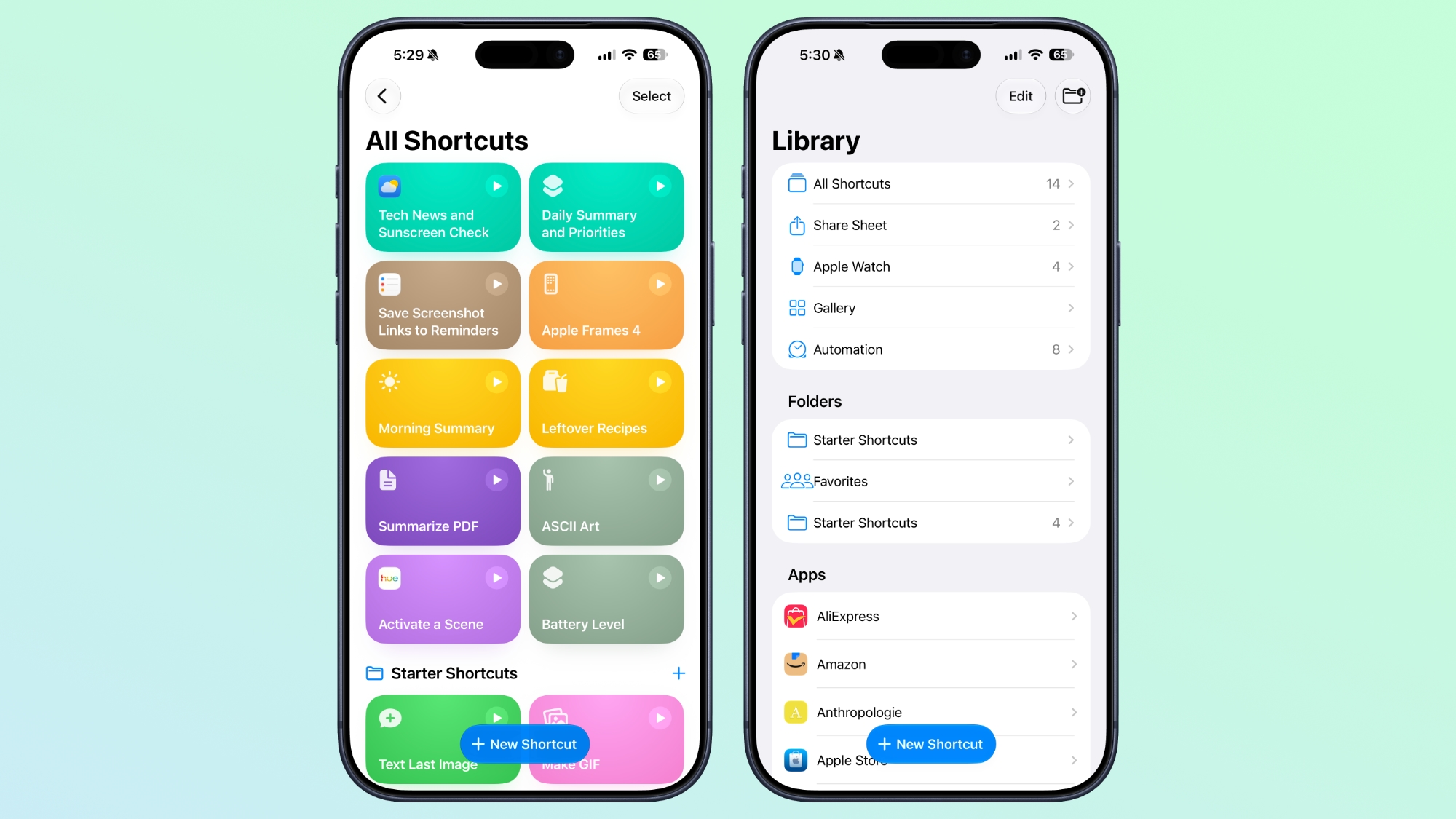
Automation is no longer a separate section in the Shortcuts app, and automation triggers are under the general Shortcuts actions.
ios-27-shortcut-interface.jpg

Cross-Platform Support

The Describe a Shortcut feature is available in the Shortcuts app in iOS 27, iPadOS 27, and macOS Golden Gate.

Requirements

The Apple Intelligence Shortcut app features require a device that supports Apple Intelligence, which includes the iPhone 15 Pro and later, iPads with an M-series chip or the iPad mini with A17 Pro, or a Mac with an Apple silicon chip.

Supported languages include English, Danish, Dutch, French, German, Italian, Norwegian, Portuguese, Spanish, Swedish, Turkish, Vietnamese, Chinese (simplified and traditional), Japanese, and Korean.

Article Link: iOS 27 Makes the Shortcuts App Much Less Intimidating
 
I'm really hoping for improvements here! As a developer, I'm often frustrated by Shortcuts and the way it dumbs things down. Some things that are easy to develop are made needlessly complex in shortcuts, while other things are sometimes easier, but named something weird or difficult to uncover. I feel like some of my shortcuts tend to break with iOS updates each year as well, so being able to just use AI to set them up feels like a win if it works, even for a technical user that doesn't have the time to stay up-to-date with all of their BS.
 
After playing about with it for a week, it’s one of my favourite features in 27, being able to ask Siri what I want in plain English is a massive improvement.

Made a shortcut to batch import photos from the Folders app and import them into the Photos app into collections, while preserving the same folder names, and then import them into those folders. Works beautifully and saved me hours of manual work.

Made another one to allow me to resize photos to either a simple small, medium, large, or enter my own custom resolution while converting it to jpeg: simple tool, and I no longer need those crappy third-party apps to do that, which are full of ads or demand a subscription.
 
Last edited:
Did they fix MacOS Music shortcuts?

Edit: I haven't tried in a while before today and apparently Music shortcuts (at least the one I setup for my iPhone) works in the latest version of MacOS 26
 
Last edited:
I never had problems with shortcuts, I asked for more automatisations not Ai slop
This is certainly not AI slop. If you wanted a shortcut to perform multiple tasks, or even a complicated one, it was impossible for the average user to make unless you knew what you were doing. I wanted a simple shortcut to resize photos, but I wouldn’t have had a clue where to start making this.

Now it’s stupidly easy to use, and anyone can use it. Good luck asking your average tech-illiterate person to make this shortcut in a few seconds.

IMG_2083.jpeg
IMG_2080.png
IMG_2081.png
IMG_2082.png
 
I'm glad you're finally able to do this. It's otherwise been somewhat time-consuming to set this up. I've gotten most of my shortcuts from other users over the years, so it's nice I can now just describe what I want. Of course, since it's AI, it might get stuff wrong, but now I'll be able to set it up easier.
 
  • Like
Reactions: SantaFeNM
I don’t think I get any of this stuff on my iPhone 13, but I look forward to any improvements I might get in terms of expanded shortcuts capability. I’ve heard some podcasters talking about how Apple added a bunch of capabilities this year, so hopefully a few of the walls I run into making manual shortcuts will be lowered or removed.
 
Can you upload an image(s) to the Apple Intelligence models now in shortcuts and ask it to analyse and research the contents of an image?
I want to take a photo and have it find places online where I can buy an item to do a price comparison whilst shopping.
 
After playing about with it for a week, it’s one of my favourite features in 27, being able to ask Siri what I want in plain English is a massive improvement.

Made a shortcut to batch import photos from the Folders app and import them into the Photos app into collections, while preserving the same folder names, and then import them into those folders. Works beautifully and saved me hours of manual work.

Made another one to allow me to resize photos to either a simple small, medium, large, or enter my own custom resolution while converting it to jpeg: simple tool, and I no longer need those crappy third-party apps to do that, which are full of ads or demand a subscription.

This is where I'm hoping we'll see some benefit of AI. We could use more bespoke small software, since the App Store has gotten out of hand with IAP.

There are still great developers who make excellent simple apps that are tiny and only do exactly what they're supposed to do and nothing else.

But they are often very hard to find and the App Store is not designed to help promote those. It's designed to promote the ones with predatory IAP because Apple gets a cut.
 
This is certainly not AI slop. If you wanted a shortcut to perform multiple tasks, or even a complicated one, it was impossible for the average user to make unless you knew what you were doing. I wanted a simple shortcut to resize photos, but I wouldn’t have had a clue where to start making this.

Now it’s stupidly easy to use, and anyone can use it. Good luck asking your average tech-illiterate person to make this shortcut in a few seconds.

View attachment 2641272
View attachment 2641273
View attachment 2641275
View attachment 2641274
We are getting to the point of Star Trek TNG were we just tell “computer” to do something and it does it, without worrying how “computer” works.

At some point there won’t actually be all these different helper programs/apps that do various small things on the phone or computer.

You will just tell “computer” to do whatever and it gets done.

What may end up happening though is that all current OSes will become relics, as there will just be a new AI OS not encumbered by any of the existing complicated and confusing detritus
 
Good update.

Question: what is the Messages inbox? It has an inbox (other than notifications in Notification Center)? Isn't the UI just a list of all conversations?

Also I wonder why putting on and taking off your Apple Watch isn't yet a trigger. I'd like that to trigger switching my phone to silent since I get all notifications on my AW anyway, and reverse when I take it off. (I know notifications don't make a sound on iPhone while wearing AW but only if your phone is locked, but if you're using the phone and eg. get a text, it will make a sound. I often forget that and it has caused embarrassment for me multiple times.)

Another trigger I'd like is a simple physical button, used at home and connected to probably wifi. When taking medication for example, someone could press it and it could log the timestamp into a spreadsheet or send a notification or something. Does that exist already? Alternatively, a button that simply displays the last time/date it was pressed would work. I've looked but haven't been able to find anything like that strangely.
 
Register on MacRumors! This sidebar will go away, and you'll see fewer ads.