

Become a MacRumors Supporter for $50/year with no ads, ability to filter front page stories, and private forums.

MacRumors

macrumors bot
Original poster


iOS 27 and iPadOS 27 include a rebranded Connectivity Assist feature that can help your iPhone stay connected to the internet.
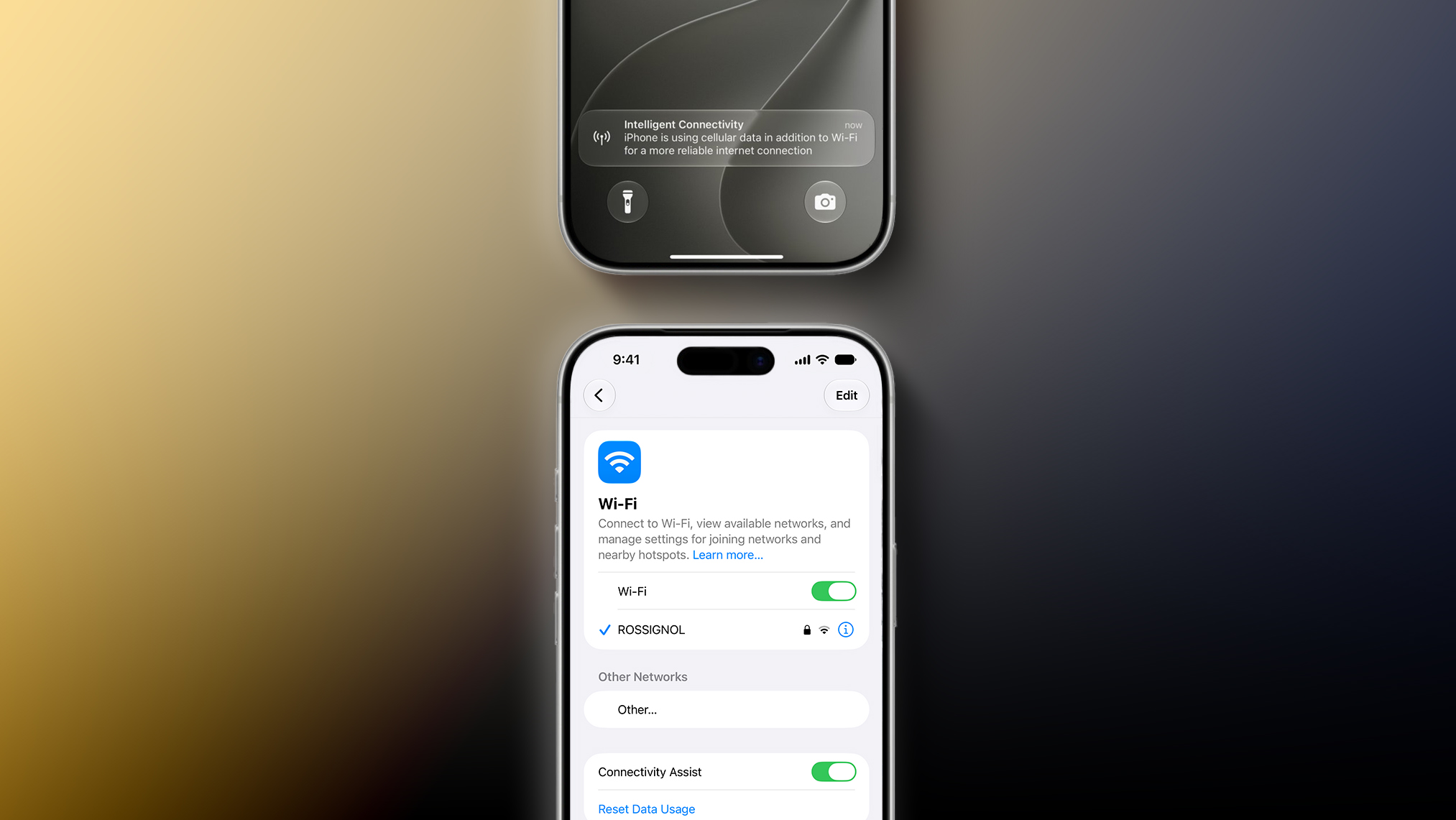
iOS-27-Boosts-Your-iPhones-Wi-Fi-With-New-Connectivity-Assist-Feature-2.jpg

Connectivity Assist can be found in the Settings app under Wi-Fi on iOS 27 and iPadOS 27. Apple's description of the feature says it lets you "use cellular data in addition to Wi-Fi for a more reliable internet connection."

A support document on Apple's website confirms that Connectivity Assist is the new name used on iOS 27 and iPadOS 27 for the feature previously known as Wi-Fi Assist, but it is unclear if there are any functionality changes.

On iOS 26 and earlier, Wi-Fi Assist automatically switches the device to cellular data when Wi-Fi connectivity is poor. Some early iOS 27 beta testers have speculated that Connectivity Assist seems to go further by offering combined Wi-Fi and cellular connectivity when it is active, but we have yet to confirm that claim.

On the iOS 27 beta, Flighty developer Ryan Jones and others have received a new "Intelligent Connectivity" notification when Connectivity Assist is active. It is possible that the feature now kicks in more aggressively.

On a related note, Apple said iOS 27 and iPadOS 27 offer "smoother network transitions."

"Your iPhone more seamlessly chooses the best available Wi‑Fi or cellular connection, so whether you're getting directions as you leave home or taking a FaceTime call as you step off a plane, you'll stay connected," the company explained.

Article Link: iOS 27's Wi-Fi Settings Include Rebranded 'Connectivity Assist' Feature
 
Last edited:
  • Haha
  • Like
Reactions: Z-4195 and KeithBN
I didn’t realize this feature existed previously, but it was toggled on after I installed the beta and it allowed ads to get past my ad blocker which had not previously been a problem. To me, that suggests the speculation is accurate. (Toggling it off immediately stopped ads from loading.)
 
I use my phone for work a lot. The transition management between WiFi & 5g is problematic. I don’t think it’s an easy solution but wish it could be better.

A majority of the time I have a problem accessing data and I’m getting no response…switching WiFi off nearly always solves the problem immediately.

So…why can’t my phone just do that…?

First world problem that could use some help.
 
I didn’t realize this feature existed previously, but it was toggled on after I installed the beta and it allowed ads to get past my ad blocker which had not previously been a problem. To me, that suggests the speculation is accurate. (Toggling it off immediately stopped ads from loading.)
Connectivity Assist for sure feels like it's doing some funky things with DNS. I use AdGuard Home as a DNS-level Ad Blocker and was seeing ads leak through but only on my phone with iOS 27. Turned it off, immediately went back to not seeing ads. Able to replicate pretty easily. Also just found this thread on Reddit confirming
 
I use my phone for work a lot. The transition management between WiFi & 5g is problematic. I don’t think it’s an easy solution but wish it could be better.

A majority of the time I have a problem accessing data and I’m getting no response…switching WiFi off nearly always solves the problem immediately.

So…why can’t my phone just do that…?

First world problem that could use some help.
exactly this. Apple's handling of this particular matter has been abysmal.
 
I've actually noticed my connectivity getting worse with this feature. Not sure if the setting mixed up but I'm disconnecting and buffering more often when watching simple things like my Instagram feed. Anyone else?
Ok so I am not the only one. I feel like it keeps disconnecting me
 
  • Like
Reactions: Brother Cavil
At my daughter’s swim school, the WiFi is 💩, and the cellular service inside the building is meh at best. There has been a noticeable improvement in overall network performance when I’m there since putting iOS 27 on my phone.
 
It would be extremely nice if iOS natively supported channel bonding so I could use both my ISP and Cellular's upstream connections for a faster, overall upstream. For example, both my ISP and Cellular provide 30Mbit/s upstream at my home location...if I could combine them to get 60Mbit/s, that would obviously be twice as fast when I send large quantities of photos and videos to friends as well as iCloud sync/backup.

Has Apple ever considered supporting this natively?
 
I’m actually quite excited for this feature. This is really going to come into clutch when a WiFi signal is just barely enough to say it’s connected but absolutely worthless.
 
  • Like
Reactions: Amadeus71
Connectivity Assist for sure feels like it's doing some funky things with DNS. [snipped]
Correct, it is.

It uses both the WiFi dns server addresses and the mobile network DNS server addresses with the predictable chaos that results when they both return different records.

It causes DNSsec tests to fail and leaks queries to the mobile network dns servers which isn’t exactly good for privacy or DNS adblocking.

There’s two solutions, either turn it off or install a DoT/DoH always on DNS profile, either option resolves the problem.

I have submitted a feedback FB23073160 for all the good it will do seeing as most are just ignored.
 
Last edited:
It would be extremely nice if iOS natively supported channel bonding so I could use both my ISP and Cellular's upstream connections for a faster, overall upstream. For example, both my ISP and Cellular provide 30Mbit/s upstream at my home location...if I could combine them to get 60Mbit/s, that would obviously be twice as fast when I send large quantities of photos and videos to friends as well as iCloud sync/backup.

Has Apple ever considered supporting this natively?
Bonding is more hassle than it’s worth, even with two connections of similar latency. I had two bonded vDSL lines and I often had to switch one off to get decent performance.

Because of differing latencies, packets arrive out of order and need to be reordered and/or retransmitted, some protocols / applications really hate it and slow down to a crawl.

I dread to think what it would be like with low latency WiFi bonded with a (relatively) high latency 5G connection.
 
  • Like
Reactions: Amadeus71
Yep this setting doesnt honor your WIFI DNS setting as it will just switch to 5G (without even changing the icon on top of the phone). So if you run some sort of network wide adblocking at home via pi-hole or AdGuard - just turn this off asap.


iOS 27 and iPadOS 27 include a rebranded Connectivity Assist feature that can help your iPhone stay connected to the internet.

iOS-27-Boosts-Your-iPhones-Wi-Fi-With-New-Connectivity-Assist-Feature-2.jpg

Connectivity Assist can be found in the Settings app under Wi-Fi on iOS 27 and iPadOS 27. Apple's description of the feature says it lets you "use cellular data in addition to Wi-Fi for a more reliable internet connection."

A support document on Apple's website confirms that Connectivity Assist is the new name used on iOS 27 and iPadOS 27 for the feature previously known as Wi-Fi Assist, but it is unclear if there are any functionality changes.

On iOS 26 and earlier, Wi-Fi Assist automatically switches the device to cellular data when Wi-Fi connectivity is poor. Some early iOS 27 beta testers have speculated that Connectivity Assist seems to go further by offering combined Wi-Fi and cellular connectivity when it is active, but we have yet to confirm that claim.

On the iOS 27 beta, Flighty developer Ryan Jones and others have received a new "Intelligent Connectivity" notification when Connectivity Assist is active. It is possible that the feature now kicks in more aggressively.

On a related note, Apple said iOS 27 and iPadOS 27 offer "smoother network transitions."

"Your iPhone more seamlessly chooses the best available Wi‑Fi or cellular connection, so whether you're getting directions as you leave home or taking a FaceTime call as you step off a plane, you'll stay connected," the company explained.

Article Link: iOS 27's Wi-Fi Settings Include Rebranded 'Connectivity Assist' Feature
Good. About time. The Wi-Fi assist debacle was a huge deal 10 years ago when our cellular plans were still mostly metered. In 2026 where nearly every carrier has unlimited plans, the current cellular assist feature’s been messing most of us up. A faster switch to cellular, plus a clear notification is sorely needed.
 
What I hate that has been there since Day 1 is when I select a public WiFi spot that wants me to sign up. I choose not to and I get the option to Use Without Internet or Use Other Network. That's it. There is no other network I want to use, so I select Use Without Internet. Then I'm stuck on this public WiFi I can't use it because I didn't sign in. I have to go into WiFi settings to select Forget. Why has there never been an option to reject and not connect to a WiFi?!
 
  • Like
Reactions: Amadeus71
What I hate that has been there since Day 1 is when I select a public WiFi spot that wants me to sign up. I choose not to and I get the option to Use Without Internet or Use Other Network. That's it. There is no other network I want to use, so I select Use Without Internet. Then I'm stuck on this public WiFi I can't use it because I didn't sign in. I have to go into WiFi settings to select Forget. Why has there never been an option to reject and not connect to a WiFi?!
There is an option for that now. Believe they added that in one of the ios26 betas
 
never understood the name wifi assist. intuitively people think wifi is assisting cellular (but might as well connect to wifi if that was the case) when it's the other way around.
 
I've turned it off, as I only tend to use WiFi when at home or travelling.

I don't want it automatically dropping out to mobile/cellular data when I'm abroad and roaming, as I usually have data limits. I had "WiFi Assist" (the old name) disabled for the same reason.
 
  • Like
Reactions: Will Tisdale 🎗
A majority of the time I have a problem accessing data and I’m getting no response…switching WiFi off nearly always solves the problem immediately.
This sounds like a problem with the WiFi, doesn't it? Around my house, you should never have this situation. I have seen it around houses of friends that use the router provided by the provider when getting close to out of range. Somehow, WiFi still shows as connected, but no data is getting through. Are you having this issue around your house, in places where you have great reception, or in other places?
 
  • Like
Reactions: xpxp2002
This sounds like a problem with the WiFi, doesn't it? Around my house, you should never have this situation. I have seen it around houses of friends that use the router provided by the provider when getting close to out of range. Somehow, WiFi still shows as connected, but no data is getting through. Are you having this issue around your house, in places where you have great reception, or in other places?
One problem Apple faces (to see things from their side) is that there are many things that can go wrong that can bundled under "why can't you just do the right thing with WiFi".

For example many homes (and many environments) use mesh wifi, but there are multiple ways you can do this. At the dumbest level, you just have more than one base station with the same name and password. This works, but handover between base stations is lousy. There are wifi specs that are supposed to improve this (eg 802.11k, 802.11r, 802.11v) but not every base station supports these, and even when they do, it's up to the device to decide when to handoff from one station to another.

So, for example, one thing Apple could do (which would improve the lives of some people, while making others think "nothing has changed") is for some older phones, without Apple WiFi, and which they knew were slow in handing over from one base station to another, they could activate cellular during these transitions. Goal is same as before, but cellular is active during the 30s or so while various combination of dumb old WiFi chips get their act together in terms of transiting from upstairs base station to downstairs base station, or whatever.

Of course if you have a very different DNS setup for your home wifi vs the DNS that cellular provides...
I'm not sure what can be done about that. Apple can't override cellular DNS (I don't think?) nor can they work around the various abominations that cellular has added to DNS.


iOS 27 and iPadOS 27 include a rebranded Connectivity Assist feature that can help your iPhone stay connected to the internet.

iOS-27-Boosts-Your-iPhones-Wi-Fi-With-New-Connectivity-Assist-Feature-2.jpg

Connectivity Assist can be found in the Settings app under Wi-Fi on iOS 27 and iPadOS 27. Apple's description of the feature says it lets you "use cellular data in addition to Wi-Fi for a more reliable internet connection."

A support document on Apple's website confirms that Connectivity Assist is the new name used on iOS 27 and iPadOS 27 for the feature previously known as Wi-Fi Assist, but it is unclear if there are any functionality changes.

On iOS 26 and earlier, Wi-Fi Assist automatically switches the device to cellular data when Wi-Fi connectivity is poor. Some early iOS 27 beta testers have speculated that Connectivity Assist seems to go further by offering combined Wi-Fi and cellular connectivity when it is active, but we have yet to confirm that claim.

On the iOS 27 beta, Flighty developer Ryan Jones and others have received a new "Intelligent Connectivity" notification when Connectivity Assist is active. It is possible that the feature now kicks in more aggressively.

On a related note, Apple said iOS 27 and iPadOS 27 offer "smoother network transitions."

"Your iPhone more seamlessly chooses the best available Wi‑Fi or cellular connection, so whether you're getting directions as you leave home or taking a FaceTime call as you step off a plane, you'll stay connected," the company explained.

Article Link: iOS 27's Wi-Fi Settings Include Rebranded 'Connectivity Assist' Feature
This broke my Technitium DNS instance I have running.

I didn’t know anything about this until I saw a thread on Reddit and someone said this was the culprit and sure enough that was it. Sent in feedback about it afterwards
 
Register on MacRumors! This sidebar will go away, and you'll see fewer ads.