What do you mean by this? What would that accessory look like/how would it be different from the Magic Keyboard?need a clamshell keyboard setup for iPads instead of the terrible design of the keyboard for the iPad Air/Pro

Got a tip for us?
Let us know
Become a MacRumors Supporter for $50/year with no ads, ability to filter front page stories, and private forums.
iPadOS 26 is an Absolute Mess
- Thread starter tweaknmod
- Start date
- Sort by reaction score
You are using an out of date browser. It may not display this or other websites correctly.
You should upgrade or use an alternative browser.
You should upgrade or use an alternative browser.


Steve Adams
macrumors 68020
Thanks. It's an interesting design, but I'm still not clear on what makes it much better than the Magic Keyboard. Or IOW, why is the MK design terrible?It would look like the pro keyboard for the galaxy tab s11 ultra. Go look it up.

Kal Madda
macrumors 603
Yeah, I fail to see how that would be an improvement. And looks like it would probably be worse for on-lap use than the iPad’s Magic Keyboard Case. I really like the Magic Keyboard Case, especially the new design for the newer Pro models. 👍🏻Thanks. It's an interesting design, but I'm still not clear on what makes it much better than the Magic Keyboard. Or IOW, why is the MK design terrible?
As far as stability, the Pro Keyboard seems to have a thing that extends the base further back to keep it from tipping backward. This could potentially make it a bit more stable than the MK, but not sure how much more. But the obvious downside to that is it takes up more table/lap surface area. This is the same with the kickstand design of many tablet keyboard cases. One of the the significant advantages of the MK's cantilever design is it provides decent/adequate stability without taking up more table/lap surface area than the iPad itself takes up, and the other big advantage of the design is that it brings the screen up and closer to the user to make it easier to use for touch.Yeah, I fail to see how that would be an improvement. And looks like it would probably be worse for on-lap use than the iPad’s Magic Keyboard Case. I really like the Magic Keyboard Case, especially the new design for the newer Pro models. 👍🏻
Kal Madda
macrumors 603
Yeah, that’s what I was meaning, the cantilever keeps it smaller on your lap, so more chance of being able to use the keyboard at a comfortable distance. And that support on the galaxy case is hollow, so it may not sit well on your lap. Maybe, but I like the cantilever approach better personally. 👍🏻As far as stability, the Pro Keyboard seems to have a thing that extends the base further back to keep it from tipping backward. This could potentially make it a bit more stable than the MK, but not sure how much more. But the obvious downside to that is it takes up more table/lap surface area. This is the same with the kickstand design of many tablet keyboard cases. One of the the significant advantages of the MK's cantilever design is it provides decent/adequate stability without taking up more table/lap surface area than the iPad itself takes up, and the other big advantage of the design is that it brings the screen up and closer to the user to make it easier to use for touch.

Silly John Fatty
macrumors 68000
They did it again 🤣 The little icon I always press to open the Reader mode and have news articles summarised by Apple Intelligence has moved back to the right. So it’s been already there the entire time before iPado’crap 26, then they moved it to the left for absolutely no reason, and now that we finally built new muscle memory, they moved it back to the right 🤦♂️ Like what are they even “perfectioning” at this point? It’s just a load of BS. How about fixing one of the millions of glitches or creating something that’s actually useful and actually increases efficiency? This is just ridiculous at this point.
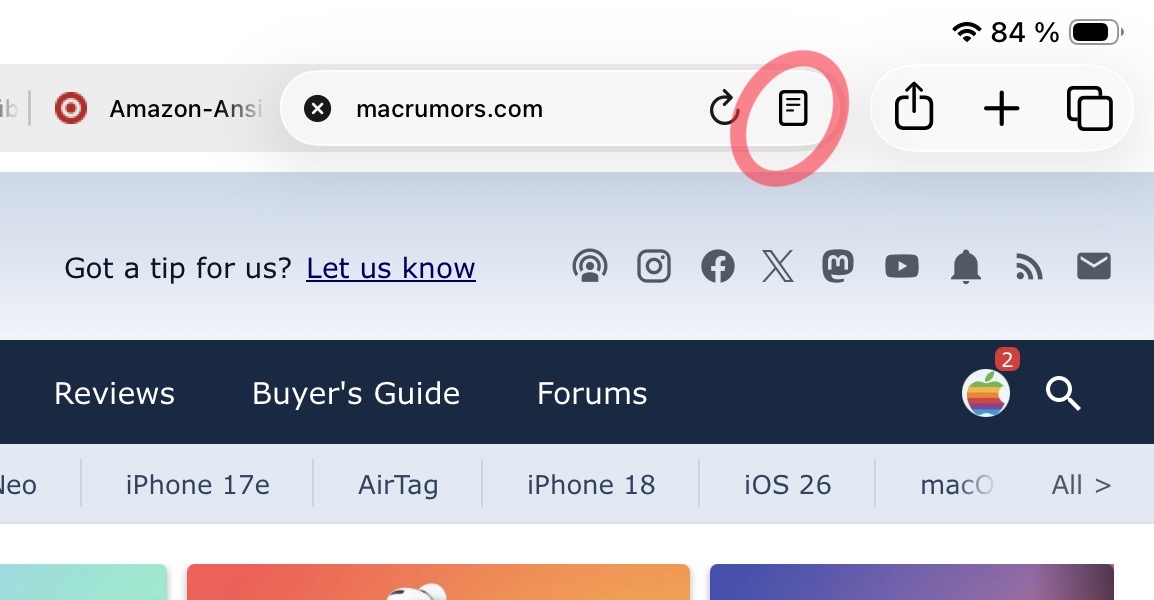
It looks like you changed to compact tabs, so the button is on the right. It has always has been on the right in this mode. Do you really want the button by the 'x' on the left and accidentally close your tab if you're not careful?They did it again 🤣 The little icon I always press to open the Reader mode and have news articles summarised by Apple Intelligence has moved back to the right. So it’s been already there the entire time before iPado’crap 26, then they moved it to the left for absolutely no reason, and now that we finally built new muscle memory, they moved it back to the right 🤦♂️ Like what are they even “perfectioning” at this point? It’s just a load of BS. How about fixing one of the millions of glitches or creating something that’s actually useful and actually increases efficiency? This is just ridiculous at this point.
View attachment 2628467
If you switch back to having a separate tab bar, then the button will be on the left. It has always been on the left in this mode.
Once again, nothing changed here compared to previous versions of iOS. The only thing that changed was that compact tabs was reintroduced.
Steve Adams
macrumors 68020
I am the opposite, I like the better keyboard travel (reviewers mentioned this), and the more laptop esque' footprint of the entire setup. Just my opinion. I don't like the hovering ipad on the MK.Yeah, that’s what I was meaning, the cantilever keeps it smaller on your lap, so more chance of being able to use the keyboard at a comfortable distance. And that support on the galaxy case is hollow, so it may not sit well on your lap. Maybe, but I like the cantilever approach better personally. 👍🏻
Silly John Fatty
macrumors 68000
It looks like you changed to compact tabs, so the button is on the right. It has always has been on the right in this mode. Do you really want the button by the 'x' on the left and accidentally close your tab if you're not careful?
If you switch back to having a separate tab bar, then the button will be on the left. It has always been on the left in this mode.
Once again, nothing changed here compared to previous versions of iOS. The only thing that changed was that compact tabs was reintroduced.
Thanks! I did have an update recently. But I didn’t have compact tabs enabled. Why would they turn that on for me? Just leave my settings the way they are, for Christ’s sake. 😭 I have no time for your BS, Apple. This is a work device! I want to focus on my work, not on your device, Apple! Disappear in the background!
Also, can someone tell me what this garbage is? Not only are the icons not on the same level, but the one on the right (ChatGPT) is blocking the menu access bar… so I can’t open the menu anymore…
This thing is just trash at this point.
Last picture is ChatGPT on the left and Adobe on the right. No matter what I do, the garbage keeps garbaging! I have to get out of split screen to be able to access the ChatGPT menu. Then I can get back into split screen. The efficiency loss is crazy on this one. Do people who work even use these devices anymore, or is it just lifestyle objects now, like those cars that have playable video games on the windshield?
Last edited:

Gregg2
macrumors 604
Silly John Fatty
macrumors 68000
New update - everything's fixed! 😉
Now, the question is, what things that used to work are now broken? 🤣
newfoundglory
macrumors 6502
Anyone know why the updates are so large, M4 iPad Pro, going from iOS 26.4.2 to iOS 26.5 is almost 12GB but the IPSW is only 9.80GB for iOS 26.5
Not even the Apple people developing this stuff are using iPads for work.Do people who work even use these devices anymore, or is it just lifestyle objects now,
You have to use macOS platform to develop software for iPadOS. Makes you wonder why... A developer wouldn't last 2 hours developing anything on that messy thing...

droplink
macrumors 6502
Nevermind developing, I wish Apple developers would consider writing on an iPad.
text input and editing is (still) so incredibly frustrating.
Selecting words or partial words with accuracy is nigh on impossible and getting the spellcheck popup to appear is is a random hit and miss. Anything more than writing two/three paragraphs is a chore.
text input and editing is (still) so incredibly frustrating.
Selecting words or partial words with accuracy is nigh on impossible and getting the spellcheck popup to appear is is a random hit and miss. Anything more than writing two/three paragraphs is a chore.

I7guy
macrumors Westmere
I agree using the on screen keyboard to write a wall of text is difficult. That is why I use a Bluetooth keyboard.Nevermind developing, I wish Apple developers would consider writing on an iPad.
text input and editing is (still) so incredibly frustrating.
Selecting words or partial words with accuracy is nigh on impossible and getting the spellcheck popup to appear is is a random hit and miss. Anything more than writing two/three paragraphs is a chore.
droplink
macrumors 6502
..and now that I upgraded to iOS 26.5, my shortcut widget had decided to only show the last 3 shortcuts I used when opening the shortcut app.
I have the widget that has space for 8 shortcuts, but nope, only three show up.
Uggh... Apple, please just get your stuff together.
I have the widget that has space for 8 shortcuts, but nope, only three show up.
Uggh... Apple, please just get your stuff together.
Attachments

Last edited:
Steve Adams
macrumors 68020
FYI, there is more to "work" then developing apps. Work is a very wide swath of things. If I changed my workflow a little bit I could completely use and iPad Pro for work. I do not code, develop or program anything.Not even the Apple people developing this stuff are using iPads for work.
You have to use macOS platform to develop software for iPadOS. Makes you wonder why... A developer wouldn't last 2 hours developing anything on that messy thing...
Kal Madda
macrumors 603
Exactly! And I’ve seen multiple developer sessions for WWDC with Apple employees demonstrating Swift coding on iPadOS. 🤷🏼♂️.FYI, there is more to "work" then developing apps. Work is a very wide swath of things. If I changed my workflow a little bit I could completely use and iPad Pro for work. I do not code, develop or program anything.

It’s always something
macrumors 6502a
Another bug introduced in 26 somewhere along the line: Safari no longer respects your font settings when saving a web page in Reader PDF style/format. It dumps the page in Times New Roman, the very ugliest possible choice, no matter what font you have selected in Reader format settings. 😡
Launch 26 into the sun and be done with it already
Launch 26 into the sun and be done with it already
I7guy
macrumors Westmere
I tried saving a MR web page as pdf and it saved correctly. YMMV.Another bug introduced in 26 somewhere along the line: Safari no longer respects your font settings when saving a web page in Reader PDF style/format. It dumps the page in Times New Roman, the very ugliest possible choice, no matter what font you have selected in Reader format settings. 😡
Launch 26 into the sun and be done with it already
It’s always something
macrumors 6502a
Did you use Reader mode? I’m guessing you didn’t because the same thing happens with pages here too: it switches the font used in the PDF to Times New Roman. Or perhaps you normally use the TNR font in reader mode, in which case you wouldn’t see the problem because you’re getting what you wanted anyway.I tried saving a MR web page as pdf and it saved correctly. YMMV.
This is not how it worked in iPadOS 18; I have PDFs in Seravek font to prove it from last year.
Kal Madda
macrumors 603
I don’t have any issues with it switching to Times New Roman. It works for me perfectly fine…Did you use Reader mode? I’m guessing you didn’t because the same thing happens with pages here too: it switches the font used in the PDF to Times New Roman. Or perhaps you normally use the TNR font in reader mode, in which case you wouldn’t see the problem because you’re getting what you wanted anyway.
This is not how it worked in iPadOS 18; I have PDFs in Seravek font to prove it from last year.
It’s always something
macrumors 6502a
Now you have me wondering if it’s an extension I use ☹️I don’t have any issues with it switching to Times New Roman. It works for me perfectly fine…
It’s always something
macrumors 6502a
Just so you can see what I mean:
The first is a web page in reader mode with the Seravek font selected. The second is the PDF iPadOS generates from it.


These were done with both my extensions turned off. I have tried multiple paths to produce the PDF and the results are always the same.
I am on iPadOS 26.5.
I wonder if this could be a problem with my iPad 11: a memory shortage.
Edit to add that I get the same misbehavior on an iPad mini A17 Pro, so it’s not a memory problem ☹️
The first is a web page in reader mode with the Seravek font selected. The second is the PDF iPadOS generates from it.
These were done with both my extensions turned off. I have tried multiple paths to produce the PDF and the results are always the same.
I am on iPadOS 26.5.
I wonder if this could be a problem with my iPad 11: a memory shortage.
Edit to add that I get the same misbehavior on an iPad mini A17 Pro, so it’s not a memory problem ☹️
Last edited: