
Got a tip for us?
Let us know
Become a MacRumors Supporter for $50/year with no ads, ability to filter front page stories, and private forums.
iPhone tilt trick (Safari easter egg)
- Thread starter milani
- Start date
- Sort by reaction score
You are using an out of date browser. It may not display this or other websites correctly.
You should upgrade or use an alternative browser.
You should upgrade or use an alternative browser.

bigbadnewill
macrumors 6502

ajohnson253
macrumors 68000
That's trippy. I did just finish a major indica session though also so 🙄
So it really is tilted right?
So it really is tilted right?

The Californian
macrumors 68040
Wirelessly posted (Mozilla/5.0 (iPhone; U; CPU iPhone OS 4_2_1 like Mac OS X; en-us) AppleWebKit/533.17.9 (KHTML, like Gecko) Version/5.0.2 Mobile/8C148a Safari/6533.18.5)
Well done, sir. Well done.
Well done, sir. Well done.

bigbadnewill
macrumors 6502

iVeBeenDrinkin'
macrumors 65816


Alxvasqz12
macrumors member
iVeBeenDrinkin'
macrumors 65816

wordoflife
macrumors 604

ChazUK
macrumors 603
Does everyone's tilt to the right slightly like mine?
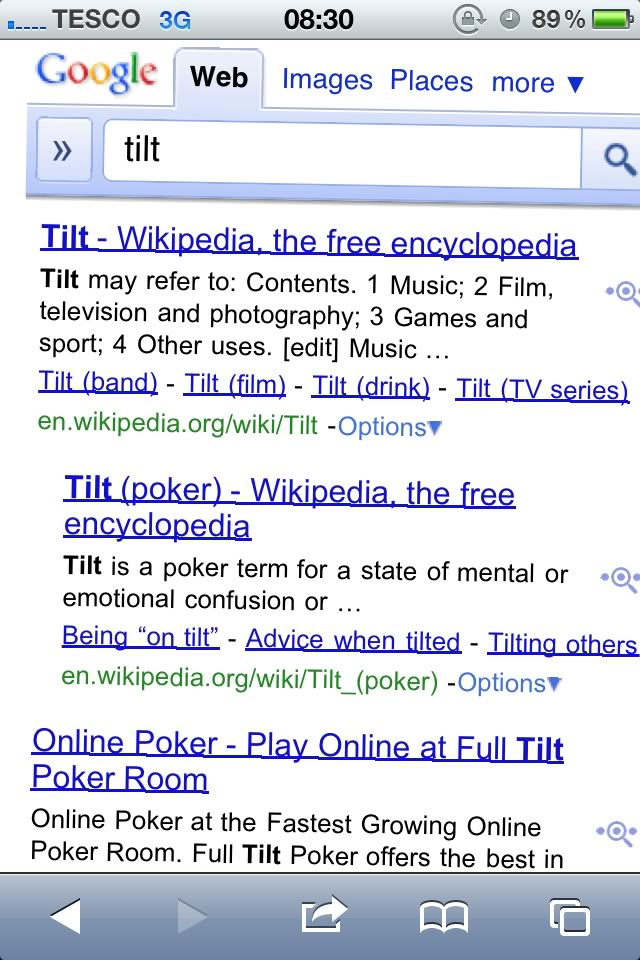
Yeah. Works for me too! 🙂

bigbadnewill
macrumors 6502
That screenshot taken on a theme'd up iPhone or Android phone?
And glad to see someone replied. I was trying all sorts of ways to try make it tilt more/ less but it seems that's all we're getting.
And glad to see someone replied. I was trying all sorts of ways to try make it tilt more/ less but it seems that's all we're getting.
ChazUK
macrumors 603
Wirelessly posted (Mozilla/5.0 (Linux; U; Android 2.3.3; en-gb; Blade Build/FRG83) AppleWebKit/533.1 (KHTML, like Gecko) Version/4.0 Mobile Safari/533.1)
Its an Android phone running Gingerbread! 🙂
bigbadnewill said:That screenshot taken on a theme'd up iPhone or Android phone?
And glad to see someone replied. I was trying all sorts of ways to try make it tilt more/ less but it seems that's all we're getting.
Its an Android phone running Gingerbread! 🙂
bigbadnewill
macrumors 6502
I suspected as much...get off this iPhone forum immediately! 😛 Just kidding.
How do you find gingerbread? I sometimes miss my android phone, I wish I could have both and choose which to use daily.
How do you find gingerbread? I sometimes miss my android phone, I wish I could have both and choose which to use daily.
wordoflife
macrumors 604
Yeah. Works for me too! 🙂
I certainly would expect that to work on a Google phone 😛😉

bigbadnewill
macrumors 6502
I think we knew it worked on iPhones when the OP told us it did and we all tried it 😉
Tis a cool, yet random, feature.
Tis a cool, yet random, feature.

TheMacBookPro
macrumors 68020
Wirelessly posted (Mozilla/5.0 (Linux; U; Android 2.3.3; en-us; Nexus S Build/GRI40) AppleWebKit/533.1 (KHTML, like Gecko) Version/4.0 Mobile Safari/533.1)
Google Easter egg 😉 Works on my Nexus S too 🙂
Google Easter egg 😉 Works on my Nexus S too 🙂
Last edited:
