Become a MacRumors Supporter for $50/year with no ads, ability to filter front page stories, and private forums.

cheddar-caveman

macrumors 6502
Original poster
iPhone 12mini running 26.3.1 I have bought This card reader for the iPhone.

I have several SD cards but none of them appear on my iPhone when I plug the card reader in.

Where should they appear if it is reading the cards please?

Do I have to download an app??

The reason I need this is that I have an Owl box with birds in it in an old barn about a mile from home and I have a TrailCam there. When I check the cam I need to be able to read the card there rather than having to bring it home and back.
 
Last edited:
As an Amazon Associate, MacRumors earns a commission from qualifying purchases made through links in this post.
The card should appear in the Files app.


An iPhone 12 probably has a similar limitation on powering USB devices as you encountered with your iPad, which is discussed here:

The card reader you linked appears to differ from the one in your iPad thread. Did you plug it into your Mac and determine what its required current is? The procedure is identical to the one described in your iPad thread.

This card reader doesn't appear to have any external power option. You should probably pick a card reader that does, or use a powered USB between the iPhone and the reader.
 
Thanks chown33. Yes this card reader has a Lightning connector specially for my iPhone, not the same as the other one for my Laptop.
I have no adapter to plug this into my Laptop but it used to work on my older phone.

I think I need a visit to my local computer shop to sort everything out!!
 
  • Like
Reactions: goldmac2006
Thanks chown33. Yes this card reader has a Lightning connector specially for my iPhone, not the same as the other one for my Laptop.
I have no adapter to plug this into my Laptop but it used to work on my older phone.

I think I need a visit to my local computer shop to sort everything out!!
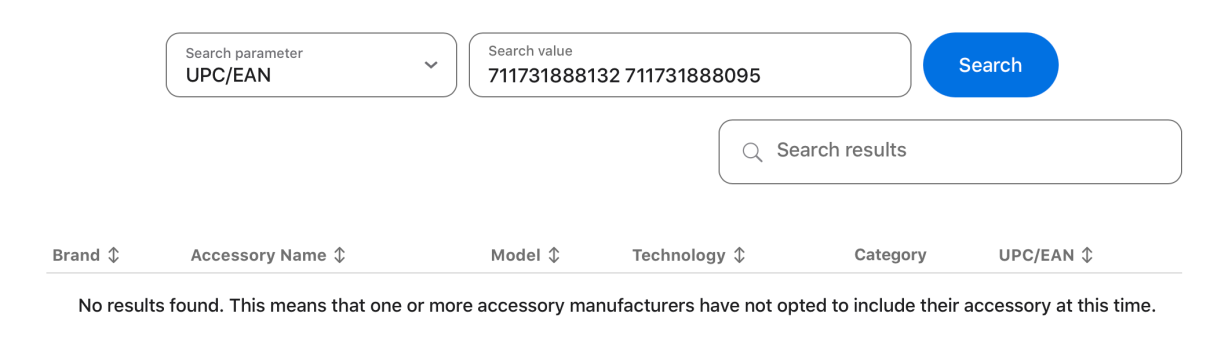
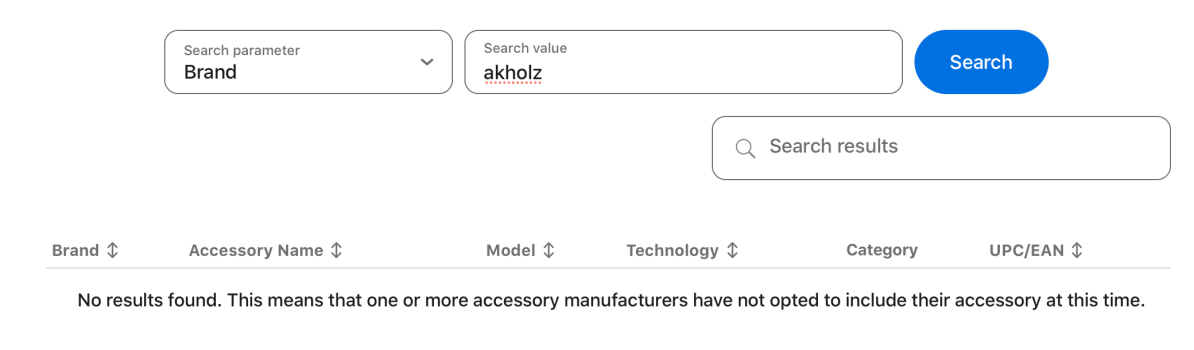
Is the reader also a mfi certified accessory? Don’t get those cheaply made ones those aren’t even that good.
 

Attachments

  • s1.png
    s1.png
    90.1 KB · Views: 28
  • s2.png
    s2.png
    84.7 KB · Views: 29
  • Like
Reactions: goldmac2006
This.

Per Apple, the connector is not MFi.


And, back to OP question, should appear in Files app.

True and I looked at the link the OP posted it’s rly a sketchy one. No mention bout it on the description of the product too.

The reverse lookup website comes in handy to make sure it’s MFi certified and legit before you buy it. I always use that webpage from Apple to check the database before I buy it like with MagSafe docks and Apple Watch chargers
 
This card reader doesn't appear to have any external power option.

It might have it. Per the images, there is a port that has a lightning bolt on it. I'm guessing that that might take a Lightning cable for power (my Lightning camera connector from Apple has this).

 
So do I understand that any connector for an iPhone / iPad have to be MFi certified? Nothing on this one to say it is or isn't!
 
As an Amazon Associate, MacRumors earns a commission from qualifying purchases made through links in this post.
So do I understand that any connector for an iPhone / iPad have to be MFi certified? Nothing on this one to say it is or isn't!
That’s certainly the safest bet. Non-mfI “might” work, “might not” but have not been certified in any way.

A common issue is an iOS update breaking compatibility due to non-certified methods the manufacturer might have used; which mfI is protected against.
 
As an Amazon Associate, MacRumors earns a commission from qualifying purchases made through links in this post.
That’s certainly the safest bet. Non-mfI “might” work, “might not” but have not been certified in any way.

A common issue is an iOS update breaking compatibility due to non-certified methods the manufacturer might have used; which mfI is protected against.
And it’s better as you don’t want your iPhone to be harmed if you use a non certified accessory. Or stop working suddenly
 
All sorted folks, bought THIS reader and it works fine on both iPad and iPhone.

Obviously the MFi thing that was the issue!±

Many thanks folks.
 
As an Amazon Associate, MacRumors earns a commission from qualifying purchases made through links in this post.
  • Like
Reactions: goldmac2006
Register on MacRumors! This sidebar will go away, and you'll see fewer ads.