Become a MacRumors Supporter for $50/year with no ads, ability to filter front page stories, and private forums.

cheddar-caveman

macrumors 6502
Original poster
My 6th generation iPad won't read my Lenovo card reader? I can charge the iPAD with the same connector as I do my MacBook Air and the Air reads the card reader perfectly well.
Any suggestions please as to why this would be?
Many thanks.

Lenovo.jpg


iPad.jpeg
 
My 6th generation iPad won't read my Lenovo card reader? I can charge the iPAD with the same connector as I do my MacBook Air and the Air reads the card reader perfectly well.
Any suggestions please as to why this would be?
Many thanks.

View attachment 2616626


View attachment 2616627

Is that a simple card reader (SD/TF only), multi-card reader or a USB hub?

The iPad mini may not be able to deliver sufficient power to the USB-C port for a multi-card reader or USB hub. If that's a hub and supports power pass-through, try connecting a charging cable.
 
  • Like
Reactions: NoBoMac and sparksd
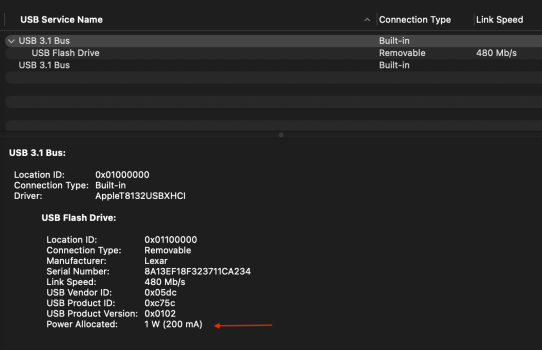
Plug the card reader into a Mac and run System Information (aka System Profiler). Under the "USB" devices, look at the card reader and see how much current it takes.

My experience with my iPad mini 5 is that it won't provide power to any USB device that needs more than 100 mA. I don't know what the limit is for different iPad models, so that may vary.

If you have a powered USB hub, you can connect that to the iPad, then plug the card reader into the hub, and since the hub is supplying power, that should work. Or if the card reader itself has an external power connector, plug that in.
 
Thanks chown33. At 87bI'm not fully familiar with System Info/profiler. How do I apply this to the reader? I've plugged it into my MBAir and it appears on the Home Screen. I can see "Get Info" but nothing about a profiler.
 
Thanks chown33. At 87bI'm not fully familiar with System Info/profiler. How do I apply this to the reader? I've plugged it into my MBAir and it appears on the Home Screen. I can see "Get Info" but nothing about a profiler.
There's an app on your Mac called "System information", that's it.

Also, on the iPad, are you checking in the Files app for your SD card?
 
You say 6th generation iPad, that one doesn't support USB-C -- how are you connecting this reader to the iPad?

Nevermind, in your image you show iPad mini which will support USB C.
 
Yes I do connect the card reader to the iPad via the USB-C connector but the iPad doesn't recognise it.
I cannot find any App with "system" in it?
Screenshot 2026-03-25 at 16.56.20.jpeg
 
I think you can still get to it via the Apple menu > About this Mac.

The app might be under /Applications/Utilities. It might be named System Information or System Report.
 
  • Like
Reactions: cheddar-caveman
Is that a simple card reader (SD/TF only), multi-card reader or a USB hub?

The iPad mini may not be able to deliver sufficient power to the USB-C port for a multi-card reader or USB hub. If that's a hub and supports power pass-through, try connecting a charging cable.

I tested on my Mini 6 and it worked with a Ugreen SD/uSD USB-C card reader and an Anker 8-in-1 USB-C hub without power (iPadOS 26.3.1).
 
Opened System Information and it only shows my MBAir. How do I get it to look at the Card Reader please?

You need to expand "Hardware" and then click on USB (or maybe Lightning [can't recall]? since gen 6). Will see something like this:

USB.png

But going with others' "not enough power" on the iPad port. I had a 6th gen iPad and only way to get it to recognize a thumb drive, SD card was via the powered Lightning dongle.

 
You need to expand "Hardware" and then click on USB (or maybe Lightning [can't recall]? since gen 6). Will see something like this:

View attachment 2616745

But going with others' "not enough power" on the iPad port. I had a 6th gen iPad and only way to get it to recognize a thumb drive, SD card was via the powered Lightning dongle.


He has the Mini 6 - see his photo.
 
  • Like
Reactions: NoBoMac
He has the Mini 6 - see his photo.

Oops! Thanks.

Still stand behind "need power". Seems to be a common problem.

Seem to recall that iPad Mini will deliver 3-5W. Should be sufficient for an SSD but guessing OP's hub wants 15W (my Anker similar hub draws 15W to power its ports).
 
Right. Updated OS and opened the USB System Information.
Still iPad does not recognise it either on the home page or the Files folder.
USB.jpeg
 
Well yes, that's on my laptop, not the iPad. It was suggested above that the power requirement of the Card Reader might help. Looks like it needs 100Ma.
 
Well yes, that's on my laptop, not the iPad. It was suggested above that the power requirement of the Card Reader might help. Looks like it needs 100Ma.

That other device that only requires 100 mA looks like it might be a mouse or something equally low-bandwidth (just 12 Mbps or 1.5 MB/s)

Your Mass Storage device with the SD/MMC installed reports 800 mA required (~4W). The laptop can provide 900 mA.

Per @chown33, the iPad mini 5 only provides 100 mA. As for the iPad mini 6 you have, I'm not sure how much power it can deliver but it's probably less than your reader needs.

My older laptops can only deliver around 2.5W (5V / 500mA or 0.5A) on USB.
 
Oops! Thanks.

Still stand behind "need power". Seems to be a common problem.

Seem to recall that iPad Mini will deliver 3-5W. Should be sufficient for an SSD but guessing OP's hub wants 15W (my Anker similar hub draws 15W to power its ports).

See my post above on my experience - no power needed.
 
I tested on my Mini 6 and it worked with a Ugreen SD/uSD USB-C card reader and an Anker 8-in-1 USB-C hub without power (iPadOS 26.3.1).
If you plug those into a Mac, what does System Information say about their power needs?

I have a couple of older USB thumb drives that only need 100 mA, so those are the ones I use with my iPad mini 5. No hubs I have are that low, so if I use a hub at all, it's always a powered one.
 
If you plug those into a Mac, what does System Information say about their power needs?

I have a couple of older USB thumb drives that only need 100 mA, so those are the ones I use with my iPad mini 5. No hubs I have are that low, so if I use a hub at all, it's always a powered one.

I don't use any Mac devices - Windows.
 
Register on MacRumors! This sidebar will go away, and you'll see fewer ads.